Netizen
Your little helper for big connections.
Team
Harris

Nilforoush

Tepper

Kemple

Sun

Problem and Design Overview
Online friendships are often categorized as being sporadic, short-lived, and easy to lose track of. Many times a friendship online can be lost solely because someone stops playing a game, or they change their username and profile, or simply because people just drift apart due to extensive periods of no communication. Current solutions to problems like this are sometimes effective - such as Discord's notepad feature, Instagram's close friends list, Steam's ability to invite people to play games together, etc. - but suffer from the exceptional amount of work required to interface with in a meaningful way.
Finding a solution that is easy to use, and safe, could help to maintain and create new long lasting connections between people. We think that anything that helps to foster community is a generally good thing! Not only that, but losing connections with people can be isolating and damaging, so finding a way to help to prevent that happening (when the friendship is safe and wanted by both parties), is exceptionally important.
The friends list screen shows which of your friends are online and what they are currently doing.
Design Walkthrough
Netizen is a tool to help you thrive in an online setting! To accomplish this, Netizen has two main goals: help you recognize and reach out to friends online, and to help strengthen those friendships. Netizen integrates your accounts on any major gaming platform (Steam, GOG, PlayStation, etc.) and can be taken on the go to keep you connected to your online friends in whatever setting you prefer. Netizens track data about you and your online friends like old username and profile pictures, match history, social medias, friends that you have in common with others, and lots more in the hopes of being able to make your online friendships last.
Strengthen an Online Friendship
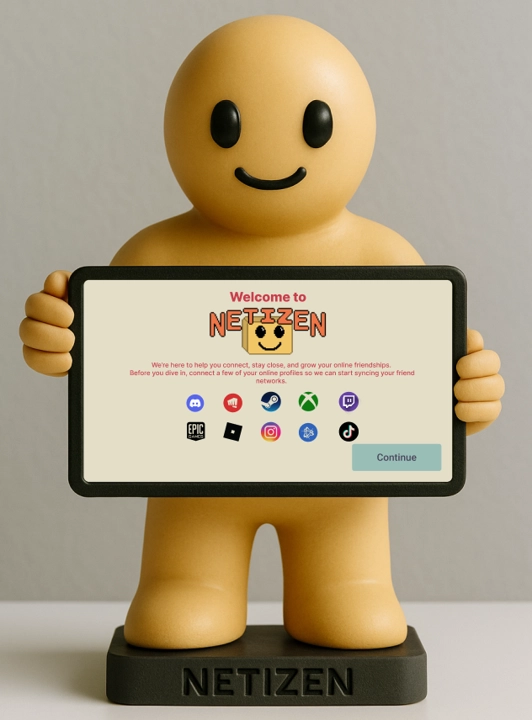
When users first open Netizen, they begin by connecting their existing gaming and social accounts. Once these accounts are linked, Netizen automatically imports their friends from those platforms and populates the home screen. From there, users can open a friend's profile to view basic statistics such as Play Time, Favorite Game, Highlighted Memories, and more. Users can also click on the "Manage Friendship" button to go to the manage friendship screen, where they can block a friend (within Netizen), adjust their closeness level, and set all of the information they would like to share based on the closeness level between them.
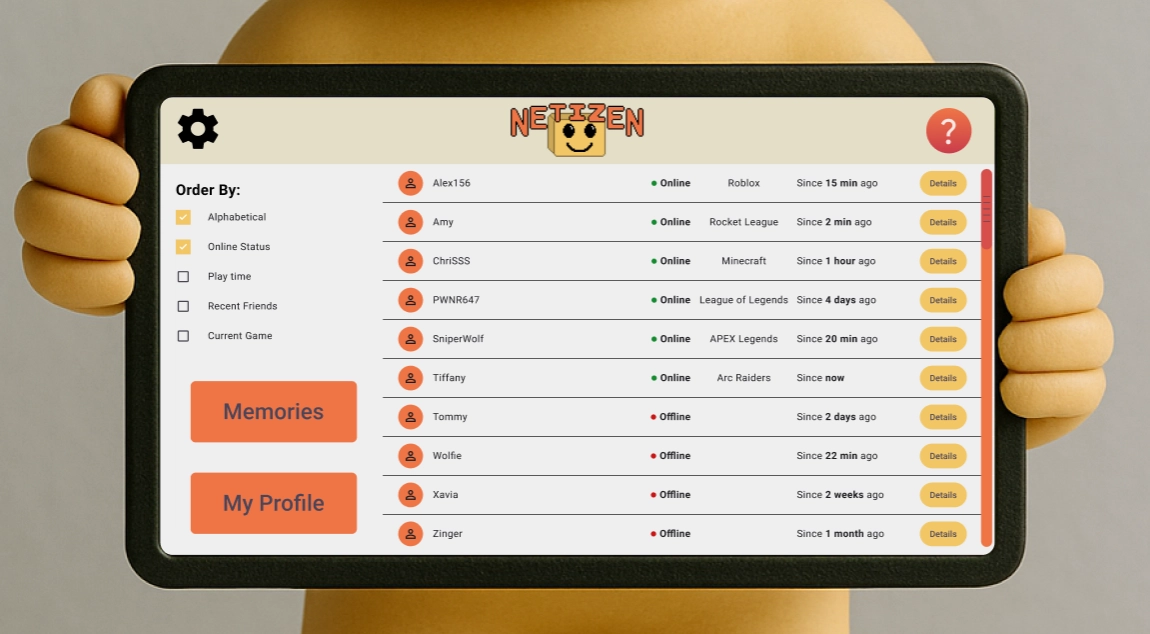
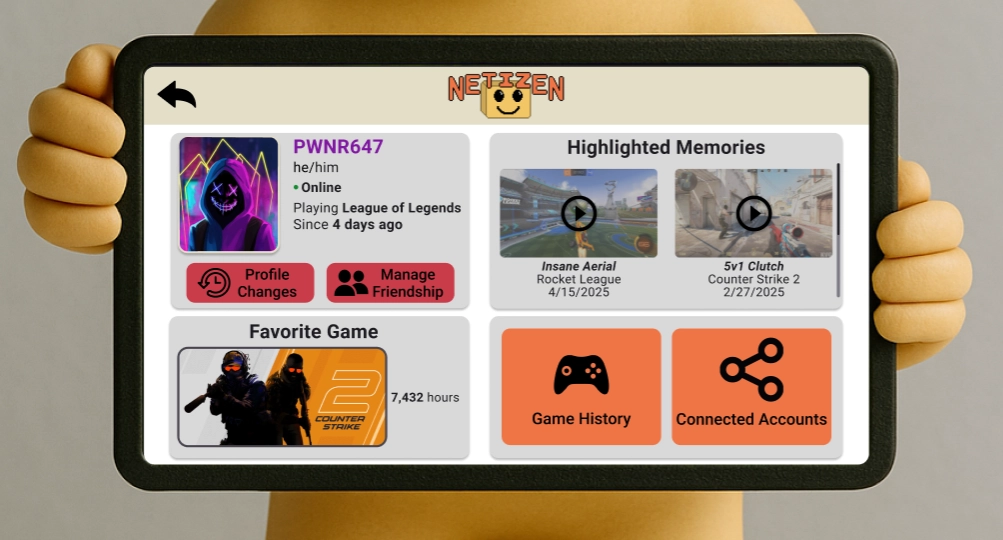
From the home screen, you can open a friend's profile, review your shared history, and decide what details you want to exchange to rebuild the connection.
Recognize and Reach Out to a Friend Online
While playing a game, Netizen notifies users when their friends are in the lobby with them as well as when the last time they played together may be. Even if a user does not recognize this person, they can investigate. Clicking on a friend's profile, gives access to their profile changes, including old usernames or profile pictures. It also gives access to shared game history and memories made together online. Once a user recognizes their friend, they can find all of their connected accounts, which allows a user to pull up a QR code that can be used to reach out to their online friend!
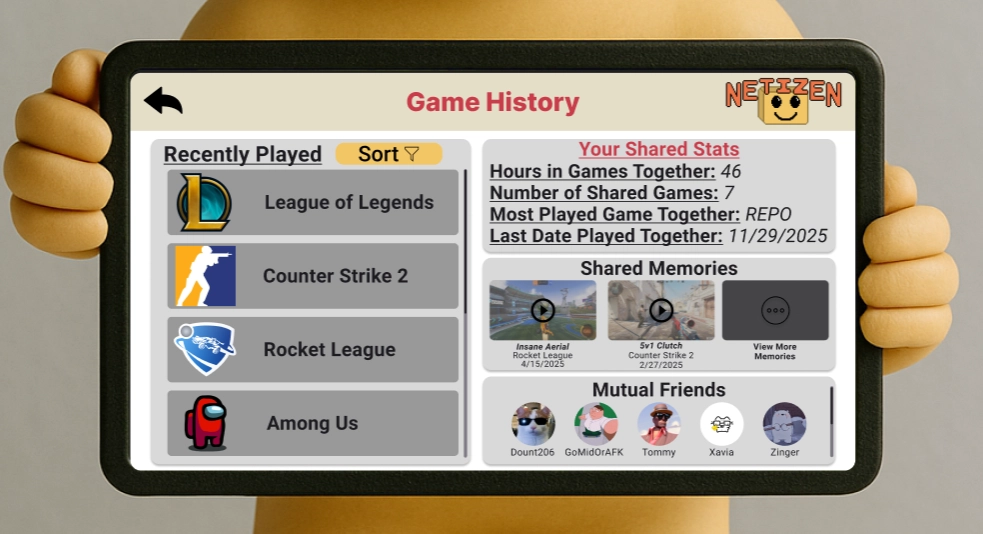
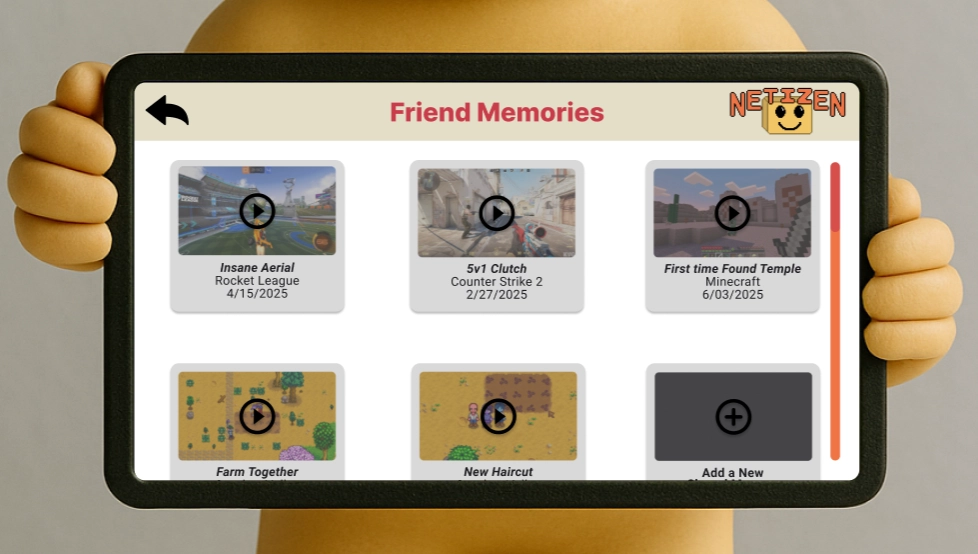
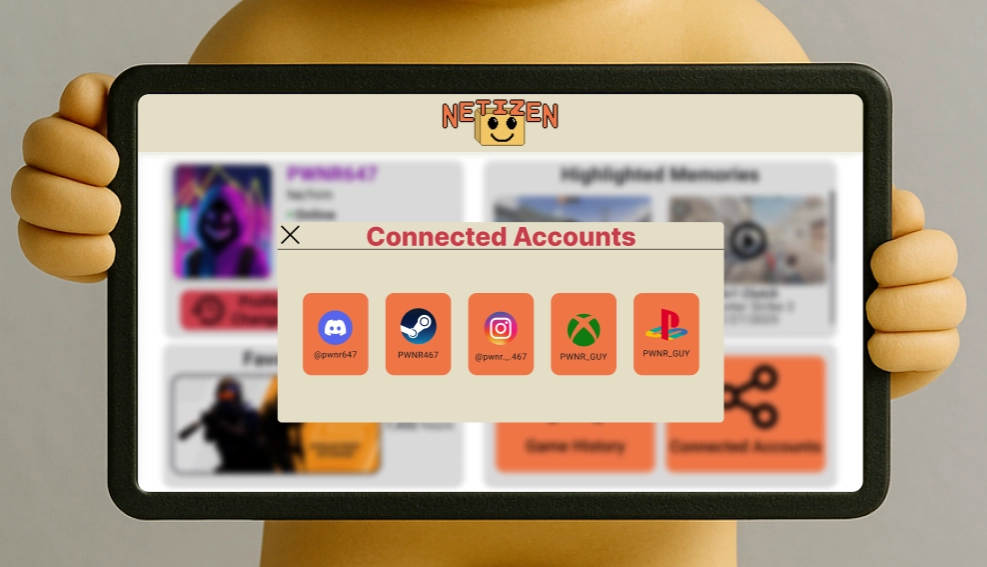
Connecting other social and gaming accounts allows you to see a list of all of your online friends. Clicking on a profile shows you information about the friend and memories from your shared in-game experiences.
Design Research and Key Insights
We started our design research by investigating the challenges people face maintaining online friendships and how people want those relationships to evolve, if at all. We conducted interviews with several participants with varying levels of online activity. We chose these participants to get a better idea of how people use online spaces in different contexts. We made sure our interviews were conversational in nature and conducted in a relaxed environment. With this approach, we encouraged the participants to share stories about their experiences with and opinions about the online environments they occupy. For the sake of their privacy, we will refer to all participants by pseudonyms.
Cam: a 20-year-old who monitors his socials online and primarily interacts with people he knows in real life via Discord and Instagram.
Banana: a 21-year-old who considers themself a gamer. Their online interaction mainly happens on Discord and in online games.
Basil: a 22-year-old drag artist who has a small social media following. They use social media to connect with other artists and friends in their community and around the world.
All of our interviews were conducted over Zoom or Discord calls for the convenience of the participants. During these calls, we had each of the participants share stories from their online experiences to better understand how to improve the process of forming and maintaining online friendships.
Difficulty Maintaining Online Connections
For people who make friends online, it is difficult to keep track of and stay connected with the people they meet. Everyone we intervied had a similar same experience of losing connections. People usually make a lot of friends then forget who they are. This is often due to changing profile pictures and names.
Banana described how they have played games with hundreds of different people that, and how they are constantly forgetting people who are on their friends list. Basil: "no idea" where some of their online friends came from. Especially after some time passes, they're just another username in their friends list." Cam: "How did I meet this person? For them, this usually does not matter that much in conversation, but it's just a thought that bugs me in the back of my head."
Online and In-Person Social Needs
Online and in-person friendships occupy different parts of each participant's life and satisfy different social needs. When we asked participants if they would like their online friendships to evolve into in-person friendships, their answers were not yes. Instead, they mention that they just want online friends to stay online, and sometimes they accept online friend to leave. These insights bring us with hints that the position and trust level of online friends is different and special, thus maintaining a comfortable distance between them may let the friendship even deeper.
Basil has “a few online friendships” that they “would not want to translate into in-person relationships.” To Cam, “online and in-person friendships each occupy a slightly different niche” in their life, and they are okay with it staying that way. Banana is the “sort of person who is happy seeing people come and go” and enjoys meeting new people online.
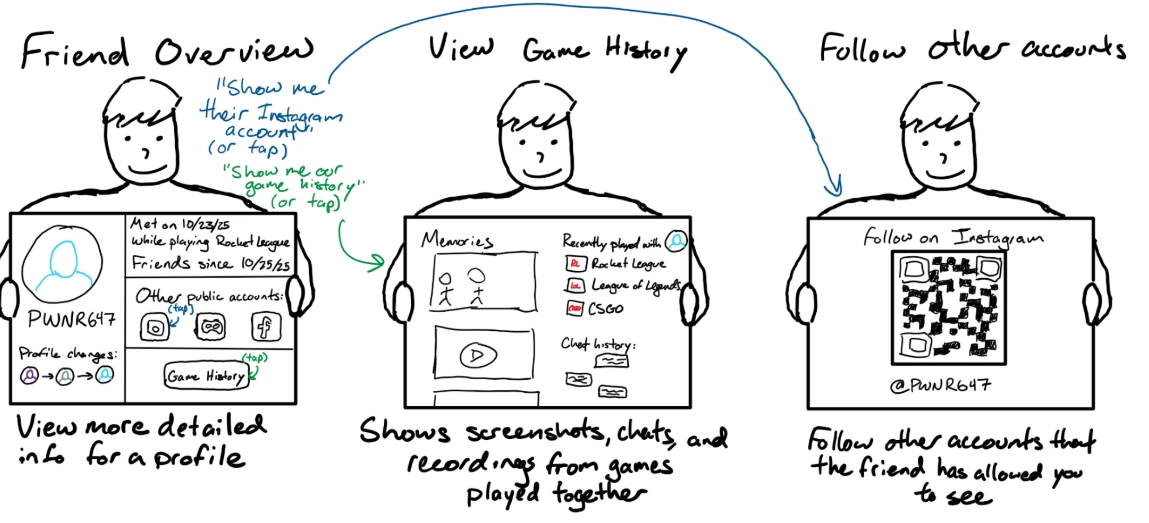
Overview sketch from original sketching that showcased a friends profile, the information shown, and an early version of the QR code system to access other connected accounts.
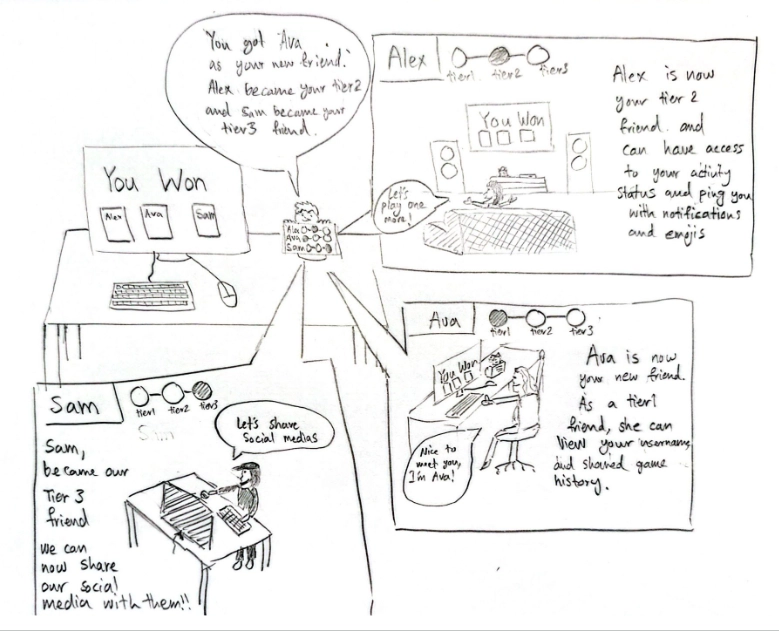
The mutual friendship is connected with amount of information that people share with each other.
Pressure to Present an Artifical Personality
Friendships that develop online are difficult to maintain because of artificial pressure created by existing platforms. We had participants speak about their experiences interacting with others online, both when they post their own content and consume conetent made by other people.
Basil says that, especially on platforms like Instagram, there is more of a "content creator and content consumer" between people, rather than authentic relationships. While this can be easier on other platforms like Discord, this implies that the people will like you based on how "good" the content you share is instead of your personality. Cam says, "a common problem with texting is you do not get tone across," and, "how you communicate ... is the biggest concern for online friendships." Since it's harder to express yourself in a way that others will understand, people have to find workarounds to properly maintain their online friendships.
Iterative Design and Key Insights
Once settled on a concept, we went through a long process of iterative design. We started with a physical paper prototype that was crafted in order to get a base idea of what our project would actually look like. However, through a process of usability and heuristic testing we realized that a lot of our initial design was confusing, or did not function in the way that we wanted it to. Our core mindset was ease of use, and clarity of message, which guided our entire iterative process.
Helping Users Understand How to Use Netizen
One theme that surfaced over the course of both heuristic evaluation and usability testing was understanding the purpose of Netizen and its features. Participants commented that the setup page and the multiple available options were unclear, so they were likely to just blow past it. From the main screen of Netizen, they found it difficult to navigate because they did not know what it was able to do. They also found some of our word choices, such as "Profile History" and "Memories," to be confusing. With all of this feedback that Netizen was hard to understand, we realized that it was difficult for users to build an effective mental model when using Netizen, and we therefore needed to provide extra documentation from within the design. So, we made setting up Netizen more modular and provided clearer explanations. Then, we added a button leading to a "How-To" screen so that they could get that information in an unobtrusive way. Lastly, we added extra pop-ups that would give explanations and ensure that they did not have to remember the meaning of that terminology in the context of Netizen.
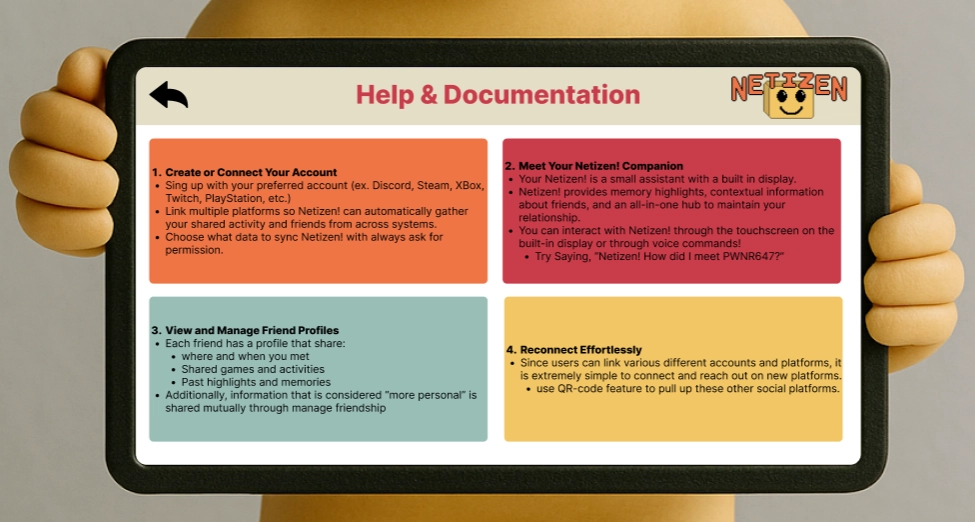
The documentation helps users to know the basic functions of Netizen and shows how to use Netizen.
Clarity and Readability
Another theme that came up in testing was that the design felt cluttered, and at times, inconsistent. Participants mentioned that it felt strange to have the exit buttons of pop-ups in the top left, but "cancel" buttons in the bottom right. Some of the screens were too cluttered, particularly the profile screen, which made it difficult to parse all of the information available quickly. This was especially problematic if you wanted to read information quickly while simultaneously playing a game. It also made it more difficult and overwhelming to figure out which voice commands were usable at a quick glance. Lastly, participants noted that some of our buttons were checkboxes when they should have been radio buttons, giving a false impression of how many options were allowed to be selected. This feedback made us go back through our design and make sure that each of our screens/pop-ups were consistent with each other and accurately portrayed their purpose. With the updated design, we ultimately felt that the voice controls were not as necessary.
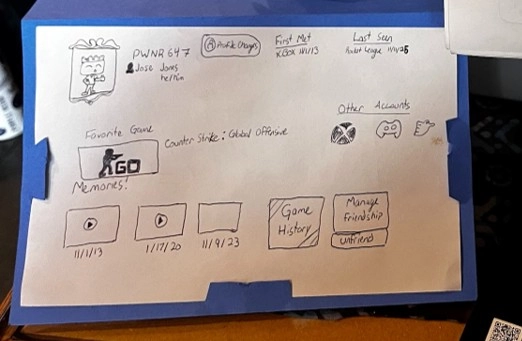
Iterated from unclear handwritten profile design to digital profile design with a clearer layout to help users understand the functions.
Access to User Information
Since Netizen's design focuses on information sharing, we received a lot of feedback on how we decided to display personal information. First, participants found the Tier system confusing and restrictive since the original version did not allow for many customization options. We decided make the friendship levels into a form of presets, where the user could specify what information they want their Acquaintances, New Friends, Known Friends, and Trusted Friends to have access to. We decided that people should only have access to a piece of information if both they and their friend decide to share it with each other, so we also decided to add a "custom" tier option. This gives users better control over how much the people they meet online knows about them and helps to support a mutual flow of information. We were also told that the "memories" feature felt under-integrated, as they were only accessible on a friend's profile page. To address this, we decided to connect memories to their own screen so that you have a place to view all of your memories, regardless of who they're with. The usability tests and feedback we received helped inform us which contexts people want to see and share information about themselves and their online friendships in.
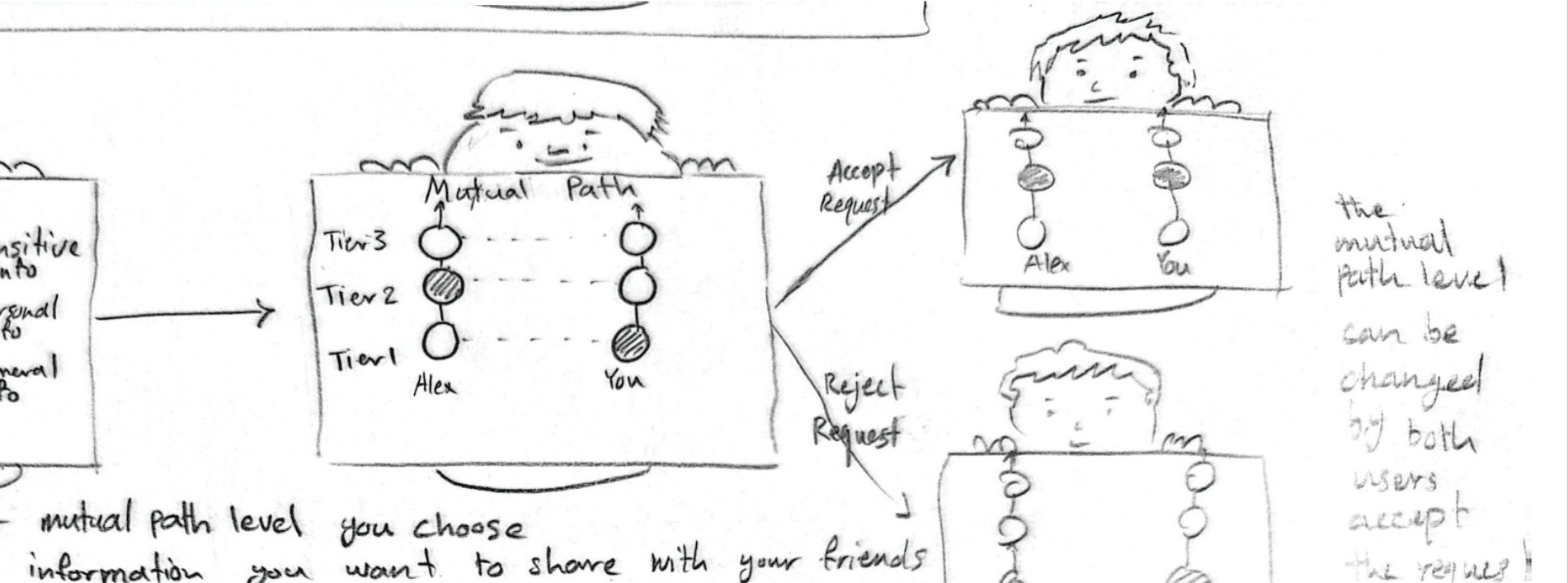
Early concept that showed a mutual-path system where users defined howclose they felt to someone, and the final level was only set when both users agreed.
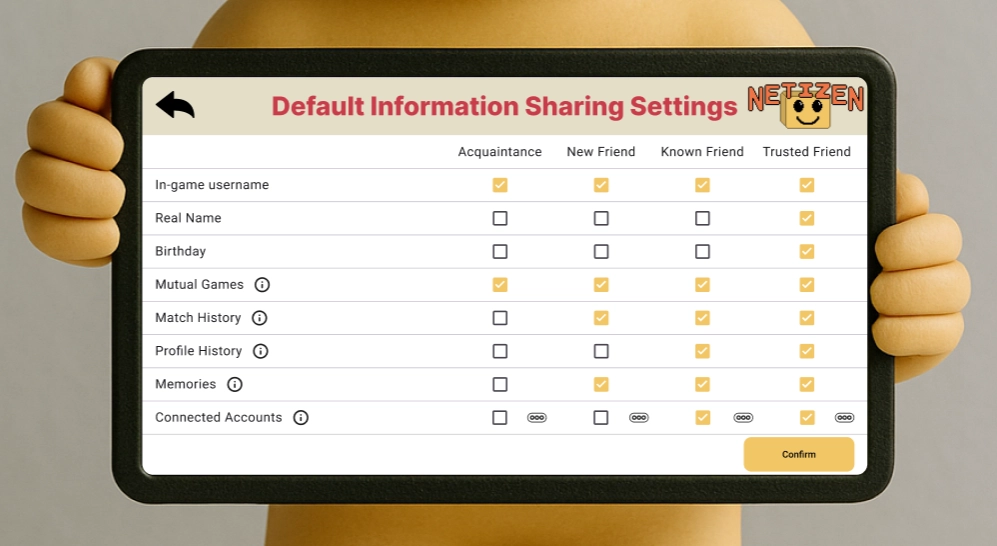
Page of default Information Sharing Settings allows users choose their own preferences of the data they want to share with friends in different Tiers.