(Week: 8) G: Milestone 3: Study & Accessibility Findings
Last revised date: 10/20/2026Overview
Run a small formative study of your prototype with potential users, implement more of your prototype, and audit what you implemented for accessibility.
When you turn in this homework you will be assessed on these competencies: Inclusive Experiments. Accessible Implementation. Accessible Communication.
Assignment Details
- Before you start
- Plan and run your study
- Report your findings (study.html)
- Implement your prototype
- Audit what you implemented (vpat.html)
- Update your logs
- Submitting for grading

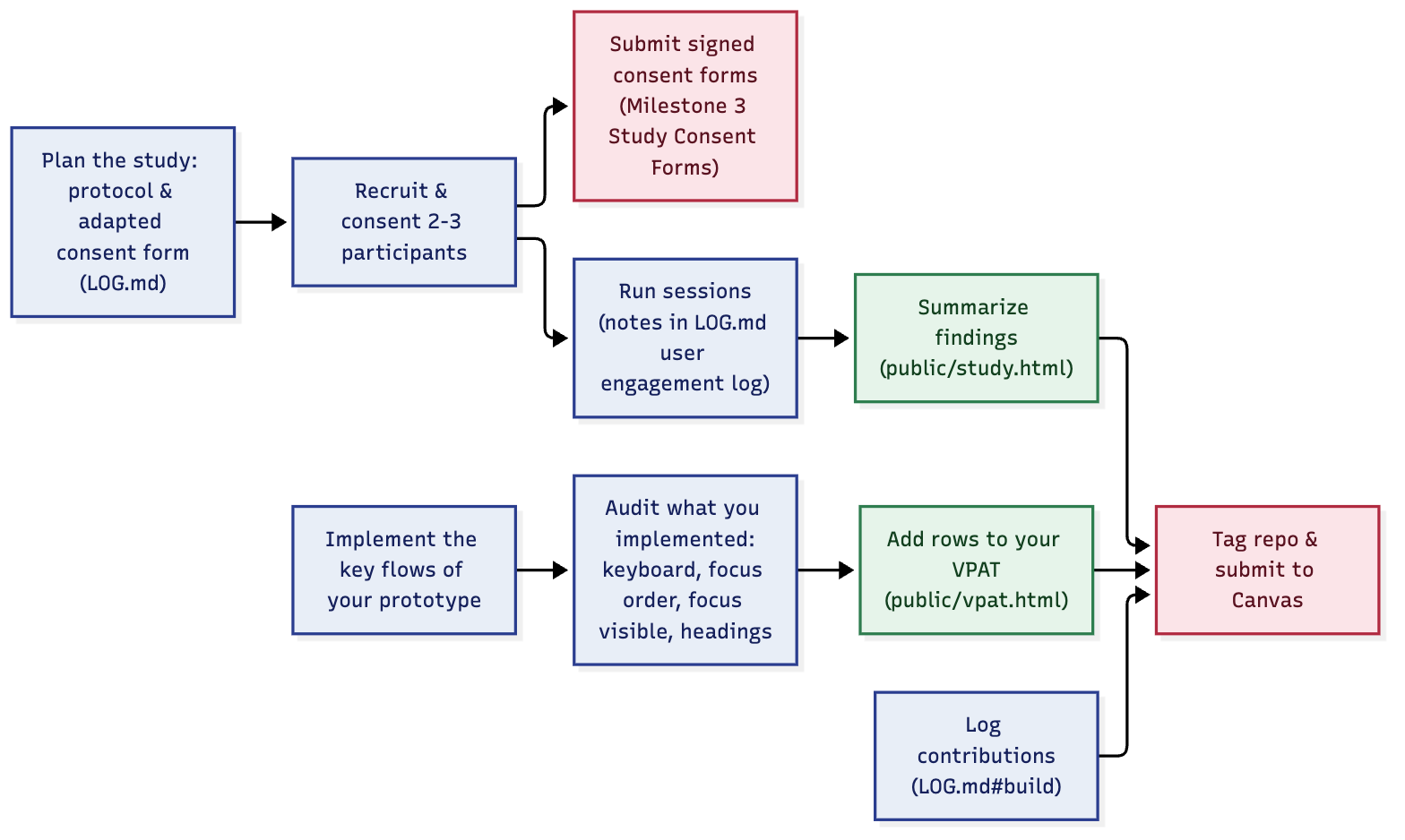
Text version of this diagram
- Implement the key flows of your prototype (repo)
- Plan the study: write a protocol and adapt your consent form (repo, LOG.md).
- Recruit and consent 2-3 participants (repo), then submit the signed consent forms in Milestone 3 Study Consent Forms (Canvas).
- Run the sessions, with notes in the LOG.md user engagement log (repo), then summarize your findings in public/study.html (public site).
- Audit what you implemented for keyboard access, focus order, focus visibility and headings (repo), and add rows to your VPAT in public/vpat.html (public site).
- Log your contributions in LOG.md#build (repo).
- Tag your repo and submit to Canvas.
- Bring a 5-minute readout of your study findings to Demo Day in class.
Before you start
You will use what you built for Milestone 2: your prototype, and the first rows of your VPAT. This milestone adds three things: a small study with potential users, more of your prototype implemented, and an audit of what you implemented.
Milestone 3 requires you to edit the following:
- study.html
- vpat.html
LOG.mdCONSENT.md(your adapted blank form)- Your prototype code
Plan and run your study
Run a small, formative study with the prototype from Milestone 2. Your goal is early feedback about your design.
Participants. Recruit 2-3 potential users. Remember to think about study accessibility for your participants and yourselves.
Tasks. Ask each participant to try one or two of your three tasks on your prototype while thinking aloud (about 30 minutes in total).
Write a one-page protocol in LOG.md before your first session. Use this template:
- Goal. What do you want to learn?
- Tasks. What will you ask them to do, and what will you say to introduce it?
- Access. How will you make the session accessible? What will you ask participants about their needs ahead of time?
- What you will observe and record. Notes only, or audio or screen recording?
Good tasks are concrete and actionable (for example, “Enter a review for the University of Washington”), can be done in under five steps, and can be done with your prototype. You may find these questions helpful to ask after the tasks are done: Accessible Usability Scale.
Running a think-aloud
Ask each to do a specific task and to describe what they are thinking as they do it. If they stop sharing, encourage them to tell you what they are thinking. Stay neutral. Things you can say:
| When this happens | Say this |
|---|---|
| You’re not sure what the participant is thinking | “What are you thinking?”, “What are you looking at?” or “What are you doing now?” |
| They seem surprised or say “hmm” | “Is that what you expected to happen?” |
| They ask you what to do | “What would you do if you were at home?” or “What would you do if I was not here?”, then “Please do whatever you would normally do” |
Consent
The consent you collected for your Milestone 1 interviews needs to be adapted for this study as follows:
- Replace statements about an interview with a description of the prototype session.
- Ask for permission if you want to record audio, video, or a screen.
Ask for consent from each participant before their session. Submit the signed forms (or screenshots of emailed consent) in Milestone 3 Study Consent Forms in Canvas.
Report your findings (study.html)
Under Findings, report:
- Method. Who took part (anonymized), what tasks they did, and how you ran the sessions.
- What you learned. The most important things that worked and did not work, including any accessibility problems participants ran into.
- What you will change. What you hope to do in response, in order of priority.
Put your anonymized notes for each session in the user engagement log in LOG.md.
Implement your prototype
Build more of your prototype (you can start this in parallel with the study). For this mileston, your prototype should implement more of your three tasks than it did at Milestone 2, in working code. Commit your work to the relevant repo.
Audit what you implemented (vpat.html)
In Milestone 2 you checked contrast and alt text. Double check that’s still good if you changed anything, and audit what you have implemented for four more criteria, adding a row for each to your VPAT.
| Criteria | Severity | Conformance Level | Brief Explanation |
|---|---|---|---|
| 2.1.1 (Keyboard) | |||
| 2.4.3 (Focus Order) | |||
| 2.4.7 (Focus Visible) | |||
| 1.3.1 (Info and Relationships: headings) |
- Keyboard (2.1.1). Can you do every task using only the keyboard? Watch for keyboard traps and controls that only respond to a mouse.
- Focus order (2.4.3). Does tabbing move through the page in an order that makes sense?
- Focus visible (2.4.7). Can you always see which control has focus?
- Headings (1.3.1). Do your heading levels reflect the real structure of the page, without skipped levels or headings used just for style?
As in Milestone 2, rate each row (Supports, Partially Supports, or Does Not Support), say what you checked and what you found (which functions or features have problems, and how). The goal of a VPAT is to be accurate, not perfect.
Update your logs
Log your individual contributions in LOG.md#build, as you did for earlier milestones. Make sure your study protocol and anonymized session notes are in LOG.md too.
Submitting for grading
At the deadline,
- tag your repo (
git tag milestone-3 && git push origin milestone-3) - submit the compare link in Canvas:
.../-/compare/milestone-2...milestone-3 - upload your signed study consent forms in Milestone 3 Study Consent Forms
This allows us to see what you changed up until the handin.
Completeness
Checklist (is your assignment complete)
- study.html describes your study (participants, tasks, method) and what you learned from it
- LOG.md has a protocol and notes for each study session (anonymized), with 2-3 participants
- Your prototype implements more of your tasks than at Milestone 2
- vpat.html has new rows for keyboard, focus order, focus visible and headings
- LOG.md#build has an entry from every team member