CSE 331: The data behind the page
Course motto: Your job is to deliver code that you know works.
A feature
Today's program is
the guestbook with a program in the page,
with one feature added: a box that shows only the messages that
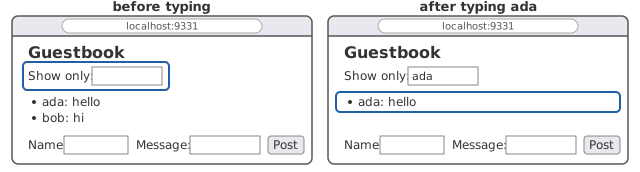
start with what you type in it. Type ada in the box, and the
list shows ada's messages. Here is the page with the box, and
line 8 is the only new line:
1 2 3 4 5 6 7 8 9 10 11 12 13 14 15 16 | |
Here is what the feature should do, with two messages posted,
before and after you type ada in the box:
The browser already has every message, since app.js asked the
server for them when the page opened. So the filter is app.js's
job, with no new request to the server.
Before you write any code, answer this: where, in the browser, are
the messages? Here is app.js as you
last saw it, its
three functions:
8 9 10 11 12 13 14 15 16 17 18 19 20 21 22 23 24 25 26 27 28 29 30 31 32 33 34 35 36 37 38 39 | |
load asks the server for the messages and hands them to show.
show puts one <li> in the page's tree for each and returns.
post hands what the server sends back to show. Nothing keeps
the messages show was handed. After show returns, the messages
are in exactly one place in the browser: the page.
A filter
So the filter has to work on the page. Here is a filter
function, added to app.js after post, with the two lines that
wire it to the page:
41 42 43 44 45 46 47 48 49 50 51 52 53 54 55 | |
Line 54 runs filter on every keystroke in the box, the way
line 53 runs post on a click. filter reads the box, finds the
list, and walks the list's items. Each item's text is a message
as the server wrote it, with the name first: ada: hello. So an
item whose text does not start with what is typed in the box is
somebody else's, and line 48 removes it. An empty box removes
nothing, since every message starts with the empty text.
(Line 46 asks for the items with querySelectorAll, which hands
back a list that stays the same while the loop removes items from
the page. The list node's own children would shrink under the
loop, and the loop would skip the item after each one it removed.)
Try it, with two messages posted: ada: hello and bob: hi.
Type ada in the box. Bob's message goes, and the list shows
ada: hello alone. The feature works.
Now clear the box. The list still shows ada: hello alone. Type
bob. The list is empty:
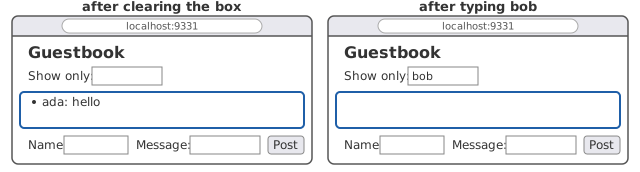
The messages are not filtered. They are gone, and nothing you
type brings them back. Press the browser's reload button, and
both are back, because the server sends them again and load
draws them again.
Where did bob's message go? Line 48 removed its <li> from the
tree, and that <li> was the only copy of the message in the
browser. show had put it there and kept nothing. Removing an
item from the page removed the data.
The page is a drawing of the data
The browser draws the page from the tree. The program drew the tree from the messages. So the page is a drawing of the data, two steps removed from it, and a program that keeps its data only in the drawing loses whatever it removes from the drawing. Filtering removes some of it. So does showing the newest ten, or any other view that leaves something out.
The server still had every message, so a reload got them back. That is what the first guestbook did for every change: ask the server for the whole page again. It costs a request over the network for every question about data the browser already had. The point of a program in the page was to answer such questions without the trip.
What the program needs is a copy of the data, kept as data: a variable that holds the messages, with the page drawn from the variable and redrawn from it.
The data in a variable
Here is app.js written that way, whole:
1 2 3 4 5 6 7 8 9 10 11 12 13 14 15 16 17 18 19 20 21 22 23 24 25 26 27 28 29 30 31 32 33 34 35 36 37 38 39 40 41 42 43 44 45 46 47 48 49 50 51 52 53 54 55 56 57 58 59 | |
Line 13 is the variable. let declares a variable that will be
assigned again, where const would not allow it. show takes no
argument now. It reads the box on line 19 and draws the page from
messages on lines 21 to 28, one item for each message that
starts with the text in the box. load and post no longer
call show. They hand the server's answer to update, on
lines 41 and 53, and update assigns the variable and redraws.
The box's oninput, on line 58, is show itself: a keystroke
redraws the page from the variable through the new text.
Run the same experiment. Type ada, and the list shows
ada: hello. Clear the box, and both messages are back. Type
bob, and the list shows bob: hi. Filtering now changes what is
drawn, and never what is kept.
One function changes the data
The variable and the page now say the same thing. What keeps them that way? Try the console, on the page with both messages posted. (Open the developer tools as you did before, on the Console tab.) Type a line that adds a message to the variable behind the program's back, and look at the page:
> messages.push("eve: yo")
3

> show()
undefined
After the first line, messages holds three messages, and the
console prints the new length. The page still shows two. Nothing
in the language connects the variable to the page. The page
changes when something redraws it, and nothing did. The second
line calls show, and the page shows three. (show returns
nothing, which the console prints as undefined.)
So the program makes a rule for itself, and writes it down. Read
lines 8 to 12 of app.js again. The comment above the variable is
a claim about the variable and the page together:
The list on the page shows exactly the messages that start with the text in the filter box, which is all of them when the box is empty.
The lines after the claim say how the program keeps it true: only
update assigns messages, and update redraws. Every other
function that changes the data goes through update, and no
function touches the list on its own. The claim is true between
one event and the next, and not at every instant. A keystroke
changes the box before the browser runs the box's callback, and
in the middle of show the list is half drawn. But
the browser's loop
runs one callback at a time, and each callback leaves the claim
true before it returns, so no callback ever finds it false.
What would break the claim? A function that assigned messages
and forgot to call show, as the console just did by hand. Or a
function that set the list's innerHTML on its own, so that the
page said something the variable did not. Each is a bug that the
page shows late, at the next redraw, far from the line that
caused it. With the rule, a wrong page points at one function to
read: update.
The same invariant, named
You have written claims of this shape before. A representation invariant is a claim about a class's fields that is true of every object of the class whenever no method of the class is running. The constructor makes it true. Every method may assume it when called and must make it true again before it returns.
The claim above messages is a representation invariant. Its
fields are the variable and the page's tree. Its methods are the
callbacks: load, post, and show, run by the browser's loop
one at a time. load's first run does the constructor's job, and
every callback leaves the claim true before it returns. The one
difference is that nothing in the language marks these two fields
as belonging together, the way a class marks its fields. The
program marks them itself, with the comment and the rule.
When
an await cut a function in two,
the advice was to make the invariant true before it and assume
only the invariant after it. Now the invariant has words, and a
rule that keeps it. Any program with a screen has
this field, in a browser or anywhere else, and some one piece of
the program has to own it.
A framework keeps it for you
Many programs in the page are not written the way app.js is.
They are written with a framework, code that calls your code,
as the server's HttpServer calls handle. One of the most used
is React, and its job is to keep the invariant you just wrote by
hand. In React you write a component: a function
from the program's state to the page it should show. You say once
how the state is drawn. When the state is assigned, the framework
redraws the page from it. Nobody calls show, so nobody can
forget to.
Here is the guestbook's list as a component. Read it beside
app.js:
1 2 3 4 5 6 7 8 9 10 11 12 13 14 15 16 17 18 19 20 21 22 23 24 25 26 27 28 29 30 | |
Line 10 declares the messages as state, and gets back the value
and the one function allowed to assign it, setMessages. That is
update with the redraw built in: load on line 15 assigns the
state, and React redraws. Lines 19 to 29 are show, written as
the page the state should produce, with the HTML inside the
JavaScript. A browser cannot read the file as it is. A build step
turns it into JavaScript before it is served, so the lecture reads
it rather than runs it.
Some of the syntax is new. The square brackets on line 10 take
apart the pair that useState returns, the value and its setter.
=> writes a function without a name: on line 24,
(event) => setOnly(event.target.value) takes the keystroke's
event and sets only to the box's text. Line 17 asks React to run
load once, after it first draws the page. On line 19,
messages.filter is JavaScript's own, not the filter above: it
returns a new list of the messages for which the function on line 20
returns true, and leaves messages as it was. Inside the HTML,
braces hold JavaScript, such as {only} on line 23, and line 26
makes one <li> for each message shown, as show's loop did.
The framework asks something in return. Look at line 11 and
lines 23 and 24. The filter box's text is state too, with its own
setter, and the box is wired to it in both directions: the box
shows the state, and every keystroke assigns it. In app.js the
browser owned the box, and show read it when it needed to. React
takes the box into the state, so that the page is a function of
the state and nothing else. Forget the wiring, and the box stops
taking keystrokes, since the page is redrawn from a state that
never changed. The invariant is the same one you wrote by hand.
Who maintains it has moved, from your update to the framework,
and the price is that everything the page shows has to be state
the framework knows about.
Exercises
Each answer is folded under its question. Write yours first.
1. Add a check to post so that a message with an empty name
is not sent, and the box is left for the visitor to fill in. Why
does the server still have to check for an empty name too?
Answer
-
The check. Before the
fetchinpost, read the name box's.value, and if it is the empty string, return without sending. The visitor sees nothing happen, so a message beside the box saying why is kinder. -
Why the server checks too. The server's user is the browser, and the server can assume nothing about it. A visitor can open the console and call
fetchwith any fields they like, or replaceapp.jswith their own program. The check in the page spares a visitor a round trip. Only the server's check decides what gets into the book.
2. Suppose post assigned messages itself and forgot to
redraw, with every other line of app.js as it is:
44 45 46 47 48 49 50 51 52 53 54 55 | |
Post ada: hello on a fresh page. What does the list show? When
does the message appear?
Answer
-
What the list shows. Nothing. The server added the message and sent it back, line 53 kept it in
messages, and no line redrew the page. Postbob: hitoo, and the list is still empty, with two messages in the variable. -
When the message appears. At the next redraw, whatever causes it: a keystroke in the filter box, since the box's
oninputisshow, or a reload, which runsload. Typeain the box andada: helloappears. Clear the box and both messages appear. -
Why the rule. The claim above
messageswas false from the moment line 53 ran until the next redraw, and the page showed the bug somewhere else and later. The one function allowed to assignmessagesisupdate, and line 53 broke the rule by assigning it directly.
3. The filter could run on the server instead: the page sends
the box's text, as part of the request, and the server answers
with only the messages that start with it. Sketch how load and
the manual would change. What does the page give up, and what
does it get?
Answer
-
The change.
loadsends the box's text with its request, for instance asGET /api/messages?only=ada, and the manual promises the messages that start with that text. The server reads the text from the part of the address after the?and filters the book before writing the JSON. The page draws what comes back. -
What it gives up. A request over the network for every keystroke, and a wait before the list changes, where
app.jsanswered from the variable at once. -
What it gets. No copy to keep. The page holds nothing the server does not, so there is no claim about a variable and the page to keep true, and no way for the two to disagree. Which is better depends on how much data there is and how often the visitor asks.
Further reading
- The tree's lists. MDN,
querySelectorAll, which returns a list that does not change afterwards, andHTMLCollection, the kindchildrenreturns, which changes as the tree does. - The box's events. MDN,
the
inputevent, fired on every change to what the box holds. - React. The React documentation's Thinking in React, which builds a filterable list as its example, and Reacting to Input with State, on the page as a function of the state.