CSE 331: Programs on the web
Course motto: Your job is to deliver code that you know works.
A guestbook
Today's program is a guestbook: a web page where a visitor leaves a name and a message, and every later visitor sees it. Most of its Java will be new to you, so start with its manual, the comment at the top of the file:
7 8 9 10 11 12 13 14 15 16 17 18 19 20 | |
To run the program, you need the file. It is printed whole in
the section near the end of these notes;
copy it into Guestbook.java. Compile it and run it. Unlike
Lecture 6's calculator, it prints no prompt, just one line:
$ javac Guestbook.java
$ java Guestbook
Serving at http://localhost:9331/
Then nothing happens. The program is waiting for someone to visit
it. So visit it: open http://localhost:9331/ in a browser.
(localhost means this machine, and 9331 is the guestbook's
port, which the section on main
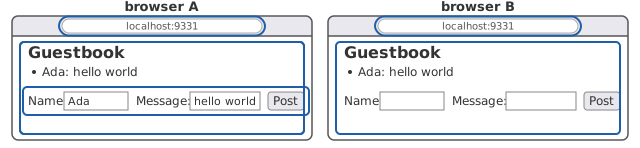
explains.) The page shows a heading, Guestbook, then two boxes
labeled Name and Message and a Post button. Type Ada as
the name and hello world as the message, and press Post. The
page comes back changed: above the boxes there is now a list
with one line, Ada: hello world. Open the same address in a
second window. The message is there too, since it lives in the
program, not in the window that posted it.
Meanwhile the terminal has printed more. Each request that reached the program is printed as it arrived:
$ java Guestbook
Serving at http://localhost:9331/
GET /
GET /favicon.ico
POST /
GET /favicon.ico
GET /
GET /favicon.ico
Six requests, for three things you did: the first page, the
post, and the second window. The three GET /favicon.ico lines
are the browser's doing: after each page, it asked on its own
for a little icon to show in its tab, and got the page instead.
Stop the program with Control-C and start it again. The message
is gone. As line 14 says, the messages last only while the
program runs.
Here is what happened, step by step. On top are the two windows you opened, A and B, and under them the programs talking, time running down:
- You open the address in browser A. The browser sends the
guestbook a request,
GET /: a few lines of text asking for the page at the path/. The terminal printsGET /as it arrives. - The guestbook runs a method named
handle, which builds the page from its book, the list of messages posted so far. The book is empty, so the page has no messages yet. The page goes back to browser A as text. - Browser A reads that text and draws it: the heading, the list with nothing in it, the two boxes, and the button. You see the first page. Browser A then asks for its icon. The drawing leaves the icon requests out.
- You type
Adaandhello worldand press Post. Browser A sends a second request,POST /, whose text ends with what you typed, asname=Ada&message=hello+world. The terminal printsPOST /. - The guestbook runs
handleagain. This time it adds the message to the book, and then builds the page as before. The page goes back withAda: hello worldin its list. - Browser A draws the new text. The message is on the page, and the boxes are empty again, since this is a new page, not the old page changed.
- You open the same address in browser B, the second window.
Browser B sends its own
GET /, and the terminal prints it: the same line as step 1, with nothing to say which window sent it. - The guestbook runs
handlea third time and builds the page from the book. There is one book, so it holds Ada's message, and the page goes back to browser B with the message in its list. - Browser B draws it. Its first page shows a message nobody typed in browser B.
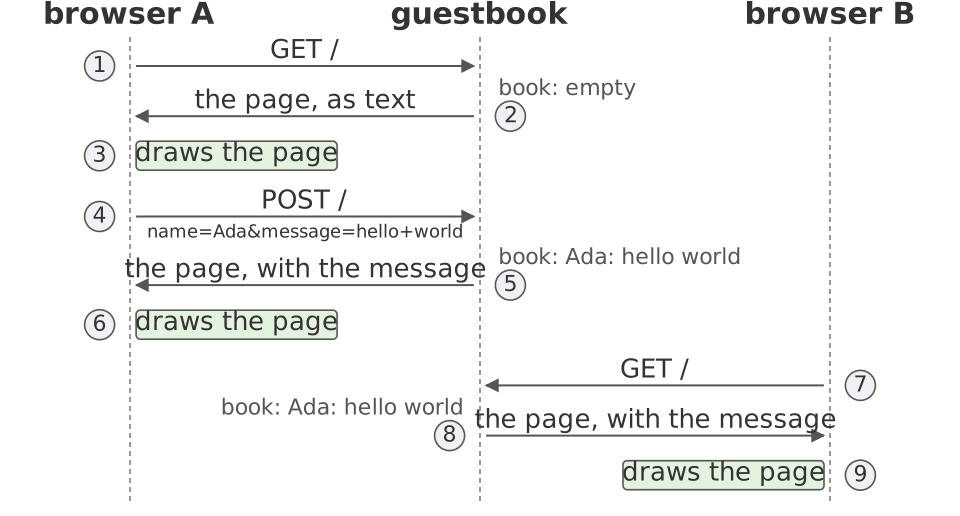
Every arrow is a message, and every message is text. The rest of this lecture reads those messages. Two things to hold on to. The guestbook only answers: it sends nothing until a browser asks. And a window shows the page that last came back to it, so the list in a window stays as it was until that window asks again.
The calculator was an interactive program: it responded to each input as it arrived. The guestbook is interactive too, but its users are not at its keyboard. They sit at browsers, maybe on other machines, and reach it over a network, in messages of a fixed form. That one difference shapes the whole program.
Servers and browsers
Definition: server
A server is a program that waits for requests and answers each with a response.
The guestbook is a server. The browser is one of its users: it
relies on what the guestbook promises, a page for a GET and a
message added for a POST, as
Lecture 3's script
relied on Sum. The guestbook, for its part, can assume nothing
about what the browser will send. The guestbook's author has no
idea which browsers, or which other programs, will send it
requests, so the author can hold none of them to a promise.
(The web's own word for the browser is the server's client. In
Lecture 2,
a client is code that calls a method, and a client can be held to
a promise. So in Lecture 2's words, the browser is a user.)
On the web, the two sides have their own names. The browser's side, what the user sees and touches, is the frontend. The server's side is the backend. This lecture's backend is the guestbook. Its frontend is a page: text, one form, and no JavaScript, the language for code that runs in the browser. A later lecture puts JavaScript in the page.
The book
The program is two classes. Guestbook talks to the web, and
Book keeps the messages. Book comes last in the file, on
lines 97 to 115. It is Java you know, so read it first:
97 98 99 100 101 102 103 104 105 106 107 108 109 110 111 112 113 114 115 | |
Book contains nothing about the web. It takes a name and a
message, and gives back a list of strings. Guestbook, in turn,
calls only add and messages on its Book, so nothing in it
depends on how the messages are kept. That is the
separation of concerns
the calculator kept, with main talking to the user and
CalcStack doing the arithmetic. So a test of Book needs no
browser, no network, and no running server, just as
a test of CalcStack needed no keyboard.
List.of builds a list from its arguments, so each test can say
the whole list it expects:
    @Test
    void messagesComeBackOldestFirst() {
        Book book = new Book();
        book.add("Ada", "hello world");
        book.add("Bob", "hi");
        assertEquals(List.of("Ada: hello world", "Bob: hi"),
            book.messages());
    }

    @Test
    void messagesIsACopy() {
        Book book = new Book();
        book.add("Ada", "hello world");
        List<String> copy = book.messages();
        copy.add("Eve: not posted");
        assertEquals(List.of("Ada: hello world"), book.messages());
    }
The first test checks the order messages promises. The second
checks the new list it promises: a client that changes the list
it got back has not changed the book. Both pass. Change line 113
to return messages;. Then the book holds
[Ada: hello world, Eve: not posted] at the test's end, so the
second test fails. Without the copy, any client holding the list
could put a message in the book without ever calling add.
The rest of the program is Guestbook, the half that talks to the
web. It keeps one Book, on line 23:
21 22 23 | |
One book for everyone
The calculator's stack belonged to one person at one keyboard.
The book on line 23 is shared: every request the program
answers, from any browser, reads it or adds to it. That is why
the second window showed Ada's message, and it is steps 7 to 9
of the figure. Browser B's GET / reaches the same handle,
which builds B's page from the same book, with Ada's message in
its list.
Lecture 6 named three things that make an interactive program harder to get right than a batch program: state that lasts, a user who chooses the order, and state the user cannot see. A server has all three, and other people make each one harder:
- The state lasts across people, not only from one line of input to the next.
- The order is the order requests arrive, chosen by nobody: two visitors who post at the same moment get the order the network gave them.
- The state a visitor cannot see is what other visitors changed since they last looked: A's window still shows the page it got, whatever has been posted since.
There is a fourth, which the calculator never had: the server
does not know who it is talking to. Look at the terminal again.
A's first request and B's printed the same line, GET /, and two
POSTs would too. A request is text, and nothing in that text
says who sent it: the guestbook cannot tell A from B. A site that
knows who you are was told so by your browser, in a request.
A later lecture shows how, with cookies.
To read the rest of Guestbook, you need to know what the
browser sends it.
A request is text
What does the browser send when you open http://localhost:9331/?
Text: a few lines that a person can read, and could type by hand.
The rules for that text are HTTP, the protocol the web runs
on: an agreed form for the messages two programs send each other.
Here are the first two lines of the request the browser sent, as
a program listening in the server's place recorded them:
GET / HTTP/1.1
Host: localhost:9331
The first line gives the request's method (HTTP's word,
nothing to do with a Java method), GET; the path asked for,
/; and the version of HTTP. The second says which server the
request is for. Most of the lines that follow describe the
browser: what it is, which languages its user prefers, what it
can read. A blank line ends this request.
The server answers with text too. Here is the guestbook's response, whole except for one line that gives the date and time:
HTTP/1.1 200 OK
Content-type: text/html; charset=utf-8
Content-length: 178

<html><body>
<h1>Guestbook</h1>
<ul>
</ul>
<form method="POST" action="/">
Name: <input name="name">
Message: <input name="message">
<button>Post</button>
</form>
</body></html>
The first line carries a status: 200 means the request was
understood and answered. (A status in the 400s means the server
thinks the request was a mistake. You have met 404.) The next two
lines are headers, each a name, a colon, and a value. The
request's Host line was a header too. These two say what the body
is, text in HTML, and how long it is, 178 bytes. A blank line,
then the body: the page.
The body is HTML: text with tags in angle brackets, each
saying what the text inside it is. <h1> marks a heading, <ul>
a list and <li> each of its items, and <form> the form. The
browser reads the tags and draws the page. Two visitors with
different browsers, or different window sizes, get the same text
and see it drawn differently. The list here has no items, so the
browser drew nothing for it, and the first page showed no list.
Now you can read the method that wrote that response. It is
handle, on lines 33 to 61 of Guestbook:
33 34 35 36 37 38 39 40 41 42 43 44 45 46 47 48 49 50 51 52 53 54 55 56 57 58 59 60 61 | |
Start at the bottom, with the response you have just seen. The
method's one argument, the exchange, stands for one request and
the response to it. Line 55 calls page, the method that builds
the page's text (its code comes below). Text travels over a
network as bytes, and a character can take more than one byte.
The header that gives the body's length counts bytes, so line 55
turns the text into bytes first. Lines 56 and 57 set the header
that says what the body is. Line 58 sends the status and the
length. Line 59 sends the body, and line 60 ends the response.
Now read from the top. Line 41 asks the request for its method,
and line 42 prints it with the path: the GET / you saw on the
terminal. The if on line 46 runs lines 47 to 50 only for a POST,
the request the form sends. We come back to those lines with
the form.
One more thing, on line 40: IOException is the checked
exception that reading or writing the network can throw, and
handle declares it rather than catching it,
Lecture 6's other choice.
main declares it too. To see an IOException thrown, start the
program a second time while the first run still holds the port.
The second run ends in a stack trace,
java.net.BindException: Address already in use.
The page is built fresh for each request, from whatever is in
the book at that moment, by page, on lines 81 to 94, which
joins strings with one <li> per message:
81 82 83 84 85 86 87 88 89 90 91 92 93 94 | |
Where is the loop?
The calculator's main was a loop, lines 41 to 109 of it: read a
line, respond, go around again. The guestbook's main, on lines 25
to 31, has no loop:
25 26 27 28 29 30 31 | |
Lines 26 and 27 make an HttpServer, a class the JDK provides,
that waits for requests on port 9331: the number after
localhost in the address, which picks out this program among
the programs on this machine.
Line 28 is the odd line. Guestbook::handle is not a call of
handle. It is the method handle itself, handed to the server
as a value, the way
Lecture 6 handed code to assertThrows
as a lambda. Line 29 starts the server, and line 30 prints. Then
main returns. The program keeps running, since the server
started on line 29 is still at work.
The loop is inside HttpServer, in the JDK: wait for a request,
call the method it was handed, and wait again. We never see it.
Each request is an event, and handle runs once per event.
A program whose methods are called by a loop it does not own
is event-driven.
A library is code you call: Scanner, ArrayList,
URLDecoder. A framework is code that calls you. It owns the
loop, and you hand it the methods to run. HttpServer is a
framework. A program built on a framework reads strangely at
first: nothing in the file calls handle, and yet handle runs.
To know when, you read the framework's specification.
GET asks, POST changes
Back to the page. Its last part is the form, on lines 88 to 92 of
page, which the browser receives as:
<form method="POST" action="/">
Name: <input name="name">
Message: <input name="message">
<button>Post</button>
</form>
Each <input> is a box the user can type in, with a name. The
button sends the form. Pressing it makes the browser collect the
fields into one line of text and send a request of the kind the
form's method names, a POST here, to the path in its action.
HTML's first standard, from 1995, already defines the
form.1 Here is the request, cut to the lines that matter:
POST / HTTP/1.1
Host: localhost:9331
Content-Length: 28
Content-Type: application/x-www-form-urlencoded

name=Ada&message=hello+world
Unlike the GET, this request has a body, after the blank line: the
form's fields, in the encoding its Content-Type header names. Each
field is its name, =, and what the user typed, and & joins the
fields. Inside a value, a space becomes +, and most characters
other than letters and digits become % and two hexadecimal
digits. parseForm, on lines 63 to 79, undoes the encoding. It
splits the body at each &, splits each pair at its first =,
and decodes each half with URLDecoder:
63 64 65 66 67 68 69 70 71 72 73 74 75 76 77 78 79 | |
Now you can read the rest of handle. On a POST, lines 47 and 48
read the request's body as text, line 49 parses it, and line 50
adds the message to the book. On any request, handle then sends
the page, so the response to the POST is the page again, now with
<li>Ada: hello world</li> in its list.
Why two kinds of request, when the server could add a message on either? HTTP gives each a meaning. A GET asks for a page, and must not change the server's state. A POST asks the server to do something, and may change its state.
The rule matters because browsers and other programs send GETs
on their own, without asking the user. The browser asked for an
icon after every page, the GET /favicon.ico lines on your
terminal. A search engine's crawler, the program that reads the
web to build the search index, follows every link it finds and
sends a GET for each. If a GET added a message, every crawler's
visit would add a message. The standard calls GET safe for this
reason: a crawler may send a GET "without fear of causing
harm."2 So the form says method="POST", and handle
adds only on a POST.
The whole program
You have now read every part but the imports on lines 1 to 5,
which name the JDK packages the program uses. Here is the file
whole. Read it through once more, as Lecture 3 read Sum, asking
what is good about it and what is not:
1 2 3 4 5 6 7 8 9 10 11 12 13 14 15 16 17 18 19 20 21 22 23 24 25 26 27 28 29 30 31 32 33 34 35 36 37 38 39 40 41 42 43 44 45 46 47 48 49 50 51 52 53 54 55 56 57 58 59 60 61 62 63 64 65 66 67 68 69 70 71 72 73 74 75 76 77 78 79 80 81 82 83 84 85 86 87 88 89 90 91 92 93 94 95 96 97 98 99 100 101 102 103 104 105 106 107 108 109 110 111 112 113 114 115 | |
What is good is the shape. Two classes keep two concerns apart,
and Book can be tested on its own. Inside Guestbook, handle
does three jobs for a POST: it reads the form, changes the book,
and sends back the page. The parsing is parseForm's job, and
building the page's text is page's, so handle itself stays
short. What is not good fills the next section.
The manual, on every request
Lecture 1's standard
applies to a server as to any program: every input a user can
produce gets a response the specification describes, and a stack
trace is never that response. The manual, on lines 17 to 19,
names two requests, GET / and POST /. But the page is not the
only way to send a request. A browser sends other requests on its
own, and a program such as curl, a terminal command for sending
requests, can send anything at all. Four cases the manual does
not cover, each with what was sent, why it got what it got, and
what that means:
- Another path. The browser asked for an icon, with
GET /favicon.ico, and got the page.- Line 28 handed
handleto the server for the path/, andHttpServer's documentation says a request goes to the handler whose path is the longest prefix of the request's./is a prefix of every path, so every path gets the page. - Harmless, but the manual does not describe it.
- Line 28 handed
- A POST with no fields.
curlsent a POST with an empty body, which the page cannot send, and got the page with a new message in it:null: null.- The map
parseFormreturned held neither field. A map'sgetreturnsnullfor a key the map does not hold, so line 50 gotnullfor both, andaddwrotenull: nullinto the book. - That is Lecture 6's seventh way, a made-up answer, and it shows on every visitor's page.
- The map
- A body that is not a form.
curlsent a POST whose body wasname=%&message=x, and got no response at all: the connection closed, and the terminal printedPOST /and nothing more.parseFormrequires a form's body, on lines 64 and 65, and nothing inhandlechecks that before line 49 calls it. A lone%is not a form's encoding, soURLDecoderthrew, andHttpServerclosed the connection.- This is the only one of the four cases that gets no response. The page can never send such a body, but a program can.
- A message holding a tag. A visitor, Eve, typed
<b>hello</b>as her message, and got the page with<li>Eve: <b>hello</b></li>in it.pagejoined the message into the HTML as it was, so every later visitor's browser reads the tag and shows hello in bold.- A
<script>tag instead can run code in every later visitor's browser. That hole is called cross-site scripting, and it comes from treating a user's text as part of the page's text.
Exercises 1 and 2 ask you to close three of the four gaps, all
but the body that is not a form. The lesson is Lecture 3's, drawn
from Sum: a program's inputs are whatever a user can send it,
not whatever its author pictured.
Exercises
Each answer is folded under its question. Write yours first.
1. The manual, lines 7 to 20, describes two requests, GET /
and POST /, and nothing else. Take two of the cases above: a
GET of some other path, and a POST with a field missing. Write
the sentence the manual should have for each, saying what the
guestbook does. For the missing field, the program adds null
in its place, which no manual should promise, so decide what it
should do instead, and change handle to do it.
Answer
-
The manual. Two sentences, after line 19:
Any other path gets the page too. A POST adds a message only if it has both a name field and a message field.
The first describes what the program already does. The second chooses a response: a POST without both fields is not a message, so the book stays as it was and the page comes back unchanged. Answering with a status in the 400s would be a reasonable choice too. Either way, the manual has to say which.
-
The code.
handleasks the map for each field, and adds only when both are there:55 56 57 58 59 60 61 62 63 64
        if (method.equals("POST")) {
            byte[] bytes = exchange.getRequestBody().readAllBytes();
            String body = new String(bytes, StandardCharsets.UTF_8);
            Map<String, String> fields = parseForm(body);
            String name = fields.get("name");
            String message = fields.get("message");
            if (name != null && message != null) {
                book.add(name, message);
            }
        }
With this change, the empty POST gets the empty book's page, 178 bytes, and nothing is added.
-
The check's place. The check is at the edge of the program, where the request arrives, as
Sum's checks were.Book.addcould check instead, butBookwould then have to know that a field can be missing, which is the web's concern, not the book's.
2. Change page so that a message is shown as typed: a tag in
it appears as text, and is never read as a tag.
Answer
-
The rule. In HTML,
<is written<,>is>, and&is&. A message written that way shows its characters and starts no tag. The&has to be replaced first, or it would replace the&that<just introduced. -
The code. A method
escape, and one call of it inpage:109 110 111 112 113 114
/** @return text with <, >, and & written as HTML spells them */ private static String escape(String text) { return text.replace("&", "&") .replace("<", "<") .replace(">", ">"); }98html += "<li>" + escape(message) + "</li>\n";Now the message
<b>hello</b>comes back in the page as<li>Eve: <b>hello</b></li>, and the browser shows it as the visitor typed it. -
The manual. One more sentence:
A message is shown as typed: a tag in it is shown as text, not read as a tag.
-
Where the book ends and the page begins.
Bookstores the message as typed, andpageescapes it on the way out. The other order, escaping inadd, would store HTML in the book, and a test ofBookthat adds<would get<back. -
Why it matters. Cross-site scripting is one of the most common holes on the web, because the mistake is so easy: one
+that joins a visitor's text into a page. A script smuggled in that way runs in every later visitor's browser, with whatever that browser can do on the site: read their page, act as them. The rule that closes it is the ruleescapefollows: every time a user's text goes into a page, the page spells it as text, never as tags. Many libraries that build pages escape by default. Notice too that each place text goes has its own spelling: the form's fields came encoded one way, whichparseFormundid, and the page needs another, whichescapeapplies.
3. Change the form's method to GET, and press Post with the
same name and message. What does the browser send, and what does
the guestbook do?
Answer
-
The request. The browser sends a GET, with the fields in the path after a
?instead of in a body:GET /?name=Ada&message=hello+world HTTP/1.1The address bar shows the same text. The encoding of the fields is the encoding the POST used.
-
The response. The page, unchanged.
handleprints the path, fields and all, but line 46 sees a GET and skips the adding. Nothing reads the fields from the path, so nothing is posted. -
The rule at work. A GET that posted a message would break the rule of GET asks, POST changes. The program keeps the rule because
handleadds only on a POST, not because the browser could not send the fields some other way. -
Which to use. The rule decides most cases, and the rest follow from where the fields go. (The standard says what each is for, in its sections on GET and POST.) A GET's fields are in the address. So the page can be bookmarked, linked to, and reloaded without a warning, and a search form wants all three. The same fact puts the fields in the browser's history and the server's log, so a password, or anything private, never goes in a GET. A POST's fields are in the body, out of the address bar and the history, and a POST may change the server. A form that changes something wants both. Neither hides the fields from the network itself. For that, a site uses HTTPS, the form of HTTP that encrypts the whole exchange.
4. Post a message, then press the browser's refresh button. What does the terminal print, what does the page show, and why?
Answer
-
What happens. The browser asks first whether to send the form again. If you agree, the terminal prints
POST /again, and the page comes back with the message twice:<li>Ada: hello world</li> <li>Ada: hello world</li> -
Why. Refresh repeats the request the page came from. The page on screen came from the POST, so refresh sends the POST again, with the same body, and
handleadds the message again. A POST may change the state of the server and a GET may not, so the browser asks you first: repeating a GET is safe, and repeating a POST is not. -
What many sites do. They answer a POST not with the page but with a short response that tells the browser to GET the page instead, a redirect, status 303 See Other. The page on screen then came from a GET, so refresh repeats a GET, and nothing is posted twice.
-
Seeing the traffic yourself. Three programs show you requests and responses as text. Your browser's developer tools have a panel, usually called Network, that lists the requests the page makes while the panel is open, each with its headers and body.
curl -vprints the request it sends and the response it gets, socurl -v http://localhost:9331/shows a GET of the page and its response, whole. And a listener,nc -l 9332on a Mac or Linux, prints whatever text arrives at a port; point a browser atlocalhost:9332and you see the request as the server does. On Windows, use the Network panel instead.
Further reading
- The protocol. Roy Fielding, Mark Nottingham, and Julian Reschke, eds., HTTP Semantics, RFC 9110 (2022). Section 9 defines the methods, and section 15 the status codes.
- The first HTTP. Tim Berners-Lee,
The Original HTTP as defined in 1991,
one page. A request was the word
GET, a space, and an address, and the response was the document. - Forms, as first standardized. Tim Berners-Lee and Dan
Connolly, Hypertext Markup Language - 2.0,
RFC 1866 (1995),
section 8. Its two sub-sections on
METHOD=GETandMETHOD=POSTdraw the line this lecture drew, in 1995's words: a query form against a form with side effects. - Why text. Eric S. Raymond, The Art of Unix Programming (2003), chapter 5, "Textuality." Protocols such as HTTP are text so that a person can read them, and write them by hand.
- Parsing a request, as a design problem. John Ousterhout, A Philosophy of Software Design (2018), sections 5.4 to 5.6. Students in a design course built HTTP servers, and the chapter reads their choices. One team read a request in one class and parsed it in another. A request cannot be read without parsing much of it, so both classes had to know most of the request's format, and parsing code was written twice. The data abstraction lectures take up the same question.