CSE 331: JavaScript in the page
Course motto: Your job is to deliver code that you know works.
Two programs
The first guestbook was one program. The server kept the "book", the messages visitors had posted. On every request it built the whole page from the book and sent the page as text. The browser drew what it was sent. Every change you saw on the page was a new page from the server.
Today's guestbook keeps the same book, with the work of building
the page moved into the browser. Here is the page the server
sends now, index.html, whole:
1 2 3 4 5 6 7 8 9 10 11 12 13 14 15 | |
Line 13 is new. A <script> tag points at a file, app.js,
and when the browser reaches the tag, it asks the server for
that file and runs it. So the server sends a program as well as
a page, and the browser runs the program. The guestbook is now
two programs:
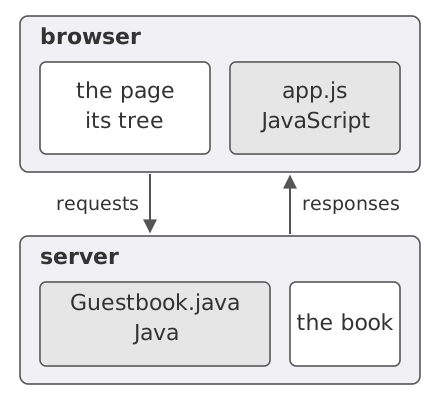
The server is the program you saw before, written in Java. It keeps the book and answers requests. The program in the page is written in JavaScript.1 It is a different language from Java, but you can already read it, and the differences that matter are pointed out as they come.
The page holds no messages: the list is the <ul> tag with the
id messages, and nothing is between its opening and its
closing. The server sends the list empty to every visitor.
Compile and run the server as you did before, and open the
address it prints:
$ javac Guestbook.java
$ java Guestbook
Serving at http://localhost:9331/
GET /
GET /app.js
GET /api/messages
GET /favicon.ico
The page on screen looks like the first guestbook's, but the terminal running the server shows something new. One visit sent four requests, where a visit to the first guestbook sent two:
GET /is the browser asking for the page, as before.GET /app.jsis new. When the browser reached line 13, it asked for the program.GET /api/messagesis new too, and it came from somewhere else:app.js, now running in the browser, asked the server for the messages.GET /favicon.icois the browser asking for its tab's icon, as it did before. (A browser that kept the icon from an earlier visit may not ask again, and then the terminal shows three lines.)
Now type ada as the name and hello as the message, and press
Post. The message appears in the list, and the message
box empties:
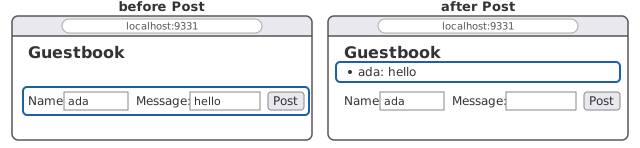
Now go back to the terminal. It printed one more line, for what you did in the browser:
POST /api/messages
In the first guestbook, a post was POST /, and the server
answered it with a whole new page. Here the post goes to
/api/messages, the path the program asked for the messages on,
and the server sends no page back. The page you are looking at is
still the one the browser drew at the start, and the program
changed it in place. That is the point of moving the work into the
browser: the page can change without the server sending it again,
so a message appears as soon as the server answers.
That raises three questions. How does a program change a page the browser has already drawn? What does the program do while the server is slow to answer? And what does the program in the browser know about the server?
The page is a tree
What the server sent on the first request was a string of
characters, index.html as it is on the disk. But look at what
the tags do. A tag opens, holds other tags, and closes: the
<body> holds the heading, the list, the two boxes, the button,
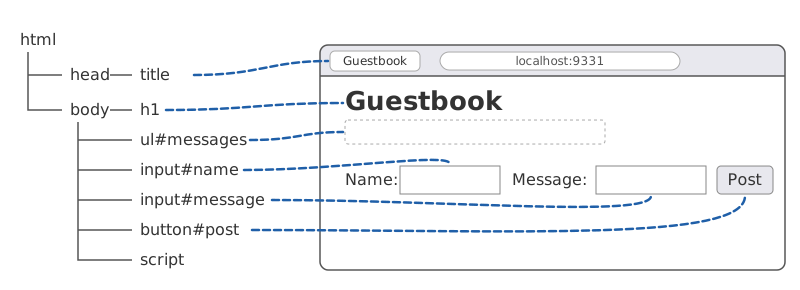
and the script. The browser reads the string and builds a tree
from it, one node per tag, each tag's children under it. Then it
draws the page on the screen from the tree: the heading in large
type, the boxes, the button. An id is a name given to a tag so
that a program can find it. Here is the tree for this page,
beside the page as the browser draws it. A line joins each node to
what it draws, and the nodes the program looks up are labeled by
their id:
Definition: DOM
The DOM (Document Object Model) is the page as the browser keeps it: a tree with one node per tag, that a program in the browser can read and change. When the tree changes, the browser redraws the page from it.
A web page, then, is a data structure, a tree like the ones you built in the intro courses. Like any data structure, a program can inspect it and change it. You can be that program. Your browser has a console, in its developer tools, where you type a line of JavaScript and the browser runs it in the current tab. In Chrome it is in the menu under More tools › Developer tools, on the Console tab, or press Ctrl+Shift+J (Option+Command+J on a Mac). Here are two lines typed into the console on the guestbook page, each followed by what the console printed back:
> document.getElementById("messages")
<ul id="messages">…</ul>

> document.getElementById("messages").innerHTML = "<li>hi</li>"
'<li>hi</li>'
document is the tree, and getElementById searches it for the
node whose id is the string given. So the first line finds the
list, the <ul> with the id messages, and the console prints
it. In Chrome, hovering over what it printed highlights the list
on the page: that is the node. The second line changes the node.
innerHTML is the HTML inside a node, and setting it replaces
the node's children with what the string says, one <li> here.
The page now shows hi in the list. The terminal running the
server prints nothing, since no request was sent. The tree
changed, and the browser redrew the page from it.
Nothing stops you doing this on any page. Open the console on a
newspaper's front page, find the headline's node, and set its
innerHTML to what you like, and the page reads as you wrote
it. The change is in your browser's tree and nowhere else. The
newspaper has not changed, and nobody else sees it.
app.js does to the tree what you just did, from a function.
Here is its first piece:
6 7 8 9 10 11 12 13 14 15 16 | |
The function is handed a list of messages. It finds the list node,
as the console did, and empties it. Then, for each message, it
makes a new <li> node, sets the node's text to the message, and
adds the node to the list as its last child. Until that last step
the new node is in no tree. In the first guestbook the server
wrote one <li> per message into the page's text. Now the program
in the browser makes one <li> node per message in the page's
tree, and the browser redraws.
If you know Java, you can read this. A few spellings differ.
function starts a function, with no return type and no types on
its parameters. const declares a variable that will not be
reassigned, where Java would name a type. The for loop says of
where Java's says :. What the code does is nothing new.
One line of show deserves a second look. Line 13 sets
textContent, where the console set innerHTML. Setting
innerHTML parses the string as HTML. A message of <b>hi</b>
would come out as hi in bold. A message holding an <img> tag
with an onerror attribute could run code in every visitor's
browser. That is the cross-site scripting hole the first guestbook
had, which
its second exercise
closed by escaping the message on the server. Setting
textContent puts the characters in the tree as text, so a tag in
a message shows as the characters typed, and nothing is parsed. As
long as the program sets text and not HTML, the escaping comes
for free.
Asking the server
show is handed the messages, and nothing in it says where they
come from. The second piece of app.js asks the server for them:
18 19 20 21 22 23 | |
fetch is a function the browser provides. Given a path, it sends
a request for that path to the server the page came from: here
GET /api/messages, the third request the server's terminal
printed.
The server does not answer this path with a page. It answers with
the messages as data, in a form the program can read. Here is the
answer, as curl shows it, after ada's post:
$ curl http://localhost:9331/api/messages
["ada: hello"]
Definition: JSON
JSON (JavaScript Object Notation) is a way of writing a value as text: a list in square brackets, a string in double quotes, and so on. Text in that form can travel between programs, in any languages, and each reads it back as a value in its own language.
Line 21 of load reads the response's body as JSON:
response.json() turns the text ["ada: hello"] into a list
with one string in it. Line 22 hands the list to show, which
draws it. That is how the messages got onto a page that held
none. The program asked for them as data, and put them in the
tree itself.
What fetch returns
load has two words you have not seen before: async before
function on line 19, and await before fetch and
response.json() on lines 20 and 21. To see what they do, here
is the console again, on the page with ada's message posted,
doing what load does one line at a time. (The console also
prints undefined after the const line, as it does after any
declaration. The session leaves that out, and cuts the response's
line to its status.)
> fetch("/api/messages")
Promise {<pending>}

> const response = await fetch("/api/messages")

> response
Response {status: 200, …}

> await response.json()
['ada: hello']
The first line is the surprise. fetch does not return the
response. It returns at once, before any response has come back,
and what it hands back is a promise, marked pending.
Definition: promise
A promise is a value that stands for a result that may
not have arrived yet. await, written before a promise, waits
until the result arrives and then gives the result itself.
Inside a function, await is allowed only if the function is
declared async.
The second line of the session awaits the promise and gets the
response: a value with a status, 200 here, and a body. Reading the
body is slow too, since the body may still be arriving over the
network. So response.json() returns a promise as well, and a
second await gives the list. That is why load has two
awaits: one for the response to arrive, and one for its body to
be read.
Why would a language want this? A request to a server can take a
long time, and while the browser waits, the user is still there.
They can click a button, scroll, resize the window. A program
that stopped dead at every fetch would stop the page with it.
So fetch does not stop. It starts the request and returns a
promise, and await says: pause this function here, let the
browser do whatever else is ready, and come back when the result
arrives. What "pause" means is the hardest idea in the lecture,
so it has a section below. First, the rule in the box's
last sentence.
Suppose you remember to await fetch and response.json(), and you
write load that way, but leave off the word before function:
3 4 5 6 7 | |
The browser refuses to run the file, with an error in the console:
Uncaught SyntaxError: await is only valid in async functions and the top level bodies of modules
Not only load fails. The browser reads the whole file before
running any of it, and refuses app.js as a whole, so nothing
in it runs: the list stays empty and the button does nothing.
For this course, the rule is that a function that uses await
is declared async, as load is on line 19. (The console is
looser. The session above awaited outside any function, and the
console allowed it. The rule is for code you write and turn in.)
One more thing the session shows. A response has a status, and 200 means the request was understood and answered. A server can answer with other statuses, such as 404 for a path it does not have. A request can also get no answer at all, if the server is down. Each of those is a different kind of failure, and a program that talks to a server has to decide what to do for each: tell the user the server cannot be reached, or that the thing they asked for is gone, or something else again.
Posting
The third piece of app.js sends a message to the server. It is
load again, with the fields added:
25 26 27 28 29 30 31 32 33 34 35 36 37 | |
Lines 27 to 29 build the fields. A URLSearchParams is a map from
names to strings, and .value on an input's node is whatever the
user has typed in the box. Line 30 is fetch again, with a second
argument the GET did not need. The argument is an object, written
in braces as names and values, and it says that the method is POST
and the body is the fields. The browser sends the fields encoded
as the first guestbook's form sent them, name=ada&message=hello,
so the server reads the body with the same parseForm. The server
answers a POST with the messages, the new one included, so lines
34 and 35 are load's last two lines: read the JSON, draw the
list. Line 36 empties the message box. load and post are both
async, since each has an await in it. show is an
ordinary function.
Then the last two lines of the file, which run once, when the browser first runs the program:
39 40 | |
Line 39 connects the button to post. It finds the button's node
and sets its onclick to the function post. There are no
parentheses after post, so this is not a call of post. It is
the function itself, handed to the browser as a value, the way the
first guestbook's main
handed handle to the HttpServer.
From then on, a click on the button is an event, and post is
what the browser runs for it. The button is in no form, so without
this line a click would do nothing. Line 40 calls load once.
After that, nothing in the program runs until an event.
One more thing to try. Post a message, then press the browser's refresh button. In the first guestbook, the page on screen came from a POST, so refresh sent the POST again, and the browser asked you first. Now the server's terminal prints three GETs and no POST:
GET /
GET /app.js
GET /api/messages
The page came from a GET, so refresh asks for the page again, then the program, then the messages. The message is still there, since the server has it.
One thing at a time
Here is an experiment. Change the server so that it waits ten
seconds, with Thread.sleep, before it answers a request to
/api/messages. (Java makes you put that call in a try block.)
Start the server again. A visit now shows the page at once, with
an empty list, and the messages arrive ten seconds later. And
during those ten seconds, while load is waiting at line 20 for
its response, you can type a name and a message and press Post.
post runs and sends the POST at once. The server's terminal
prints POST /api/messages only when the ten seconds are up,
since this server handles one request at a time.
The browser runs your program on one thread, so it never runs two
of its functions at once: JavaScript runs one thing at a time. Yet
while load is waiting, a click runs post. How can both
be true?
The answer starts from something you saw in the first guestbook.
Its server has no loop in it.
Its main makes an HttpServer, hands it handle, starts it,
and returns. The program keeps running because the loop is inside
HttpServer: wait for a request, call handle, wait again. Now
look at app.js. Its one loop is the for in show, which only
makes list items. Nothing in the file waits for a click. And yet a
click runs post. So the browser has a loop of the same kind.
Definition: event loop
The browser runs a program in the page from an event loop: wait for an event, run the function registered for it, and wait again. A click is an event. A response arriving is an event. The function the loop runs for an event is its callback.
That is one half of the answer: the browser runs a loop, and
post is the callback the loop runs for a click. The other half
is what await does. When load reaches the await on line 20,
it sends the request, and then it stops. Stopping means returning:
load returns to whoever called it, with its place marked so that
it can go on from line 21 later. What it returns is a promise, as
every async function returns one, and line 40 ignores it. Line
40 is the last line of the file, so the browser is then back at
the loop, and the loop runs whatever is ready next, a click's
post among them. When the response arrives, that is an event
too, and its callback is the rest of load, from line 21 on.
So await cuts a function in two. The part before the await
runs now, and then hands the browser back to the loop. The part
after runs later, as a callback, when the promise's result
arrives. Between the halves, the loop runs what else is ready. A
function with two awaits is cut twice: load runs in three
pieces, and so does post. Here is one run of the slowed server,
with time running left to right. The figure draws each function's
last two pieces as one box, since in this run nothing else was
ready between them:
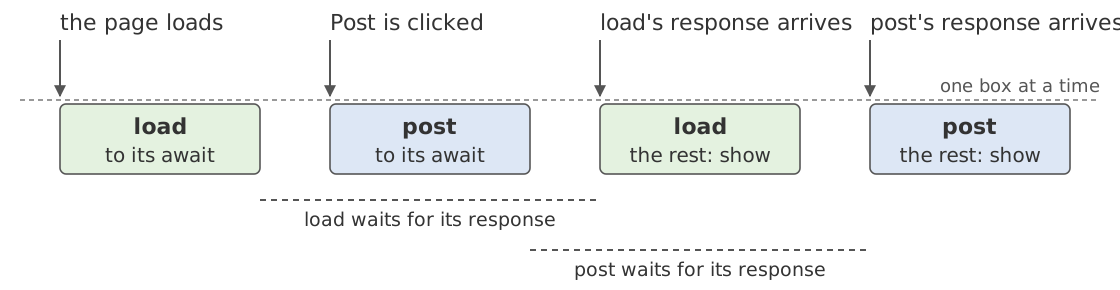
- The page loads, and line 40 calls
load. It runs to itsawaiton line 20, sendsGET /api/messages, and hands the browser back. Its request is out. - Post is clicked, while the server is still asleep. The loop
runs the click's callback,
post, which runs to its ownawaiton line 30, sends the POST, and hands the browser back. Now two requests are out, and nothing is running. load's response arrives. The loop runs the rest ofload: line 21 reads the body, and line 22 draws the list.post's response arrives, and the loop runs the rest ofpost, which draws the list again, now with the new message.
Read the row of boxes first. The loop runs one box at a time, left to right, and never two at once. That is what "one thing at a time" means. Now read the dashed lines. The two waits overlap, and during them nothing is running at all. That is why the browser is never stuck on the network. Only one of your functions is ever running. Any number of them may be set aside waiting for a promise, and each comes back in the middle of itself after other code has run.
Three things follow from the picture.
- Where does control go at an
await? Back to whoever called the function, which for a callback is the browser's event loop, and from there to whatever event is next: a click, a resize, another function's response arriving. You do not know which. You only know where your function will resume: at theawait, which then gives the promise's result. - What changed while you were away? Anything the code that
ran in between could change: a global, a field, the page's
tree. Before an
await, your function is the only JavaScript running, and nothing changes unless it changes it. After one, that is no longer true. - How is the pausing done? From JavaScript you cannot see
how, and you do not need to. The language promises only that
the function resumes after the
awaitwith the promise's result.
Last, and most important: the figure shows one possible run. Had
the server been quick, load would have finished before anyone
clicked, and the row would be load's two boxes and then
post's. Had post's response arrived first, the rest of post
would have run before the rest of load. The events come in
whatever order the user and the network give them, and each order
is another run, with the boxes in another order. In practice the
responses come fast, so the program only feels sequential. A test
that posts a message and sees it on the page has confirmed one
order and says nothing about the rest.
Definition: concurrency
A program is concurrent when more than one task is in
progress at once and the order of their steps is not the
program's to choose. In the browser the steps are large:
one callback runs at a time, and a function gives up its
turn only at an await.
This changes what a claim about the program is about. Until now a
run was fixed by its input. Now a run is fixed by its input and by
the order its events come in, so a description of what the program
does is a claim about every order. You have met this before,
with a class. Its methods may be called in any order, so you
wrote a
representation invariant,
a claim about its fields that is true whenever no method is
running, which every method may assume when called and must make
true again before it returns. A function in the page is cut at
each await, and
between any two of its pieces any other callback may run. So an
await is a method boundary in disguise. Treat it as one: make
the invariant true before it, and assume only the invariant after
it. The invariant is about what another callback can reach: a
global, an object both can see, the page's tree. Your function's
own locals are still yours, since no other callback can
reach them.
Who is the client?
The guestbook is now two programs, and a request is one program
calling the other. For the request load sends, the program in
the browser is the client. It calls the server as code calls a
method, with a request in place of a call and a response in place
of a return value, and it relies on what the server promises. The
server is the implementation. And the specification between
them is
the server's manual,
the comment at the top of Guestbook.java:
15 16 17 18 19 20 | |
The implementation is handle, changed from the first
guestbook's to answer by the request's path:
40 41 42 43 44 45 46 47 48 49 50 51 52 53 54 55 56 57 58 59 60 61 62 | |
The first change is that the server no longer builds a page. For
/, it reads index.html from the disk and sends the bytes as
they are, with the status 200 and the type text/html. For
/app.js it does the same with the program's file. That is how
servers send files: read the bytes, send the bytes. So the
browser's first two requests get the page and the program, each
exactly as it sits on the disk in the directory the server runs
in. The third
path is for the program. On /api/messages, a POST adds the
message first, reading the fields with parseForm as the first
guestbook did. Then POST and GET alike get the book's messages as
JSON. So post in the browser can redraw from the answer without
asking again. Any other path gets 404, the icon's among them. The
first guestbook sent the page to every path.
The JSON is written by hand, in json:
87 88 89 90 91 92 93 94 95 | |
Each message goes in double quotes, with three characters escaped: a backslash, a quote, and a newline. The strings are joined with commas inside square brackets. In practice a library writes the JSON, from any value and not only a list of strings.
What does the client know about the server? Only the manual.
It never sees the book or the server's code. It sends a request
and gets back text. So the manual is the server's
specification, and app.js relies on it as a caller relies on
a method's specification.
Read line 18 again. It promises the messages posted so far, as
JSON. It does not say that the JSON is a list, that each
element is a string, or that a string is a name, a colon, and
the message. The server does all three, in json and in
Book, but the manual promises none of it. So show relies on
what the server does, not on what the manual promises. The
manual is at fault: a specification of a method that returns
JSON has to say what the JSON looks like, and this one leaves
the shape open.
Suppose the server's author changes the JSON to a list of objects,
each with a name field and a message field. The server still
satisfies the manual, since the messages still come back as JSON.
In Java a change like that is a change to a return type, and a
caller that used the old type stops compiling. Here no compiler
sees both programs. The new server runs, the old app.js runs,
and show puts [object Object] in every list item, since that
is what an object becomes as text. Web systems often break this
way: the specification leaves something open, the clients rely on
what the server happened to send, and then the server changes it.
A good manual promises the shape. Then a client that relies on the shape relies on the specification alone. A change to the shape is then a change to the specification, and the server's author knows the clients have to change too. Many teams that build web systems write that promise in a form a tool can check, called a schema.
Exercises
Each answer is folded under its question. Write yours first.
1. Write the sentence the manual should have about the JSON,
so that show relies on a promise and not on what the server
happens to send.
Answer
-
The sentence. After line 20:
The messages are a JSON list of strings, oldest first, each the poster's name, a colon, a space, and the message.
-
What relies on it. Line 21 of
app.jsrelies on the body being JSON. Theforon line 11 relies on it being a list. Line 13 relies on each element being a string, since it puts the element in the page as text. The order the list comes in is the order the page shows, so the sentence promises that too. -
Who it binds. With the sentence in the manual, a change to the JSON's shape is a change to the specification, and the server's author knows to change the client with it. Without it, the client relies on what the server happens to send, and the server's author can change that without breaking the manual.
2. In the figure, the server handled load's GET before
post's POST, and the responses reached the browser in that
order. Suppose the server handled them in the same order, but
load's response was slow on the network and reached the browser
after post's. List the boxes the event loop runs, in order,
and say what the page shows at the end.
Answer
-
The boxes.
loadto itsawait;postto itsawait; the rest ofpost; the rest ofload. -
The page.
post's response holds the new message, since the server added it before answering, so the rest ofpostdraws a list with the message in it.load's response was built from the book as it stood when the server handled the GET, before the message was added. So the rest ofloadthen draws a list without it. The page ends with the message gone from the list, though the book has it, until something callsloadagain. -
The lesson. Nothing in
loadis wrong on its own, and nothing inpostis. The run that goes wrong is one order of the same events. A test that posts and sees the message on the page confirms its run; another order is another run the test never saw.
3. Take the word async off line 19 of app.js, reload the
page, and press Post. What happens, and why does the button
do nothing?
Answer
-
What happens. The console shows the error from the section on what
fetchreturns, the list stays empty, and the button does nothing. -
Why. The browser reads the whole file before running any of it, and an
awaitoutside anasyncfunction is a syntax error, so it refuses the whole file. Line 39, which gives the button its callback, never ran, so a click is an event with no callback. Line 40 never ran either, so the list is empty.
Further reading
- Promises and
await. MDN, Using promises: what a promise is, whatawaitdoes with one, and what happens when a promise's result is an error. MDN's reference pages forasync functionandawaitstate the rule in the promise box, and what elseawaitcan be written before. - The loop. MDN, JavaScript execution model, which draws the event loop and the queue of callbacks waiting for it. The browser's loop is defined in the HTML standard's section on event loops.
- The tree. MDN, Introduction to the DOM. The tree itself is defined by the DOM standard.
- JSON. MDN, Working with JSON: what JSON looks like, and how a program turns it into a value and back. The format itself is Tim Bray, ed., The JavaScript Object Notation (JSON) Data Interchange Format, RFC 8259 (2017).
fetch. MDN, Using the Fetch API, including the second argument that makes a POST.
-
JavaScript is not Java. The two share four letters of their names and nothing else: the name was marketing, in 1995. Allen Wirfs-Brock and Brendan Eich, "JavaScript: The First 20 Years," Proceedings of the ACM on Programming Languages 4, HOPL (2020), doi:10.1145/3386327, tell in section 3 how Netscape and Sun announced the language in December 1995 as a companion to Java, to link the two brands, "even though their technical designs were only superficially similar," and call the name "a continuing source of confusion." ↩