Objectives
By the end of this lesson, students will be able to:
Define and use lambda functions
Understand how dunder methods work in Python and object equality
Write and use superclasses and subclasses
Use methods from
networkxto create and manipulate graphs
Lambda Functions
apply_fun takes a list of values and another function as a parameter, and returns a new list that is the result of applying the given function to each element in the input list.
def apply_fun(values, function):
    # Use a list comprehension to apply function to each value
    return [function(v) for v in values]

def times_two(x: int) -> int:
    return 2 * x

numbers = [i for i in range(10)]
print('numbers  :', numbers)
print('times two:', apply_fun(numbers, times_two))
numbers : [0, 1, 2, 3, 4, 5, 6, 7, 8, 9]
times two: [0, 2, 4, 6, 8, 10, 12, 14, 16, 18]
It’s a bit tedious that we have to write out a whole function called times_two just so we can pass it in as a parameter. Often times the operation we want to apply is simple enough to try to write an expression to pass to apply to each value, rather than defining some named function.
Enter the lambda (commonly called an anonymous function). The idea behind a lambda is to let you specify a function without needing to go through the whole def syntax. This works best for very simple operations. Below is an example showing how to do this with our apply_fun.
def apply_fun(values, function):
    # Use a list comprehension to apply function to each value
    return [function(v) for v in values]

numbers = [i for i in range(10)]
print('numbers  :', numbers)
print('times two:', apply_fun(numbers, lambda v: 2 * v))
numbers : [0, 1, 2, 3, 4, 5, 6, 7, 8, 9]
times two: [0, 2, 4, 6, 8, 10, 12, 14, 16, 18]
Notice instead of passing a function named times_two as the second parameter, we pass
lambda v: 2 * vThe lambda keyword defines a new function without giving it a name (hence, anonymous function). The way to read this is it is a function that takes a single parameter v and it returns the value of 2 * v. This is essentially just shorthand for the previous example, with the benefit that we don’t have to define a whole function called times_two to do this.
By design, it is very difficult to do something more complex than a one-line expression inside a lambda since it is meant to be a super quick-and-easy way of defining functions for simple operations.
Lambdas in Sorting
One of the most common places lambdas show up is for sorting values. Suppose we wanted to use our Dog class to make a list of Dogs. Additionally, suppose I wanted to sort them by their name (alphabetically). Recall that the sorted function can take in another function as the key= parameter. Since lambda functions are still functions, we can use them to define the key to sort by!
class Dog:
    def __init__(self, name: str) -> None:
        self._name: str = name

    def get_name(self) -> str:
        return self._name


dogs = [Dog('Bella'), Dog('Scout'), Dog('Chester')]
dogs = sorted(dogs, key=lambda d: d.get_name())

# Should print in sorted order!
for dog in dogs:
    print(dog.get_name())
Bella
Chester
Scout
Fancy Syntax
Last time, we talked about defining how equality is checked with the == operator by writing our own implementation of the __eq__ method. It turns out that most of the common syntax in Python is really just “special methods” that can be defined in your class. Below is a list of common features you might define when writing your own classes. You can “plug in” to the Python syntax of, say, x < y, by implementing a method __lt__ that says what should happen when the less than (lt) symbol is used on your object.
| Syntax | Method Call |
|---|---|
x < y | x.__lt__(y) |
x == y | x.__eq__(y) |
x >= y | x.__ge__(y) |
print(x) | print(x.__str__()) |
x[i] | x.__getitem__(i) |
x[i] = v | x.__setitem__(i, v) |
For example, here is a toy class that implements all of these methods to prove that they get called when you use the syntax shown above.
class SomeClass:
    def __lt__(self, other):
        print('Calling __lt__')
        return False

    def __eq__(self, other):
        print('Calling __eq__')
        return False

    def __str__(self):
        print('Calling __str__')
        return 'SomeString'

    def __getitem__(self, i):
        print(f'Calling __getitem__ with {i}')
        return -1

    def __setitem__(self, i, v):
        print(f'Calling __setitem__ with {i} and {v}')
        return -1


x = SomeClass()
y = SomeClass()

print('Less Than')
print(x < y)
print()

print('Greater Than')
print(x > y)
print()

print('Equal')
print(x == y)
print()

print('Not equal')
print(x != y)
print()

print('Print')
print(x)
print()

print('Bracket Notation')
print(x[0])
x[14] = 4
Less Than
Calling __lt__
False
Greater Than
Calling __lt__
False
Equal
Calling __eq__
False
Not equal
Calling __eq__
True
Print
Calling __str__
SomeString
Bracket Notation
Calling __getitem__ with 0
-1
Calling __setitem__ with 14 and 4
It turns out that because we implement
__lt__and__eq__there is no need to implement any other comparison operators (__le__,__gt__,__ge__). This is why when we wrotex > yit can figure it out just from__lt__! For example,x >= ycan be implemented asnot x.__lt__(y)andx <= ycould be implemented asx.__lt__(y) or x.__eq_(y)!
Python providing an ability to define what happens when you use their general syntax on an object is one of the reasons the libraries people write are so popular and easy to learn! They can rely on a lot of the syntax people already know, rather than learning a bunch of specific niche methods.
Inheritance
When designing classes, we often find that multiple classes share common attributes and behaviors. For example, think about different types of courses at a university: lecture courses (like CSE 163!), lab courses, seminars, and capstones. They all share basic properties like a course code, credit hours, and instructor, but each type has its own specific characteristics. Writing separate classes for each would lead to a lot of duplicate code.
Inheritance is a powerful object-oriented programming concept that allows us to create new classes based on existing ones. The new class (called a subclass or child class) automatically gets all the attributes and methods from the existing class (called a superclass or parent class). The subclass can add new features or modify existing ones.
Inheritance Syntax
For this example, we leave out the doc-strings for readability, but we have kept the type annotations for parameters, returns, and fields.
Let’s revisit our Dog class from the previous lessons:
class Dog:
    def __init__(self, name: str) -> None:
        self._name = name

    def bark(self):
        print(self._name + ': Woof')
Now suppose that we want to create a specialized version of the Dog called ServiceDog that also tracks the kind of service that the ServiceDog provides, and whether she’s currently on-duty. Otherwise, the ServiceDog also has a name, which is a property that we can inherit from Dog:
class ServiceDog(Dog):
    def __init__(self, name: str, service_type: str) -> None:
        # Call the parent class initializer
        super().__init__(name)

        # Add new attributes specific to ServiceDog
        self._service_type: str = service_type
        self._on_duty: bool = False

    def get_service_type(self) -> str:
        return self._service_type

    def is_on_duty(self) -> bool:
        return self._on_duty

    def clock_in(self) -> None:
        self._on_duty = True
Let’s unpack the new syntax:
| Line | Meaning |
|---|---|
class ServiceDog(Dog) | Class definition for a subclass requires the superclass name in parentheses. Here, the subclass is ServiceDog and the superclass is Dog |
def __init__(...) | The initializer takes in all the same parameters as the superclass, along with any additional parameters that are unique to the subclass |
super().__init__(name) | Invoke the superclass’s initializer to set the attributes in common |
self._service_type: str = service_type | Any fields that are not defined in the superclass’s initializer should be initialized separately |
def get_service_type(self) -> str: | Any methods that are not defined in the superclass should be defined separately |
A ServiceDog object has access to all the methods from Dog, plus its own specialized methods! This means that a ServiceDog also has a bark method, but Dog does not have a get_service_type or is_on_duty function!
buddy = ServiceDog("Buddy", "guide")

# Methods from Dog work automatically
buddy.bark()  # Buddy: Woof

# New methods specific to ServiceDog
print(buddy.get_service_type())  # guide
buddy.clock_in()                 # Buddy is now on duty as a guide dog.
print(buddy.is_on_duty())        # True
Buddy: Woof
guide
True
Overriding Methods
Sometimes a subclass needs to change the behavior of a method inherited from its parent. This is called method overriding. For example, we might want service dogs to bark differently when they’re on duty:
class Dog:
    # ... other methods ...

    def bark(self) -> str:
        return f"{self._name}: Woof!"
class ServiceDog(Dog):
def __init__(self, name: str, service_type: str) -> None:
# Call the parent class initializer
super().__init__(name)
# Add new attributes specific to ServiceDog
self._service_type: str = service_type
self._on_duty: bool = False
# Functions unique to ServiceDog
def get_service_type(self) -> str:
return self._service_type
def is_on_duty(self) -> bool:
return self._on_duty
def clock_in(self) -> None:
self._on_duty = True
# Overriding the bark function
def bark(self) -> str:
if self._on_duty:
print(f"{self._name}: *alert bark*")
else:
# Call the parent's bark method using super()
super().bark()When we use the bark() function in ServiceDog, it will use the overridden method:
regular_dog = Dog("Max")
service_dog = ServiceDog("Buddy", "guide")

regular_dog.bark()  # Max: Woof

service_dog.bark()  # Buddy: Woof (off duty, uses parent's bark)
service_dog.clock_in()
service_dog.bark()  # Buddy: *alert bark* (on duty, uses overridden bark)
Max: Woof
Buddy: Woof
Buddy: *alert bark*
Typing
One of the powerful aspects of inheritance is that a subclass object can be used anywhere the parent class is expected. This is because a ServiceDog is a Dog; it has all the same methods and attributes as its parent, plus more.
def make_dog_bark(dog: Dog) -> None:
    """
    Makes any Dog bark.
    """
    dog.bark()

regular = Dog("Max")
service = ServiceDog("Buddy", "therapy")

# Both work! ServiceDog is a subtype of Dog
make_dog_bark(regular)  # Max: Woof
make_dog_bark(service)  # Buddy: Woof
Max: Woof
Buddy: Woof
Your type annotations should still be as specific as possible! If a function can expect any type of
Dog, then it would be appropriate to useDogas a type annotation (rather thanDog | ServiceDog). However, if it only expects aServiceDog, it is most appropriate to useServiceDogas the type annotation.
Networks
In Homework 4 - Networks, you’ll work with graphs in the networkx Python library to represent a social media friend recommendation algorithm, such as Facebook. This section will introduce you to some of the underlying ideas we will need to understand how graphs work, their uses in data science, and the implementation of this recommendation algorithm.
Graphs
A graph is a data structure that represents relationships between entities. It consists of:
Nodes (also called vertices): The entities themselves
Edges: Connections between nodes
The degree of a node is the number of edges connected to it.
Graphs are everywhere in computing and data science: transportation systems, web pages linked by URLs, citation neteworks, course prerequisites, food webs, and much more. There are a few main types of graphs:
Undirected graphs: Edges have no direction. If A connects to B, then B connects to A. Example: Facebook friendships (symmetric relationships).
Directed graphs (digraphs): Edges have direction. An edge from A to B doesn’t necessarily mean there’s an edge from B to A. Example: Twitter follows (asymmetric relationships).
Weighted graphs: Edges have associated weights or costs. Example: Road networks where weights represent traffic congestion.
Note that either an undirected or directed graph can have weighted or unweighted edges. A helpful way to think about this is that a graph can be either undirected or directed, and either weighted or unweighted.
The networkx Library
networkx is a fairly powerful Python library for creating and analyzing graphs. You can find a full tutorial for how to get started in the Homework 2 spec, or by following the link here. The convention is to import the networkx library as nx, and most of the work that we will do with graphs uses the nx.Graph() object. This initializes an empty graph so that we can add edges and/or nodes.
import networkx as nx
import matplotlib.pyplot as plt  # Needed to make the graphs appear

# Create an undirected graph
avengerz = nx.Graph()

# Add individual nodes
avengerz.add_node("Ava")
avengerz.add_node("Bob")

# Or add multiple nodes at once using a list
avengerz.add_nodes_from(["Yelena", "John", "Bucky", "Alexei"])

# Add individual edges
avengerz.add_edge("Alexei", "Yelena")

# Or several at once, using a list of two-element tuples
avengerz.add_edges_from([("Bob", "Yelena"),
                        ("John", "Ava"),
                        ("Bucky", "John"),
                        ("John", "Yelena")])

# Visualize the graph
nx.draw_networkx(avengerz)

# Save figure
plt.savefig('avengerz_graph.png')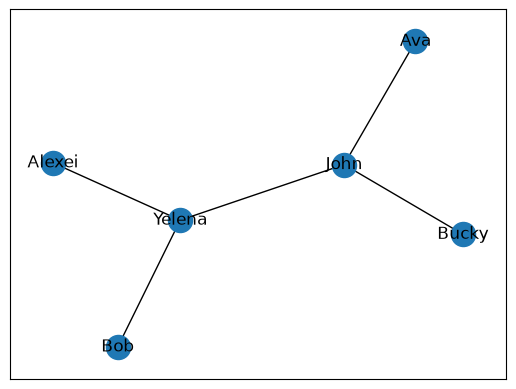
It is also possible to initialize nodes in a Graph only by using the add_edge or add_edges_from functions:
friends = nx.Graph()

abc = [("Enjolras", "Combeferre"),
       ("Combeferre", "Prouvaire"),
       ("Prouvaire", "Feuilly"),
       ("Feuilly", "Courfeyrac"),
       ("Courfeyrac", "Bahorel"),
       ("Bahorel", "Bossuet"),
       ("Bossuet", "Joly"),
       ("Joly", "Grantaire")]

friends.add_edges_from(abc)
nx.draw_networkx(friends)
plt.savefig("friends_graph.png")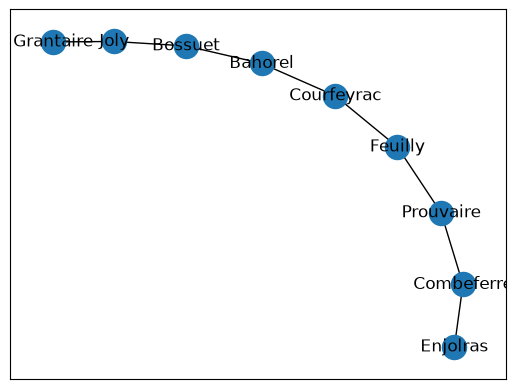
For a directed graph, we use DiGraph instead. Also, note that a node can have any type! You can even create nodes with additional attributes by defining them in the form (node, dict) where the dict is a dictionary of the node’s attributes.
# Create a directed graph
rj = nx.DiGraph()

rj.add_nodes_from([("Romeo", {"House": "Montague"}),
                   ("Juliet", {"House": "Capulet"}),
                   ("Mercutio", {"House": "Prince"})])

rj.add_edge("Romeo", "Juliet")
nx.draw_networkx(rj)
plt.savefig("rj_graph.png")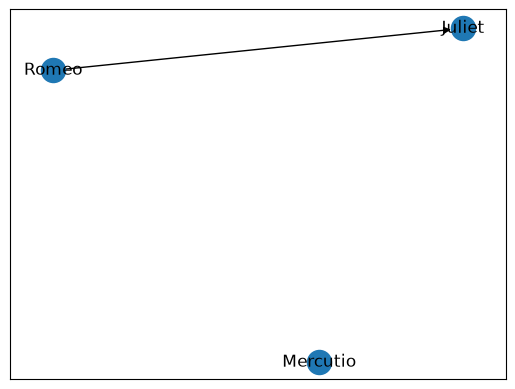
Here are some functions you may find helpful for both Graphs and DiGraphs:
graph.number_of_nodes()returns the number of nodes in the graphgraph.number_of_edges()returns the number of edges in the graphgraph.nodes()returns a set-like object containing all the nodes in the graphgraph.edges()returns a set-like object containing all the edges in the graphgraph.degree[n]returns the number of edges thatnhasgraph.neighbors(n)returns the “neighbor” nodes ofn, or any node that is connected tonby an edge
Food for thought: When would you want to directed or undirected graphs?
Set Operations
When working with graphs and social networks, we frequently need to compare groups of nodes. Python’s set operations are perfect for this! Sets allow us to efficiently find commonalities and differences between collections.
Intersection (
&) lets us find the elements that appear in both setsUnion (
|) lets us find the elements that appear in either or both setsDifference (
-) lets us find the elements that appear in the first set but not the second (order matters!)
s1 = {1, 2, 3, 4, 5}
s2 = {3, 4, 5, 6, 7}

print(s1 & s2)
print(s1 | s2)
print(s1 - s2)
{3, 4, 5}
{1, 2, 3, 4, 5, 6, 7}
{1, 2}
⏸️ Pause and 🧠 Think
Take a moment to review the following concepts and reflect on your own understanding. A good temperature check for your understanding is asking yourself whether you might be able to explain these concepts to a friend outside of this class.
Here’s what we covered in this lesson:
Lambda functions
Dunder methods
Inheritancee
Superclasses and subclasses
Overriding methods
Typing
Graphs
Undirected graphs
Directed graphs
networkx
Set operations
Practice Problems
Let’s work together on writing the class in labcourse.py, which is a subclass of the Course class in course.py.
LabCourse
Recall the Course class, which represents a course object that has a course code, credit hours, an instructor, and a list of prerequisites:
class Course:
    def __init__(self, code: str, credit_hours: int,
                 instructor: str, prereqs: list[str]) -> None:
        self._code: str = code
        self._credit_hours: int = credit_hours
        self._instructor: str = instructor
        self._prereqs: list[str] = prereqs

    def get_name(self) -> str:
        return self._code

    def get_prereqs(self) -> list[str]:
        return self._prereqs

    def get_credit_hours(self) -> int:
        return self._credit_hours

    def check_instructor(self, other: "Course") -> bool:
        return self._instructor == other._instructor
Task: Update the Course class to include a __str__ method which returns a string representation of the course in the format: "COURSE (X credits)" where COURSE is the name of the course, and X is the number of credit hours in the course.
Task: Define a new class LabCourse that inherits from the Course class and adds the following attributes:
A field
lab_days, which is a list of strings representing the days that the labs meet, e.g.,["Tuesday", "Thursday"]A field
lab_materialswhich is a boolean representing whether the lab requires extra materials, e.g.,FalseA method
get_lab_daysthat returns the list of strings representing the days that the labs meetA method
needs_materialswhich returns whether the lab requires extra materialsA method
__str__that overrides the existing__str__function to return a string representation of a lab course in the format:"COURSE (X credits) - Lab: DAYS", whereCOURSEis the name of the course,Xis the number of credit horus, andDAYSis the list of days that the lab meets.
Here’s an example of the usage:
cse164 = LabCourse("CSE 164", 4, "Suh Young Choi", ["CSE 163"],
                   ["Tuesday", "Wednesday"], True)

print(cse164.get_name())          # CSE 164
print(cse164.get_credit_hours())  # 4
print(cse164.get_lab_days())      # ['Tuesday', 'Wednesday']
print(cse164.needs_materials())  # True
print(cse164)  # CSE 164 (4 credits) - Lab: Tuesday, Wednesday