Exercise 4: POSIX in C from C++
Rating: 5 (
Each exercise this quarter is rated on a integer scale of 1 – 5, inclusive, with 1 being the "least time-consuming" and 5 being the "most time-consuming".
This difficulty scale is meant as a rough guide for you in predicting the amount of time to set aside for each exercise as you balance the work required for 333 with your other obligations. However, it is necessarily imperfect as everyone's set of circumstances and experiences with the exercises differ. If your experience with an exercise does not align with its rating, that is not a reflection of you or your abilities.
- Read a file's size and contents using only POSIX I/O (open/read/lseek/close).
- Handle short reads and errors from read(), cleaning up resources on every path.
- Implement a directory iterator module using the POSIX dirent API.
- Measure how read granularity affects file I/O performance.
- Call C modules from a C++ client.
Background
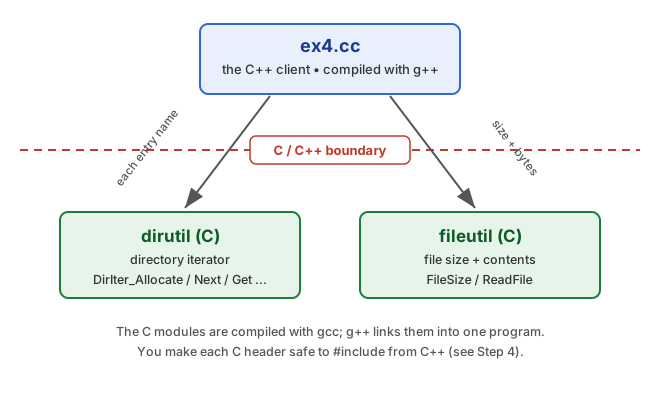
In this exercise you will build ex4: given a
directory, it prints the size and contents of each file in it. The
work is split into two parts:
- Part A: a POSIX file-I/O module,
fileutil, plus a timing experiment and the warm-up questions. - Part B: a directory-iterator
module,
dirutil, and the C++ clientex4.ccthat ties everything together.
POSIX File I/O
The POSIX layer gives you low-level, unbuffered access to files
through file descriptors rather than the C standard
library's FILE*. The calls you need are
open(), read(), lseek(), and
close(). Remember that a single read()
can return fewer bytes than you requested, or an error. Your code
must handle both cases; the comments in fileutil.c
have the specifics.
Directories
Directories are special files that store the names of their
entries. You access them in C with struct dirent and
the dirent.h functions opendir(),
readdir(), and closedir(). Your
dirutil module wraps these in an iterator.
Part A: File I/O & Timing
Implement fileutil
ssize_t FileSize(const char* filename);
ssize_t ReadFile(const char* filename, char* buf, size_t buflen,
                 size_t chunk_size);
In fileutil.c, implement FileSize() and
ReadFile(). FileSize() reports a file's
size. ReadFile() copies up to buflen
bytes of the file into buf, requesting
chunk_size bytes on each read(). Use only
POSIX calls, not the file functions in stdio.h. The
comments in fileutil.h and the TODOs in
fileutil.c give the full contract.
Answer the warm-up questions
The starter includes questions.txt, a short,
required warm-up about how chunk_size affects
performance. It follows a Predict, Verify,
Reflect pattern: answer the Predict parts before
running any timing code, right after you finish
fileutil, then run test_fileutil and
fill in what you measured. You are graded on your reasoning after
verifying and reflecting, not on whether your predictions were
right, and you may discuss your answers with other students.
Compilation
$ make test_fileutil
$ ./test_fileutil
test_fileutil uses your ReadFile() to
read the provided txtdir files at several chunk sizes
and prints, for each file, a small table with columns for the
chunk size, the total time in milliseconds, and the time per byte
in nanoseconds. Run it, then complete the Verify and
Reflect parts of questions.txt to explain what
you observe.
Part B: Directory Iterator & C++ Client
Implement dirutil
DirIter* DirIter_Allocate(const char* dirname);
void     DirIter_Free(DirIter* iter);
bool     DirIter_IsValid(DirIter* iter);
bool     DirIter_Next(DirIter* iter);
const char* DirIter_Get(DirIter* iter);
Before you start, read dirutil.h and answer the
directory-iterator questions in questions.txt. Then,
in dirutil.c, implement the iterator. Your iterator
should skip the "." and ".." entries. Read the
function comments in dirutil.h for each contract, and
pay attention to the ownership rule for the string returned by
DirIter_Get().
Fix the linker error
When you first build ex4, each source file compiles,
but the program fails to link: you will see
undefined reference errors for the fileutil
and dirutil functions that main() calls.
The reason is that C and C++ do not name compiled functions the
same way, so the linker cannot match the calls in
ex4.cc to your C code.
To fix this, make the declarations in fileutil.h and
dirutil.h use C-style linkage when they are included
from C++. You can do this by using the extern syntax
in the header files. Work out the exact form from what we covered in
lecture.
Write the C++ client (ex4.cc)
Write main() in ex4.cc. It takes a
directory name as its single argument, argv[1], and
walks it with the dirutil iterator. Each entry the
iterator returns is just a name, so build the full path
<dir>/<name> before passing it to
FileSize() and ReadFile(). For each
entry, print its name, size, a divider line, and up to
NUM_BYTES_TO_PRINT bytes of its contents. Use the C++
iostream library rather than
stdio.h: write to std::cout and
std::cerr, and use std::cout.write() for
raw bytes. On any error, such as wrong usage, an unopenable
directory, or an unreadable file, print a message to
std::cerr, free the iterator, and return
EXIT_FAILURE.
Compilation
$ make
$ ./ex4 <directory>
make builds ex4. Run it on any
directory to list the size and contents of each file. Its output
must exactly match the format shown in Sample output below.
Sample output
Build with make and run ex4 on a
directory. The provided txtdir/ is a handy one to try.
Your output must match this format exactly:
$ ./ex4 exampledir
Contents of exampledir:

test2.txt (11 bytes):
==================================================
hello world

test.txt (16 bytes):
==================================================
asdfasdfasdfasdf
- First line: Contents of <dir>:, where <dir> is exactly the argument you were given.
- Then, for each entry other than "." and
"..": a blank line, a line
<name> (<size> bytes):, a divider line of
50 = characters, which you can build with
std::string(HEADER_SIZE, '='), and the file's contents written verbatim, ending with a newline. - <size> is the file's full size, but only
the first
NUM_BYTES_TO_PRINTbytes are printed. - Entry order depends on the filesystem, so your output may differ from the example.
Compilation
The provided Makefile gives you:
make, ormake ex4, buildsex4.make test_fileutilbuilds the timing harness.make cleanremoves built files.
This exercise uses two compilers. Your .c files
are compiled as C with gcc -std=c17, and
ex4.cc is compiled as C++ with
g++ -std=c++17, then linked together with
g++. The object files only need to agree on symbol
names, which is exactly what the extern "C" change in
Part B arranges.
Style Focus
Match the provided style
You have been given code, so match its style: commenting,
indentation, data types such as size_t,
ssize_t, and off_t, and error checking.
Do not change the provided interfaces other than the
extern "C" edit from Part B.
Clean up system resources, including open file descriptors,
directory streams, and heap allocations, on all paths,
including errors. The starter's TODO and planning
comments are there to guide you; update or remove them so your
submitted comments stay accurate and meaningful.
C++ style
Write C++-style code in ex4.cc: prefer
std::cout over printf, and
nullptr over NULL when checking the
pointers returned by your C modules. If you use using
directives, list each name individually, for example
using std::cout;, and never write
using namespace std;.
cpplint
You have both C and C++ here, so lint each with the right checks:
use the --clint flag for your .c and
.h files, and no flag for the .cc file.
$ ./cpplint.py --clint fileutil.c fileutil.h dirutil.c dirutil.h
$ ./cpplint.py ex4.cc
Submission
Submit your work by creating an ex4-submit tag in your exercise repo before the deadline.
For full credit, your code must:
- Compile with the provided
Makefile, with no errors or warnings, on CSE Linux machines. - Have no runtime errors, memory leaks, or memory errors, so that
valgrindruns clean. - Have a comment at the top of each submitted source file with your name and CSE or UW email.
- Be pretty: formatting, naming, and comments follow class style,
and the linter runs clean, using
--clintfor your .c and .h files and no flag for the .cc file.