CSE 331 Homework 4: Generics and Inventory++
Due Friday, December 4 at 11:59pm (late policy).
Task 1: QuokkA-round and Find Out
The first task uses the following classes:
class Critter {..}
class Marsupial extends Critter {..}
class Blobfish extends Critter {..}
class Quokka extends Marsupial {..}
Suppose we are writing a method with the following parameters:
Object obj;
Critter critter;              List<Critter> critters;
Marsupial marsupial;          List<? extends Marsupial> marsupials;
                              List<Blobfish> blobfishes;
Quokka quokka;                List<? super Quokka> quokkas;

A quokka (k-woke-a) is a smiley marsupial native to southwestern Australia. It brings you much luck and joy for this homework. Thank you San Diego Zoo :)
For each line of code below, consider whether the Java compiler would accept it in a method with the parameters above. Write "true" the compiler would accept it, or "false" otherwise. No explanation needed.
-
marsupials.add(quokka); -
quokkas.add(quokka); -
quokkas.add(marsupial); -
quokkas = critters; -
blobfishes.add(new Blobfish()); -
quokkas.add(critter); -
marsupial = marsupials.get(0); -
quokka = marsupials.get(0); -
quokka = quokkas.get(0); -
obj = quokkas.get(0); -
blobfishes.add(null); -
critter = marsupials.get(0);
Inventory++
In this part of the homework, you will extend the inventory you built in the last homework with new features, make it generic so it can hold any kind of item, test it, and then use it as the backend of a web application with a JavaScript frontend.
Getting started
Get the starter code via gitlab as before (download directory as zip, then unpack it).
Most of the files are similar to the previous homework. The differences are:
Inventory.java: We have changed the interface. It is now generic, we have added several new methods, and one existing method has a new running time requirement. Task 2 lists every change.InventoryItems.javaandInventoryItem.java: some example item types (tools, materials, and snacks from Santa's Workshop) that you will use to test that your generic inventory works with items other thanString.InventoryWebApp.java: a new starter file for your web app. It is a small demo, which you will study in Task 4 and then replace.static/: a new directory holding the web page that your app serves: the HTML, JavaScript, and CSS files that the browser loads.
After unpacking the starter code, you should copy the contents of your
InventoryImpl.java and test files from the previous homework into the corresponding
starter files provided. Be careful when copying, because this homework uses Java
packages. We have included the correct package declarations for you in the starter code,
but you must be careful not to overwrite them when copying your code from the previous
homework.
Your code will not compile against the updated Inventory.java interface until you have
finished Task 2 below.
If you are using VS Code, be sure to open the hwInventory++ folder as the
"root" folder in your editor, or else it will not be able to find the
dependencies in lib/.
Task 2: Implement the new Inventory spec
We have updated Inventory.java in several ways.
Everything is now generic. Yay! An Inventory<T> holds items of some type T, rather than
always String. So every method that took or returned a String item now uses T, and
the two records inside the interface are generic as well: Transaction<T> and
ItemSummary<T>.
There are also new/updated methods.
- new:
renameItem(oldItem, newItem): renames an item everywhere in the history, merging withnewItemif it already exists. - new:
correctTransactionQuantity(index, quantity): fixes the quantity of a transaction that was recorded wrongly. - new:
getTotalReceived(item): the total units shipped to the inventory for an item. - new:
getTotalSold(item): the total units purchased from the inventory for an item. - new:
getFullHistorySize(): how many transactions there are. - new:
getTransactionByIndex(index): the transaction at a position in the full history. - updated:
getItemQuantity(item)now has a runtime requirement.
Now, starting from your copied solution from the previous homework, update your implementation to satisfy the new specification. A good order is:
- Make your class generic.
- Add the new methods.
- Meet the running time requirements. Some of the old and new methods are specified to achieve a certain running time. Depending on your choice of data structures in the previous homework, you may need to change your code to use data structures that can implement the operations you need within the specified running time bounds.
Also recall that big oh running time always implicitly includes "or better". In particular, if the spec says "must run in O(log n)" then running in constant time also satisfies that spec. You may assume that hashing based data structures run in constant time. You may also ignore code that only runs when "slow checks are enabled" (e.g., slow parts of checkRep) when analyzing running times.
When you change your data structure, be sure to update your abstraction function (AF)
and representation invariant (RI) comments, and update your checkRep() method to
check the new invariants. Then you will also want to revisit any existing methods and
ensure that they still work as specified with your new choice of data structure.
Task 3: Update your tests
If you haven't already, copy over your specification tests from the previous homework into
the provided starter file, being careful to preserve the package declaration from the
starter code. Inventory is now generic, so your tests will need to declare their inventories
as Inventory<String> and create them with new InventoryImpl<>().
Then write specification tests for the new methods, adhering to 331 testing heuristics and coverage standards. You should also update your tests for any existing methods from the previous homework so that they also maintain 331 testing heuristics and coverage standards.
Test that your inventory is really generic. Because Inventory is generic, your specification tests should exercise the inventory with at least two different types of InventoryItem provided in InventoryItems.java (e.g., Material and Snack). This helps verify that your implementation works generically rather than depending on a particular item type.
As in previous homeworks, only your specification tests in InventorySpecTest.java will be graded. We will run them against your implementation, the staff implementation, and possibly deliberately buggy implementations. Your specification tests must pass on any correct implementation while still being thorough enough to detect incorrect ones.
InventoryImplTest.java will not be graded and may be left blank if you wish.
Task 4: The web application
In this task, you will build a browser-based frontend for your upgraded inventory application. We have provided a small demo app so that you can see all the pieces working together. Part of your task is to understand the demo well enough that you can use the same techniques for the inventory.
Architecture
The app has two halves that talk to each other: a server that keeps the inventory, and a client that the user sees and clicks in their browser. They only ever communicate by the client sending a request and the server sending back a reply.
The server: InventoryWebApp.java
The server is Java code that runs on your computer. It uses the InventoryImpl from Task 2 to
keep the inventory, and it answers each request that the browser sends. It uses only the Java
standard library.
- A request has a method:
GETto read something andPOSTto change something. It has a path, such as/api/shipment, which says what it is for. It sometimes has data. APOSTcarries the fields of a form in its body, such asitem=wood&quantity=5. AGEThas no body, so any data it needs goes in the URL as a query parameter, such as/api/item?name=wood. - The server replies with JSON, a text format for data, not with a finished web page. We
build the JSON out of strings in Java. Every reply has a
statusthat is eitherSUCCESSorERROR, amessageto show the user, and the data the page needs. A failed request gets anERRORreply, with an HTTP error status, and must leave the inventory unchanged. - The server also sends the three files of the client when the browser asks for them.
- The server must check everything it is sent. A quantity arrives as text, so the server has to confirm that it really is a whole number, and an item name can be blank.
The client: static/
The client is three files that the browser loads from the server: static/index.html describes
what is on the page, static/index.js is the JavaScript that makes it work, and
static/style.css is for styling. The browser loads the HTML once. After that, the page
never reloads. The JavaScript does everything else:
- It sends requests to the server with
fetch, and receives the JSON replies. - It changes what is on the page to match what the server said, and shows the server's
message. Make sure to put text from a reply on the page withtextContent, notinnerHTMLas your app may try to render an item with special characters as HTML that is part of the page. - It runs a function when the user does something. Give each button its own
function that handles it, such as
handleShipment, and when you register it withaddEventListener, pass the function itself. Do not writeaddEventListener('click', handleShipment()), as that will call the function right away rather than when the button is clicked.
Working with the frontend: views
Your app has several views, such as the inventory, one item, and one transaction. They are not separate web pages. The HTML file holds a section for every view, and exactly one section is visible at a time. Moving to another view is JavaScript hiding the section on screen and showing another. This is what we call paging.
- Each section has a
hiddenattribute that the JavaScript turns on and off. The demo'sshowOnlyfunction shows one section and hides the rest. - A view usually needs data, so a function such as
showItemViewfirst asks the server and then fills in the section with the reply. Which item to ask about is part of the request, as a query parameter. - A link to another view, such as each item in a list, is a button that the JavaScript makes once the server has said which items there are. Each one gets a click handler.
- A button can send a value the user shouldn't have to type, such as which item a rename is for, from a variable that the JavaScript sets when it shows the view.
- After an action changes the inventory, redraw the view that is on screen, so that the user sees the new state.
- Every view other than the main one needs a way back.
Your app will have three views: the inventory, one item, and one transaction. The starter code demo has three views too, so you can see all of this working before you write any of it.
Starter code walkthrough
The starter code is a demo with similar functionality to the simple terminal application from the previous homework's starter code. It keeps a counter that the user can increment and decrement. It also keeps every value the counter has ever had, and how many times it has had each. It has three views.
To run the demo, use make run or press the word "Run" right above main() in VS Code when
looking at InventoryWebApp.java, and then open http://localhost:7070/ in your browser.
(If you use the makefile, you must finish implementing the ADT first. Otherwise you will get an error
because the implementation is missing the new methods from the updated interface.)
The server keeps its state in memory, so stopping and restarting it starts you over.
The counter view
When you first load the page, you see the counter view. It shows the count, a button to increment and one to decrement, how much each press changes the count, and the list of values seen so far, which is empty at first.
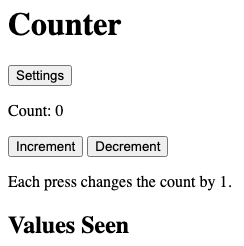
When the page loads, index.js asks the server for the current state with a GET to
/api/state and draws the reply on the page. Pressing Increment runs a function in
index.js that sends a POST to /api/inc. The server adds the step to the count, records
the new value, and replies with the new state as JSON. The JavaScript then updates the count
and the list, and shows a message.
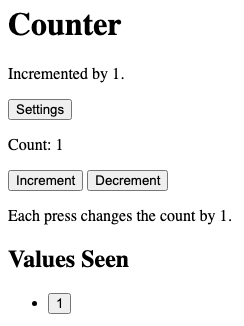
Every reply from the server is JSON with a status that is either SUCCESS or ERROR, a
message to show the user, and the data for the page. Here is the reply to that Increment:
{"status":"SUCCESS","message":"Incremented by 1.","count":1,"step":1,"seen_numbers":[1]}
Pressing Decrement twice then takes the count to 0 and then -1.
The settings view
The Settings button on the counter view opens a second view. It has a Back button, and a field where the user chooses how much each press changes the count.
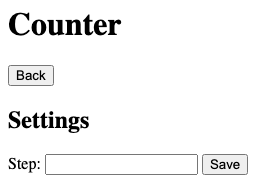
Nothing is loaded from a new page. The page already contains all three views, and index.js
shows exactly one at a time. Look at how showOnly does this in index.js, and at the
hidden attributes in index.html.
Pressing Save sends a POST to /api/settings whose body carries the field, such as
step=5. The server checks it, and if it is no good, replies with an ERROR and a message
that explains why. The JavaScript shows that message, and nothing changes.
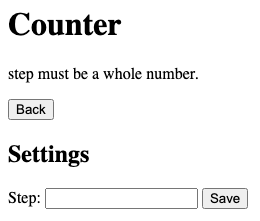
When the step is valid, the server saves it and replies with SUCCESS.
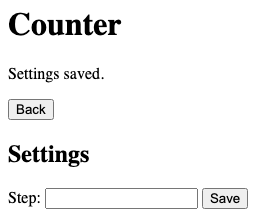
Going back to the counter view, each press now changes the count by 5.
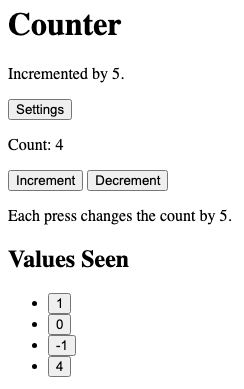
The value view
Each value in "Values Seen" is a button. Pressing one opens a third view, about that value. It shows how many times the count has been that value, and has a button to set the count back to it.
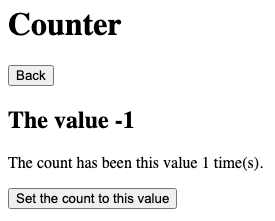
These buttons are made by index.js once the server has said which values there are, so there is
a makeButton function that gives each one a click handler.
When one is pressed, the page asks the server about that value with a
GET to /api/value?n=-1. A GET has no body, so which value is part of the URL, as a
query parameter.
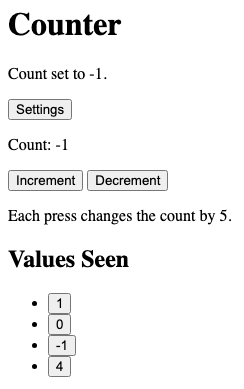
The button on this page needs to tell the server which value to use, but the user should not
have to type it. index.js keeps the value the view is showing in a variable, and the button
sends it as a field, such as value=-1. If it works, the app goes back to the counter view.
What to take from the demo
You should study InventoryWebApp.java, static/index.html, and static/index.js
together to see how the pieces fit. Everything described under Architecture above appears in the
demo, and your inventory app uses the same techniques: replies with a status and a
message, fields the server must check, views that are sections shown and hidden,
buttons made from the server's data, query parameters, and values kept in variables.
Required functionality
Your app has three views, each of which is a part of one HTML page.
Inventory view
The inventory view is the main view. It lets the user see the quantity of every item, in stock and out of stock, along with a full log of the transaction history. It must support:
- Add a shipment: A user gives an item name and a quantity.
- Add a purchase: A user gives an in-stock item name and a quantity.
- View an item: Each item can be opened, to go to that item's view.
- View a transaction: Each transaction in the history can be opened, to go to that transaction's view.
Items with a quantity of 0 are still in the inventory, so they must still be shown (as out of stock).
Item view
The item view shows detailed information about one item: its current quantity, the total units received, the total units sold, and a complete history of the item's transactions, sorted from newest to oldest. It must support:
- Rename the item: A user gives a new name. Renaming an item updates the item and all of its transactions, and if the new name is already in the inventory, the two items' histories are merged.
- View a transaction: Each transaction in the item's history can be opened.
- Go back to the inventory view.
The three totals on this view must agree: the units received minus the units sold is the current quantity. The history runs newest first, which is not the order the transactions were recorded in.
Transaction view
The transaction view shows one transaction, and lets the user correct its number of units, such as when there was an input error. It also shows the current quantity of the item the transaction is about. It must support:
- Correct the amount: A user gives the correct number of units. The correction updates the transaction and adjusts the item's current quantity accordingly. A correction cannot turn a shipment into a purchase or a purchase into a shipment. A correction that would leave some item with a negative quantity at any point in the history, such as raising a purchase above what was on hand when it was made, must be rejected with a message, and nothing changes.
- View the item: The transaction's item can be opened, to go to that item's view.
- Go back to the inventory view.
Messages and errors
After each action, the page must show what happened: a message saying that it worked, or a message saying why it did not. Your application should handle all inputs reasonably and with decent error messages. For example:
- If a user tries to purchase more units of an item than are currently in stock, or an item that is not in the inventory, the application should not crash, but rather should show a message explaining the problem.
- If the user tries to change the number of units in a transaction to an invalid amount, the application should show a message that the amount is not accepted.
- If a quantity is not a positive integer, the application should show a message that a positive integer is required.
- If a form is submitted with a blank item name, the application should show a message that an item name is required.
Your application should never crash, stop responding, or show a Java stack trace in the browser, and a request that fails must leave the inventory unchanged.
Your application does not need to match the exact style or wording of our example, but all the functionality described above must be present. Feel free to style your app however you want!
Your web app's inventory holds String items, the names of the items, so use an
Inventory<String>. (The other item types in InventoryItems.java are for testing, in Task 3.)
Example scenario
The following scenario illustrates the required functionality. Your application should be able to handle equivalent functionality, though you are free to design the layout and display information differently. Of course, just being able to handle this one example scenario correctly does not mean your code is correct in all cases.
It is almost Christmas, and Santa has a problem: his workshop is running out of supplies. He has hired friend of the class, Jared, to supply the workshop for the upcoming season. Jared needs to keep track of everything coming in and going out: the wood the elves build with, the tools they build it with, and the snacks that keep them going. Luckily, Jared knows a 331 student who can write him an inventory web app.
On the first morning, Jared opens the app. There is nothing in it yet.
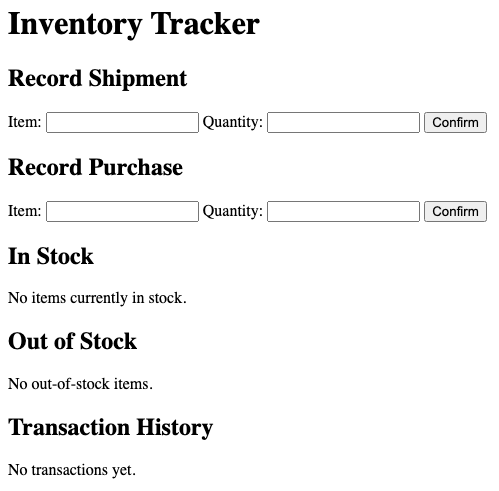
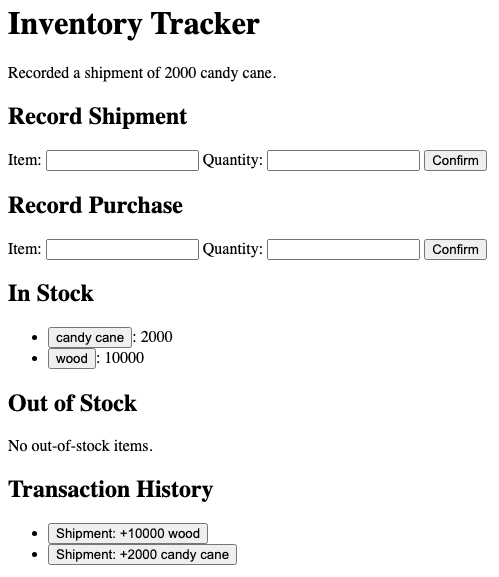
Now the first deliveries arrive. A truck brings a huge load of wood, and another brings candy canes for the elves, so Jared records them in the app, checking by hand that what he is storing is right.
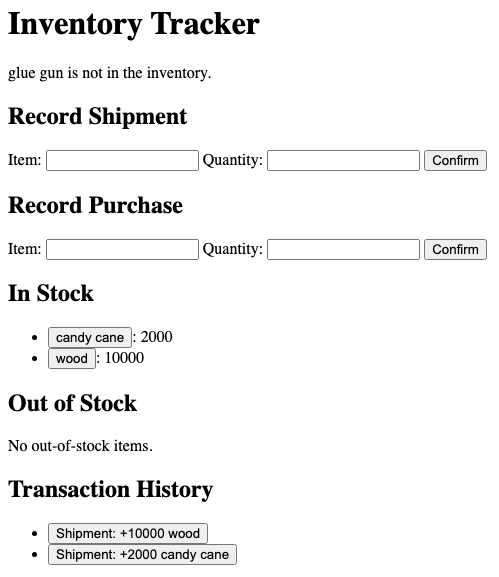
Then the first elf arrives. Ari, the head of toy-making, needs a glue gun for a rush order of toy trains. Jared goes to sell him one, but...
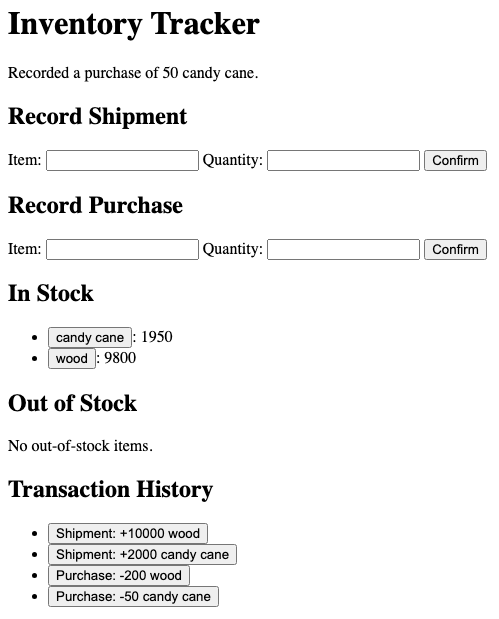
Ari sighs and asks what Jared does have. Jared looks at the app and tells him. Ari decides to take some wood for the toy trains, and Santa himself stops by for a few candy canes.
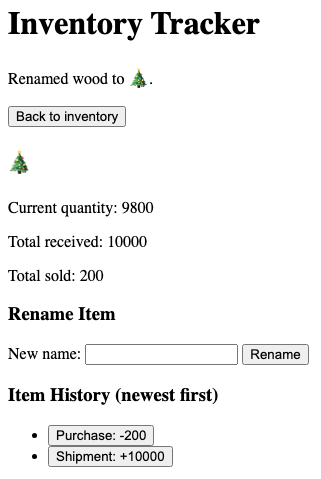
Pleased with how it is going, Jared remembers that Java accepts emojis as strings, so he decides to give the wood a festive name. He opens the item view for wood and renames it 🎄.
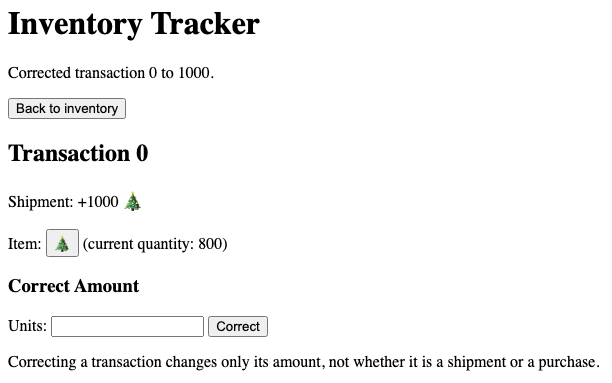
A little later, Jared looks over the paperwork and realizes that the wood shipment was only 1000 units, not 10000: someone typed an extra zero. He opens the transaction view for that shipment and corrects the amount. With the first sales done and the inventory double-checked, he calls it a day and heads home to wrap presents.
Correctness and code quality
As with the previous homework, you are held to the 331 correctness and code quality guidelines.
You do not need to write JUnit tests for the web application. Course staff will grade the web application by running it and trying it themselves.
AI Policy
You should not use any AI assistance for any part of this assignment. See the course's AI policy.
Submission
Submit your answers for Task 1 to the "HW4 Written" assignment on Gradescope.
Submit the following files to the "HW4 Coding" assignment on Gradescope:
InventoryImpl.javaInventorySpecTest.javaInventoryImplTest.javaInventoryWebApp.java- Your web page files in
static/(index.html,index.js, andstyle.css, plus any other files you added there)
You can either upload these files individually on Gradescope, or run
make submission to bundle them into a submission.zip and upload that.
You should not modify or submit Inventory.java, InventoryItems.java, or
InventoryItem.java.
HW4 Written and HW4 Coding each need their own Friday submission to unlock their late day. A Friday submission to one does not unlock the other; see the late policy.