Today, we will be intoducing PyTorch, "an open source deep learning platform that provides a seamless path from research prototyping to production deployment".
This notebook is by no means comprehensive. If you have any questions the documentation and Google are your friends.
Goal takeaways:
Before we even import torch packages, a quick note on how to install PyTorch with as little headache as possible. Go to PyTorch website, and scroll down until you see "INSTALL PYTORCH" section.
There you will be able to choose specific version for each OS, package indexes (pip vs conda), but most importantly which version of CUDA to use. For this class we advise you to choose "None" option, as models will not be too big.
However, if you have NVIDIA GPU (or want to use lab machines with GPUs) and/or are curious, you should run nvidia-smi command on that machine and look in right-top for CUDA version. Then choose it in the installation.
import torch
import torch.nn as nn
import torch.nn.functional as F
from mpl_toolkits.mplot3d import Axes3D
import matplotlib.pyplot as plt
import numpy as np
torch.manual_seed(446)
np.random.seed(446)
By this point, we have worked with numpy quite a bit. PyTorch's basic building block, the tensor is similar to numpy's ndarray
# we create tensors in a similar way to numpy nd arrays
x_numpy = np.array([0.1, 0.2, 0.3])
x_torch = torch.tensor([0.1, 0.2, 0.3])
print('x_numpy, x_torch')
print(x_numpy, x_torch)
print()
# to and from numpy, pytorch
# The tensor and ndarray share the same memory.
print('to and from numpy and pytorch')
print(torch.from_numpy(x_numpy), x_torch.numpy())
print()
# we can do basic operations like +-*/
y_numpy = np.array([3,4,5.])
y_torch = torch.tensor([3,4,5.])
print("x+y")
print(x_numpy + y_numpy, x_torch + y_torch)
print()
# many functions that are in numpy are also in pytorch
print("norm")
print(np.linalg.norm(x_numpy), torch.norm(x_torch))
print()
# to apply an operation along a dimension,
# we use the dim keyword argument instead of axis
print("mean along the 0th dimension")
x_numpy = np.array([[1,2],[3,4.]])
x_torch = torch.tensor([[1,2],[3,4.]])
print(np.mean(x_numpy, axis=0), torch.mean(x_torch, dim=0))
x_numpy, x_torch [0.1 0.2 0.3] tensor([0.1000, 0.2000, 0.3000]) to and from numpy and pytorch tensor([0.1000, 0.2000, 0.3000], dtype=torch.float64) [0.1 0.2 0.3] x+y [3.1 4.2 5.3] tensor([3.1000, 4.2000, 5.3000]) norm 0.37416573867739417 tensor(0.3742) mean along the 0th dimension [2. 3.] tensor([2., 3.])
Tensor.view¶We can use the Tensor.view() function to reshape tensors similarly to numpy.reshape()
It can also automatically calculate the correct dimension if a -1 is passed in. This is useful if we are working with batches, but the batch size is unknown.
# "MNIST"
N, C, W, H = 10000, 3, 28, 28
X = torch.randn((N, C, W, H))
print(X.shape)
print(X.view(N, C, 784).shape)
print(X.view(-1, C, 784).shape) # automatically choose the 0th dimension
print(torch.reshape(X, (N, C, 784)).shape) # You can still do torch.reshape
print(torch.reshape(X, (N, -1, 784)).shape) # Including -1 trick
torch.Size([10000, 3, 28, 28]) torch.Size([10000, 3, 784]) torch.Size([10000, 3, 784]) torch.Size([10000, 3, 784]) torch.Size([10000, 3, 784])
The special thing about PyTorch's tensors is that it computes some gradients for us. This is done through Computational Graphs, which are explained at the end of this notebook.
Consider the function $f(x) = (x-2)^2$.
Q: Compute $\frac{d}{dx} f(x)$ and then compute $f'(1)$.
We make a backward() call on the leaf variable (y) in the computation, computing all the gradients of y at once.
def f(x):
return (x-2)**2
def fp(x):
return 2*(x-2)
x = torch.tensor([1.0], requires_grad=True)
y = f(x)
y.backward()
print('Analytical f\'(x):', fp(x))
print('PyTorch\'s f\'(x):', x.grad)
Analytical f'(x): tensor([-2.], grad_fn=<MulBackward0>) PyTorch's f'(x): tensor([-2.])
It can also find gradients of functions.
Let $w = [w_1, w_2]^T$
Consider $g(w) = 2w_1w_2 + w_2\cos(w_1)$
Q: Compute $\nabla_w g(w)$ and verify $\nabla_w g([\pi,1]) = [2, \pi - 1]^T$
def g(w):
return 2*w[0]*w[1] + w[1]*torch.cos(w[0])
def grad_g(w):
return torch.tensor([2*w[1] - w[1]*torch.sin(w[0]), 2*w[0] + torch.cos(w[0])])
w = torch.tensor([np.pi, 1], requires_grad=True)
z = g(w)
z.backward()
print('Analytical grad g(w)', grad_g(w))
print('PyTorch\'s grad g(w)', w.grad)
Analytical grad g(w) tensor([2.0000, 5.2832]) PyTorch's grad g(w) tensor([2.0000, 5.2832])
Now that we have gradients, we can use our favorite optimization algorithm: gradient descent!
Let $f$ the same function we defined above.
Q: What is the value of $x$ that minimizes $f$?
x = torch.tensor([5.0], requires_grad=True)
step_size = 0.25
print('iter,\tx,\tf(x),\tf\'(x),\tf\'(x) pytorch')
for i in range(15):
y = f(x)
y.backward() # compute the gradient
print('{},\t{:.3f},\t{:.3f},\t{:.3f},\t{:.3f}'.format(i, x.item(), f(x).item(), fp(x).item(), x.grad.item()))
x.data = x.data - step_size * x.grad # perform a GD update step
# We need to zero the grad variable since the backward()
# call accumulates the gradients in .grad instead of overwriting.
# The detach_() is for efficiency. You do not need to worry too much about it.
x.grad.detach_()
x.grad.zero_()
iter, x, f(x), f'(x), f'(x) pytorch 0, 5.000, 9.000, 6.000, 6.000 1, 3.500, 2.250, 3.000, 3.000 2, 2.750, 0.562, 1.500, 1.500 3, 2.375, 0.141, 0.750, 0.750 4, 2.188, 0.035, 0.375, 0.375 5, 2.094, 0.009, 0.188, 0.188 6, 2.047, 0.002, 0.094, 0.094 7, 2.023, 0.001, 0.047, 0.047 8, 2.012, 0.000, 0.023, 0.023 9, 2.006, 0.000, 0.012, 0.012 10, 2.003, 0.000, 0.006, 0.006 11, 2.001, 0.000, 0.003, 0.003 12, 2.001, 0.000, 0.001, 0.001 13, 2.000, 0.000, 0.001, 0.001 14, 2.000, 0.000, 0.000, 0.000
Now, instead of minimizing a made-up function, lets minimize a loss function on some made-up data.
We will implement Gradient Descent in order to solve the task of linear regression.
# make a simple linear dataset with some noise
d = 2
n = 50
X = torch.randn(n,d)
true_w = torch.tensor([[-1.0], [2.0]])
y = X @ true_w + torch.randn(n,1) * 0.1
print('X shape', X.shape)
print('y shape', y.shape)
print('w shape', true_w.shape)
X shape torch.Size([50, 2]) y shape torch.Size([50, 1]) w shape torch.Size([2, 1])
PyTorch does a lot of operations on batches of data. The convention is to have your data be of size $(N, d)$ where $N$ is the size of the batch of data.
# visualize the dataset
%matplotlib notebook
fig = plt.figure()
ax = fig.add_subplot(111, projection='3d')
ax.scatter(X[:,0].numpy(), X[:,1].numpy(), y.numpy(), c='r', marker='o')
ax.set_xlabel('$X_1$')
ax.set_ylabel('$X_2$')
ax.set_zlabel('$Y$')
plt.title('Dataset')
plt.show()
def visualize_fun(w, title, num_pts=20):
x1, x2 = np.meshgrid(np.linspace(-2,2, num_pts), np.linspace(-2,2, num_pts))
X_plane = torch.tensor(np.stack([np.reshape(x1, (num_pts**2)), np.reshape(x2, (num_pts**2))], axis=1)).float()
y_plane = np.reshape((X_plane @ w).detach().numpy(), (num_pts, num_pts))
plt3d = plt.figure().gca(projection='3d')
plt3d.plot_surface(x1, x2, y_plane, alpha=0.2)
ax = plt.gca()
ax.scatter(X[:,0].numpy(), X[:,1].numpy(), y.numpy(), c='r', marker='o')
ax.set_xlabel('$X_1$')
ax.set_ylabel('$X_2$')
ax.set_zlabel('$Y$')
plt.title(title)
plt.show()
visualize_fun(true_w, 'Dataset and true $w$')
To verify PyTorch is computing the gradients correctly, let's recall the gradient for the RSS objective:
$$\nabla_w \mathcal{L}_{RSS}(w; X) = \nabla_w\frac{1}{n} ||y - Xw||_2^2 = -\frac{2}{n}X^T(y-Xw)$$Let's see if the match up:
# define a linear model with no bias
def model(X, w):
return X @ w
# the residual sum of squares loss function
def rss(y, y_hat):
return torch.norm(y - y_hat)**2 / n
# analytical expression for the gradient
def grad_rss(X, y, w):
return -2*X.t() @ (y - X @ w) / n
w = torch.tensor([[1.], [0]], requires_grad=True)
y_hat = model(X, w)
loss = rss(y, y_hat)
loss.backward()
print('Analytical gradient', grad_rss(X, y, w).detach().view(2).numpy())
print('PyTorch\'s gradient', w.grad.view(2).numpy())
Analytical gradient [ 5.1867113 -5.5912566] PyTorch's gradient [ 5.186712 -5.5912566]
Now that we've seen PyTorch is doing the right think, let's use the gradients!
We will now use the gradients to run the gradient descent algorithm.
Note: This example is an illustration to connect ideas we have seen before to PyTorch's way of doing things. We will see how to do this in the "PyTorchic" way in the next example.
step_size = 0.1
print('iter,\tloss,\tw')
for i in range(20):
y_hat = model(X, w)
loss = rss(y, y_hat)
loss.backward() # compute the gradient of the loss
w.data = w.data - step_size * w.grad # do a gradient descent step
print('{},\t{:.2f},\t{}'.format(i, loss.item(), w.view(2).detach().numpy()))
# We need to zero the grad variable since the backward()
# call accumulates the gradients in .grad instead of overwriting.
# The detach_() is for efficiency. You do not need to worry too much about it.
w.grad.detach()
w.grad.zero_()
print('\ntrue w\t\t', true_w.view(2).numpy())
print('estimated w\t', w.view(2).detach().numpy())
iter, loss, w 0, 10.80, [-0.03734243 1.1182513 ] 1, 2.31, [-0.28690195 1.3653738 ] 2, 1.24, [-0.4724271 1.5428905] 3, 0.67, [-0.6105486 1.6702049] 4, 0.36, [-0.71353513 1.7613506 ] 5, 0.20, [-0.79044634 1.8264704 ] 6, 0.11, [-0.8479796 1.8728881] 7, 0.06, [-0.89109135 1.9058872 ] 8, 0.04, [-0.92345405 1.9292755 ] 9, 0.03, [-0.94779253 1.9457937 ] 10, 0.02, [-0.9661309 1.957412 ] 11, 0.01, [-0.97997516 1.9655445 ] 12, 0.01, [-0.9904472 1.9712044] 13, 0.01, [-0.9983844 1.9751165] 14, 0.01, [-1.0044125 1.9777979] 15, 0.01, [-1.0090001 1.9796168] 16, 0.01, [-1.0124985 1.9808345] 17, 0.01, [-1.0151719 1.9816359] 18, 0.01, [-1.0172188 1.9821515] 19, 0.01, [-1.0187894 1.9824725] true w [-1. 2.] estimated w [-1.0187894 1.9824725]
visualize_fun(w, 'Dataset with learned $w$ (Manual GD)')
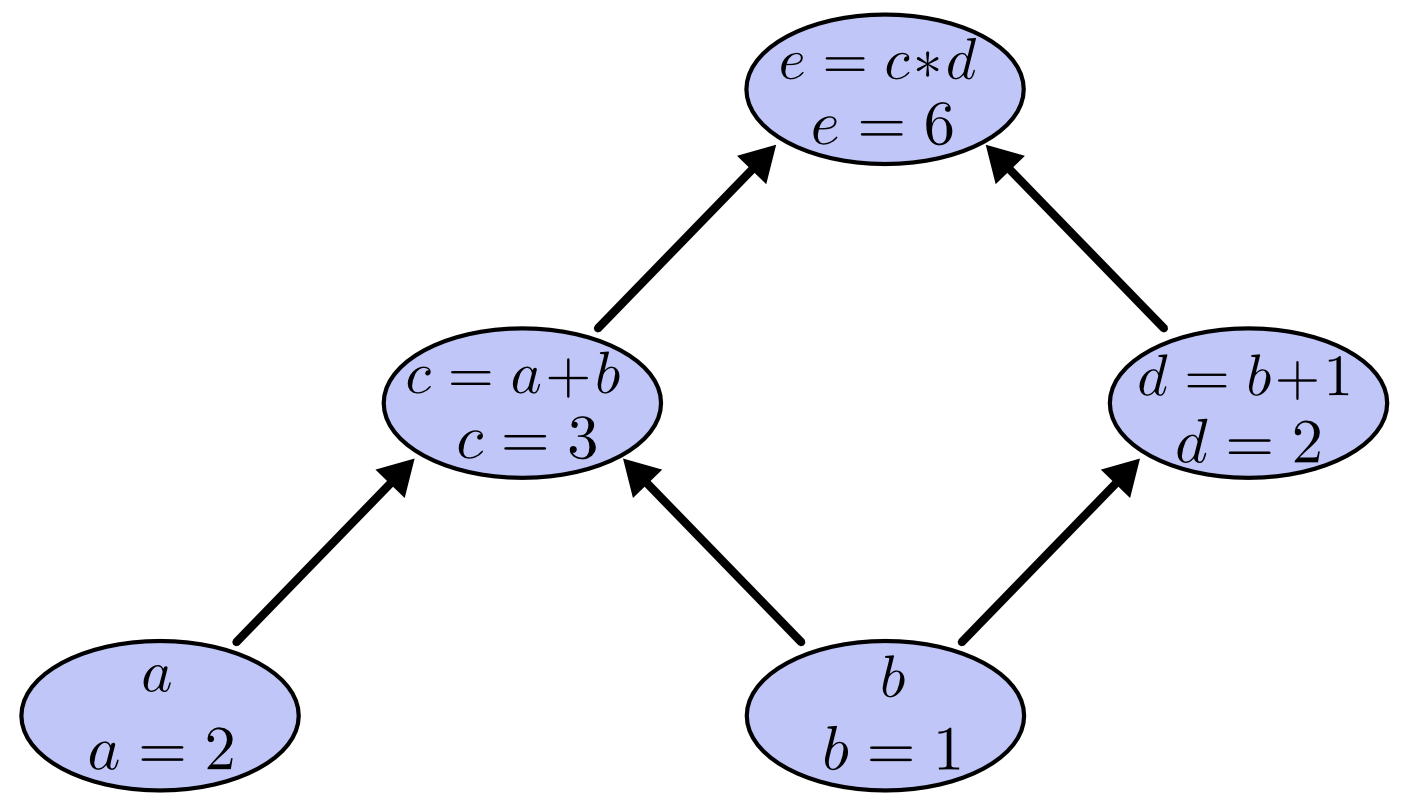
What's special about PyTorch's tensor object is that it implicitly creates a computation graph in the background. A computation graph is a a way of writing a mathematical expression as a graph. There is an algorithm to compute the gradients of all the variables of a computation graph in time on the same order it is to compute the function itself.
Consider the expression $e=(a+b)*(b+1)$ with values $a=2, b=1$. We can draw the evaluated computation graph as

In PyTorch, we can write this as
a = torch.tensor(2.0, requires_grad=True) # we set requires_grad=True to let PyTorch know to keep the graph
b = torch.tensor(1.0, requires_grad=True)
c = a + b
d = b + 1
e = c * d
print('c', c)
print('d', d)
print('e', e)
c tensor(3., grad_fn=<AddBackward0>) d tensor(2., grad_fn=<AddBackward0>) e tensor(6., grad_fn=<MulBackward0>)
We can see that PyTorch kept track of the computation graph for us.