CSE 331: Vanilla-JS guestbook
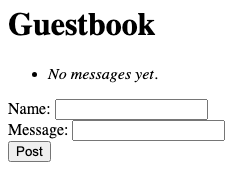
In this guide we will build the same guestbook as the companion no-JS guide, but using JavaScript in the browser. The server no longer renders HTML, but instead exposes a small JSON API. The browser loads a nearly-empty HTML page and runs JavaScript to fetch the data and build the visible page itself.
Get the final code here:
The server exposes two endpoints under /api/messages: GET returns the
list of messages as JSON, POST accepts a new message as JSON and
returns the updated list. The HTML page the browser loads is essentially
empty. JavaScript in the browser calls the API, receives data, and builds
the visible page by manipulating the DOM directly.
A JSON API
The server serves static files out of static/ and exposes two endpoints
under /api/messages:
public class Server {

    private final List<Message> messages = new ArrayList<>();

    public static void main(String[] args) {
        Server s = new Server();
        Javalin.create(config -> {
            config.staticFiles.add("/static");
            config.routes.get("/api/messages", s::handleGetMessages);
            config.routes.post("/api/messages", s::handlePostMessage);
        }).start(8331);
    }

    private void handleGetMessages(Context ctx) {
        ctx.json(messages);
    }

    private void handlePostMessage(Context ctx) {
        Message m = ctx.bodyAsClass(Message.class);
        if (m.name() != null && !m.name().isBlank()
                && m.message() != null && !m.message().isBlank()) {
            messages.add(m);
        }
        ctx.json(messages);
    }
}
ctx.json(...) serializes its argument and sends it as the JSON response
body. ctx.bodyAsClass(Message.class) reads the request body and
deserializes it into a Message. The record's fields line up directly
with the JSON object keys:
public record Message(String name, String message) {}The POST handler returns the updated list so the client can re-render in one round trip. Jackson does the JSON serialization in both directions automatically.
Promises and async/await
When JavaScript code calls fetch(url) to send an HTTP request, fetch
does not wait for the network. It returns immediately, with a value that
represents "the response, eventually." That value is called a promise.
To do something when the response arrives, attach a callback with .then:
fetch("/api/messages").then(response => {
    console.log("got it", response);
});
console.log("kicked it off");
This logs "kicked it off" first, then "got it" some milliseconds later.
Parsing the body as JSON is also asynchronous, so response.json() returns
another promise. With .then, the code nests:
function loadMessages() {
    fetch("/api/messages").then(response => {
        response.json().then(messages => {
            console.log(messages);
        });
    });
}
These nested then handlers get tedious. Javascript has a shorthand for this kind
of code via async/await. Inside an async function, await waits for a
promise and gives back its resolved value:
async function loadMessages() {
    const response = await fetch("/api/messages");
    const messages = await response.json();
    console.log(messages);
}
The two versions are equivalent. async/await is an abbreviation for .then,
but the code reads top to bottom in the order it runs. One gotcha:
await is a syntax error outside of an async function.
Calling the API with fetch
To POST a JSON body, pass fetch an options object:
const response = await fetch("/api/messages", {
    method: "POST",
    headers: { "Content-Type": "application/json" },
    body: JSON.stringify({ name, message }),
});
const messages = await response.json();
The body is a string built with JSON.stringify, which serializes a JavaScript
object into JSON syntax. The Content-Type header tells the server how to
interpret the body. The server replies with the updated list, which
response.json() parses back into a JavaScript array.
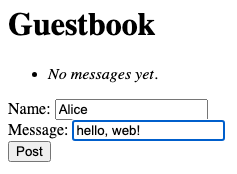
fetch with a JSON body rather than submitting a form.Checking response.ok
One surprise about fetch: a 4xx or 5xx response from the server is
not treated as an error. The returned promise resolves successfully,
with a response whose ok property is false (and whose status is
the actual HTTP status). Code that only catches errors will silently
ignore server failures.
Check response.ok (or response.status) explicitly:
try {
    const response = await fetch("/api/messages", { method: "POST", ... });
    if (!response.ok) {
        console.log("server error", response.status);
        return;
    }
    const messages = await response.json();
    // ... use messages
} catch (err) {
    // The network itself failed: server down, etc.
    console.log("network error", err);
}
The catch block only fires when the network itself fails. A non-2xx
HTTP status means the server replied, but with an error.
On the server side, set an explicit status before sending the response so the client can branch on it cleanly:
if (m.name() == null || m.name().isBlank()) {
    ctx.status(400).json(Map.of("message", "Name is required."));
    return;
}
Status codes worth recognizing:
- 200 OK: the normal success.
- 400 Bad Request: the client sent something the server can't make sense of.
- 404 Not Found: no handler matches the URL.
- 500 Internal Server Error: the server crashed while handling the request.
Building the DOM
The HTML page the server sends is nearly empty:
<!DOCTYPE html>
<html>
<body>
  <h1>Guestbook</h1>
  <ul id="messages">
    <li><em>Loading...</em></li>
  </ul>
  <label>Name: <input type="text" id="name"></label><br>
  <label>Message: <input type="text" id="message"></label><br>
  <button onclick="doPost()">Post</button>
  <script src="app.js"></script>
</body>
</html>
The <ul> has no real messages in it. The <script> tag at the bottom loads
app.js, which fills the page in.
JavaScript reaches into the page through the DOM (Document Object
Model). Every HTML element is also a JavaScript object; modifying the
object modifies the page. The most important entry point is
document.getElementById:
const ul = document.getElementById("messages");Given an element, the code can:
- Read or set its text with
element.textContent. - Read or set its HTML with
element.innerHTML. - Read or set form input values with
inputElement.value. - Build a new element with
document.createElement("li")and attach it withparent.appendChild(newElement).
Putting these together, here is how app.js renders the list:
function render(messages) {
    const ul = document.getElementById("messages");
    ul.innerHTML = "";
    for (const m of messages) {
        const li = document.createElement("li");
        const strong = document.createElement("strong");
        strong.textContent = m.name;
        li.appendChild(strong);
        li.appendChild(document.createTextNode(": " + m.message));
        ul.appendChild(li);
    }
}
Buttons
The button has an onclick attribute naming a global function:
<button onclick="doPost()">Post</button>When the user clicks, the browser calls doPost. That function (in app.js)
reads the input values, sends a POST, and re-renders:
async function doPost() {
    const name = document.getElementById("name").value;
    const message = document.getElementById("message").value;
    const response = await fetch("/api/messages", {
        method: "POST",
        headers: { "Content-Type": "application/json" },
        body: JSON.stringify({ name, message }),
    });
    const messages = await response.json();
    render(messages);
}
For the initial page load, app.js calls loadMessages() at the bottom of the
file. That issues a GET, awaits the response, and renders the existing list.
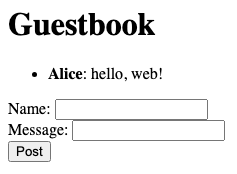
<ul> and rebuilt it from the server's JSON response.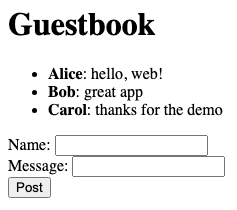
<li> from JSON.