CSE 331: No-JS guestbook
In this guide we will build a simple no-JS web app that implements a guestbook. Visitors type their name and a message, click a button, and see the running list of everything that has been posted.
Get the final code here:
The browser
For our purposes, the web browser lets the user do exactly two things. It can send a GET request when the user types in a URL or clicks on a link, and it can send a POST request when the user presses the submit button in an HTML form. Other than that, the browser just renders HTML.
A <form> is how the user sends data. Here is a minimal form:
<form action="/submit" method="POST">
  <label>Name: <input type="text" name="name"></label>
  <label>Message: <input type="text" name="message"></label>
  <button type="submit">Post</button>
</form>
The action attribute is the URL the form submits to. The method is the HTTP
method to use (GET or POST). The name attribute on each <input> becomes the
key in the submitted data; the value is whatever the user typed. When the user
clicks the button, the browser sends a HTTP request to the given action URL with
all the contained key-value pairs from the input elements.
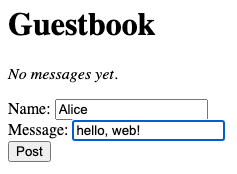
The browser collects the form fields into a body like
name=Alice&message=hello+world, sends a POST request to /submit with that
body.
/submit.A server: Javalin
A web server is just a program that listens for HTTP requests. Servers can be implemented in any language, but we'll use Java in 331. We've chosen a specific library, Javalin, because it is small and easy to use.
The minimal setup:
Javalin.create(config -> {
    config.staticFiles.add("/public");
    config.routes.get("/", ctx -> ctx.html("<h1>hello</h1>"));
}).start(8331);
This sets up the server to serve files out of the /public subdirectory and to
respond to GET requests on / by sending back that little HTML snippet.
To handle the form's POST, register a handler. The convention this guide
follows is to put each handler in a named static method on the Server
class and pass it as a method reference:
config.routes.post("/submit", Server::handleSubmit);where handleSubmit is defined as a peer of main:
private static void handleSubmit(Context ctx) {
    String name = ctx.formParam("name");
    String message = ctx.formParam("message");
    System.out.println("Got: " + name + " / " + message);
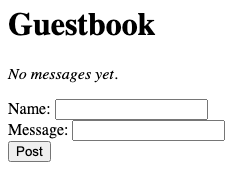
    ctx.html("<html><body>Thanks " + name + "!</body></html>");
}
The path passed to config.routes.post must match the action attribute on the
form. ctx.formParam("name") extracts the value the user typed into the input
whose name attribute was "name". ctx.html(...) sends an HTML string back
as the response body.
The handler above already builds its response with string concatenation:
"<html><body>Thanks " + name + "!</body></html>". One could imagine a more
complicated page as well:
private static void handleSubmit(Context ctx) {
    String name = ctx.formParam("name");
    String message = ctx.formParam("message");
    ctx.html(
        "<!DOCTYPE html>" +
        "<html><body>" +
        "<h1>Got it</h1>" +
        "<p>Thanks, " + name + "!</p>" +
        "<p>You said: " + message + "</p>" +
        "<p><a href=\"/\">back</a></p>" +
        "</body></html>"
    );
}
This works, but it's annoying to use string concatenation in this way. We have to escape special characters manually, and it feels strange to mix HTML and Java in the same file.
Instead, we can use a templating engine such as JTE. A "template" is an HTML
file with holes in it, that can be filled in with a small programming language.
JTE templates live in templates/ with the extension .jte. JTE works well with
Javalin:
TemplateEngine engine = TemplateEngine.create(
        new DirectoryCodeResolver(Path.of("templates")),
        ContentType.Html);

Javalin.create(config -> {
    config.fileRenderer(new JavalinJte(engine));
    // ...
});
This configures Javalin to look for templates in the right folder.
A JTE template looks like this:
@import guestbook.Message
@import java.util.List
@param List<Message> messages

<!DOCTYPE html>
<html>
<body>
  <h1>Guestbook</h1>
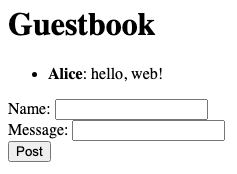
  @if(messages.isEmpty())
    <p><em>No messages yet.</em></p>
  @else
    <ul>
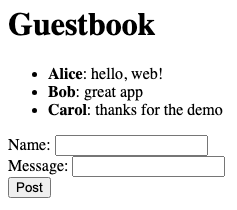
      @for(var m : messages)
        <li><strong>${m.name()}</strong>: ${m.message()}</li>
      @endfor
    </ul>
  @endif
  <form action="/submit" method="POST">
    <label>Name: <input type="text" name="name"></label><br>
    <label>Message: <input type="text" name="message"></label><br>
    <button type="submit">Post</button>
  </form>
</body>
</html>
The @param line declares that the template expects the server to pass it a
List<Message> called messages. You can see that JTE supports @if, @else,
@for, and @endfor for control flow. ${expr} interpolates a Java expression
into the output.
On the Java side, register a handler and define it to call ctx.render:
config.routes.get("/", Server::handleIndex);private static void handleIndex(Context ctx) {
ctx.render("index.jte", Map.of("messages", MESSAGES));
}The Map argument to render passes the values to the parameters.
render constructs the HTML and returns it to the browser.
State on the server
The list of messages has to live somewhere. The simplest thing is a static field on the server class:
private static final List<Message> MESSAGES = new ArrayList<>();Message itself is a Java record:
public record Message(String name, String message) {}The full POST handler appends to the list:
private static void handleSubmit(Context ctx) {
    String name = ctx.formParam("name");
    String message = ctx.formParam("message");
    if (name != null && !name.isBlank() && message != null && !message.isBlank()) {
        MESSAGES.add(new Message(name, message));
    }
    ctx.render("index.jte", Map.of("messages", MESSAGES));
}
@for loop.