CSE 331 Homework 7: Ticket Buying App
Due Friday, June 5 at 11:59pm.
In this homework, you will make your queue data structure generic and use it to build a small ticket buying web application with a JavaScript frontend.
Getting started
Get the starter code via gitlab as before (download directory as zip, then unpack it).
Most of the files are similar to HW6. The differences are:
genericqueue/: a new package replacingofficehours/. The interface (GenericQueue.java) is a generic version of the HW5/HW6 queue, parameterized by a value typeV, with renamed methods and tightened time/space bounds.tickets/TicketApp.java: a new starter file for your web app. Unlike the HW6 web app, it serves a JSON API rather than rendering HTML pages.static/: a new directory containing the HTML, JavaScript, and CSS files that the browser loads. Replaces the HW6templates/directory. (There are no JTE templates in this assignment).
After unpacking the HW7 starter code, you should copy the contents of your HW6
OfficeHoursQueueImpl.java into GenericQueueImpl.java. Be careful when
copying, because HW7 uses a different package name. The starter code has the
correct package declaration (package genericqueue;), so don't overwrite it
when pasting in your HW6 code. Then rename your class to GenericQueueImpl to
agree with the new filename.
Your copied code will not compile immediately because the interface has been renamed and generic-ified. You will need to make the changes described in Task 1 below.
If you are using VS Code, be sure to open the hw07 folder as the
"root" folder in your editor, or else it will not be able to find the
dependencies in lib/.
Task 1: Implement GenericQueue
GenericQueue is a generic version of the OfficeHoursQueue from HW5/HW6.
One way to think about the HW5/HW6 queue data structure is as a kind of
"key-value queue", that is, a queue whose entries can be referred to by a unique
String key (the student's name). And the queue also stores for each name, an
associated String "value" (the student's question).
GenericQueue is similar, except that the type of the associated value is a
type parameter V of the interface. Note that the "keys" are still Strings and
not some other generic type. We continue to refer to the keys as "names".
A GenericQueue<String> stores string values (like questions), which
essentially reproduces the behavior of this data structure on HW5/HW6. But the
value can also take on other types. For example, a GenericQueue<Integer>
stores a queue whose values are integers (but again, the keys/names are still
strings).
The methods of GenericQueue are mostly analogous to those in HW6. A few
methods have been updated to reflect the generalized value type:
getQuestion(name)is nowgetEntry(name), and it returns anEntry<V>(and not aV!)updateQuestion(name, question)is nowupdateValue(name, value)
All other methods have the same names as before.
Note that Entry is now generic (Entry<V>) because nested records in a
generic interface are implicitly static and so do not inherit the enclosing
interface's type parameter.
Read the specifications for all methods carefully in GenericQueue.java. Note
the time complexity requirements on each method: some methods must run in O(1)
time, some in O(log n), and some in O(n). The new HW7 interface states an
explicit time bound on every method. For methods that already had a bound in
HW6, the bound is the same. But many methods that had no stated bound in HW6 now
have a required time bound.
Recall that a big-oh time bound such as O(f(n)) means "runs in time proportional to f(n) or better". Thus, a method that runs in constant time also satisfies a specification that requires O(log n).
The interface specification for GenericQueue also requires your implementation
to use O(n) space, where n is the number of elements currently in the queue.
A few methods also now explicitly require their name argument(s) to be non-null.
HW6 did not state this requirement for all relevant methods; if any of your
HW5/HW6 spec tests passed null for a name, you will need to remove those tests
or convert them to implementation tests.
Starting from your HW6 solution, implement GenericQueueImpl<V>. You will need
to:
- Add a type parameter
<V>to your class and update your code to useVwhere it previously usedStringfor questions/values. - Rename methods to match the updated interface.
- Ensure all time and space bounds are met.
Meeting all time and space bounds may require redesigning your choice of data structures. We recommend thinking about your data structure choices carefully before you start making changes to your HW6 code.
When you change your code, be sure to update your abstraction function (AF)
and representation invariant (RI) comments, and update your checkRep()
method to check the new invariants.
Task 2: Test your queue
Copy over your HW6 specification tests into the provided HW7 starter file, being careful to preserve the package declaration from the starter code. Then update your tests to work with the new generic interface. If you changed your data structure or method implementations in Task 1, make sure your tests still cover the updated code correctly.
Your tests should exercise the queue with at least two different value types
(e.g., GenericQueue<String> and GenericQueue<Integer>) to verify that the
implementation works generically.
As with previous assignments, specification tests must pass on any correct
implementation. If you would like to test additional behavior of your
implementation that is not guaranteed by the specification, you can do so in the
GenericQueueImplTest.java file. The implementation test file will not be
graded, and you may leave it blank if you wish.
Task 3: Ticket Buying App
In this task, you will build a small ticket buying web application that simulates a ticket-purchasing experience.
Architecture
In HW6, the server generated complete HTML pages using JTE templates. Every user action submitted an HTML form, the server processed it and rendered a new page, and the browser loaded that new page.
In this assignment, the architecture is different:
- The backend (still Java/Javalin, but no JTE) exposes a set of JSON API routes. Each route receives a request, processes it, and returns a JSON response (not an HTML page).
- The frontend is written as a separate HTML file and a JavaScript file (and an
optional CSS file for styling). The JavaScript is responsible for sending
requests to the backend via
fetch, receiving the responses, and updating the page dynamically to show the correct UI.
Starter code walkthrough
The starter code app is a simple timed quiz web app that demonstrates the techniques you will need to build the full ticket buying app.
The rest of this section is collapsed. Click here to expand the walkthrough.Click here to collapse this section.
Run the starter code app with one of these techniques:
- From the command line, use
make run. (You must finish Task 1 before the code will compile.) - From VS Code, press the word "Run" near the
main()method in VS Code when looking atTicketApp.java.
Then visit http://localhost:7070/ in your browser.
The app loads a page that shows you an "Start quiz" button.
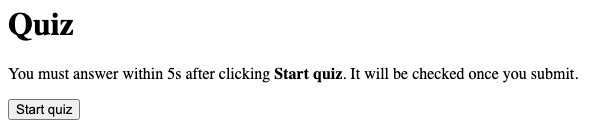
Pressing "Start quiz" displays a randomly selected question from a small hard-coded bank.
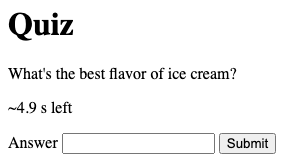
If you type the correct answer (Vanilla) into the text box and press Submit
within 5 seconds, then the server will check your answer and tell you whether
you got it right.
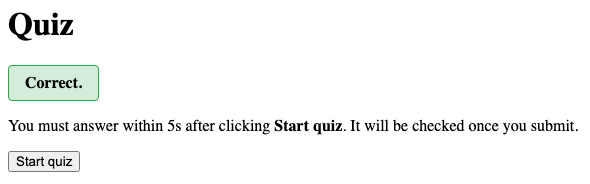
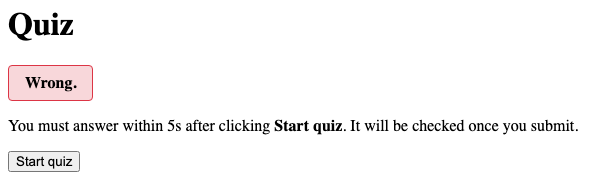
Pressing "Start quiz" again starts a new round with a fresh deadline, and possibly a different question. If we submit an incorrect answer this time, the server returns "Wrong." instead.
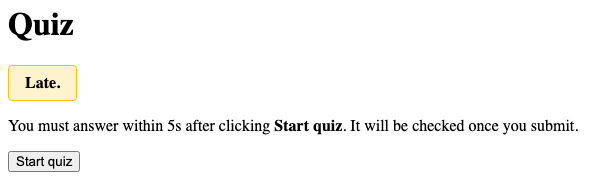
Another possibility is that the user waits too long to respond. In this case, the server gives a third response: "Late."
The starter code shows how four files work together:
tickets/TicketApp.javais the Javalin backend that defines the static files directory and registers handlers for all the GET and POST requests, which return JSON.static/index.htmlis the HTML file for the frontend. Note that this file is not a template.static/index.jsis the JavaScript file for the frontend. It sends requests to the backend and manipulates the HTML based on the responses.static/style.cssis the CSS file for the frontend. We use this to display some parts of the UI in a nicer way. You are welcome to leave this blank or use it however you see fit.
Whenever the user clicks a button, the frontend JavaScript code sends an HTTP request to the server, which is handled by the Java backend, possibly updating its state, which then returns a small JSON response, which is parsed by the frontend JavaScript, which updates the relevant parts of the UI in place. The HTML page itself is only loaded once, on the first page visit.
You should study TicketApp.java, index.html, and index.js together
to see how the pieces fit together. Once you are satisfied that you
understand it, you should delete the quiz demo and replace it with your
real ticket buying application.
Ticket Buying App
The ticket buying app works as follows:
- The goal of the app is to let users buy tickets.
- The page where users buy tickets is called the "shopping center". It has a fixed capacity (configurable, default 10) measured in tickets.
- When a user wants to buy tickets, they first declare how many tickets they intend to buy. The declared amount cannot exceed the shopping center capacity.
- If there are no other waiting users and there is enough capacity in the shopping center to accept the new user's request, then they are immediately admitted to the shopping center. Otherwise, they are added to the back of the waiting list.
- The waiting list is served on a first-come, first-served basis. The user at the front of the line is admitted only when their declared number of tickets fits in the currently-free capacity. A small-quantity waiter behind a large-quantity waiter must wait their turn even if they might fit in the shopping center.
- A waiter may change how many tickets they want (up or down) at any time. Adjusting down may let them fit when they previously didn't.
- A waiter can also see how many seconds they have been waiting, and this should refresh in some way. (In the staff solution, we have a refresh button. You could also do this with a timer if you want it to tick automatically.)
- A user on the shopping center page has a deadline (configurable, default 60 seconds) by which they must purchase tickets or leave. The number purchased must be between 1 and their reserved quantity (a user can purchase fewer tickets than they had declared while in line, but they cannot purchase more than this, as that might cause the shopping center's capacity to be exceeded). If the deadline expires, they are kicked out and must re-join (at the back of the line).
- When a user leaves the shopping center for any reason (purchase, leave, or timeout), their reserved tickets are released. Other users are then admitted from the front of the waiting list one by one as long as there is still capacity.
- Users also have a "profile" page, accessed by typing in their name, where they can see their past purchases and change their name.
- The app has an "admin" page (with no authentication, so anyone can view it). It shows the queue length, the total and currently-used capacity, and the next person in line (with their declared quantity). It also has a form to insert a new entry into the line just after a specified existing waiter (carrying that entry's own declared quantity).
Your task is to build a web application with the features described above. More detailed examples of user scenarios are given below. You do not need to match the style or wording of our example interface exactly, but all the same functionality must be present.
Your web app must use the generic queue from task 1 to store the users who are waiting to enter the shopping center. You may also use additional data structures of your choice.
Web app technology
Here are some tips on how to use Java/Javalin in the backend for this assignment:
-
For GET requests, read query parameters with
ctx.queryParam(...). For POST requests, define a record matching the JSON body shape and usectx.bodyAsClass(...)to parse:public record JoinBody(String name, int quantity) {} // ... JoinBody body = ctx.bodyAsClass(JoinBody.class); String name = body.name(); int quantity = body.quantity(); String otherName = ctx.queryParam("name"); // GET query stringJackson (bundled with Javalin) deserializes the JSON into the record by matching JSON field names against record component names.
And here are some tips for the JavaScript frontend:
-
To send a GET request with query parameters:
const resp = await fetch('/api/status?name=' + encodeURIComponent(name));
const data = await resp.json();
Use
encodeURIComponent()when putting user input into a URL so that special characters are handled correctly. -
If you need to build an HTML list of unknown length, you can create elements dynamically in JavaScript:
const li = document.createElement('li'); li.textContent = '2 tickets on 5/20/2026'; purchaseList.appendChild(li); -
You can have multiple "pages" and switch between them by marking all but one of them
.hidden.
See the guide on Web Development with JavaScript for more information about how to build this style of web application.
Other tips about the ticket buying app:
- Shoppers who exceed the time limit must be removed from the shopping center, and users waiting in line should then be allowed to enter in order as long as there is spare capacity. There are different valid approaches to implementing this. A simple approach that does not require background timers or threads is to evict and promote at the beginning of every request handler on the backend.
- Your application should handle all inputs reasonably. For example:
- If a user tries to join with a name that is already in the queue, the API should return an error message.
- If a user tries to purchase when they are not in the shopping center, the API should return an error message.
- If a required parameter (like a name) is missing, the API should return an error message.
- Your backend should never crash or return a Java stack trace, even for "invalid" inputs. Your frontend should display error messages from the API to the user in a clear way (via the developer console is fine; via the UI is even better, but not required).
Example scenarios
Here are a few example scenarios to demonstrate how the application works. Remember that your app does not need to look exactly like ours, but it should have the same logical behavior.
The rest of this section is collapsed. Click here to expand the scenarios.Click here to collapse this section.
Scenario A: The first user joins, shops, and buys
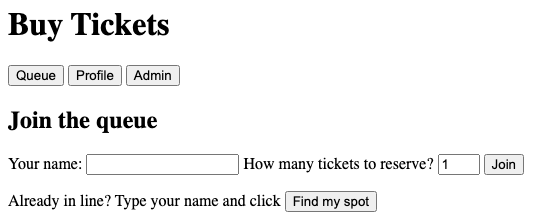
The first user types their name (alice) and desired ticket count (2); then they click Join.
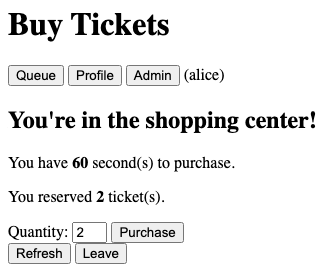
Since they are the first user to arrive, the shopping center is empty, so they are immediately granted access to the shopping center. The page displays the amount of time they have before being kicked out, their name (at the top), and the number of tickets they reserved. They can finalize their decision about how many tickets they want (but it must be less than or equal to their reserved number of tickets).
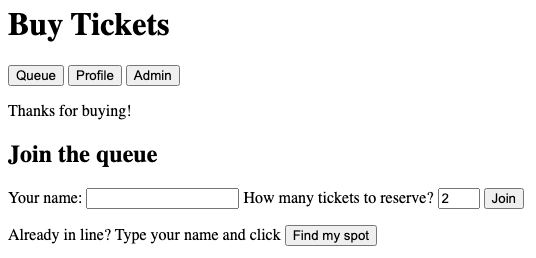
Clicking Purchase records the sale on the server and displays the homepage with a message banner confirming their purchase. (The message banner is cleared the next time the user clicks a button or refreshes.)
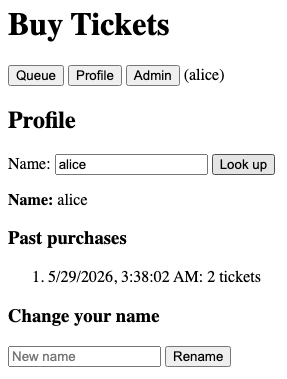
Clicking the profile button and entering their name shows the list of tickets they have purchased and when.
Scenario B: When the shopping center gets full
The shopping center has a capacity of 10 tickets. Suppose two people are already shopping: bob with 2 tickets, and cathy with 3 tickets. This means 5 tickets are currently reserved, which leaves 5 free.
Two more users then join in this order:
- drew wants 6 tickets. 6 > 5 free, so drew goes to the back of the line.
- erin wants 1 ticket. erin would fit in the 5 free, but because users are served in order, erin must wait behind drew. She does not skip ahead even though she individually fits within the free capacity.
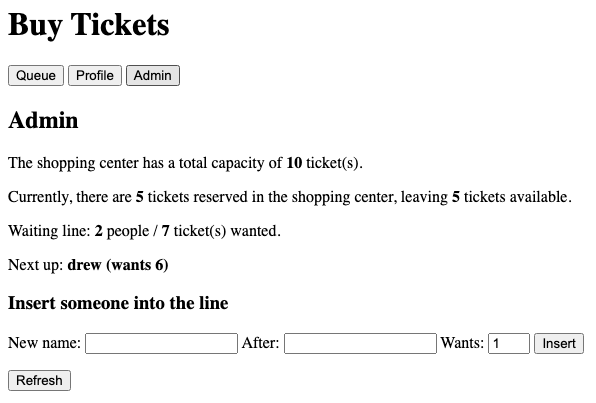
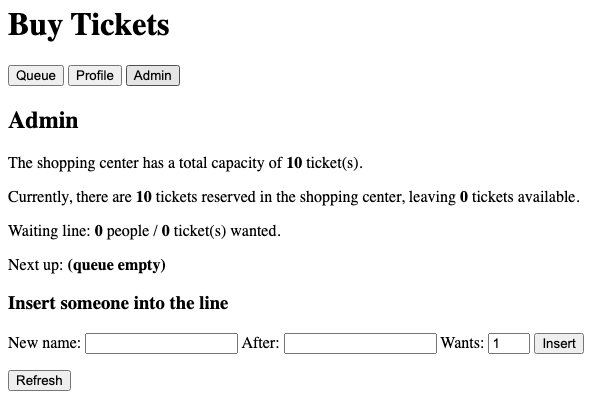
Clicking on the admin button shows the resulting state. 2 shoppers using 5 tickets, 2 waiters wanting 7 tickets total, and drew at the front of the line:
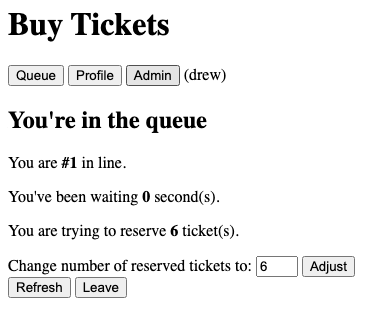
drew's own view shows position 1, the 6-ticket reservation, and the adjust form:
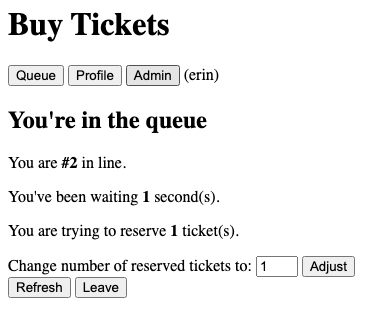
erin's view shows position 2. She's stuck not by capacity but by drew being in front of her:
Now suppose drew adjusts his requested reservation down to 4 tickets. Since the waiting room has room for this, drew is then immediately admitted. The shopping center now contains reservations for 9 tickets, leaving 1 ticket still free. So erin is admitted as well. The shopping center is at capacity.
The admin view shows the resulting state.
Scenario C: Admin inserts into the line
The admin view also lets staff splice a new entry into the line just after an existing waiter, perhaps if a VIP comes along. The inserted entry carries its own declared quantity and is gated by the same capacity logic as any other waiter.
Suppose frank is in the shopping center with 4 tickets reserved, gina is waiting trying to reserve 7 tickets. The admin types "vip", "gina", and 1 into the Insert form:
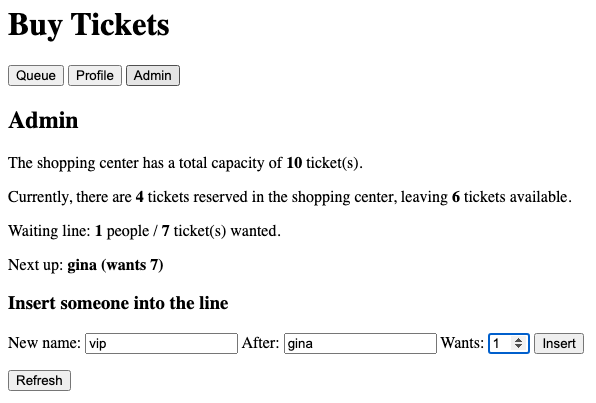
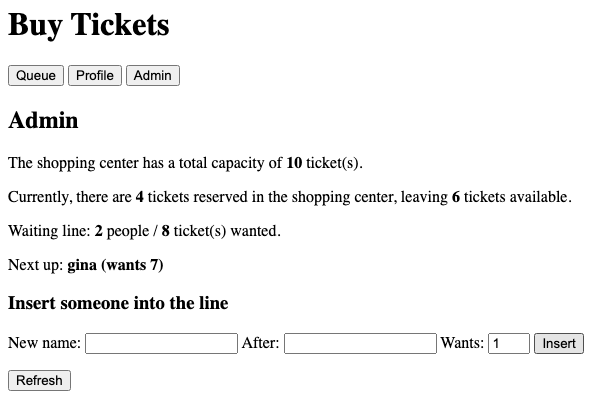
Clicking Insert places vip at position 2, right behind gina. The admin view refreshes to show the updated line. Note that vip still has to wait: even though there's plenty of capacity for 1 ticket, gina is in front and blocks the line.
Correctness, code quality, and AI
The same correctness and code quality and AI guidelines from HW5 and HW6 apply to this assignment.
You do not need to write JUnit tests for the web application. Course staff will grade the web application by running it and trying it themselves.
Reflection
Submit a short text file called REFLECTION.txt in the top level directory
answering the questions below.
- Briefly describe what changes you needed to make to your HW6 code to support a generic value type and the new time and space requirements.
- Compare the HW6 web application (server-rendered HTML, no JavaScript) with the HW7 web application (JSON API and JavaScript). Which approach did you find easier to work with as a developer, and why? Do you think users can tell the difference between the two approaches?
- Did you use AI assistance on this assignment? If yes, which tool(s) and for which parts?
- Anything else you would like us to know about how this assignment went for you?
Submission
Submit the following files to the Homework 7 assignment on Gradescope:
GenericQueueImpl.javaGenericQueueSpecTest.javaGenericQueueImplTest.javaTicketApp.java- Your static frontend files (HTML, JavaScript, CSS)
REFLECTION.txt
You can either upload these files individually on Gradescope, or run
make submission to bundle them into a submission.zip and upload that.
You should not modify or submit GenericQueue.java.
We have set up a Gradescope autograder that will compile and run your code. It will run your own tests on your own code and show you the results. It will also run a small number of very basic staff tests to make sure that your code compiles and has the required features. Passing all the autograder tests does not guarantee your code is correct or high quality.