Project Writeup
Accessibility-Preserving Presentation-to-HTML Converter
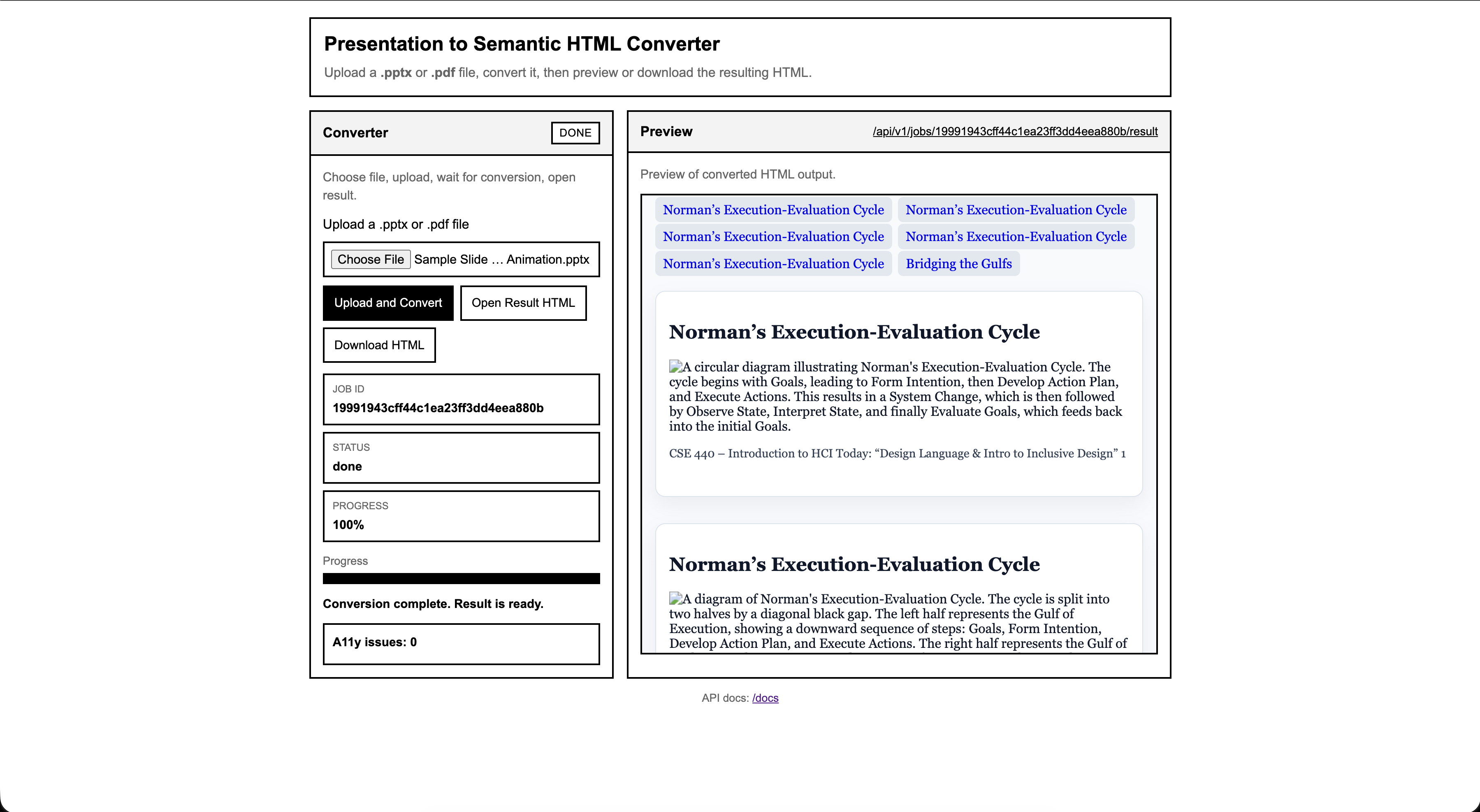
This project converts inaccessible lecture slide PDFs and PowerPoint files into structured, semantics-preserving HTML designed for screen readers and keyboard navigation. Instead of keeping slide content trapped inside visual layout, the system reconstructs headings, tables, reading order, and image descriptions so blind and low-vision users can navigate the material more independently.
Overview
The converter runs as a web service that accepts .pptx and .pdf
files, processes each slide, and returns a single accessible HTML document. The pipeline uses
deterministic structure reconstruction first and supplements that process with a vision-language
model when slide content is ambiguous.
Demo link: https://slides-jk0z.onrender.com/
- Async upload and job status workflow.
- Semantic HTML output with landmarks, headings, lists, tables, and labels.
- Accessible output focused on reading order and navigation rather than pixel-perfect slide rendering.
Abstract
Blind students in computer science programs depend heavily on screen readers to review and absorb lecture material, whether they are studying in their dorm room, a library, or any other campus study space. In this setting, lecture slides posted by professors as PDFs, one of the most common formats in UW's CSE department, frequently present severe accessibility barriers. These PDFs often lack proper heading structure for individual slides, contain visual tables with no screen reader navigation support, and include images and charts without meaningful alt text, effectively locking blind students out of the same material their sighted peers can freely review. Despite the prevalence of these issues, accessible PDF authoring remains an afterthought in most academic workflows, placing the burden on disabled students to seek out accommodations rather than ensuring equitable access from the start.
This project draws from Rene Jaun's first-person account, "The Accessibility Experience: How Does a Blind Person Navigate PDF Documents and Forms?," in which he demonstrates how screen readers interact with PDF documents and exposes the many ways they fail blind users. Rene emphasizes that people with disabilities have the same right to access content as anyone else, and he is frustrated by the constant need to justify why blind people should have access at all. Through live demonstrations, he shows how missing tags and structural markup cause screen readers to guess at reading order with often disastrous results, how the absence of headings makes navigation impossible since blind users rely on keyboard shortcuts to scan headings the same way sighted users scan them visually, and how images and graphics without alt text render content meaningless. He also highlights how even when one part of a process is accessible, a single inaccessible link in the chain breaks the entire experience. His insights are especially relevant to the UW CSE context, where lecture slides routinely contain complex visual content like code diagrams, data tables, and architectural charts that become completely inaccessible without proper tagging and structure.
In response, we propose a software pipeline that takes a standard, inaccessible CSE lecture slide PDF and outputs a fully accessible, properly annotated and structured version. This tool uses a vision-language model alongside deterministic extraction to interpret slide content, generate alt text for images and charts, structure heading hierarchies across slides, and annotate tables for screen reader navigation. Rather than requiring professors to retroactively fix their materials or forcing students to request individual accommodations, this system aims to automate the transformation process so that accessibility becomes a seamless step in the content pipeline. However, consistent with Rene's emphasis on structural integrity, the goal is not to replace human judgment entirely but to reduce the manual effort required to bring lecture PDFs up to an accessible standard and make review by course staff much easier.
Project Details
The motivation for this project comes directly from the experience of blind students who are expected to learn from lecture slides that were authored for visual consumption first and accessibility second. A typical slide deck may look organized to a sighted student, but for a screen reader user it can collapse into disconnected text fragments, unlabeled graphics, and tables with no meaningful row or column structure. That gap is not a minor inconvenience. It changes how quickly a student can review course material, whether they can study independently, and whether they are given access to the same information as their peers at the same time.
Rene Jaun's first-person account sharpened that motivation by showing that the problem is not only missing alt text, but the absence of meaningful document structure itself. His experience with broken reading order, missing headings, and inaccessible forms made it clear that any useful solution has to preserve semantics and navigation, not just convert one file format into another.
First Person Information
What first-person account did we find, and does it meet the requirements?
We found a first-person account by Rene Jaun from PDF Accessibility Days 2015. He explicitly identifies himself as blind multiple times during the presentation and speaks from both his professional and personal experience navigating digital documents. He works as an accessibility evaluator, but he also talks about reading books for school exams, completing tax forms, interacting with airline paperwork, and accessing documents in everyday life.
This meets the assignment requirement for a first-person account because it is not a tutorial, product demo, or secondhand summary. It is a direct description of lived experience from a blind person explaining how inaccessible documents affect his ability to study, complete forms, and remain independent. He does not talk about accessibility only in the abstract. He demonstrates missing structure live and explains the consequences in concrete terms.
What barriers and opportunities did he describe?
One of the clearest examples happens when he tries to read a 400-page German book for exams. OCR makes the text technically readable, but the document lacks structural tags, so his screen reader produces what he describes as "a worm of words without any structure." Without headings or navigation markers, locating specific information becomes extremely time consuming. He compares that experience to asking a sighted person to read a newspaper with no bold headlines or visual hierarchy.
He also shows barriers in form workflows. When he attempts to complete a PDF form for Swiss International Airlines, his screen reader outputs confusing information because of missing labels and structure. In another case involving a health insurance claim, content is entered into the wrong fields, with information like name and birthplace misplaced, and the form is rejected. These examples show that accessibility failures are not merely inconvenient. They can create real administrative and financial consequences.
Beyond the technical barriers, Rene describes the emotional and social impact of repeatedly having to justify why accessibility matters. He emphasizes his desire to remain independent rather than rely on assistance. At the same time, he shows that accessibility works well when structural elements are implemented correctly. Properly tagged PDFs allow him to generate a table of contents and navigate by headings. Well-structured tables announce row and column headers and preserve context. He also says he strongly prefers HTML forms because they are more reliable, which shows that the core issue is not the format alone, but the presence of meaningful semantic structure.
What technology did he describe using?
Rene demonstrates NVDA (NonVisual Desktop Access), an open-source screen reader, and plays its speech output live while showing how he navigates with keyboard shortcuts such as jumping by headings. He also uses a braille display connected through Bluetooth, which functions as both a tactile display and an input device. Across the presentation, his workflow depends on structural elements like headings, lists, and labeled form fields so he can navigate entirely by keyboard without relying on a mouse.
How might what we learned extend beyond this specific person, disability, or technology?
His examples make it clear that this is not a niche issue. Accessibility affects millions of people, and his presentation shows how a single inaccessible document can break an entire workflow even when other parts of the process are accessible. The problem is therefore systemic rather than isolated. For example, an online tax portal may be usable, but the workflow still fails if the supporting salary receipt is inaccessible.
Rene's comparison between headings for blind users and bold headlines for sighted readers also highlights a broader design principle: semantic structure improves clarity and navigation for everyone. His preference for HTML forms over PDFs further reinforces that format alone does not guarantee accessibility. What matters is whether the content exposes meaningful structure to the tools people actually use.
Sources
- Jaun, Rene. PDF Accessibility Days 2015 - Rene Jaun Presentation. YouTube, 2015.
- World Health Organization. Global Report on Health Equity for Persons with Disabilities. WHO, 2022.
- Screen Reader User Survey #10 Results. WebAIM, 2024.
- Keyboard Accessibility. WebAIM, 2024.
- NV Access. About NVDA (NonVisual Desktop Access).
- Adobe. PDF Accessibility Overview.
Background Research
Research Contribution – Amogh
PowerPoint is one of the most widely used presentation tools in academic and professional environments. However, many presentations are difficult to use with assistive technologies such as screen readers. Although PowerPoint includes accessibility features like alt text, reading order tools, and built in accessibility checkers these features rely heavily on the author’s understanding of accessibility principles. In practice slides often contain visual layouts that don’t translate well into logical reading structures. For example, text boxes may be visually aligned but programmatically out of order, images lacking alternative text and decorative elements being announced unnecessarily by screen readers.
This problem is especially relevant to our project which proposes converting PowerPoint files into structured HTML or XML formats. Unlike visually arranged slide elements, HTML uses semantic structure such as headings, lists and labeled images. Screen readers are designed to navigate structured HTML efficiently. By extracting slide content and reorganizing it into a meaningful hierarchy we can improve navigation and make sure that relationships between elements are preserved. Through my research I learned that accessibility barriers in PowerPoint are often structural rather than purely visual. Therefore, improving semantic structure rather than only adding alt text may create a more accessible experience for users who rely on assistive technology.
Research Contribution – Mason
The article, "All about the presentation: don't let accessibility slide" by Doug Abrams discusses how presenters often make assumptions about their audiences and fail to explain visual elements that are obvious to sighted viewers. One important point is that content placed outside the visible area of a slide can still be read by a screen reader and disrupt the reading order. This research matters for our project because it shows that slide accessibility is not just about what appears on screen. It is also about how authoring tools expose content to assistive technology.
By using a vision-language model, we aim to better determine which visual elements matter for the intended meaning of the presentation. We also reviewed research on accessible remediation of scientific PDFs, including the SciA11y work described in this paper. That research showed how often PDFs lack the structural tags that screen readers need to distinguish headings, paragraphs, charts, and tables. The paper is closely aligned with our project because both approaches use AI to transform inaccessible PDFs into formats that are more usable for blind readers. One major takeaway was that users accept imperfect results when the system is fast and reviewable. Another was that tables are especially difficult to reconstruct correctly, which is directly relevant to lecture slides that contain code, data, and chart-like tabular layouts.
Research Contribution – Denis
This paper, https://arxiv.org/abs/2105.00076v1, looks at how hard it is for blind people to read science papers on a computer. Most science papers come as PDF files. PDFs show each page as a picture that stays the same on every screen. Sighted people can read them fine. Blind people use software that reads words out loud to them. This software needs tags in the file to know what each part of the page means. Most PDFs do not have these tags. Without them, the software cannot tell a heading from a paragraph or describe a chart. The authors built a tool called SciA11y that uses artificial intelligence (AI) to fix this. AI is software that can learn patterns and make decisions on its own. The team checked over 11,000 PDFs from the past ten years. Only 2.4% of them worked well for blind readers. Most had no text that describes what charts or pictures show. Most had no clear order for the software to follow. The tool reads a PDF, figures out what each part of the page is, and creates a new version that works with the reading software. In testing, 87% of the results came out clean. Every blind user in their study said they would use the tool again. Over 6,000 papers have been run through the tool since it launched. This work is very close to what our project does. Both use AI to take a PDF that does not work for blind readers and make one that does. The main difference is that we focus on class slides instead of science papers. We also use a newer type of AI that can understand both pictures and text at the same time. We learned a few useful things. Users accept results that are not perfect if they get them fast. This supports our plan to let a person review and edit what the AI produces. Tables are one of the hardest parts to get right. This matters for computer science slides that often show code and data in rows and columns.
Storyboards
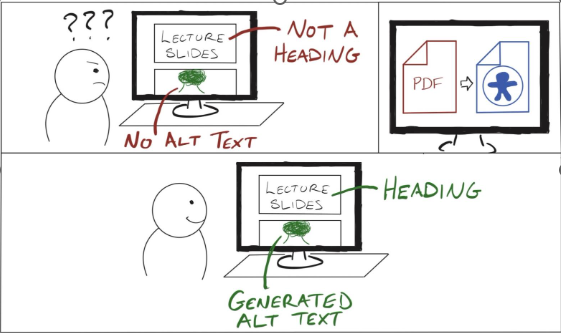
This storyboard shows a user of the web app looking at a PDF of lecture slides. They are initially confused by the lack of semantic information. After uploading the PDF to the tool, they receive a new version of the same lecture slides with proper headings for slide titles and generated alt text for images that previously had none.
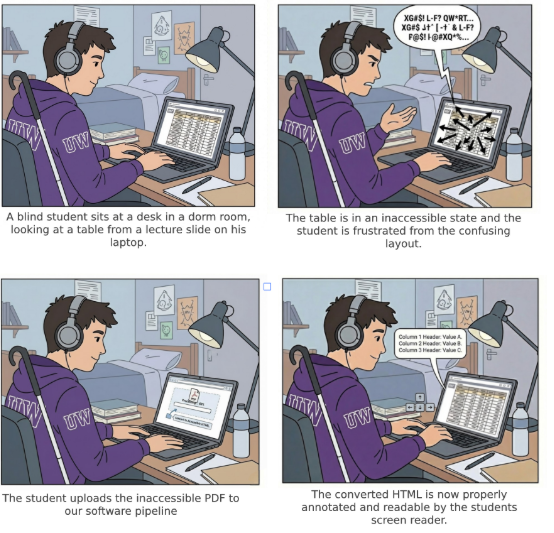
This storyboard focuses on table access. The student attempts to read a table in lecture slides but cannot because the original PDF is not structured for screen readers. After conversion, the student receives a version of the slide content where the table can be navigated properly with header context preserved.
Disability Model Analysis
Disability Justice Principle 1: Interdependence (Sins Invalid)
Interdependence rejects the idea that people must function independently in order to be valued. Instead it recognizes that people rely on one another, on tools, and on shared systems of support. In disability justice, access is created through relationships and collective effort rather than through isolated individual work.
The accessibility problem our project addresses is fundamentally a breakdown of interdependence because when lecture slides are distributed as visually structured PDFs, a blind student has to independently attempt to navigate the material or request individual accommodations. This isolates the user and places the burden of solving the access problem entirely on the person who is already experiencing the barrier.
Our project attempts to restore a more interdependent model of access by enabling multiple actors in the educational ecosystem to contribute to accessibility. Blind users articulate the barriers they experience with inaccessible tables and reading order, instructors control how slides are created and distributed, and developers build tools that translate visual layout into structured semantic content. By converting slide PDFs into structured HTML with correct headings, table associations, and reading order, our system allows professors or course staff to participate in making materials accessible without needing deeper knowledge of screen reader semantics.
In this way, the tool supports an interdependent relationship between the people involved in producing and using course materials. Accessibility is no longer something the blind student must independently struggle through, and instead becomes a process in which instructors, developers, and students all contribute to meeting each other's needs through shared infrastructure.
Disability Justice Principle 2: Collective Access
This second principle emphasizes that accessibility should be built into shared systems and environments rather than just treated as some individual accommodation. It recognizes that access needs are variable and that institutions should anticipate them proactively. Importantly, it frames accessibility as a shared responsibility of people, including non-disabled people, not just some abstract infrastructure problem to be solved technically.
CSE lecture slides at UW are typically created and distributed visually which leaves blind students to independently request tailored accommodations or navigate through inaccessible PDFs. This individualizes access and puts the entire burden on the person who is already experiencing the barrier. But the existing ecosystem has other stakeholders who are just as relevant here: professors who create the slides, TAs who distribute them, and institutions that set the standards for course materials. Right now none of those people are meaningfully pulled into the process of making materials accessible. The blind student has to identify the problem, raise it, advocate for a fix, and then wait on someone else to act. That entire sequence places the weight of access onto the person least responsible for creating the barrier in the first place.
Our tool shifts that dynamic in two ways. First it embeds accessibility into the document itself through automatic conversion to structured HTML, so the semantic structure becomes available to anyone who uploads the slide deck rather than requiring one student to advocate for a separate accessible copy. Secondly, it repositions the professor or course staff as an active participant in collective access. By giving them a tool that makes remediation low effort, it asks non-disabled stakeholders to take on some of the responsibility that currently falls entirely on the blind student. The barrier to contributing to accessibility becomes much lower because the technical knowledge required is abstracted away. A professor doesn't need to understand reading order or header tagging to produce a structurally accessible document, they just need to run it through the pipeline.
This is closer to what collective access actually looks like in practice. It isn't just about making a system technically capable of serving everyone, it's about getting the people who have power over shared resources to actively participate in maintaining access. Our tool doesn't fully solve that cultural problem because professors still have to choose to use it. However, it does remove the most common excuse which is that remediation is too technically complex or time consuming. In that sense it lowers the threshold for non-disabled people to contribute meaningfully to shared access rather than leaving it as someone else's problem.
Is the technology ableist?
Traditional slide-based PDFs reflect structural ableism because they assume vision as the default mode of understanding. Meaning is encoded spatially rather than semantically. This project challenges that assumption by reconstructing headings, table relationships, and alt text so that information is perceivable through screen readers and non-visual navigation.
Is the technology informed by disabled perspectives?
Yes. The problem framing and core features were shaped by Rene Jaun's demonstration of PDF inaccessibility and by research on reading order and table navigation. The system is not guessing at disabled needs. It responds to clearly articulated barriers from lived experience.
Does the technology oversimplify disability or identity?
The project focuses primarily on screen-reader accessibility, but it avoids reducing blindness to a simple missing-alt-text problem. By prioritizing headings, tables, reading order, and context, the design recognizes that accessibility is fundamentally about structure and navigation. Future iterations can broaden the range of supported access needs, but the current design already treats non-visual use as a first-class interaction model.
Accessibility Assessment
4.1.2 - Name, Role, Value
Supports. The screen reader speaks the name, role, and value of every button and link. When buttons are greyed out/unavailable or links have been visited before, that is communicated as well (tested with NVDA screen reader).
2.4.3 - Focus Order
Supports. The webpage is organized into three sections: the title/banner, Converter section, and Preview section. The website supports left-to-right, top-to-bottom navigation between both the overall sections and the elements within each section (tested with NVDA screen reader).
1.4.10 - Reflow
Supports. All content is readable without having to scroll in two directions. Only vertical scrolling is required.
1.4.4 - Resize Text
Supports. Text wraps properly at larger text sizes, requiring vertical scrolling only.
1.4.11 - Non-Textual Contrast
Supports. All content on the screen has proper contrast ratios (tested with WAVE accessibility checker and WebAIM's contrast checker).
1.3.1 - Info and Relationships
Supports. All information on the screen can be conveyed with assistive technologies, and is not purely visual (tested with VoiceOver screen reader).
1.1.1 - Non-text Content
Supports. The only non-text content on the website is a progress bar, which has is conveyed as a percentage by the screen reader. All visual elements that are used as input to the web app are converted to ALT text before being displayed.
1.3.4 - Orientation
Supports. Content on the screen rotates with the orientation of the device (tested on a laptop that supports screen rotation).
4.1.3 - Status Messages
Partially Supports. Status messages like “idle,” “processing,” progress percentages, and “Result is ready” are passed to assistive technologies via the Aria tags. However, there is no status message for the Download button when a download begins.
1.4.3 - Contrast (Minimum)
Supports. The contrast ratio between the text color and background color is greater than 4.5:1 (tested with WebAIM’s contrast checker)
Validation
To determine how accurate the VLM is at converting PDFs into screen reader-accessible HTML, we tested our project with lecture slides from different CSE classes and topics. We compared the original versions of the slide decks with the more accessible HTML versions to determine what the VLM does well and where it can improve.
Due to the way we set up our project, all plain text content in each PDF is directly copied to the accessible HTML version. The VLM does not attempt to modify it in any way, other than placing it inside an HTML wrapper. This means that all textual content was preserved across every slide deck we tested without issues.
The VLM generates ALT text for all images in each slide deck. In our testing, we found that the VLM is able to infer context from slide titles and other textual content. We never encountered generated ALT text that had factually incorrect information, but the VLM would occasionally generate over descriptive ALT text or include unnecessary details. For example, it generated the text, “Illustration of people participating in a poll or presentation, showing a bar chart with categories A, B, and C” for an image below a Poll Everywhere link. The names of the categories shown in the image are included in the ALT text, but in this context, the purpose of the image was just to represent people participating in a poll.
We also attempt to convert diagrams into a screen-reader accessible format. Sometimes, the VLM will interpret a diagram as an image and give a textual description. For example, when given a diagram with a circular structure and textual labels about Norman’s Execution-Evaluation Cycle, the following ALT Text was generated:
“The Gulf of Execution path flows from Goals to Form Intention, to Develop Action Plan, to Execute Actions, leading to System Change. The Gulf of Evaluation path flows from System Change to Observe State, to Interpret State, to Evaluate Goals, returning to Goals.”The steps it describes are accurate to the visual representation of the Cycle. We found that the VLM was able to properly convert simple diagrams with text and arrows into understandable and accurate ALT text. If a diagram is composed of mostly boxes, the VLM will sometimes convert it into a fully screen-reader accessible table, which is often easier to understand and access compared to the ALT text-only diagrams.
When additional annotations are added to a diagram, such as extra text boxes, circles, and arrows that aren’t part of the original image, the VLM struggles to figure out a good way to format it. Sometimes, extra text boxes will appear in both the ALT text and as its own line of plain text in the HTML interpretation. The ordering of these additional elements is also questionable. Sometimes the VLM is able to put text annotations in an intuitive spot relative to other content on the slide, but sometimes those annotations appear in seemingly random places. Usually the most important aspects of the slide can still be inferred from the other text on the slide. However, this could create a much more difficult and confusing experience for someone who doesn’t have the context of the original slide.
The last major problem we observed was that emphasis techniques don’t transfer 100% of the time. Whether bold, italics, and underlining appears in the HTML version of the slides is inconsistent at best. Sometimes bold text will be converted to a low-level heading, sometimes it will be properly bolded, and sometimes it just appears as regular text. Additionally, many CSE slide decks use different font colors to put emphasis on words (either in addition to bold or as a replacement for bold), but the VLM ignores font colors entirely. Again, this does not result in any incorrect information, but it omits the emphasis on words or concepts that are present in the inaccessible PDFs.
Despite these problems, we believe that this project still makes PDFs a lot more screen reader accessible. Every slide title is converted to the correct heading level, tables are properly converted to HTML and easy to navigate with a screen reader, and code is properly converted into code blocks a majority of the time. While the VLM has issues with some more complex diagrams, regular images and simpler diagrams are given meaningful textual representations that seems to make sense. That said, none of us are regular screen reader users. We would need input from people who have lived experiences with accessible technologies to make any concrete claims. However, our findings lead us to believe that if we had more time and resources, this project could turn into a very useful tool to support professors and students who are seeking accessible presentation slides.
Learnings and Future Work
One of our biggest learnings was that accessibility problems in slides are usually not just about missing alt text. The harder problem is structure. A slide can contain all the right words but if the reading order is broken, the headings are unclear, or a table is flattened into plain text, the result is still frustrating to use with a screen reader. Working on this project really pushed us to think less about visual appearance and more about how meaning is exposed programmatically. That shift in perspective changed how we evaluated our output. We stopped asking whether the converted HTML looked close to the original slide and started asking whether a blind user could actually move through it efficiently and understand the relationships between pieces of content.
We also learned that a mixed approach works better than relying on one method alone. Deterministic processing is good for keeping order, preserving slide boundaries and producing predictable HTML. The VLM is useful when the content is more visual, such as diagrams, screenshots or layouts that do not translate cleanly from extracted text. Combining those methods gave us something much stronger than either one on its own. The structured parts of the pipeline helped keep the output consistent while the model helped recover meaning from slides that were clearly designed for visual presentation first. That combination was especially important for turning classroom slides into something closer to a readable document instead of just a dump of extracted text.
If we continued this project, our future work would focus on quality, review, and user feedback. First, we would add a lightweight review interface so a professor, TA, or accessibility staff member could quickly edit heading levels, alt text, and table structure before sharing the final document. Second, we would improve support for harder slide content such as code heavy diagrams, nested tables, and visual emphasis like color or callouts. Third, we would run real evaluations with blind or low vision users instead of relying only on our own judgment. That is the most important next step, because the project should be measured by whether it improves real workflows, not just whether it produces valid HTML. Over time, we would also want to support direct export from course workflows so accessibility remediation can happen earlier and more routinely, rather than only after a student runs into a barrier.