SlideAssist AI
Description
SlideAssist AI is a Chrome extension designed to improve lecture slide accessibility for visually impaired students. Our extension enhances lecture materials by generating slide summaries, visual descriptions, and semantic interpretations of visual content to help users better understand lecture material. This tool serves as a proof of concept for improving accessibility in lecture environments by using AI to interpret slide visuals and lecture transcripts.
Visuals
To be added.
Abstract
Our project is an AI-powered Chrome web extension designed to improve the accessibility of visual course materials, such as PDFs and slide decks, for blind and low-vision students. Many lecture slides contain charts, diagrams, images, and complex spatial formatting that are not meaningfully accessible through screen readers. As a result, students often encounter missing content, incorrect reading order, skipping visuals, or generic alt text that fails to capture the semantic meaning of the material.
Our extension enhances accessibility by analyzing lecture PDFs and generating contextual, lecture-aware descriptions of visual content. Using API calls to Gemini 3 Flash, the system extracts slide text and produces detailed alt text, slide summaries, semantic explanations of visuals, conceptual connections across the lecture, and emphasis cues based on transcript data and lecture markdown such as professor highlighted concepts. The extension features a side panel interface where users can review slide summaries, search keywords across visual descriptions, and request deeper explanations for specific slides.
Unlike generic image-captioning tools, our system situates visual descriptions within the broader lecture context, incorporating transcript data to better reflect instructional intent and conceptual relationships. By reducing cognitive load and improving semantic clarity, our tool aims to create a more immersive and independent study experience for visually impaired students reviewing course materials in any environment.
This approach is informed by research papers and first person accounts, such as a YouTube video in which a blind creator describes how inaccessible PDFs create barriers when using screen readers, including content being read in the wrong order or announced as blank.
Project Details
Motivation
Our goal is to support students by creating an assistive study tool that enhances their experiences interacting with lecture slides and visual materials. Many classes publish lecture slides as PDFs, which can pose an accessibility issue. We found a first person account from a YouTube channel called Unsightly Opinions, where blind creator Tamara explains how inaccessible PDFs create barriers when using a screen reader. She describes her personal experience of PDFs being read in the wrong order, skipping content, or being announced as blank. This first person account is intended to be educational and communicates both Tamara’s frustrations with using inaccessible PDFs and possible fixes, not an advertisement.
Tamara describes and shows herself using a screen reader on PDFs, but notes that for inaccessible documents it often jumbles the order of content, skips sections, or reads PDFs as being blank. Tamara emphasizes the importance of adding appropriate alt text, proper headings, and exporting to PDF (instead of printing to PDF) to make sure PDFs are accessible for screen readers. In describing all of these fixes, she also shows the technology/apps needed to do each of these in the video.
The creator explained that many PDFs are not properly formatted, so screen readers jump around, skip entire sections, or fail to recognize text. This makes long documents frustrating or impossible to access independently. She also mentions that PDFs made by “printing to PDF” look good but sound blank. This means that it is only useful to sighted people and is inaccessible to blind users. However, she believes PDFs can become accessible quickly if people use real headings, proper formatting, alt text, and export PDFs correctly. This shows that small changes in how documents are created can make huge differences.
Even though the video focuses on PDFs, the same issues apply to many other formats, especially lecture slides and visual materials in classes, which is our focus for this project. If images, diagrams, or charts are missing alt text or structure, blind and low-vision students may miss key information or need extra help. This problem can affect other users too, like people with dyslexia and other learning disabilities, or anyone using text-to-speech for various reasons. Overall, it shows how important it is to provide structured content and meaningful descriptions for visual information.
Disability Model Analysis
Disability Justice Principle 1
Our proposed system meets the Recognizing Wholeness principle, which emphasizes that disabled people are whole people with full lives, experiences, histories.
In our research when coming up with our project idea, we found that recent AI tools for automatically generated alt text are being treated as a primary technological “solution” for visual accessibility, but in many online disability forums we found that this is seen as somewhat reductive and can be an example of throwing AI at an accessibility barrier and deeming it fully solved (without verification of its effectiveness or usefulness for disabled people). Rather, being able to accurately know what each visual in a document is depicting should be seen as a bare minimum requirement of accessibility for visually impaired users, but this alone does not fully support such students in participating entirely in academic learning. Thus, our tool attempts to go beyond only providing autogenerated alt text by recognizing that visually impaired students reviewing lecture slide PDFs (even those that are fully accessible documents!) are trying to make cross-concept connections, study key ideas, understand how visuals relate to lecture content, and navigate professor emphasis on slides such as bolded, highlighted, or circled material on slides that many screen readers do not announce. Rather than us making a tool that only provides literal audio descriptions of everything on a lecture PDF, our project is designed to offer semantic explanations, conceptual connections to other parts of the lecture, summaries, and cues drawn from lecture transcripts and slide markdown for professor emphasis. Additionally, our system supports both in-lecture and out-of-lecture review modes as well as keyword search across lecture text and generated visual alt texts, allowing students to more flexibly revisit and connect concepts across slides similarly to how sighted students are able to visually skim slides. This reflects an understanding that low vision and blind students need more than just autogenerated descriptions to engage with course material in the ways that sighted students are predominantly privileged with, and we feel that supporting this deeper conceptual navigation recognizes the wholeness of visually impaired students as learners rather than treating accessibility as a minimal, logistical add-on.
Disability Justice Principle 2
Our proposed system does not meet the Leadership of Those Most Impacted principle, which emphasizes centering the leadership and lived experiences of people marginalized by the systems being fought against.
Though we are a team of undergraduate students who have taken the UW CSE 12X lecture series which we are designing a tool around, none of us have a life experience where we are navigating most day-to-day interactions with impaired vision. While some of us or our family members experience low vision when not wearing prescription glasses, this is not equivalent to the lived experiences of blind and low vision students who regularly rely on assistive technologies such as screen readers to access academic materials. Because we are not being led by visually impaired students, it is especially important that our team continues to seek out and center first person accounts from blind and low vision students as we have been trying to do, as well as research studies involving visually impaired student participants (ex. paper on LectureAssistant AI prototype that makes video lectures more accessible for visually impaired people). From these sources, we can gain more insight into what tools are actually useful for visually impaired students reviewing lectures, understand what may constitute as a disability dongle, and avoid falling into technology solutionism where we might only focus on creating a new AI-powered tool when systemic pedagogical approaches (like improving visually accessible lecture training for professors) might actually be the only effective fix. This underscores why it is very important for our team to make sure that our tool is actually addressing a real student need through effective methods. Moving forward, engaging with even more disability justice-informed research and first-person accounts in this area will be critical for grounding our design decisions in real needs—especially in the absence of directly impacted leadership in our team.
Additional Questions
Our proposed system tries to avoid ableist assumptions but may still unintentionally reinforce some. In designing this tool, we are actively pushing against assumptions that access simply means description (e.g. that if an image is described then the accessibility barrier is fully solved), that visually impaired students are only trying to passively receive information rather than actively study, review, synthesize, and connect concepts, or that accessibility only needs to support real-time lecture participation rather than independent review later on. By supporting features such as conceptual summaries, professor emphasis cues, keyword search over generated visual alt texts, and in-lecture versus out-of-lecture review modes, our system aims to increase user control and agency by allowing visually impaired students to revisit, skim, and connect lecture content on their own terms. For example, the ability to navigate slides through keyword searches of visual descriptions or identify emphasized professor content that may otherwise go unannounced by screen readers can support studying agency. Our two modes also give users the option to utilize our tool while in lecture, outside of it, or both. However, the current version of our system does not fully support user control, such as the ability to query the AI for more detailed explanations or clarification of its provided summaries. Our project may also still reflect ableist assumptions in other ways, such as assuming that online academic materials are the primary site of visual inaccessibility when inaccessible teaching practices may be the primary barrier, that students necessarily want automated interpretation of meaning through semantic summaries, or that blind and low vision students would like to be able to interact with visual material in ways that mirror how sighted students visually skim and study. For example, by implementing keyword-based search over visual descriptions, we are implicitly assuming that visually impaired students could find value in studying lecture visuals through text-based skimming, which may not reflect all user preferences.
While we are attempting to ground our project in first person accounts and further research, our team is not currently being led by visually impaired CS students who regularly engage with lecture slide materials. We are also currently not able to conduct surveys or studies with visually impaired users, so we are relying on interpreting first person accounts found online as being relevant to our specific project context, which may overlook key pain points or priorities that those users would identify if we directly consulted them. Also, the perspectives highlighted in these accounts may not fully represent the views of visually impaired technologists and designers who actively work on accessibility tools like ours, which could bring key insights into what makes AI-powered assistive technologies genuinely useful. Although we do have a team member who is involved in accessibility research, this is not the same as incorporating directly impacted leadership into our design process, and primarily relying on published first person accounts could risk us filtering people’s lived experiences through our own interpretations.
Our system is designed to include visually impaired students who use screen readers by ensuring that our browser extension is fully screen reader accessible, and by supporting interaction with lecture materials through generated descriptions, summaries, and transcript-linked contextual information. However, currently we are unfortunately leaving out visually impaired students who would prefer to use our tool to study in languages other than English, especially those who may benefit from receiving semantic explanations or conceptual connections in a different language. This potentially leaves out a lot of students whose first language is not English. While many AI models are capable of automatic translation, we have not planned for multilingual support within the scope of our project due to time, as implementing such a feature would also require careful validation to avoid inaccurate translations. As a result, our current design includes users who wish to use our tool in English, which oversimplifies disability and identity by holding the implicit assumption that most visually impaired CSE 12X students would primarily prefer to use our tool in English.
Background Research
Accessibility barriers in higher education technology often stem from visually structured content that is not designed with assistive technologies in mind. Across our individual research, a common theme emerged: visual information in lectures, PDFs, charts, and interactive visualizations is frequently inaccessible to visually impaired students who rely on screen readers or other assistive tools. Missing alt text, improper document structure, incorrect reading order, embedded text within images, and lack of captions prevent visually impaired students from fully engaging with course materials. Even when screen readers are available, their effectiveness depends heavily on formatting decisions that are often outside the student’s control.
Several of the tools we studied demonstrate how AI can help bridge this gap. The LectureAssistant paper shows how lecture recordings and slides can be translated into contextualized explanations, allowing students to ask questions about visual content and better understand how spoken explanations connect to slide visuals. Similarly, the Chart-Text paper and the AltGosling paper focus on automatically generating alt text for visualizations. While Chart-Text emphasizes automated chart classification and description generation, AltGosling highlights the importance of structured, hierarchical, and navigable descriptions that allow users to explore complex data in multiple levels of detail. These systems demonstrate that accessibility extends beyond simply labeling images; it requires semantic explanations, organized information, and customizable depth.
In addition, best practices in accessible document design emphasize the importance of headings, tags, concise alt text, logical reading order, and layouts that do not rely solely on color to convey meaning. Legal and institutional frameworks such as the ADA (ADA homepage), Section 508 (Section 508 guidelines page), and WCAG (WCAG guidelines page) further reinforce the responsibility of universities to ensure accessible materials and to train faculty and staff accordingly. However, research also cautions that AI tools should not replace inclusive teaching practices, but rather supplement them.
Together, this research informs our project by reinforcing that effective accessibility solutions must combine automated description generation, structured organization of concepts, integration with lecture transcripts, and user-centered design. Our proposed Chrome extension aims to build on these insights by transforming visually structured lecture PDFs and slide content into organized, screen reader-accessible conceptual information that supports meaningful learning rather than simple surface-level description.
Project Storyboard
Task 1: Figure out which lecture visualizations are related to modifying a linked list while compiling notes
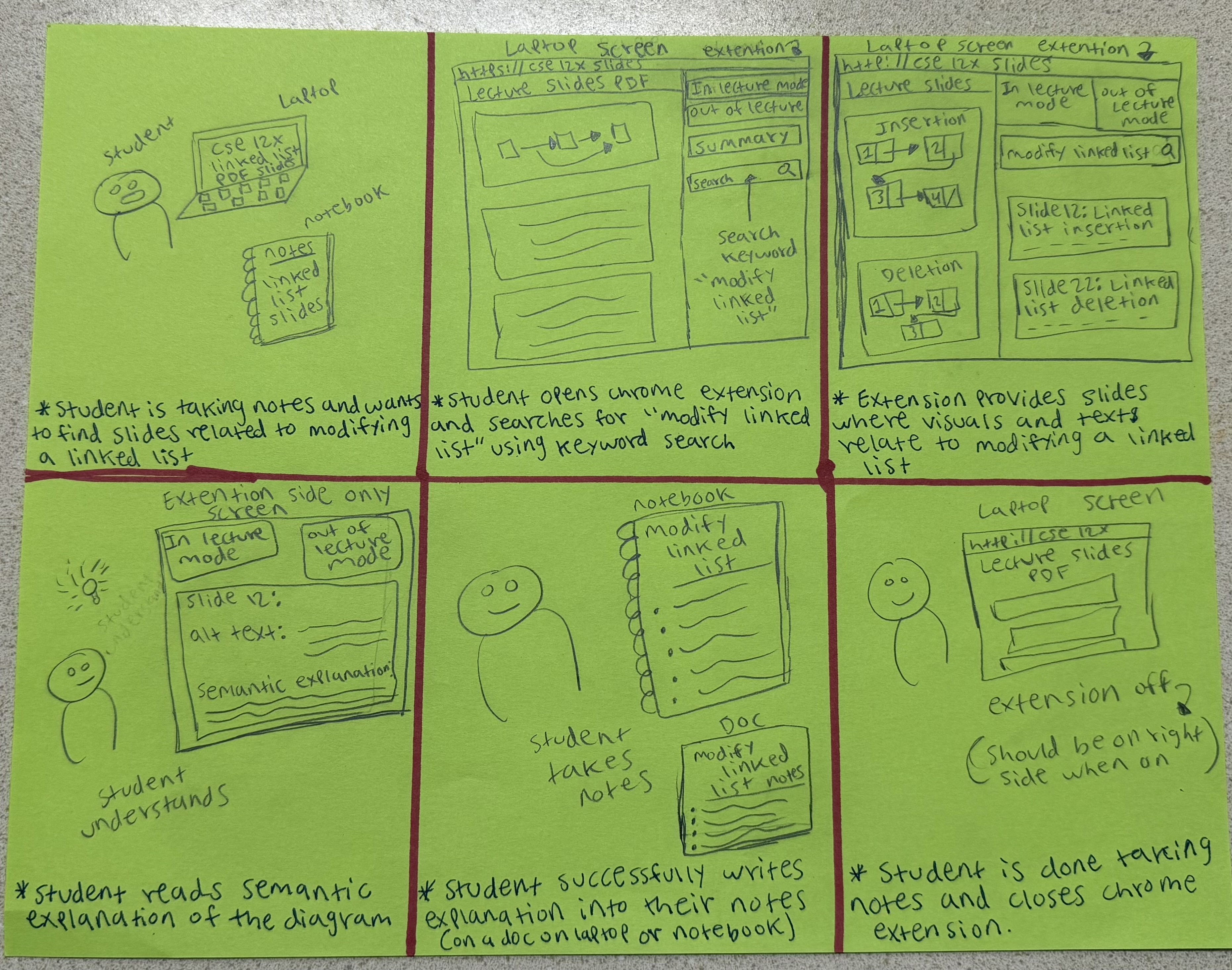
A student wants to review content and take notes on modifying linked lists. They decide to open the Chrome extension and utilize the keyword search feature. The extension shows results of relevant slides, and the students can click into it. There is lots of information on the images and visuals, as it shows alt-text and semantic explanations. This helps them review the content and take notes effectively.
Task 2: Figure out the topic of a flagged visual-heavy lecture slide while studying for final exam
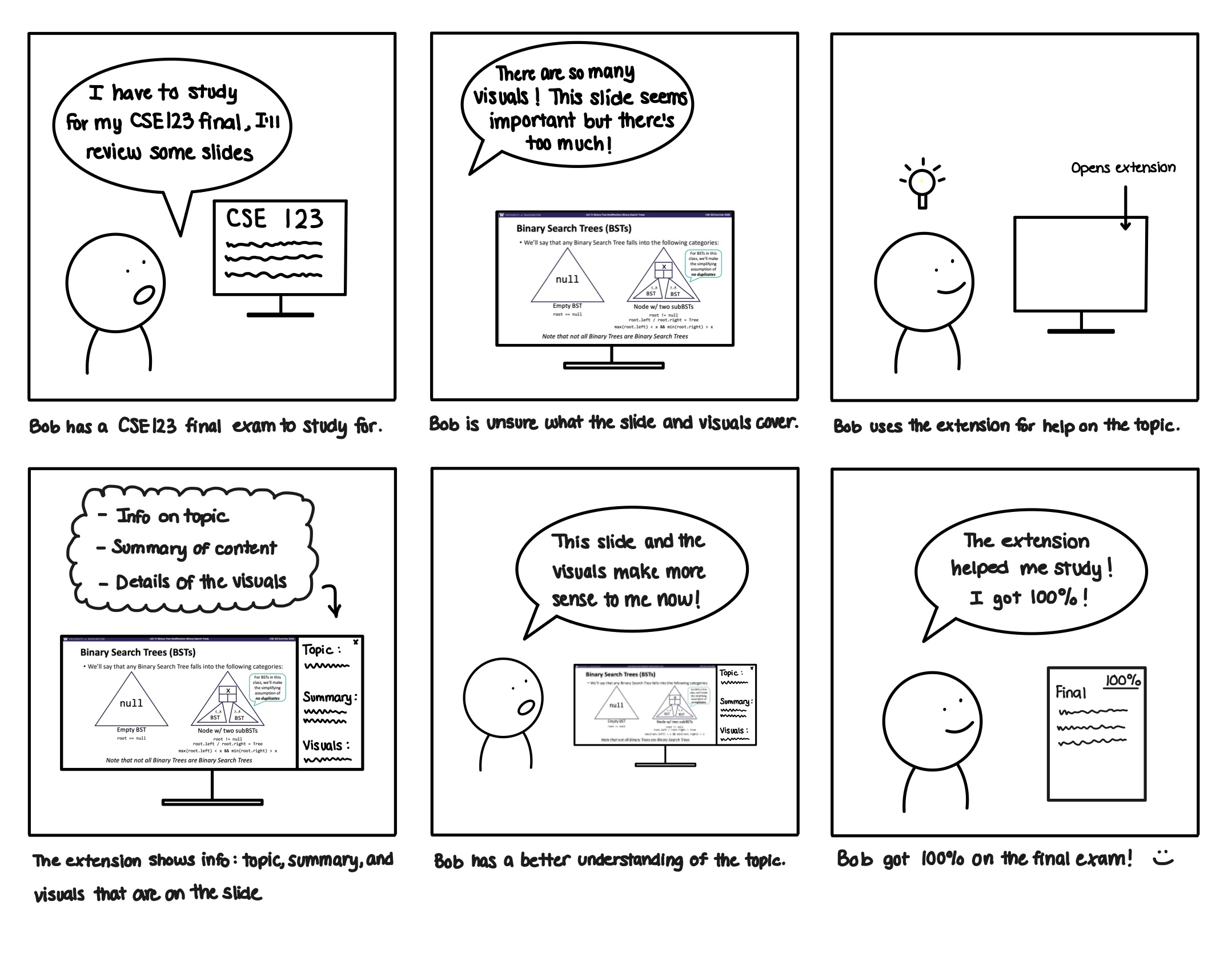
A student decides to review previous lecture slides to study for their final exam in CSE 123. They decide to start reviewing linked lists, but find that there are many visuals, so they open the extension. It shows valuable information, like information on the topic, summary of the content, and details beyond a short description or alt text on the visuals. This helps them gain a better understanding, and they do well on the exam.
Task 3: Figure out what is happening in the lecture visual that the professor is talking about
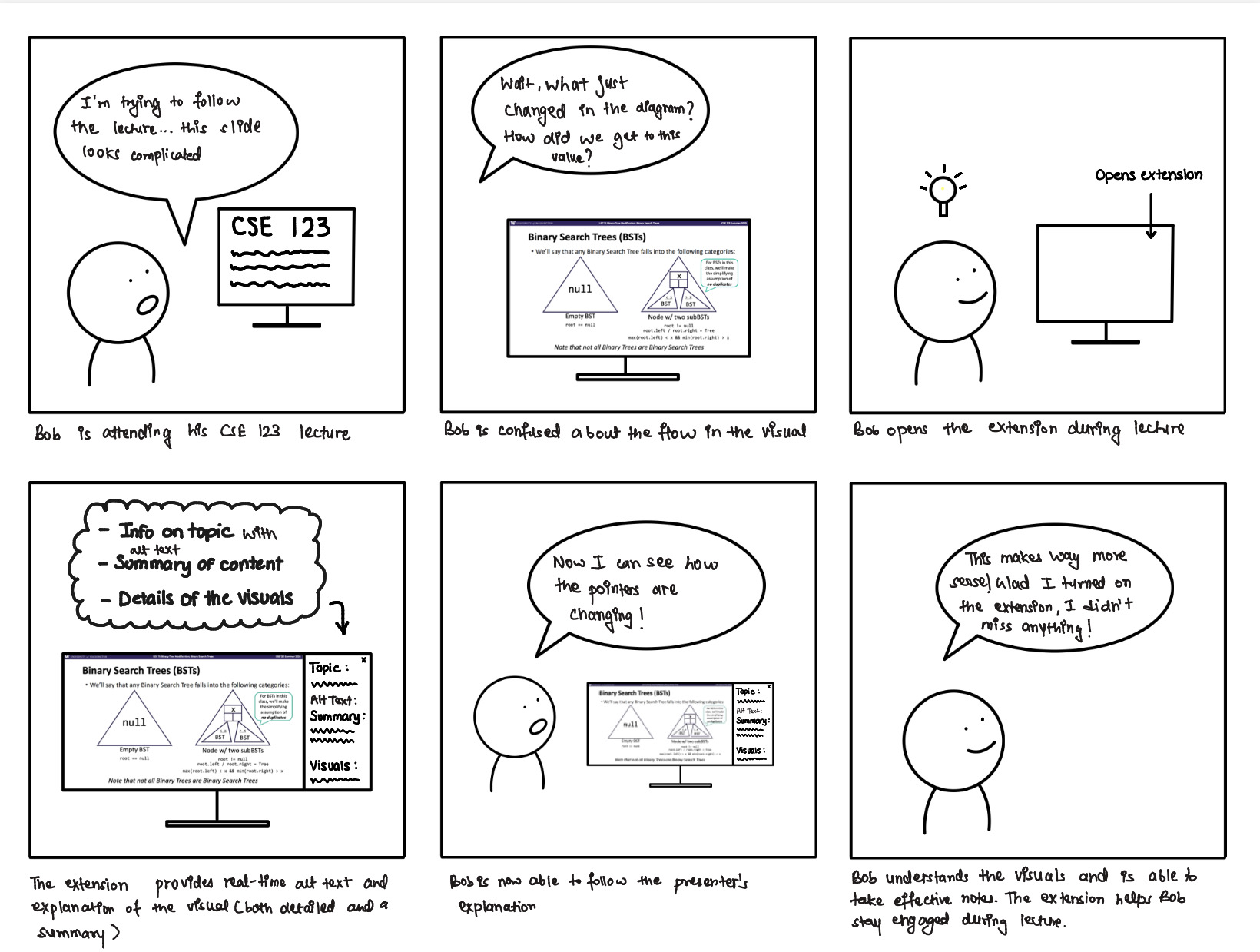
A student is attending a live lecture and is following the slides on their computer. They are having difficulty understanding the content, especially the visuals on the slides. They decide to open the extension. It provides more details on what’s happening in the slide, as there’s alt-text and explanations for the visuals. Additionally, there’s information on the content too. This helps them better understand how the visuals and lecture in general are flowing, and they are better engaged in the content.
Installation
Prerequisites
- Google Chrome
- Node.js (v18 or higher recommended)
- npm
- Gemini API key
Build Extension
-
Clone the repository (or navigate to the project directory):
cd lecture-extension -
Install dependencies:
npm install -
Set up Gemini API key: Create a
.env.localfile in the root directory:VITE_GEMINI_API_KEY=your_gemini_api_key_here -
Build the extension:
npm run build
Load Extension in Chrome
- Open Chrome Extensions page:
Navigate tochrome://extensionsin a Chrome tab. - Turn on Developer Mode:
Toggle the Developer Mode button on in the top-right corner. -
Load in extension:
Click the “Load unpacked” button in the top-left corner and load the project’sdist/folder.Note that while developing, any time you make updates to the Chrome extension you will need to run
npm run buildagain and click “Reload” on the Chrome extension in thechrome://extensionspage.
Technologies Used
- React
- TypeScript
- CSS
- Vite
- Gemini Flash 3
- Chrome local storage
Future Work
To be added.
Authors and acknowledgment
Built for CSE 443 (Digital Accessibility) at the University of Washington. Thank you to our Professor Jen Mankoff and the CSE 443 TAs for their support and guidance throughout this project!