| Assignment 2: Heuristic Search |
|
CSE 415: Introduction to Artificial Intelligence The University of Washington, Seattle, Autumn 2026 |
 |
|
Due Monday, October 19, at 11:59 PM.
You may do this assignment either individually or in a partnership of two.
If you work in a partnership, you'll be turning in one set of files
for the partnership, rather than two sets of files.
You are permitted to use AI as a coding assistant in this assignment;
however, we recommend that you read
the guidelines for prompting (see the ED post about prompting guidelines under "General" here)
and do the record-keeping so that you can complete
the prompting-related part of the report.
The report also includes the general sections described on the
Assignment Reports page,
including the models and tools you used for agentic programming.
|
|
Introduction
This assignment continues our study of state-space search in single-agent, deterministic environments, building on Assignment 1. There, we introduced a framework for the classical theory of problem solving (problem formulation files with a State class and operators, and an interactive solving client), and we implemented blind search algorithms (DFS and BFS). In this assignment we use the same problem-formulation framework and search-program structure to examine heuristic search.
After doing the coding and executions described below,
you'll make entries in a report document |
|
Informed Search
1. First, download the starter code for this assignment. Unzip it with a utility such as Windows Compressed Folders, etc. The starter code uses the same problem-formulation format and search framework as the A1 code; you may find it helpful to refer back to your own A1 formulation and BFS code. |
2. The starter-code file UCS.py, provides an implementation
of the Uniform-Cost Search algorithm. This file also provides you
with an implementation of a special kind of priority queue which
supports not only the standard insert
and delete_min operations, but also a method
called contains, which returns True if a given element is
in the priority queue. It also allows accessing and updating the
priority value of any element in the priority queue. See the
documentation for more information.
This priority queue is not just adequate for
implementing Uniform-Cost Search, but is particularly helpful in
implementing the A* Search algorithm.
The main difference between Breadth-First Search (which you implemented in A1) and Uniform-Cost Search (UCS) is that UCS works with problem formulations that have different costs associated with different moves. In terms of graph search, there are edge costs, and they are not necessarily assumed to be all equal to 1 as they essentially are in Breadth-First Search.
The starter code includes a new problem formulation for you to use
with UCS; it's the French Cities network in which the problem is to
find a shortest route from the initial-state city to the goal-state
city. These are, by default, RENNES and AVIGNON. (These could easily
be changed by editing the formulation file's line defining
STARTING_CITY, etc.) This formulation is in the
file For the default initial state and goal state, the results are ['Rennes', 'Nantes', 'Limoges', 'Lyon', 'Avignon']for the self.PATH variable and
1041.0for the self.TOTAL_COST variable.
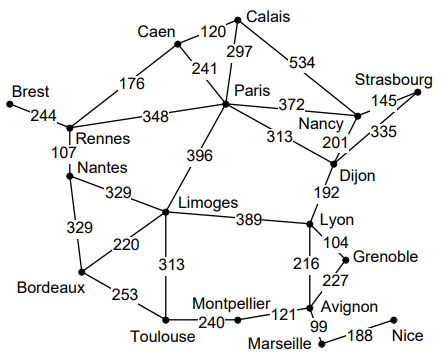
Page 184 in the reading shows the state space for this problem, with the distances on the graph edges. When you run the code you should get a solution path of 4 edges (5 cities) and total distance 1041: ['Rennes', 'Nantes', 'Limoges', 'Lyon', 'Avignon']. It might be formatted differently in the printout. The map is also shown below:
Map showing French cities (which serve as the states of this problem) and distance values on roads (represented as graph edges) between them. Implement an A* search program, putting your code into the starting template file AStar.py. You may wish to cut and paste from the UCS.py file, since most of the implementation will be identical. Develop your A* program to work with the heuristic function defined in the file FranceWithDXHeuristic.py. Your program will be operated as follows: python AStar.py FranceWithDXHeuristicWhen it is working, it should find the same path that UCS does, but it should have only expanded 12 states instead of 15. Here are some hints about how to modify UCS.py to implement A*. Change the names of the file and the algorithm in the code and the comments. After the code that imports the Problem, assign self.h = Problem.h, so that you can call the heuristic function easily in your algorithm. Within the search algorithm, any time UCS uses gs or new_g as a priority value, you should compute f (or call it fs or new_f, depending on the context), and use the f value as the priority. When checking the CLOSED list, don't necessarily delete the new state if the same city is already on CLOSED, but look at the priority, and if the new state has a lower priority value, delete the state on CLOSED and put the new one on OPEN.
Make sure that the first five CAPITALIZED variables in class AStar get
assigned the values they need (as described in the corresponding
comments), so that you can receive credit on autograder tests. These
include |
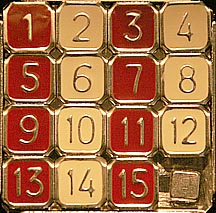
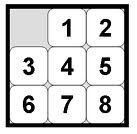
| 3. The Eight Puzzle is a simplified version of the popular
Fifteen Puzzle. A photo of one commercial model of the Fifteen Puzzle
is given below on the left, and a picture of the Eight Puzzle is on
the right.
Try to solve some instances of the Eight Puzzle using UCS.py. There is a default instance you should try first. You can do it with the command line: python UCS.py EightPuzzleThere is an easy way to try more instances. Simply provide a string on the command line that represents the initial state in list form. python UCS.py EightPuzzle '[[3, 1, 2], [4, 5, 0], [6, 7, 8]]'Another way is to create a file that first imports EightPuzzle's definitions and then overwrites the definition of CREATE_INITIAL_STATE. This is illustrated in the file puzzle_rotate_2.py. To run UCS.py on such a puzzle, type this: python UCS.py puzzle_rotate_2This instance of the Eight Puzzle is named this way, because the solution requires moving all the outside pieces "around" the middle square a distance of two steps each. The lowest-cost path for this instance should have total cost 14.0, since there are seven tiles that move, and they each move twice. Example puzzles to try: # Puzzle A. (should be very fast) python UCS.py EightPuzzle '[[3,0,1],[6,4,2],[7,8,5]]' # Puzzle B. (should not take long) python UCS.py EightPuzzle '[[3,1,2],[6,8,7],[5,4,0]]' # Puzzle C. (May take a few minutes) python UCS.py EightPuzzle '[[4,5,0],[1,2,8],[3,7,6]]' # Puzzle D. (May take several seconds or even minutes) python UCS.py EightPuzzle '[[0,8,2],[1,7,4],[3,6,5]]' |
4. Implement the following two pre-defined (i.e., standard)
heuristics for the Eight Puzzle. (a) Hamming Distance (count the
number of tiles out of place, but not the blank, in order to maintain
admissibility), and (b) Total of Manhattan distances for the 8 tiles.
Each of these should be in a separate file. If you look at the
starter code file FranceWithDXHeuristic.py, it shows you how your file
should import the basic problem formulation module (EightPuzzle) and
then define the heuristic function h. When you are ready to test your
Hamming distance heuristic, for example, you will type something like
this to test it out.
# Test with Puzzle A:
python AStar.py EightPuzzleWithHamming '[[3,0,1],[6,4,2],[7,8,5]]'
If your A* algorithm and heuristics are working correctly, then you should see some rather noticeable improvements in the search speed and statistics. |
|
Written Report
|
5.
Comparing Heuristics and Writing the Report: After testing these
heuristics on the four previously given instances of the Eight Puzzle,
record the results in your report. Also, compare them with "no
heuristic" (straight Uniform Cost Search). We recommend that you
write the report by starting with the latex template file
A2_Report_Template.tex that comes with the starter code;
rename it to "A2Report.tex" and edit it in Overleaf.
If you prefer to use Word, please use the same report style and structure.
You can see the "empty" PDF in the starter code folder.
Your report will have a section called "Heuristics for the Eight Puzzle". Compare the performance of these heuristics on each of the example puzzles (given above). For each puzzle-heuristic pair, report (a) whether the puzzle was successfully solved, (b) length of the solution path found, in number of edges, (c) total cost of the path found, (d) number of states expanded, and (e) MAX_OPEN_LENGTH. Put this information into the table given in the report template, described below. The table in the template has one row for each puzzle-heuristic pair (e.g., Puzzle A with Hamming), with "none (UCS)" as the heuristic for the Uniform-Cost Search runs. The first two columns identify the puzzle and the heuristic, and the remaining five columns hold items (a) through (e) above, in that order: Solved?, # Soln Edges, Soln Cost, # Expanded, and Max Open. (The initial state of each puzzle, as a flattened list such as [3,0,1,6,4,2,7,8,5], is listed just below the table.) If it takes more than 5 minutes to solve a particular puzzle with a particular heuristic, you may abort that run; write "aborted" in its Solved? column and leave the rest of that row blank. |
6. (Optional, for 5 points of extra credit). Find or create one more
Eight-Puzzle heuristic that you believe may be interesting in terms of
either how informed it is, how easy it is to compute, or how it
relates to other known heuristics. (It must not be so trivial that
it has a constant or mostly constant value! It should either be
admissible or have some compensating quality that you can describe.)
Implement and apply your heuristic, in a file
named EightPuzzleWithCustom.py that is set up like your
Hamming and Manhattan files. Compare the results from this
with the results you got for the other heuristics and describe them
in the extra-credit section of your report.
|
| 7. Partnership retrospective. After your results, include your "partnership retrospective." This starts with whether or not you worked in a partnership. Then, if so, it will contain (a) the names of the people in your team, (b) how you divided up the work, and (c) what if anything in this collaboration was a new experience for either partner. |
| 8. Assignment report sections and AI prompts. Next come the general sections described on the Assignment Reports page (Goals, Activities, Challenges & Solutions, Reflections/Learnings, Next Steps, and AI use, including the models and tools you used). The report ends with your AI prompts. For the record: if the full prompting conversation for your AI-assisted coding on this assignment is under 50K bytes, provide the full conversation; if it is longer than that, provide just your own prompts. If your prompts mentioned any external documents, they should be identified here, but not included verbatim unless they are small files basically representing parts of your main prompts. |
|
Keep in Mind
Here are some ideas to keep in mind for this assignment. As in A1, the problem format we are using permits both "manual solving" with the Interactive Solving Client and automatic solving, such as with UCS and A*. Thus it is important that any formulation files you write (such as your heuristic files) follow the problem structure correctly. Certain methods are required in the State class, including __init__, __eq__, __hash__, __str__, and copy. Even if you are familiar with Python, there may be some constructs in the formulation files that you are not familiar with. You can read up on list comprehensions (p.31 of the first reading) and lambda expressions (pp. 47-52 of that reading). Parts of your code will be graded by an autograder. To do this, your files will be imported as modules by the autograder. Your search should not automatically start running when the module is imported. The starter template file AStar.py comes with some code at the end of the file that takes care of this. This code is: "if __name__ == '__main__' " which avoids running the search automatically if it is being imported, but still runs it automatically if it is the main program. The autograder will be comparing the solutions and statistics found by your code with expected solutions, by calling functions in your code and examining the values of certain variables in your code. These variables are generally already in place for you in the starter code UCS.py. So you should not rename variables like self.PATH or any of the other variables written with all CAPITAL letters. |
| Commenting your Code
Each of your Python files should begin with a multiline string (more details are shown below.) Follow reasonable commenting practice in your code. The comments in the starter code can serve as examples of the commenting style that we consider appropriate. |
|
What to Turn In
Turn in the following files to Gradescope: AStar.py EightPuzzleWithHamming.py EightPuzzleWithManhattan.py A2Report.pdfIf you do the optional extra credit, also turn in the Python file containing your additional heuristic, named EightPuzzleWithCustom.py.
(The autograder runs an informational, 0-point check on this file:
it runs A* with your heuristic on Puzzles A through D and reports whether
the heuristic is admissible. The extra credit itself is graded from your report.)
Each of the Python files should start with a multiline comment in the following format with your own information rather than the sample information given here. '''AStar.py by John Nathan Smith and Emily Doe UWNetIDs: jnsmith25, emilydoe24 Student numbers: 2576543, 2483119 Assignment 2, in CSE 415, Autumn 2026 This file contains my (or our) implementation of A* search. ''' Your file "A2Report.pdf" will start with some specific information given in the template. Then it will contain your results mentioned above (heuristics comparison and, optionally, extra credit), then your partnership retrospective, the general report sections, and at the end, your AI prompts. The turn-in method is via file uploads to Gradescope. Be sure to upload your files to the A2 assignment. |
| Updates and Corrections
If needed, updates and corrections will be posted here, and/or in ED. |
| Last updated 2026-10-09. |