Homework 7: C++ Vector
Due: Friday, June 5, at 11:59pm
Goals
This assignment provides practice with basic C++ functionality, including class definitions, heap memory usage, and namespaces.
Synopsis
You will create a C++ class Vector that implements 3-D vectors. A header file is provided that describes the required functionality for this class, and you will implement each method or function required to support the class. You will use C++ techniques.
Set-Up
Before you get started, ensure that your set-up is up-to-date and appropriate.
- You should do this assignment using
calgary, includingg++ - Ensure that your repository is up-to-date and committed. (You can use
git statusto determine if there are outstanding changes, andgit addandgit commitif you are unsure.) - Use
git pull upstream mainto pull the newest commit from the upstream repository. This will give you access to thehwVecfolder containing the materials for this assignment.
You will do this assignment in your new hwVec folder.
You should get into the habit of committing and pushing code frequently.
Provided Files
Your hwVec folder contains the following files:
Vector.h: Header file describing the Vector Class.hw8.cc: Client for the Vector class; Runs hw8 demo.Makefile: A Makefile to compile your code and run the demo.cpplint.py: The linter you will use to check your coding style.
Specifications
You will create a C++ class Vector that implements 3-D vectors. This
class will be defined in the file Vector.cc. You should
not modify any of the starter files provided for this assignment.
In file Vector.cc implement the Vector
class with the following properties:
- The representation of a
Vectorshould be an array containing three floats giving the magnitudes in the x, y, and z directions. The array should be dynamically allocated on the heap when aVectoris created and deleted when theVectorno longer exists. - There should be a default (0-argument) constructor that initializes
a
Vectorto (0,0,0), a constructor with 3 floats as parameters giving initial values for the x, y, and z magnitudes, and a copy constructor. - There should be a destructor that does whatever work is needed
when a
Vectorobject is deleted. If no work is needed, the body of the destructor can be empty. - The class should define assignment for vectors
(u=v). - Operator
*should compute the inner product (dot product) of two Vectors. If v1=(a,b,c) and v2=(d,e,f), thenv1*v2should return the scalar value a*d+b*e+c*f. - Operator * should be overloaded so that if v is the Vector (a,b,c)
and k is a double, then v*k and k*v should return a new
Vectorcontaining the components of v multiplied by k (i.e., (a*k,b*k,c*k)). - The class should define stream output so that
s<<vwill writeVectorv to stream s as (a,b,c), i.e., a left parentheses followed by the x, y, and z components of v separated by commas, and a right parentheses. There should be no added spaces in the output. Thereis no std::endl at the end. - The
Vectorclass and associated functions should be placed in a namespace vector374.
Note: Pay attention to the data types of the specified
functions. This code makes use of references, and also sometimes requires
returning a Vector (not a pointer to a Vector).
You should take care to
create your Vectors and return them appropriately.
Code Quality
You should ensure that your code follows typical guidelines regarding
variable naming. You
may include comments as necessary for any tricky parts of your code. You
will also want to use cpplint.py to check that your code
complies with the style guidelines before submitting.
Submitting your work
You will submit this homework to the Gradescope HWVec: C++ Vector implementation, via Gitlab.
You will first update your Gitlab repository. Use git add
and git commit to ensure that your updated
Vector.cc. Use git push to bring the
origin/remote repository up-to-date.
Once you locate the Gitlab assignment you will tap the "GitLab" button on the bottom:
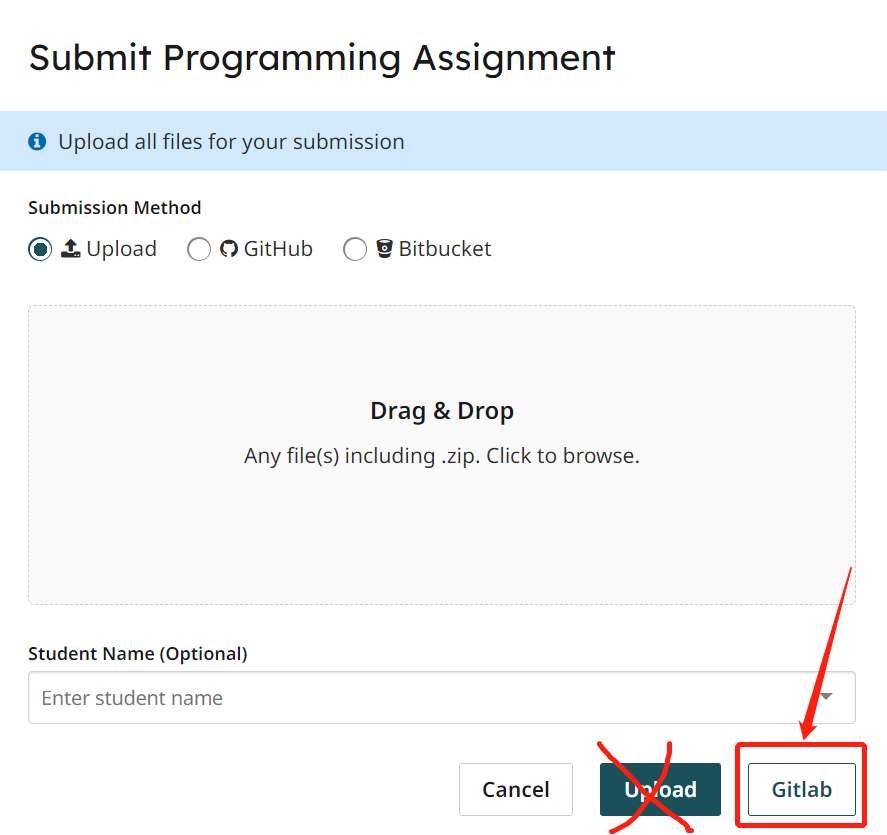

Once you submit your code the autograder may take some time to run. You may resubmit for a higher grade, but your should always do as much testing as possible on your own platform before resubmitting.
Grading
This assignment will be worth 40 points. Your code will be evaluated by an autograder. You are welcome to submit again in order to achieve a better score, but, you should use your hwVec exectuble to test your code before you do so. Be sure to fix warnings or errors that occur during compilation, and then compare the ouput of your code to the target output.