Homework 3: Basic C
Due: Monday, April 27, at 11:59pm
Goals
The purpose of this assignment is to gain some experience with C programming. In particular, in this assignment, you will:
- Gain experience creating and running C programs,
- Become familiar with basic C libraries, including those for file and string handling,
- Get a better understanding of how Unix utilities are implemented,
- Gain some basic experience with the unix debugger,
gdb, and - Learn to use a style-checking tool to locate source code that may need attention.
You are responsible for your own work. If you work with a classmate make sure you are each editing and working on your own set of files. You should not copy and paste code, but you may discuss approaches or debugging tactics. You should add comments to your code specifiying any help you received or resources you used.
The material that we have learned in lecture is not enough to complete this assignment. It is expected that you will investigate the resources and libraries mentioned in this document to learn about how to use them.
Set-up
Before you get started, ensure that your set-up is up-to-date and appropriate.
- You should do this assignment using
calgary, includinggcc - Set-up your Git repository, including adding the remote upstream repository as instructed on our Git reference page.
- Commit and push any outstanding files you have in your local repository. You can use
git statusto see what files this applies to. - Use
git pull upstream main. This will update your repository with the resource files for this homework. You can then work in your local copy of the repository.
Specifications
Synopsis
In this assignment you will create your own version of the unix command wc. You will read in a file and report stats including the number of lines and number of words in the file. Your code should behave as follows:
- Compile with the command
gcc -Wall -std=c11 -o wordcount wordcount.c - Requires one or more input files.
- If there are no input files, prints a usage message to stderr and exits with a (1) code.
- Does not need to work with redirected input
- If a file can not be opened an error message is printed that the file is skipped.
- For each input file calculate the number of lines, words, and characters
- Can check against
wcon any test file - the results should be the same.
- Can check against
- Prints a message with the results and the file name.
This message is similar to the results from
wc, but should match the example response towordcountprecisely. (See example below.) - Additionally prints the total number of lines for all files
- Proccesses a limited number of options:
-l, -w, -c- If an option is detected the program will output only the number of lines, words, or characters respectively.
- The program will additionally not print the total number of lines in all the files
- The program shouldn't process more than one option.
If more than one option is submitted the first one should be activated. - To simplify the option handling you will assume that any
options will come before the names of the input files.
If you detect any input argument string that is not a valid option, you will assume that it, and any subsequent arguments are file names. - Be able to handle input lines containing up to 500 characters
(including the terminating \0 byte).
The performance for other files is undefined, and will not be evaluated.
Example Operation:
$ ./wordcount -l
Usage: ./wordcount requires an input file.
$ echo $?
1
$ ./wordcount point.c "NON FILE" shorttext
73 247 1574 point.c
NON FILE will not open. Skipping
4 13 68 shorttext
Total Lines = 77
$ wc point.c "NON FILE" shorttext
73  247 1574 point.c
wc: 'NON FILE': No such file or directory
4   13   68 shorttext
77  260 1642 total
$ ./wordcount -l point.c
73
$ ./wordcount -c point.c shorttext
1574
68
$ ./wordcount -l -wc shorttext
-wc will not open. Skipping
4
Technical Requirements
You should pay attention to the following guidelines for meeting performance expectations:
- Use standard C library functions where possible; do not
reimplement operations available in the basic libraries. For
instance,
strncpyin<string.h>can be used to copy\0-terminated strings - You should use "safe" versions of file and string
handling routines such as
fgetsandstrncpy. These functions allow specification of maximum buffer or array lengths and will not overrun adjacent memory if used properly. - If an error occurs when opening or reading a file, the program
should write an appropriate error message to
stderrand continue processing any remaining files on the command line. - Since this program is likely relatively short, all of the functions
should be in a single file called
wordcount.c. You should arrange your code so that related functions are grouped together in a logical order in the file. - Your code must compile and run without errors or warnings when
compiled and executed on
calgaryusinggccwith the-Walland-std=c11options. - Your program must be robust. It should not
crash (segfault or otherwise) or produce meaningless or incorrect
output regardless of the contents of command line parameters or input
files (except, of course, you are not required to deal with files
or string parameters with lines longer than the limits given above).
If the program terminates prematurely because of some error,
it should print an appropriate error message to
stderrand exit with an exit code ofEXIT_FAILURE(defined in<stdlib.h>-- see the description of theexit()function). - If the program terminates normally after attempting to open and
process all of the files listed on the command line, it
should terminate with an exit
code of
EXIT_SUCCESS(see<stdlib.h>).
Code Quality Requirements
As with any program you write, your code should be readable and understandable to anyone who knows C. In particular, for full credit your code must observe the following requirements.
- Divide your program into suitable functions, each of which does
a single well-defined task. For example, there should almost
certainly be a function that processes a single input file, which
is called as many times as needed to process each of the files
listed on the command line. Your program most
definitely may not consist of one huge
mainfunction that does everything. - Each function should implement one coherent portion of the solution. Be sure to include function prototype declarations near the beginning of the file so the actual function definitions can appear in whatever order is most logical. Related function definitions should be defined together.
- Comment sensibly, but not excessively. You should not use
comments to repeat the obvious or explain how the C language works, but your
code should, however, include the following minimum comments:
- Every function must include a heading comment that explains what the function does (not how it does it), including the significance of all parameters and any effects on or use of global variables.
- You should describe every non-obvious variable, and particularly specify units if applicable.
- Any code based on someone else's work must include a comment for citation. (If the code is longer than a couple of lines you should read for understanding and then create your own version. Citations are still appropriate.)
- There should be a comment at the top of the file with your name, the date, and the name and purpose of the file.
- Use appropriate names for variables and functions: nouns or noun
phrases suggesting the contents of variables or the results of
value-returning functions; verbs or verb phrases
for
voidfunctions that perform an action without returning a value. Variables of local significance like loop counters, indices, or pointers should be given simple names likei, orp, and do not require further comments. - Avoid global variables. Use parameters (particularly pointers) appropriately.
- You may use an appropriate
#define MAXLINEcommand to set the maximum line length mentioned above. - Don't make unnecessary copies of
large data structures; use pointers. (Copies of
ints, pointers, and similar things are cheap; copies of arrays and large structs are expensive.) - Don't read the input by calling a library function to read each individual character. Read the input a line at a time (it costs just about the same to call an I/O function to read an entire line into a char array as it does to read a single character).
- Your code should be simple and clear, not complex containing lots of micro-optimizations that don't matter.
- You should use the cpplint.py style checker:
- Use
chmod +xto make it executable if needed. - Use
./cpplint.py --clint wordcount.cto review your code.
Note: If this fails, check for your python installation (whereis python. In some cases you must call python3 explicitely:python3 ./cpplint.py --clint wordcount.c, or modify the first line of cpplint.py to point to your system's python installation.) - cpplint.py is an example of a linter, which is tool to check code for compliance to style and or coding standards. In this case, the linter is checking that code complies with style guidelines developed at Google, and used widely in industry. Compliance with style guidelines is essential when multiple developers are working on the same codebase.
- While this checker may flag a few things that you wish to leave as-is, (Notably: You may ignore warnings about 'strtok') most of the things it catches, including whitespace errors in the code, should be fixed. We will run this style checker on your code to check for any issues that should have been fixed. Use the discussion board or office hours if you have questions about particular clint warnings.
Hint: All reasonable programming text editors have commands or settings to use spaces instead of tabs at the beginning of lines, which is required by the style checker and is much more robust than having tabs in the code. For example, if you are a emacs user, you can add the following line to the.emacsfile in your home directory to ensure that emacs translates leading tabs to spaces:(setq-default indent-tabs-mode nil).
- Use
Implementation Hints
- Break the problems into small tasks to make it more manageable.
For instance, figure out
how to process a single file before you implement the logic to
process all of the files on the command line. (Or, vice-versa, but
start small and test before you move on). Figure out how to
open, read, and copy all of a file to
stdoutbefore adding another step. HINT: We have a sample program from an earlier lecture that does this. - You might notice that the structure of this program is similar
to your
spellcheckscript: You first check for usage (is the command called correctly?), and then, for each input file you perform a task. You write similar error messages, and exit with a failure code under similar circumstances. - Implement a main that gets the arguments and prints a place holder for the output (either to screen or file), and you are off to a good start. Test this before you move on.
- Think before you code. You will ultimately get the job done faster, better, and with less pain if you spend some time to sketch your design first. Start coding by writing function headings and heading comments and creating significant variables -- and commenting those too. Then as you write detailed code and test it you will have your written design information in the comments to compare and check as you work on the code.
- I/O is relatively expensive, while storing one more integer is relatively inexpensive. As a result, it is likely a good idea to write one function that calculates all the potential output values in one go, and use the options to determine which ones to print to stdout.
- Every time you add something new to your code (see hint #1), test it. Right Now! Immediately!! BEFORE YOU DO ANYTHING ELSE!!! It is much easier to find and fix problems if you can isolate the potential bug to a small section of code you just added or changed.
- The standard C library contains many functions that you will
find useful. In particular, look at the
<stdio.h>,<string.h>,<ctype.h>and<stdlib.h>libraries. Use the cplusplus reference link on the course home page to look up details about functions and their parameters; use a good book like The C Programming Language for background and perspective about how they are intended to be used. strlentells you how many characters are in a string.- Every file stream that is open should be subsequently closed.
- Use the compiler
-Walloption. Don't waste time searching for errors that the compiler or run-time tests could have caught for you. - Be sure to test for errors like trying to open or read a nonexistent file to see if your error handling is working properly.
- Once you're done, read the instructions again to see if you overlooked anything.
Submission
You will submit this homework to the Gradescope HW3: Wordcount assignment, via Gitlab.
You will first update your Gitlab repository. Ensure that your
wordcount.c file is located in the hw3
directory, which is at the top level of your repository. Use
git add, git commit, and git push to bring the
remote repository up-to-date.
Once you locate the Gitlab assignment you will tap the "GitLab" button on the bottom:
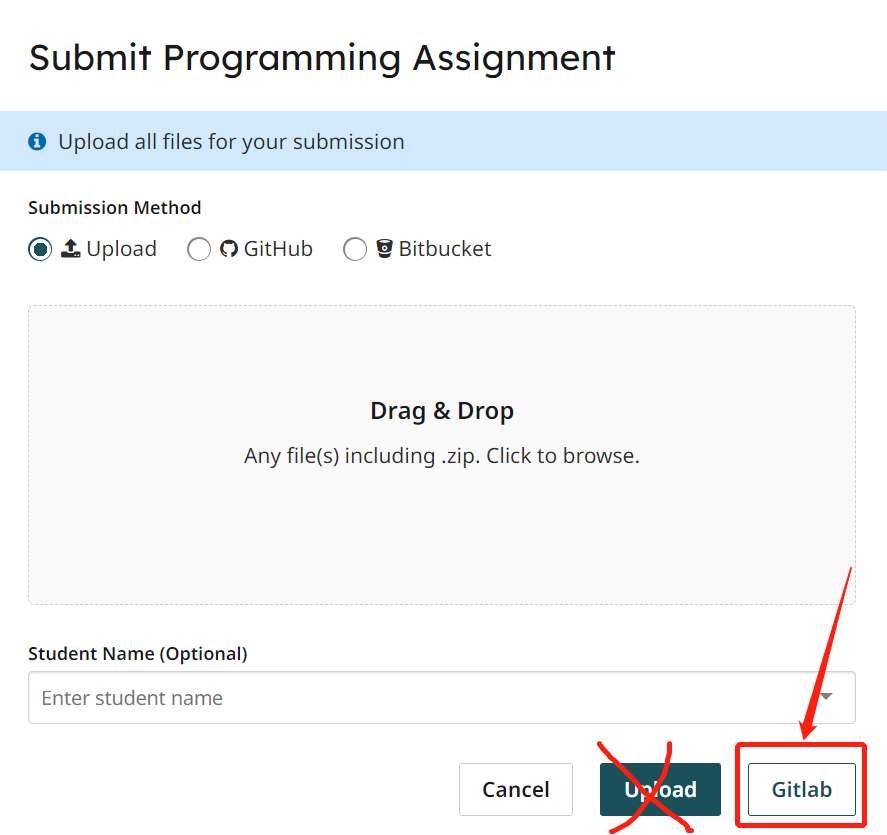

Once you submit your code the autograder may take some time to run. You may resubmit your code to address any deductions, but, you may only resubmit 5 times per hour. You should do your debugging and testing in your personal repository and not rely on autograder feedback for that purpose.
Grading
Your code will be evaluated by an auto-grader that will check specified performance criteria. There will be some additional manual grading that will look at the points brought up in the Code Quality requirements above (specifically looking at commenting and code efficiency). You may re-submit up to five times every hour to achieve a higher grade on the auto-graded portion of this assignment.