CSE 331 Homework 6: Office Hours Queue, on the Web
Due Wednesday, May 27 at 11:59pm.
In this homework you will extend the office hours queue you built in HW5 with new features and turn it into a small web application.
Getting started
Get the starter code via gitlab as before (download directory as zip, then unpack it).
Most of the files are similar to HW5. The differences are:
OfficeHoursQueue.java: We have made slight changes to the interface, adding a few new methods and removing one old method.OfficeHoursWebApp.java: a new starter file for your web apptemplates/: a new directory for your JTE templates (part of the app)
After unpacking the HW6 starter code, you should copy the contents of your HW5
OfficeHoursQueueImpl.java and test files into the corresponding starter files
provided. Be careful when copying, because HW6 uses Java packages. We have
included the correct package declarations for you in the starter code, but you
must be careful not to overwrite them when copying your HW5 code.
Your HW5 code will not compile against the updated OfficeHoursQueue.java
interface until you have added the new methods in Task 1 below.
If you are using VS Code, be sure to open the hw06 folder as the
"root" folder in your editor, or else it will not be able to find the
dependencies in lib/.
Task 1: Extend the queue
The OfficeHoursQueue.java interface has been updated with five new methods
since HW5:
indexOfName(name)entries()getQuestion(name)updateQuestion(name, question)rename(oldName, newName)
The new interface also removes
toNamesForTestingOnlyDoNotCallInNonTestingCodeOrElse() from the interface
because its functionality is subsumed by entries().
Read the specifications for these methods carefully in OfficeHoursQueue.java.
Now, starting from your copied-in HW5 solution, implement the new methods. Note that some of the new methods are specified to achieve a certain running time. Depending on your choice of data structures in HW5, you may need to change your code to use data structures that can implement the operations you need within the specified running time bounds.
When you change your data structure, be sure to update your abstraction
function (AF) and representation invariant (RI) comments, and update your
checkRep() method to check the new invariants. Then you will also want to
revisit any existing methods and ensure that they still work as specified with
your new choice of data structure.
Task 2: Update your tests
If you haven't already, copy over your HW5 specification tests into the provided HW6 starter file, being careful to preserve the package declaration from the starter code.
Then write specification tests for the new methods in the HW6 interface to achieve 331 test coverage standards. You should also update your tests for any existing methods from HW5 so that they also maintain 331 test coverage standards.
As with HW5, specification test must pass on any correct implementation. If you
would like to test additional behavior of your implementation that is not
guaranteed by the specification, you can do so in the ...ImplTest.java files.
The implementation test file will not be graded, and you may leave it blank if
you wish.
Task 3: The web application
In this task, you will build a small "circa 1995" web application in
OfficeHoursWebApp.java that lets students and TAs interact with your office
hours queue via a web browser. By "circa 1995", we mean that the application
will not have any Javascript running in the browser.
Libraries used
We will use the Javalin web server framework for Java and JTE templates to build the application. The starter code contains a demo showing the basics of how Javalin and JTE work together.
- Javalin server framework. This library makes it easy to define web servers in Java that respond to different routes and requests. For example, when a user presses a button to submit a form, Javalin will call the Java method registered to handle that event. For more information see the demo app below and the Javalin docs.
- JTE templating engine. This library makes it easy to create HTML responses that are generated by plugging some data variables into a template. Again, see the demo below and the JTE docs.
Starter code walkthrough
The starter code app is a web app with similar functionality to the simple terminal application from the HW5 starter code that allows you increment and decrement a number.
The rest of this section is collapsed. Click here to expand the walkthrough.Click here to collapse this section.
To run the starter code app, use make run or press the word "Run" right above
main() in VS Code when looking at OfficeHoursWebApp.java. (If you use the
makefile, you must finish task 1 first. Otherwise you will get an error because
the queue implementation is not complete.)
The demo serves a page at http://localhost:7070/ with a counter and two HTML
forms: one to increment and one to decrement. Each form POSTs to a different
path, the handler updates the counter, and the browser is redirected back to
/. The app does not use any Javascript.
When you first load the page, you see the initial state below. The app keeps track of a single integer counter which can be incremented and decremented. In addition, it keeps track of the set of all the values that the counter has ever had. The page also displays the "last action" that the user took, which can be "None" if there is no last action.
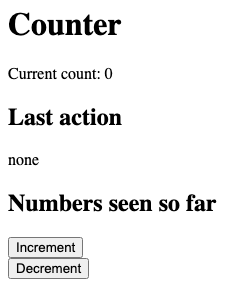
Pressing Increment submits a form to /inc. The handler increments the count,
adds the new value to seen_numbers, and redirects back to /?last_action=increment.
The browser reloads the page and you see the updated state.
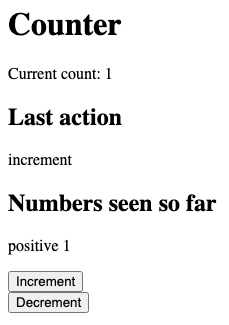
count=1, last_action="increment", and 1 has been added to the seen-numbers list.Now pressing Decrement does the analogous thing: it POSTs to /dec, which
decrements the count and redirects back with last_action=decrement.
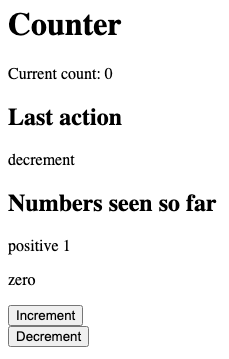
count is back to 0, last_action="decrement", and 0 joins the seen-numbers list.Pressing Decrement once more takes the count below zero.
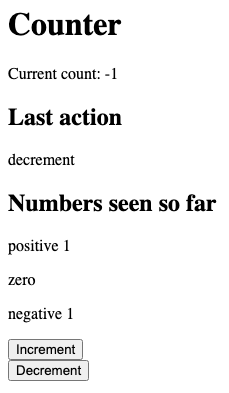
count=-1, and -1 has been added to the seen-numbers list. Notice how the template renders negative, zero, and positive values differently.The code shows how to set up JTE to compute the HTML to send to the client. For
example, the index method (which generates the homepage) passes data from the
Java route handler to a .jte template using a Map. This template is then
rendered with ctx.render(...). As another exmaple, the inc() and dec()
methods are called when the user presses the increment and decrement buttons.
They make changes to the server's state and then redirect the user back to the
homepage so that they can perform another action. Notice how inc() and dec()
pass information back to the homepage via a query paramater (the part of the
argument to redirect() after the ? character).
You should study OfficeHoursWebApp.java and templates/demo.jte together to
see how the pieces fit together. Once you are satisfied that you understand it,
you should delete the demo and replace it with your real application.
Office hours web app
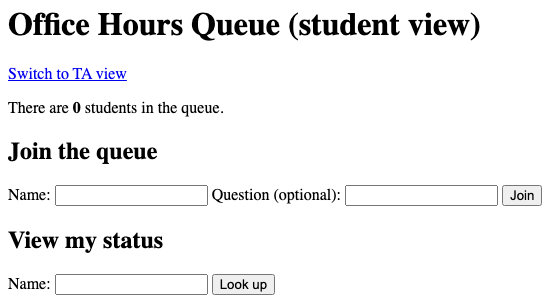
Your task is to build a web application for keeping track of an office hours queue. The application will have two separate pages: one for students and one for TAs. You do not need to match the style or wording of our example interface exactly, but all the same functionality must be present.
Student page
The student view allows a student to see their own position in the queue, but not the positions or questions of other students.
The student view supports the following functionality:
- Join the queue: A student gives their name and question and joins the back of the queue.
- View status: A student can look up their current status in the queue by name.
- Change question: From their status page, a student already in the queue can change their question.
- Change name: From their status page, a student already in the queue can change their name.
- Leave the queue: A student can remove themselves from the queue.
TA page
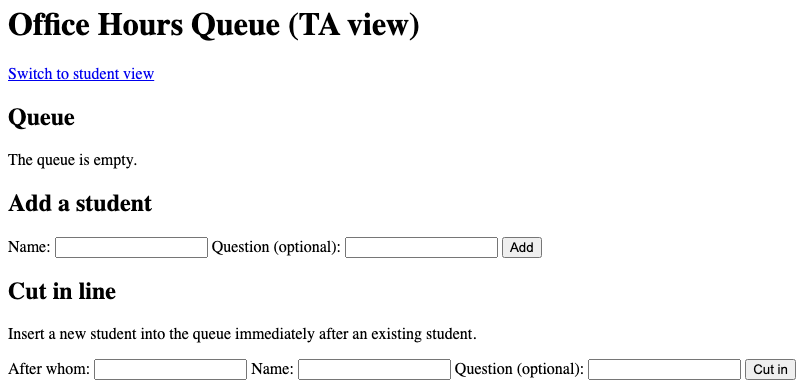
The TA view shows the entire queue and provides operations on it that are not available on the student page.
The TA view must support the following functionality:
- View the queue: The full queue is displayed in order, showing each student's name and question (or an indication that they have no question).
- Help next student: Dequeue the student at the front of the queue. The TA should see the dequeued student's name and question.
- Remove a student: Remove a specific student from the queue by name.
- Add a student: Add a student to the back of the queue with a name and optional question. (Useful when a TA wants to add someone on behalf of a student.)
- Cut in line: Insert a new student into the queue immediately after a given existing student. (Useful when a TA wants to handle a small follow-up question right after the student in front of it.)
Web app technology
Every operation that updates the state of the application (joining, leaving,
helping, removing, etc.) is performed by submitting an HTML <form> via POST.
Each form's action attribute specifies which path to POST to, and the form's
<input> elements carry the data (e.g., student name, question). The form's
<button type="submit"> (or <input type="submit">) is what the user clicks to
submit it.
After processing a POST request, your handler should redirect the browser
back to the appropriate page using ctx.redirect(...) rather than directly
rendering a template. This pattern prevents the browser from resubmitting the
form if the user refreshes the page. Without this, refreshing the page after
submitting a form would resubmit the form, e.g., enqueueing Alice a second time.
If you want to show a status message after an action (e.g., "Welcome, Alice! You've joined the queue." or "Bob is not in the queue."), you can pass it as a query parameter on the redirect URL and then read it back when rendering the page. For example:
// in the POST handler:
ctx.redirect("/student?msg=Welcome!");

// in the GET handler:
String msg = ctx.queryParam("msg");
// pass msg to the template so it can display the message
The counter demo in the starter code shows this pattern in action: after
incrementing or decrementing, it redirects to /?last_action=increment (or
decrement) so the rendered page can show which button was most recently
pressed.
JTE templates
Your HTML pages should be generated by JTE template files in the templates/
directory. A template is a .jte file that looks like regular HTML with
embedded expressions and control flow. You pass data from your Java route
handler to the template using a Map:
Map<String, Object> model = new HashMap<>();
model.put("name", "Alice");
model.put("position", 3);
ctx.render("student.jte", model);
In the template, you declare the parameters you expect, then use them:
@param String name
@param int position

<p>Hi, ${name}. You are #${position} in line.</p>
The ${...} syntax automatically escapes HTML special characters, so you do
not need to worry about a student whose name contains HTML special characters
breaking the page. This is handled for you.
JTE also supports conditionals and loops:
@if(position > 0)
    <p>You are in the queue.</p>
@else
    <p>You are not in the queue.</p>
@endif

@for(var entry : entries)
    <li>${entry.name()} -- ${entry.question()}</li>
@endfor
See the JTE documentation and templates/demo.jte in the
starter code for more examples.
Hidden form fields
Sometimes you need to send data that the user has already provided. For example, when a student who is already in the queue clicks "Leave", the form needs to include their name even though they aren't typing it again. You can use a hidden input for this:
<input type="hidden" name="name" value="${lookupName}">This sends the student's name as a form parameter when the form is submitted, without showing a visible input field to the user.
Error handling
Your web application should handle all inputs reasonably and with decent error messages. For example:
- If a student tries to join with a name that is already in the queue, the application should not crash, but rather should show a message explaining the problem.
- If the TA tries to help the next student when the queue is empty, the application should show a message that the queue is empty.
- If a form is submitted with a blank name, the application should show a message that the name is required.
Your application should never crash or show a Java stack trace in the browser.
Example scenario
The following scenario illustrates the required functionality. Your application should be able to handle equivalent functionality, though you are free to design the layout and display information differently. Of course, just being able to handle this one example scenario correctly does not mean your code is correct in all cases.
The rest of this section is collapsed. Click here to expand the example scenario.Click here to collapse this section.
It's a Monday morning. TA Pratika opens office hours and navigates to the TA view. The queue is empty.
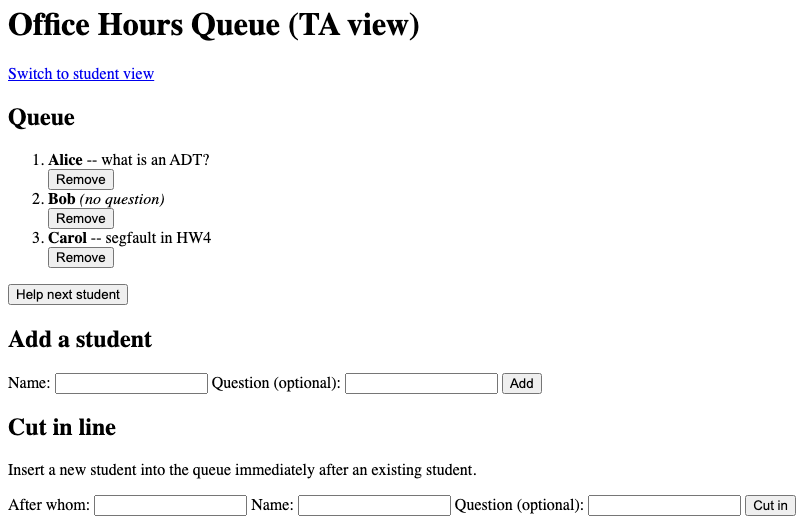
Three students arrive in quick succession. Alice has the question "what is an ADT?", Bob has no specific question, and Carol has the question "segfault in HW4". Each student visits the student view and fills out the join form.
After all three have joined, the TA view shows the full queue: Alice, Bob, Carol.
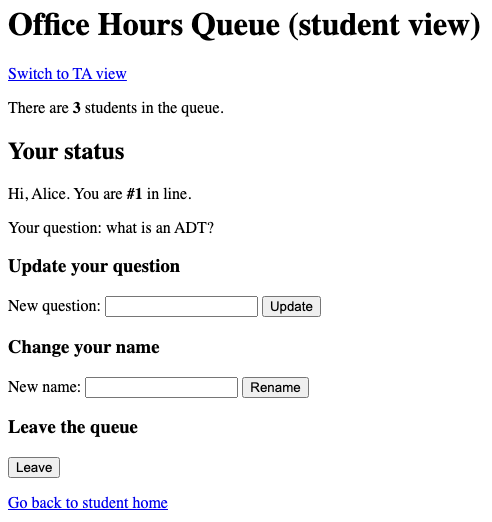
Alice looks up her status on the student view. She sees that she is #1 in line and her question is "what is an ADT?".
Pratika clicks "Help next student" on the TA view. Alice is dequeued, and the TA sees Alice's name and question. The queue is now Bob, Carol.
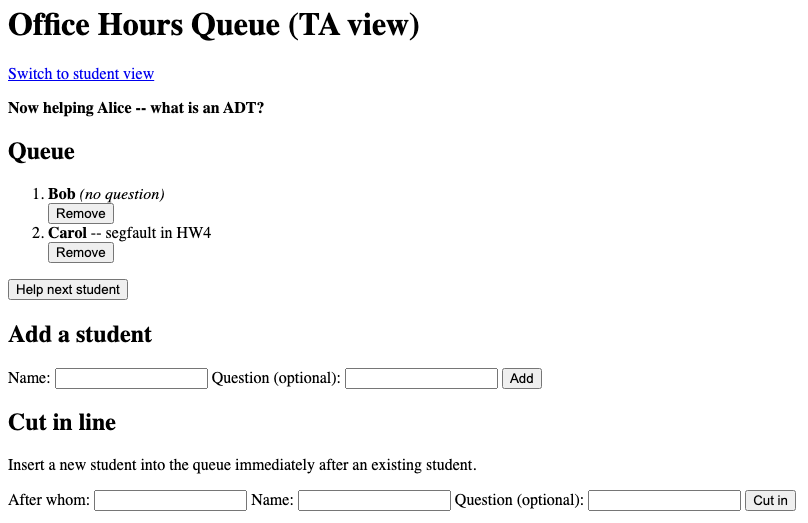
A few minutes later, Alice comes back with a quick follow-up question. Pratika uses "Cut in line" to insert Alice (question: "follow-up: still confused") into the queue immediately after Bob. The queue is now Bob, Alice, Carol.
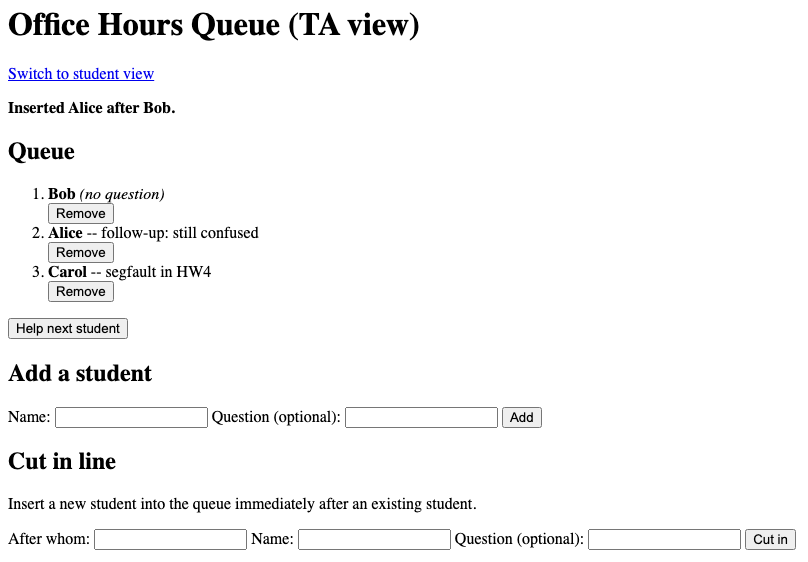
Bob remembers he has to run to another class. He visits the student view, looks up his name, and clicks "Leave". The queue is now Alice, Carol.
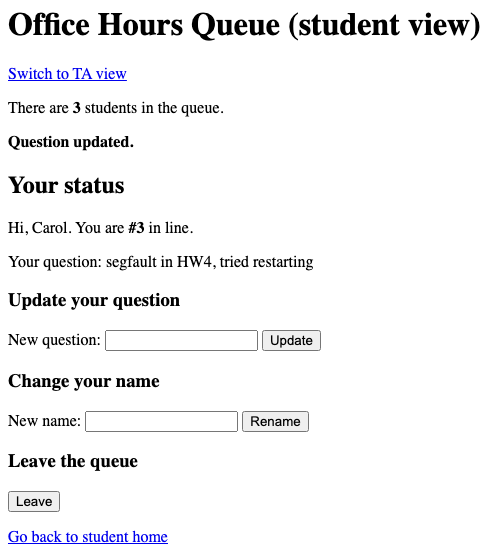
Meanwhile, Carol decides to update her question. She looks up her name on the student view and uses the update form to change her question to "segfault in HW4, tried restarting".
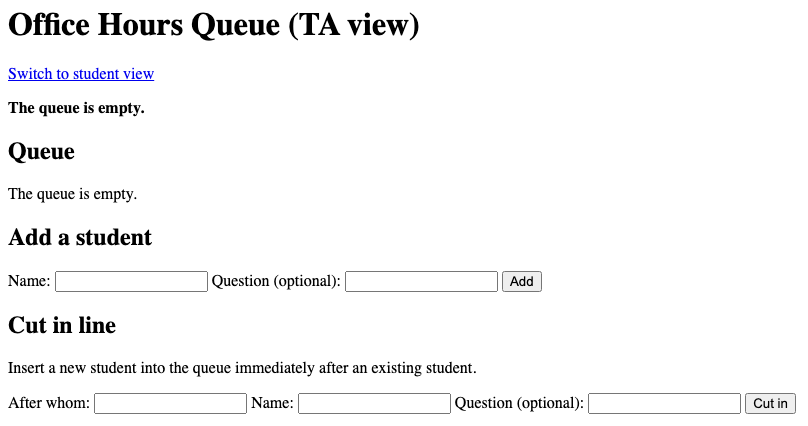
Pratika helps the remaining students. When she tries to help one more from an empty queue, the application shows a message that the queue is empty and continues working normally.
Correctness, code quality, and AI
The same correctness and code quality and AI guidelines from HW5 apply to this assignment. Make sure to follow them.
You do not need to write JUnit tests for the web application. Course staff will grade the web application by running it and trying it themselves.
Reflection
Submit a short text file called REFLECTION.txt in the top level directory answering the questions
below.
- Briefly describe what changes, if any, you needed to make to your HW5 data structures in order to meet the O(log n) requirement.
- If you changed data structures from HW5, briefly describe what other parts of your HW5 code had to be updated as a result.
- Did you use AI assistance on this assignment? If yes, which tool(s) and for which parts?
- Anything else you would like us to know about how this assignment went for you?
Submission
Submit the following files to the Homework 6 assignment on Gradescope:
OfficeHoursQueueImpl.javaOfficeHoursQueueSpecTest.javaOfficeHoursQueueImplTest.javaOfficeHoursWebApp.java- Your JTE template files
REFLECTION.txt
You can either upload these files individually on Gradescope, or run
make submission to bundle them into a submission.zip and upload that.
You should not modify or submit OfficeHoursQueue.java.
We have set up a Gradescope autograder that will compile and run your code. It will run your own tests on your own code and show you the results. It will also run one very basic staff test that makes sure you have implemented the zero-argument constructor for the queue ADT. Passing all the autograder tests does not guarantee your code is correct or high quality.