Reading 3 Discussion and Modern Frontends
CSE 331: Software Design and Implementation, Autumn 2026
Your job is to deliver code that you know works.
TODO
- Section tomorrow: exceptions and subtyping
- Homework 3: due Friday, November 6, 11:59pm
Reading 3 discussion
- Form groups of 3 or 4 with the people next to you
- Parnas and Brooks readers: raise a hand, then spread out
- Parnas 1972: hide each decision likely to change in a module
- Brooks 1986: no silver bullet; grow software by prototypes
- Lamport 2015: write the spec first; without one, every line is a patch
Share (5 minutes)
How much of the knowing happens before the first line of code,
and how much of it is worth writing down?
- Each of you, in turn:
- Which article you read, and its answer
- The question you wrote for the discussion
The argument, in this course's words
- Lamport: without a spec first, every line is a patch
- Brooks: no client can specify a system before trying one
- Parnas: decide first what is likely to change, and hide each in a module
- Put them on one program: the prototype that became the product
Argue (6 minutes): who is right?
- Lamport: every line of that prototype is a patch
- Brooks: there was no other way to learn what to build
- Parnas: which of its decisions will change, and is each one hidden?
- If your group agrees, argue the other side, or take a case:
- An AI splits $10 three ways, $3.33 each: where's the penny?
- HW2's roster: two right answers, and a test expecting one
- 95% of code needs only "a couple of prose sentences": which 5%?
Report (a few minutes)
- A couple of groups: what did you decide, and why?
Half sheet, question 1 (3 minutes)
- The names of the others in your group
- What changed in how much you'd write down before coding
- One new point, and the article or person it came from
The guestbook, where we left it
loadandposthand the server's messages toshowshowputs one<li>in the tree for each, and keeps nothing
10function show(messages) {
11  const list = document.getElementById("messages");
12  list.innerHTML = "";
13  for (const message of messages) {
14    const item = document.createElement("li");
15    item.textContent = message;
16    list.appendChild(item);
17  }
18}
A feature
- Show only the messages that start with what is typed
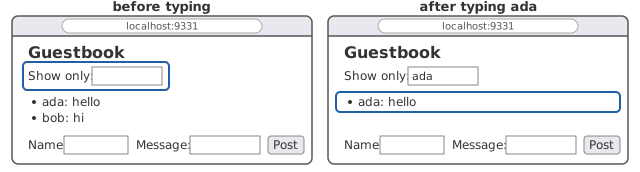
8Show only: <input id="only">- Where are the messages?
A filter, run on every keystroke
43function filter() {
44  const only = document.getElementById("only").value;
45  const list = document.getElementById("messages");
46  for (const item of list.querySelectorAll("li")) {
47    if (!item.textContent.startsWith(only)) {
48      list.removeChild(item);
49    }
50  }
51}
52
53document.getElementById("post").onclick = post;
54document.getElementById("only").oninput = filter;- Type
ada. What happens to bob's message?
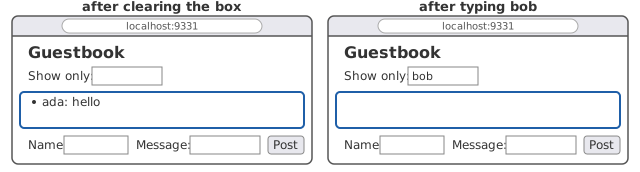
Now clear the box
- Predict: what comes back?
- Then type
bob: what does the list show?
Then reload
- Predict: what does the list show?
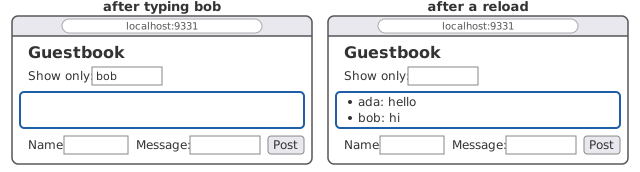
- Both come back, but only by asking the server again
Half sheet, question 2 (3 minutes)
- The first filter has a bug
- Which line loses bob's message, and why?
The page is a drawing of the data
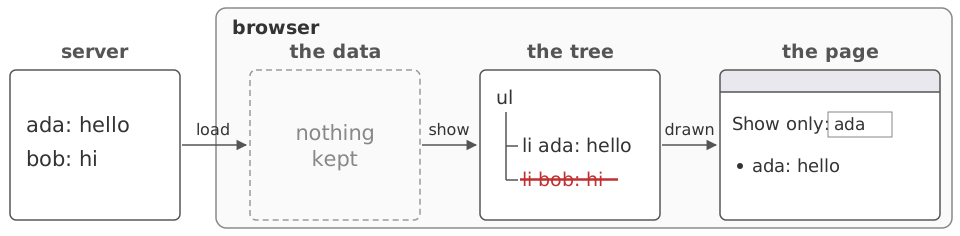
showdrew the tree from the messages, and kept nothing- Keep data only in the drawing, and you lose whatever you remove
What the program needs
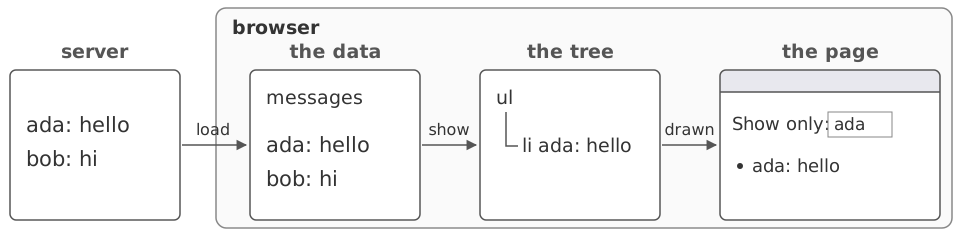
- Keep the messages in a variable, and draw the page from the variable
- Bob's message is still there, to draw again when the box changes
The data in a variable
18function show() {
19  const only = document.getElementById("only").value;
20  const list = document.getElementById("messages");
21  list.innerHTML = "";
22  for (const message of messages) {
23    if (message.startsWith(only)) {
24      const item = document.createElement("li");
25      item.textContent = message;
26      list.appendChild(item);
27    }
28  }
29}- Above
show, on line 13 of app.js:let messages = [];
The same three presses
- Line 58: every keystroke in the box now runs
show - Type
ada, clear the box, typebob: what does the list show?
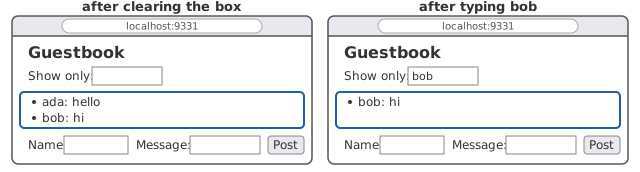
- Filtering changes what is drawn, never what is kept
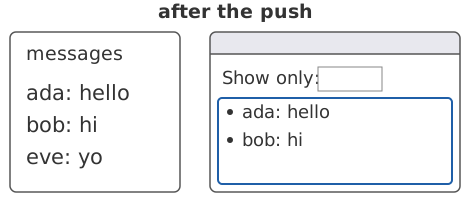
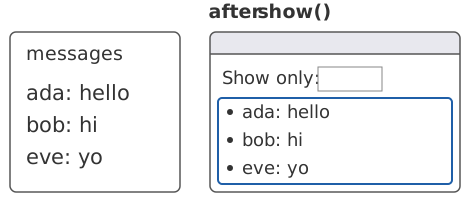
What keeps them the same?
- In the console:
messages.push("eve: yo"). The page?
> messages.push("eve: yo")
3
> show()
undefined
A claim about the variable and the page
The list on the page shows exactly the messages that start with the text in the filter box, which is all of them when the box is empty.
- app.js writes it in the comment above
let messages - The console's push made it false, and
show()made it true again - Between events only: a keystroke changes the box before
showruns
One function changes the data
33function update(sent) {
34  messages = sent;
35  show();
36}loadandposthand what the server sent toupdate- Only
updateassignsmessages, and it redraws - Assign
messagesand forgetshow, and the claim is false
The claim is a representation invariant
| Lecture 11's class | The guestbook |
|---|---|
| its fields | messages and the tree |
| its methods | the callbacks: load, post, show |
| the constructor | load's first run |
| true when no method runs | true between events |
Lecture 12: await cuts a function in two, so make the claim true before it
A framework keeps the invariant for you
- A framework is code that calls your code, as
HttpServercallshandle - React: a component is a function from the state to the page
- You write how the state is drawn, once
- Set the state, and React redraws
- Nobody calls
show, so nobody can forget to
- Nobody calls
The guestbook's list, as a component
9function Guestbook() {
10  const [messages, setMessages] = useState([]);
11  const [only, setOnly] = useState("");
12
13  async function load() {
14    const response = await fetch("/api/messages");
15    setMessages(await response.json());
16  }
17 useEffect(() => { load(); }, []);useStatereturns the state and its setter;=>writes a functionsetMessagesisupdatewith the redraw built in
What the framework asks in return
19const shown = messages.filter(
20  (message) => message.startsWith(only));
21return (
22  <div>
23    Show only: <input value={only}
24      onChange={(event) => setOnly(event.target.value)} />
25    <ul>
26      {shown.map((message, i) => <li key={i}>{message}</li>)}
27    </ul>
28  </div>
29);- The box's text is state too, wired both ways
Coming up
- Section Tuesday: exceptions and subtyping
- Wednesday: equality
- Friday: generics
- Homework 3: due Friday, November 6, 11:59pm
- Task 2: representation invariants, like today's
- Hand in your half sheet at the door