JavaScript in the Page
CSE 331: Software Design and Implementation, Autumn 2026
Your job is to deliver code that you know works.
TODO
- Section tomorrow: abstract data types
- Reading 3: due Friday, October 30, 11:59pm
The guestbook, step by step
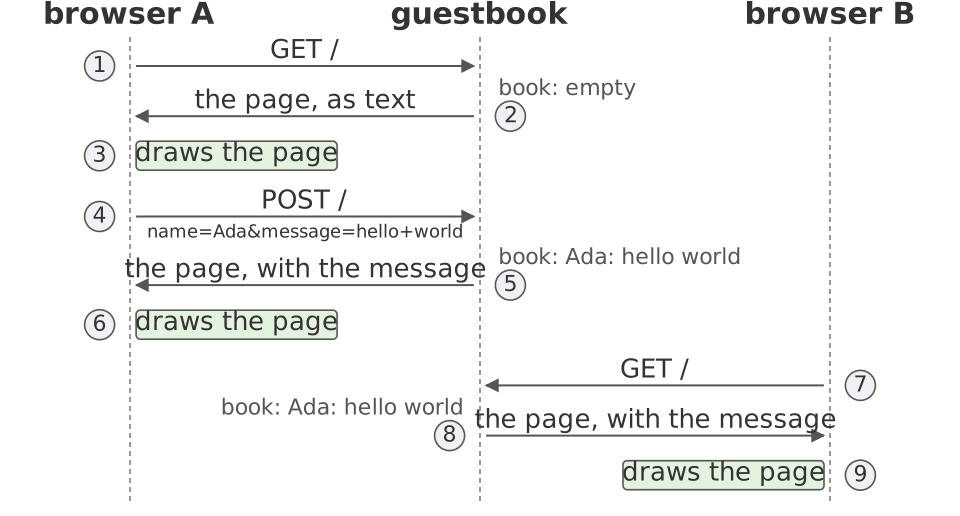
The guestbook so far
- The browser asks for the page:
GET / - The server builds the whole page and sends it
- The form posts:
POST /, and the server sends the whole page again - Every change you see is a new page from the server
The page is a tree
6<body>
7  <h1>Guestbook</h1>
8  <ul id="messages">
9  </ul>
10  Name: <input id="name">
11  Message: <input id="message">
12  <button id="post">Post</button>
13  <script src="app.js"></script>
14</body>
15</html>Each tag is a node, and the tags inside it are its children
The browser keeps the tree in memory and draws the page from it
A program in the page
6<body>
7  <h1>Guestbook</h1>
8  <ul id="messages">
9  </ul>
10  Name: <input id="name">
11  Message: <input id="message">
12  <button id="post">Post</button>
13  <script src="app.js"></script>
14</body>
15</html>
The browser asks the server for app.js, and runs it
Java on the server, JavaScript in the browser: two programs, two languages
One app, two programs
In the browser: app.js, JavaScript
- Draws the list
- Reads what you typed
- Asks for the messages, and posts one
- One copy per visitor
On the server: Guestbook.java, Java
- Keeps the book
- Sends the page and the program, as files
- Sends the messages, as JSON
- One copy for everyone
Between them, only HTTP: a request one way, a response back
The console
> document.getElementById("messages")
<ul id="messages">…</ul>
> document.getElementById("messages").innerHTML = "<li>hi</li>"
'<li>hi</li>'
The DOM: the page's tree, reachable from the program
Change the tree, and the browser redraws the page: no request was sent
show: put the messages on the page
8function show(messages) {
9  const list = document.getElementById("messages");
10  list.innerHTML = "";
11  for (const message of messages) {
12    const item = document.createElement("li");
13    item.textContent = message;
14    list.appendChild(item);
15  }
16}
messages is a list of strings: whoever calls show hands it in
Find the list by its id
Empty it
For each message, a new li, its text, then into the tree
load: ask the server
19async function load() {
20  const response = await fetch("/api/messages");
21  const messages = await response.json();
22  show(messages);
23}
fetch sends GET /api/messages: what will the server send back?
async, and two awaits. What does fetch return, if not the response?
What fetch returns
> fetch("/api/messages")
Promise {<pending>}
> const response = await fetch("/api/messages")
> response
Response {status: 200, …}
> response.json()
Promise {<pending>}
> await response.json()
['ada: hello']
A promise: the response, once it arrives
await waits for it, and gives the response
response.json() is a promise too: the body, read as JSON
A second await, and the list is in hand
await has one rule
3function load() {
4  const response = await fetch("/api/messages");
5  const messages = await response.json();
6  show(messages);
7}
SyntaxError: await is only valid in async functions
and the top level bodies of modules
Only inside a function declared async: the browser refuses the whole file
The server's side: files
46if (path.equals("/")) {
47    send(exchange, 200, "text/html",
48        Files.readAllBytes(Path.of("index.html")));
49} else if (path.equals("/app.js")) {
50    send(exchange, 200, "text/javascript",
51        Files.readAllBytes(Path.of("app.js")));
Two paths send files as they are on disk: the page, and its program
The server's side: data
52    } else if (path.equals("/api/messages")) {
53        if (method.equals("POST")) {
54            post(exchange);
55        }
56        send(exchange, 200, "application/json",
57            json(book.messages()).getBytes(UTF_8));
58    } else {
59        send(exchange, 404, "text/plain",
60            "not found".getBytes(UTF_8));
61    }
62}
One path is for the program: /api/messages
A POST adds the message first, then gets the same answer as a GET
The answer is the messages as JSON, not a page
Any other path: 404
JSON
88private static String json(List<String> strings) {
89    List<String> quoted = new ArrayList<String>();
90    for (String s : strings) {
91        quoted.add("\"" + s.replace("\\", "\\\\")
92            .replace("\"", "\\\"").replace("\n", "\\n") + "\"");
93    }
94    return "[" + String.join(", ", quoted) + "]";
95}
$ curl http://localhost:9331/api/messages ["ada: hello"]
Quotes, backslashes, and newlines escaped, so the text parses
Text that the browser reads back into a list: response.json()
Let's run it
$ javac Guestbook.java
$ java Guestbook
Serving at http://localhost:9331/
- Then open the page: how many requests does one visit send?
Visit it
$ java Guestbook
Serving at http://localhost:9331/
GET /
GET /app.js
GET /api/messages
GET /favicon.ico
Four: the page, the program, the program's own request, and the icon
The icon gets 404 now, since the server knows three paths and no more
Half sheet, question 1 (3 minutes)
- 1. JavaScript runs one thing at a time
- Yet while
loadwaits for the server, a click on Post runspost - The server is a loop: wait for a request, handle it, wait again
- What is the browser doing while
loadwaits? When doesloadgo on?
- Yet while
The browser's loop
- The browser runs a loop, as
HttpServerdoes- Wait for an event (a click, a response), then run its callback
awaitcuts a function in two- The part before runs now, then hands the thread back
- The part after runs later, as a callback, when the promise is kept
- Between the halves, the loop runs what else is ready: a click's
post - One thing at a time, and still never stuck on the network
await cuts a function in two
load runs to its await, sends its request, and hands the thread back
A click, with the server slow: post runs to its await
The response arrives: the rest of load runs, and draws the list
Then the rest of post. Whichever promise is kept first runs first
One possible run. The events could come in another order: another run
post: send the message
26async function post() {
27  const fields = new URLSearchParams();
28  fields.append("name", document.getElementById("name").value);
29  fields.append("message", document.getElementById("message").value);
30  const response = await fetch("/api/messages", {
31    method: "POST",
32    body: fields,
33  });
34  const messages = await response.json();
35  show(messages);
36  document.getElementById("message").value = "";
37}
The fields, as a form would have sent them
fetch with a second argument: a POST, with a body
The messages come back as JSON, and show redraws the list: load's last two lines
Post it
39document.getElementById("post").onclick = post;
40load();
GET /favicon.ico POST /api/messages GET / GET /app.js GET /api/messages
Line 39 made post the click's callback. The page changed, and no page was sent
Now refresh. With the form, a refresh posted the message again
A refresh asks for the page, the program, and the messages. It posts nothing
textContent, not innerHTML
11for (const message of messages) {
12  const item = document.createElement("li");
13  item.textContent = message;13  item.innerHTML = message;
14  list.appendChild(item);
15}
innerHTML parses the message as HTML: <b>hi</b> comes out bold
textContent shows the characters as typed: escaping, for free
Half sheet, question 2 (3 minutes)
- 2. The guestbook is now two programs, on two machines
- Line 20 of
app.jssends a request - Which program is the client, and which the implementation?
- What is the specification between them, and where is it written?
- Line 20 of
Who is the client?
15* Four kinds of request reach the program:
16*   GET /               the page, index.html, as it is on disk
17*   GET /app.js         the page's program, app.js, as it is on disk
18*   GET /api/messages   the messages posted so far, as JSON
19*   POST /api/messages  adds the message the fields send, then the
20*                       messages posted so far, as JSON
app.js is the client; this comment is the specification it calls against
The client sees only what the specification promises: JSON, never the book
Change the JSON's shape and the client breaks, and no compiler says so
1995, and now
- Who draws the page: the server did; now the program in the page
- What travels: whole pages; now data, as JSON
- A refresh: posted again; now asks again
- How many programs: one; now two, in two languages
- What can happen next: one thing; now any event, in any order
Coming up
- Wednesday: exceptions
- Reading 3: due Friday, October 30, 11:59pm
- Hand in your half sheet at the door