{
"cells": [
{
"cell_type": "markdown",
"id": "95f07f9b",
"metadata": {},
"source": [
"# Lesson 16.5: Algorithmic Efficiency"
]
},
{
"cell_type": "markdown",
"id": "c3a43ab2",
"metadata": {},
"source": [
"## Objectives\n",
"\n",
"In this bonus lesson, we'll learn about the following concepts:\n",
"\n",
"* The concept of efficiency (namely in terms of time)\n",
"* How to analyze efficiency\n",
"* Big-O run-time"
]
},
{
"cell_type": "markdown",
"id": "3771744b",
"metadata": {},
"source": [
"## What Does Efficiency Mean?\n",
"\n",
"Programmers spend a lot of time talking about \"efficiency\", but what does that actually mean?\n",
"\n",
"**Efficiency** in programming generally refers to how effectively an algorithm uses time and space. Typically, efficiency is measured on two axes--- **time complexity** (how long the algorithm takes) and **space complexity** (how much memory the algorithm uses). Time complexity is measured by the number of instructions or operations that an algorithm has; whereas space complexity is a combination of input size and auxiliary space (memory taken up by intermediate data structures or variables)."
]
},
{
"cell_type": "markdown",
"id": "f1d33441",
"metadata": {},
"source": [
"## Measuring Time Efficiency\n",
"\n",
"Consider the following two methods to compute the sum of the numbers from 1 to some input `n`. (For readability, we've left out type annotations and documentation for now.)"
]
},
{
"cell_type": "code",
"execution_count": null,
"id": "0464ba51",
"metadata": {
"vscode": {
"languageId": "plaintext"
}
},
"outputs": [],
"source": [
"def sum1(n):\n",
" total = 0\n",
" for i in range(n + 1):\n",
" total += i\n",
" return total\n",
"\n",
"def sum2(n):\n",
" return n * (n + 1) // 2\n",
"\n",
"print(sum1(10))\n",
"print(sum2(10))"
]
},
{
"cell_type": "markdown",
"id": "a24e14be",
"metadata": {},
"source": [
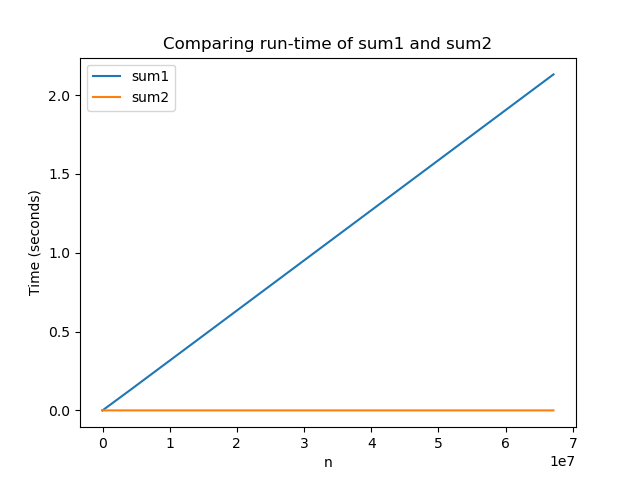
"The second one uses a clever formula discovered by Gauss that computes the sum of the numbers from 1 to n using the formula \n",
"\n",
"$$Sum(n) = \\frac{n(n+1)}{2}$$\n",
"\n",
"To see which one is more \"efficient\" in practice, we have to first tate what resources we care about before deciding which is more efficient. As we said before, the most common resource to worry about is time (if we ever omit this, you should assume we are discussing time). To answer which one is more efficient, we might actually try to write code to time how long it takes them to finish. \n",
"\n",
"The details of the snippet below are not important, but we could try timing each implementation by using the `time` package that is built into Python. `time` has a method called `time` that reports the number of seconds since the \"epoch\" (midnight on Jan 1, 1970 in UTC time). We can then figure out how much time each method call takes."
]
},
{
"cell_type": "code",
"execution_count": null,
"id": "49ec9225",
"metadata": {
"vscode": {
"languageId": "plaintext"
}
},
"outputs": [],
"source": [
"import time\n",
"\n",
"\n",
"def sum1(n):\n",
" total = 0\n",
" for i in range(n + 1):\n",
" total += i\n",
" return total\n",
"\n",
"\n",
"def sum2(n):\n",
" return n * (n + 1) // 2\n",
"\n",
"\n",
"t0 = time.time()\n",
"sum1(10)\n",
"t1 = time.time()\n",
"sum2(10)\n",
"t2 = time.time()\n",
"\n",
"\n",
"print(f'sum1 took {t1 - t0} seconds')\n",
"print(f'sum2 took {t2 - t1} seconds')"
]
},
{
"cell_type": "markdown",
"id": "2322072b",
"metadata": {},
"source": [
"The first thing to notice is if you run this code block multiple times, we get different time results! The reason for this is that timing has a lot of uncertainty built into it. One of the biggest sources of uncertainty comes from a trick your computer is playing on you: it makes you think it's able to run many programs (Chrome, Spotify, your OS itself) at once when in reality it is quickly switching between them and running them in sequence. This comes from the fact that your computer can really only \"run\" one thing at a time for each processor it has (this is an oversimplification, but it works well enough). The result of this fact means that measuring time will be inexact because it depends on how frequently your computer switches away from the Python program to work on something more important!\n",
"\n",
"However, timing can still give us a general idea of how fast one program is versus another (we can be more confident if we run multiple times and see the same trend). It looks like `sum1` is just a little slower than `sum2` in most runs of the code cell above.\n",
"\n",
"Let's explore a more reliable way of measuring efficiency besides measuring time."
]
},
{
"cell_type": "markdown",
"id": "271df818",
"metadata": {},
"source": [
"## Counting Steps\n",
"\n",
"Instead of trying to measure time, we will instead count \"steps\" the program takes. This is a very inexact approximation and will feel weird at first but is a very helpful exercise.\n",
"\n",
"To get an intuition for this, try clicking the \"next\" button through this [PythonTutor example](https://pythontutor.com/visualize.html#code=def%20sum1%28n%29%3A%0A%20%20%20%20total%20%3D%200%0A%20%20%20%20for%20i%20in%20range%28n%20%2B%201%29%3A%0A%20%20%20%20%20%20%20%20total%20%2B%3D%20i%0A%20%20%20%20return%20total%0A%20%20%20%20%0A%0Adef%20sum2%28n%29%3A%0A%20%20%20%20return%20n%20*%20%28n%20%2B%201%29%20//%202%0A%20%20%20%20%0A%0Aprint%28sum1%2810%29%29%0Aprint%28sum2%2810%29%29&cumulative=false&curInstr=0&heapPrimitives=nevernest&mode=display&origin=opt-frontend.js&py=3&rawInputLstJSON=%5B%5D&textReferences=false) shown with `sum1` and `sum2`.\n",
"\n",
"\n",
"\n",
"Which of the methods do you have to press \"next\" on more often? It seems like you have to press \"next\" twice for every iteration of the loop in sum1 while for sum2, you can just press \"next\" twice overall (no matter how big n is).\n",
"\n",
"This idea of how many times you have to press \"next\" in a tool like PythonTutor is exactly the idea for how many \"steps\" it takes to run a function. We will use these simplified rules to determine the number of steps for a program:\n",
"\n",
"* A \"simple\" line of code takes one step to run. Some common simple lines of code are:\n",
" * print statements\n",
" * Simple arithmetic (e.g. 1 + 2 * 3)\n",
" * Variable assignment or access (e.g. x = 4, 1 + x)\n",
" * List or dictionary accesses (e.g. l[0], l[1] = 4, 'key' in d).\n",
"* The number of steps for a sequence of lines is the sum of the steps for each line. By a sequence of lines, we mean something like the code block below (which would have a total of 2 steps)\n",
"* The number of steps to execute a loop will be the number of times that loop runs multiplied by the number of steps inside its body. \n",
"* The number of steps in a function is just the sum of all the steps of the code in its body. The number of steps for a function is the number of steps made whenever that function is called (e.g if a function has 100 steps in it and is called twice, that is 200 steps total).\n",
"\n",
"Here are some examples:"
]
},
{
"cell_type": "code",
"execution_count": null,
"id": "b53761a6",
"metadata": {
"vscode": {
"languageId": "plaintext"
}
},
"outputs": [],
"source": [
"# Total: 1 step\n",
"\n",
"print(1 + 2 * 3 / 2 % 4) # 1 step"
]
},
{
"cell_type": "code",
"execution_count": null,
"id": "f8ea8187",
"metadata": {
"vscode": {
"languageId": "plaintext"
}
},
"outputs": [],
"source": [
"# Total: 4 steps \n",
"\n",
"print(1 + 2) # 1 step\n",
"print('hello') # 1 step\n",
"x = 14 - 2 # 1 step\n",
"y = x ** 2 # 1 step "
]
},
{
"cell_type": "code",
"execution_count": null,
"id": "7614a0de",
"metadata": {
"vscode": {
"languageId": "plaintext"
}
},
"outputs": [],
"source": [
"# Total: 51 steps\n",
"\n",
"print('Starting loop') # 1 step\n",
"\n",
"# Loop body has a total of 1 step. It runs 30 times for a total of 30\n",
"for i in range(30): # Runs 30 times\n",
" print(i) # - 1 step\n",
" \n",
"# Loop body has a total of 2 steps. It runs 10 times for a total of 20\n",
"for i in range(10): # Runs 10 times\n",
" print(i) # - 1 step\n",
" print(i ** 2) # - 1 step"
]
},
{
"cell_type": "code",
"execution_count": null,
"id": "ae49be3b",
"metadata": {
"vscode": {
"languageId": "plaintext"
}
},
"outputs": [],
"source": [
"# Total: 521 steps\n",
"\n",
"print('Starting loop') # 1 step\n",
"\n",
"# Loop body has a total of 26 steps. It runs 20 times for a total of 520\n",
"for i in range(20): # Runs 20 times\n",
" print(i) # - 1 step\n",
"\n",
" # Loop body has a total of 1 step. \n",
" # It runs 25 times for total of 25.\n",
" for j in range(25): # - Runs 25 times\n",
" print(i * j) # - 1 step"
]
},
{
"cell_type": "markdown",
"id": "16ee7090",
"metadata": {},
"source": [
"**Food for thought:** How would you explain the difference in the number of steps between consecutive for loops vs. nested for loops?"
]
},
{
"cell_type": "markdown",
"id": "2d810b0a",
"metadata": {},
"source": [
"## Big-O\n",
"\n",
"Let's revisit our two sum functions, now annotated with step-counting:"
]
},
{
"cell_type": "code",
"execution_count": null,
"id": "a4fb933d",
"metadata": {
"vscode": {
"languageId": "plaintext"
}
},
"outputs": [],
"source": [
"def sum1(n): # Total: n + 3 steps\n",
" total = 0 # 1 step\n",
" for i in range(n + 1): # Runs n + 1 times, for a total of n + 1\n",
" total += i # 1 step\n",
" return total # 1 step\n",
"\n",
"\n",
"def sum2(n): # Total: 1 step\n",
" return n * (n + 1) // 2 # 1 step"
]
},
{
"cell_type": "markdown",
"id": "158f8f96",
"metadata": {},
"source": [
"So with this counting rule, `sum1(n)` runs in `n+3` steps while `sum2(n)` always runs in 1 step!\n",
"\n",
"Amazingly, this weird counting rule matches the graph that we produced earlier with timing code! We saw that sum1 grew proportionally to its input n while sum2 always seemed about the same. With these counting rules, it's easier to come to that conclusion without having to go through the process of actually timing the code!\n",
"\n",
""
]
},
{
"cell_type": "markdown",
"id": "a74c7890",
"metadata": {},
"source": [
"### Reporting Steps\n",
"\n",
"Since everything we've done with counting steps is a fairly loose approximation, we don't really want to promise that the relationship for the run time is something exactly like `n + 3`. Instead, we want to report that there is some dependence on `n` for the run-time so that we get the idea of how the function scales, without spending too much time quibbling over whether it's truly `n + 3` or `n + 2`.\n",
"\n",
"> This is a lot like the concept of \"significant digits\" in science classes! We should only report numbers that we have the accuracy to measure well\n",
"\n",
"Instead, computer scientists generally drop any constants or low-order terms from the expression `n + 3` and just report that it \"grows like `n`.\" The notation we use is called Big-O notation. Instead of reporting `n + 3` as the growth of steps, we instead report $\\mathcal{O}(n)$. This means that the growth is proportional to `n` but we aren't saying the exact number of steps.\n",
"\n",
"Even though it feels weird to throw away things like constants and low-order terms, the Big-O notation is helpful because it lets us communicate how our algorithms scale very simply. By scale, we mean quantifying approximately how much longer a program will run if you were to increase its input size. For example, if I told you an algorithm was $\\mathcal{O}(n^2)$, you would know that if I were to double the input size $n$, that the program would take about 4x as long to run (because 2x input squared is 4x)!\n",
"\n",
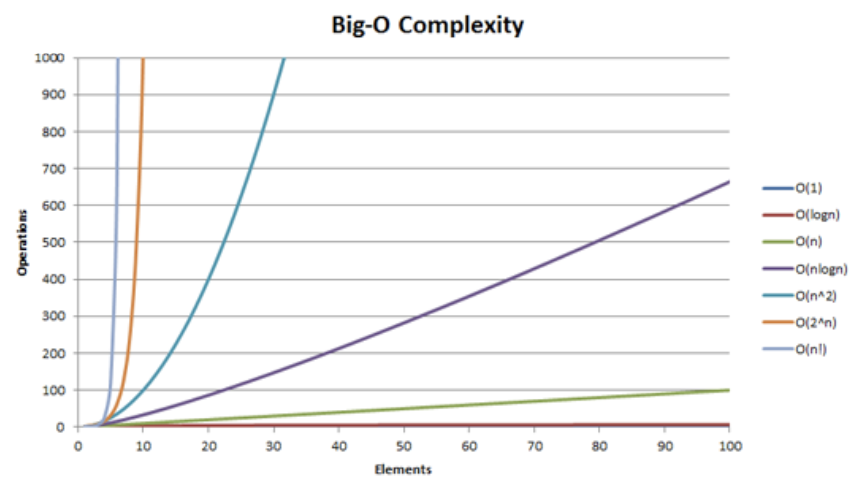
"Computer scientists use Big-O notation so much, we consider algorithms by which complexity class they are in. The word complexity is a computer science term for Big-O run-time. Here are some common complexity classes\n",
"\n",
"* Constant: $\\mathcal{O}(1)$\n",
" * If $n$ doubles, run-time stays the same. Constant-time operations don't depend on $n$ at all!\n",
"* Logarithmic: $\\mathcal{O}(\\log(n))$\n",
" * Grows very slowly. If you double , then the runtime increases slightly, but not too much.\n",
"* Linear: $\\mathcal{O}(n)$\n",
" * If $n$ doubles, run-time doubles\n",
"* Quadratic: $\\mathcal{O}(n^2)$\n",
" * If $n$ doubles, run-time quadruples\n",
"* Cubic: $\\mathcal{O}(n^3)$\n",
" * If $n$ doubles, run-time multiplies by 8\n",
"* Exponential: $\\mathcal{O}(2^n)$\n",
" * Not good... Even for some moderately sized $n$, say around 200, $2^n$ is larger than the number of atoms in the observable universe!\n",
"\n",
"It sometimes helps to compare how these things grow pictorially. Below is a graph showing the approximate number of steps for each complexity class as $n$ increases. Notice which ones grow slowly and which ones shoot off the graph for even small $n \\approx 10$.\n",
"\n",
""
]
},
{
"cell_type": "markdown",
"id": "20b7c04a",
"metadata": {},
"source": [
"### Data Structures\n",
"\n",
"Understanding complexity is important so that you can more easily analyze how your algorithm and code will scale. Another important application of this knowledge is to understand code efficiency when using data structures like `list`, `set`, and `dict`.\n",
"\n",
"For example, consider a list with $n$ elements in it. It is useful to know that if you append a value to the list, this will take $\\mathcal{O}(1)$ time; this means it's always a constant-time operation no matter how many elements are in it.\n",
"\n",
"Not every method provided by the list takes the same amount of time though. For example, to run `x in l` where `l` is a `list`, how much time would that take? You might notice it depends on if `x` is in `l` and if it is, where in `l` it is found. Internally, `in` is implemented like the following code snippet.\n",
"\n",
"```python\n",
"def __contains__(self, x):\n",
" \"\"\"\n",
" Example showing how x in l might be implemented\n",
" \"\"\"\n",
" for val in self._values:\n",
" if val == x:\n",
" return True\n",
" return False\n",
"```\n",
"\n",
"**Food for thought:** Try annotating this code snippet with step counts. What do you find?\n",
"\n",
"> The runtime depends on where `x` is in the `list`. In the worst-case scenario (which is how we conceptualize Big-O), `x` might be at the very end of the `list`, and we will have had to traverse `n` elements to find it! As such, we describe the `in` operator for a `list` as a $\\mathcal{O}(n)$ operation.\n",
"\n",
"With a `set` or `dictionary`, however, almost all of the operations for these data structures (e.g., adding values, removing values, seeing if something is in the set/dict) are actually constant time ($\\mathcal{O}(1)$)! That means no matter how much data is stored in them, they can always answer questions like \"is this value a key in this dict\" in constant time. To do this, they use this special trick called \"hashing.\" How hashing works is beyond the scope of this course, but you can read more about it in your own time! It's related to why `set`s and `dict` keys both can't take duplicates."
]
},
{
"cell_type": "markdown",
"id": "ec3a58d5",
"metadata": {},
"source": [
"## ⏸️ Pause and 🧠 Think\n",
"\n",
"Take a moment to review the following concepts and reflect on your own understanding. A good temperature check for your understanding is asking yourself whether you might be able to explain these concepts to a friend outside of this class.\n",
"\n",
"Here's what we covered in this lesson:\n",
"\n",
"* Conceptualizing efficiency\n",
"* Timing code vs. counting steps\n",
"* Big-O\n",
"\n",
"Here are some other guiding exercises and questions to help you reflect on what you've seen so far:\n",
"\n",
"1. In your own words, write a few sentences summarizing what you learned in this lesson.\n",
"2. What did you find challenging in this lesson? Come up with some questions you might ask your peers or the course staff to help you better understand that concept.\n",
"3. What was familiar about what you saw in this lesson? How might you relate it to things you have learned before?\n",
"4. Throughout the lesson, there were a few **Food for thought** questions. Try exploring one or more of them and see what you find.\n",
"\n",
"## Canvas Quiz\n",
"\n",
"*This is a bonus lesson that has no associated Canvas Quiz.*"
]
}
],
"metadata": {
"language_info": {
"name": "python"
}
},
"nbformat": 4,
"nbformat_minor": 5
}