Useful CSE 163 Resources
Learning objective: Read, process, and group CSV data to compute descriptive statistics with and without Pandas.
You can find the starter code here. Make sure to extract (unzip) the contents anywhere on your computer. If you are working in VS Code, navigate to File | Open or Open Folder, then select the hw3 folder.
-
hw3_creative.ipynbis the notebook for you to complete the Creative Component -
hw3_manual.pyis the file for you to put your implementations for solving each problem in the Technical Component without Pandas. -
hw3_pandas.pyis the file for you to put your implementations for solving each problem in the Technical Component with Pandas. -
hw3_test.pyis the file for you to put your own tests. The Run button executes this program. -
cse163_utils.pyis a helper file that has code to help you test your code. -
pokemon_box.csvis a large CSV file that stores information about Pokemon. -
pokemon_missing.csvis a small CSV that is used for the Creative Component. -
pokemon_test.csvis a very small CSV file that stores information about pokemon used for the example cases. -
PandasWordbank.ipynbis a Jupyter Notebook that reviews all of the Pandas features needed for this assessment. Feel free to edit this Jupyter Notebook to prototype ideas and explore the data. -
pets.csvis the tiny example dataset used only by thePandasWordbank.ipynb.
Context
In the Pokémon video game series, the player catches pokemon, fictional creatures trained to battle each other as part of a sport franchise. Pokémon exerted significant cultural influence on people who grew up in the late 1990s and early 2000s not only in its country of origin, Japan, but also around the world. More recently, Pokémon Go became a viral hit as hundreds of millions of people played the augmented-reality game at its peak during the summer of 2016. You do not need to understand the details of Pokémon or need to have played the game to do the assignment. All you need to understand is the statistics we provide in our dataset about each pokemon.
The pokemon_box.csv file stores some imagined data about a player’s pokemon in the following format.
| id | name | level | personality | type | weakness | atk | def | hp | stage |
|---|---|---|---|---|---|---|---|---|---|
| 1 | Bulbasaur | 12 | Jolly | Grass | Fire | 45 | 50 | 112 | 1 |
-
idis a unique numeric identifier corresponding to the species of a pokemon. All pokemon of the same species share the sameid. -
nameis the name of the species of pokemon, such as Bulbasaur. -
levelis the integer level of the pokemon. -
personalityis a one-word string describing the personality of the pokemon, such as Jolly. -
typeis a one-word string describing the type of the pokemon, such as Grass. -
weaknessis the enemy type that this pokemon is weak toward. Bulbasaur is weak to fire-type pokemon. -
atk,def,hpare integers that indicate the attack power, defense power, and hit points of the pokemon. -
stageis an integer that indicates the particular developmental stage of the pokemon.
In the Charmander species, Charmander begins at stage 1, evolves into a Charmeleon at stage 2, and finally evolves into Charizard at stage 3.
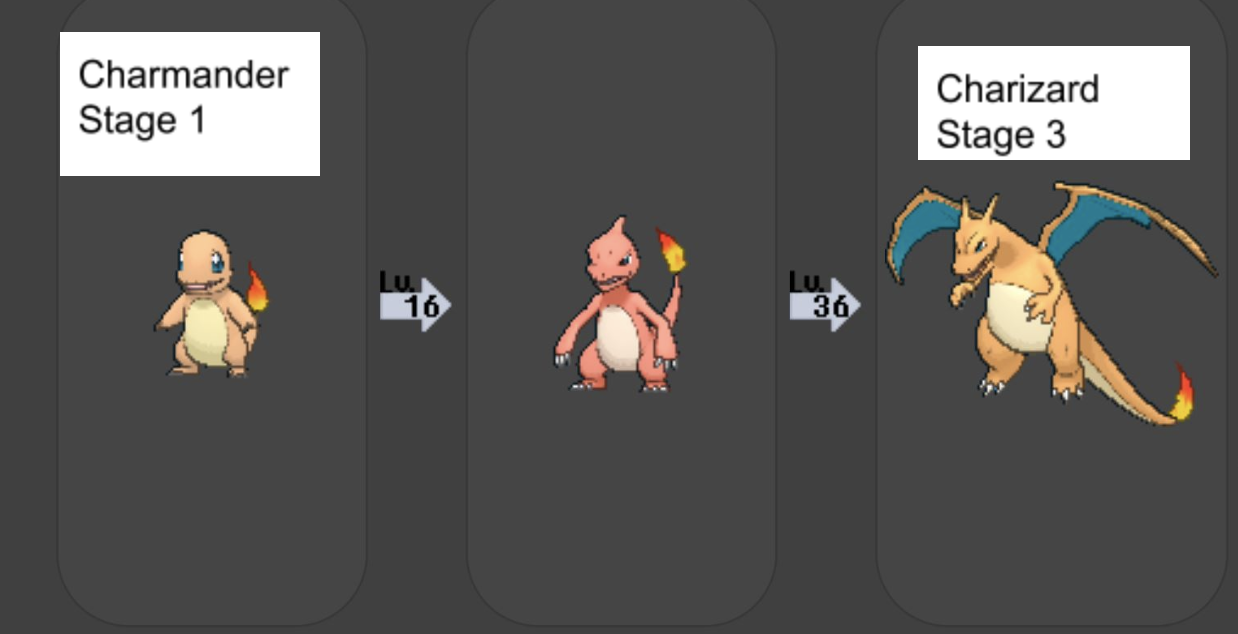
The problems in this assessment focus on providing descriptive statistics for summarizing the pokemon dataset, such as computing the mean or count of a certain column. You will be asked to solve each problem in two ways.
Technical Component
-
In
hw3_manual.py, solve each problem without the Pandas library by utilizing only built-in data structures and Python math functions. Data in thePokemonManualclass should be stored as a list ofPokemon–essentially a list of dictionaries. -
In
hw3_pandas.py, solve each problem with the Pandas library (as well as some built-in data structures) functions as necessary. Data in thePokemonPandasclass should be stored as a PandasDataFrame. Note that this file should not include any loops (for,while), but may include conditionals (if/else).
Here are some examples about how to show how the methods that you will implement can be called– you don’t need to add them to your files:
Manual methods:
analyzer = PokemonManual('pokemon_box.csv')

print('Number of species:', analyzer.species_count())
print('Highest level pokemon:', analyzer.max_level())
print('Low-level Pokemon:', analyzer.filter_range(1, 9))
print('Average attack for fire types:', analyzer.mean_attack_for_type('fire'))
Pandas methods:
analyzer = PokemonPandas('pokemon_box.csv')

print('Number of species:', analyzer.species_count())
print('Highest level pokemon:', analyzer.max_level())
print('Low-level Pokemon:',  analyzer.filter_range(1, 9))
print('Average attack for fire types:', analyzer.mean_attack_for_type('fire'))
Assume the data is never empty (there’s at least one pokemon) and that there’s no missing data (each pokemon has every attribute). For __init__, you should note this assumption in your docstrings, and do not validate that the input data is not empty.
Note
Canonically, Pokémon cannot have an attack stat of 0. For this assessment, however, you should NOT make that assumption.
Hint
Remember to use the PandasWordbank.ipynb Jupyter Notebook to explore the data and work in a more interactive environment. You might even prefer writing all of your code in the notebook and periodically transferring functions over to your submission files to run the automated checks.
__init__
For both classes, you will need to read in the dataset and store it as a private field. The initializer does not need a test.
-
To initialize the dataset for the
PokemonManualclass,cse163_utils.pydefines aparsefunction that takes a filename and returns the dataset as a list of dictionaries. The type associated to each dictionary is defined asPokemonincse163_utils.pyand should be used for your type annotations.Here is an example of calling
parse.>>> dataset: list[Pokemon] = parse('pokemon_box.csv') >>> print(dataset[0]) # first Pokemon in the dataset {'id': 53, 'name': 'Persian', 'level': 40, ...} -
To initialize the dataset for the
PokemonPandasclass, callpd.read_csvto get the dataset as aDataFrame.Here is an example of calling
read_csv.>>> import pandas as pd >>> dataset: pd.DataFrame = pd.read_csv('pokemon_box.csv')
Info
Just like above, to add a type annotation for a DataFrame field, use the type pd.DataFrame (assuming pandas is imported as pd).
species_count
Task: In the PokemonManual class of hw3_manual.py, write a method species_count that uses your stored pokemon dataset to return the number of unique pokemon species in the dataset as determined by the name attribute without using Pandas.
For the pokemon_test.csv file, .species_count() should return 3.
Task: In the PokemonPandas class of hw3_pandas.py, write the same method using Pandas. Recall, this method deals with a Pandas DataFrame rather a list of dictionaries.
Task: Write in hw3_test.py one or more test functions that call species_count with some CSV files and compares the output of the program with the expected value using assert. In addition to the pokemon_test.csv file, add one additional test case for both the manual and pandas implementation by creating your own CSV file.
max_level
Task: In the PokemonManual class of hw3_manual.py write a method max_level that that uses your stored pokemon dataset to return a 2-element tuple of the (name, level) of the pokemon with the highest level in the dataset. If there is more than one pokemon with the highest level, return the pokemon that appears first in the file. Consider how to address this in your docstrings and in your tests.
For the pokemon_test.csv file, .max_level() should return the 2-element tuple, ('Lapras', 72).
Task: In the PokemonPandas class of hw3_pandas.py write the same method using Pandas. Recall that this function will interact with a Pandas DataFrame rather than a list of dictionaries.
Task: Write in hw3_test.py one or more test functions that call max_level with some CSV files and compares the output of the program with the expected value using assert. In addition to the pokemon_test.csv file, add one additional test case for both the manual and pandas implementation by creating your own CSV file.
filter_range
Task: In the PokemonManual class of hw3_manual.py, write a method filter_range that uses your stores pokemon dataset and takes two integer parameters: a lower bound (inclusive) and upper bound (exclusive). The method returns a list of the names of pokemon whose level fall within the bounds in the same order that they appear in the dataset. Be sure to make note of the ordering in your docstrings.
For the pokemon_test.csv file, .filter_range(35, 72) should return ['Arcanine', 'Arcanine', 'Starmie']. Note that Lapras is not included because the upper bound is exclusive of Lapras, which is exactly level 72.
Task: In the PokemonPandas class of hw3_pandas.py, write the same method using Pandas. Recall that this function will interact with a Pandas DataFrame rather than a list of dictionaries. To convert a Pandas Series to a list, use the built-in list function.
For example:
# data is a DataFrame storing following info:
# name,age,species
# Fido,4,dog
# Meowrty,6,cat
# Chester,1,dog
# Phil,1,axolotl
names = data['name']  # Series
list(names)  # ['Fido', 'Meowrty', 'Chester', 'Phil']
row = data.loc[1]  # Series
list(row)  # ['Meowrty', 6, 'cat']
Task: Write in hw3_test.py one or more test functions that call filter_range with some CSV files and compares the output of the program with the expected value using assert. In addition to the pokemon_test.csv file, add one additional test case for both the manual and pandas implementation by creating your own CSV file.
mean_attack_for_type
Task: In the PokemonManual class of hw3_manual.py, write a method mean_attack_for_type that uses your stored pokemon dataset and takes a str parameter representing the pokemon type. The method returns the average atk for all the pokemon in the dataset with the given type. If there are no pokemon of the given type, return None.
For the pokemon_test.csv file, .mean_attack_for_type('fire') should return 47.5.
Task: In the PokemonPandas class of hw3_pandas.py, write the same method using Pandas. Recall that this function will interact with a Pandas DataFrame rather than a list of dictionaries.
Task: Write in hw3_test.py one or more test functions that call mean_attack_for_type with some CSV files and compares the output of the program with the expected value using assert. In addition to the pokemon_test.csv file, add one additional test case for both the manual and pandas implementation by creating your own CSV file.
Creative Component: Pokemon Sum and Min
In the technical component, you were working with a full CSV of Pokemon stats. However, while we were preparing a second CSV for you in the creative component, the staff were attacked by a Charizard which resulted in some missing data! We need your help to fill in these values!
There are five “missing” values in pokemon_missing.csv. In this creative component, use pandas functions to fill in two of them. We are trying to have the most likely and accurate measures, so this means we can’t just fill in random values. You will be able to use the rest of the data to inform your decision for what to use as a fill-in value, and how to do this. You may refer to the functions in PandasWordbank.ipynb for ideas.
Here’s a suggested workflow:
- Identify the 2 values you are going to fill in.
- Explore the data to inform your choice of fill-in value.
- Use
pandasfunctions to determine the fill-in value. - Update the DataFrame with these values, likely via
.loc
Requirements
In the provided code cells, use at least 2 distinct pandas functions to determine which values you will fill in. This means that each value must use a different pandas function! Then, explain your process and justify why you are using this particular function for that imputation.
As an example, you might choose to fill in one of the values using the max of some other set of values. You should tell us why you want to use the max, what values you are finding the max over, and how they relate to the missing value.
You are free to choose which functions you use for each missing value, but your solution must be presented as a fully documented and type-annotated function. You are not responsible for testing with assert statements in this part of the THA, but you should show us the result after you have filled in your missing values by directly calling your function.
Testing!!!
For the technical component
As with THA1, you’ll also check your solutions by adding tests to hw3_test.py using assert statements.
-
Create your own testing CSV file by pressing the + icon in the editor and selecting New file. When specifying file names in your own IDE or on Ed, use absolute paths, such as
/pokemon_test.csv. When you are submitting to Gradescope, make sure to update these to be relative paths, such aspokemon_test.csv. (This ensures that the Gradescope tests run correctly.) Do not use thepokemon_box.csvfile in your own test cases. The file is too large to come up with the correct answer on your own—it’s not valid to run your code and then paste it as the expected output! -
Write at least one test function for each problem and give it a descriptive name that indicates the method being tested, such as
test_species_count. One test function per problem is fine since both ways of solving the problem should compute the same result. In addition to the providedpokemon_test.csvexample, add one additional test case for each problem (both manual andpandasimplementation) using your own data.
Note
Do not use the pokemon_box.csv file in your own test cases. The file is too large to come up with the correct answer on your own—it’s not valid to run your code and then paste it as the expected output.
For the creative component
You are welcome, but not required to use assert statements to test your two functions for the creative component. Make sure to show the result of filling in the missing value for each function by calling it on the pokemon_missing dataset and showing the result in your cell output.
Quality
Assessment submissions should pass these checks: flake8, and code quality guidelines. The code quality guidelines are very thorough. For this assessment, the most relevant rules can be found in these sections (new sections bolded):
-
-
Boolean Zen
-
Loop Zen
-
Factoring
-
Unnecessary Cases
-
Avoid Looping with Pandas
-
Reminder
Make sure to provide descriptive comments in docstring format including at the top of every module you write!
Submission
Submit your work by uploading the following files to Gradescope:
hw3_manual.pyhw3_pandas.pyhw3_test.pyhw3_creative.ipynbpokemon_missing.csvpokemon_test.csv- Any other
.csvfiles that you created and used for testing.
Submit as often as you want until the deadline for the initial submission. Note that we will only grade your active submission.
If you would like to designate a different submission to grade prior to the deadline, select the assignment, click on Submission History at the bottom, and click “Activate” on the submission you would like us to grade.
Please make sure you are familiar with the resources and policies outlined in the syllabus and the take-home assessments page.
THA 3 - Pokemon

Initial Submission by Thursday 04/30 at 11:59 pm.
Submit on Gradescope