CSE 154
Lecture 18: Client/Server, Post Again, and Debugging
Reminders and Administrivia
HW3 due Tomorrow by 11 pm PST
I'm changing my office hours from Wednesday to Tuesday morning: 9:50-10:50am
Today's Agenda
- Servers, clients, localhost, node, oh my.
- Debugging Node
- Client + Server Activity and Review
Node warmup
Either on your phone or computer, go to PollEv.com/robcse

Client/Server
Servers, clients, localhost, node, oh my.
Localhost? Files? Servers?
Remember our analogy of the restaurant:
- The "patrons": want something (menu, food)
- Waiter: takes order, gives to kitchen
- Kitchen: Prepares the food
Analogous to our client/server:
- Client: The browser. Wants a website, HTML
- Network: Protocols like HTTP communicate between client and server
- Server: Has the website, can "serve" the HTML (and other files)
Servers, clients, localhost, node, oh my.
What if we're making food for ourselves/friends/family at home?
Where's that line now?
I'm giving the order, taking the order, prepp'ing it, serving it, everything.
This is just like what we're looking at with Node on our localhost.
So, last week we talked about why. Let's look at what and how.
Client's perspective
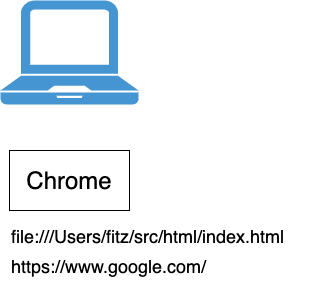
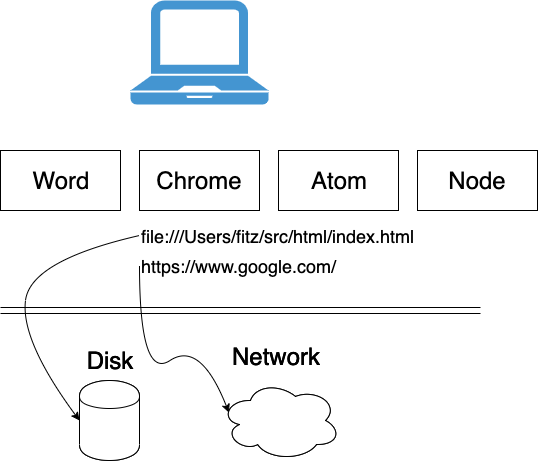
Here, we have our own computer, and our browser
Couple of different URLs we could put in: file://... or http{s}://...
Client's perspective
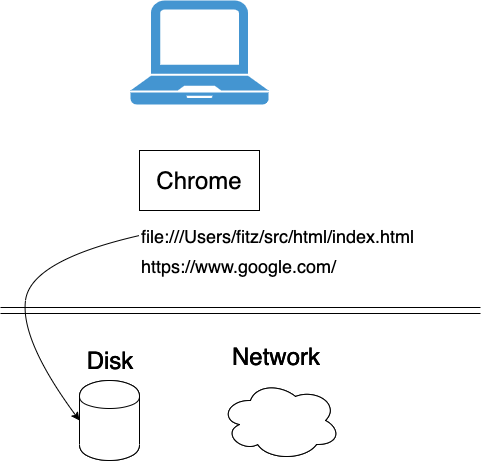
Underneath the browser, we have more layers (remember lecture 1? Everything's in layers)
Disk, network, and more.
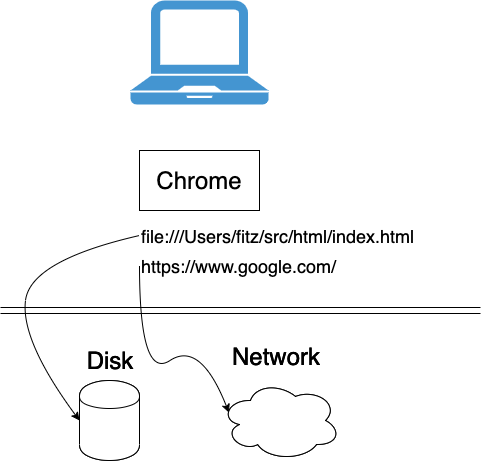
file:// is the protocol that tells the browser to check the Disk
http
http{s}:// is the same, but asks the browser to go to the network
In this case, we do a couple other things: lookup the hostname, create an http request, wait for the network, etc.
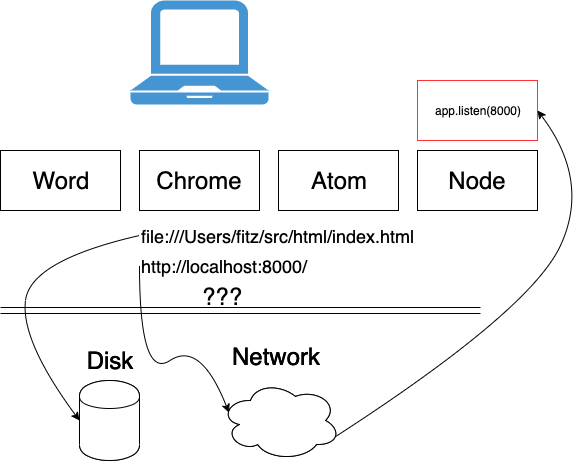
But what if the hostname we're looking up is something like localhost:8000?
Other apps?
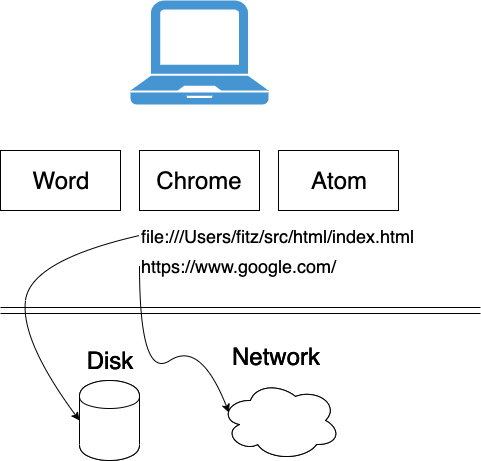
But we also have other things running on the computer:
All of these have their own little boxes (sometimes containers, but It's Complicated™)
Servers
Remember, we're here to talk about our own servers. When we start our own server, we do:
node app.jsornodemon app.js
Node is Yet Another Box
Node
Two main steps when we start our node server:
node app.jsapp.listen(PORT);
What happens if we don't do app.listen?
Listening...
So when the browser does that lookup to the network, we come back across that layer and check for things listening on that port
Servers
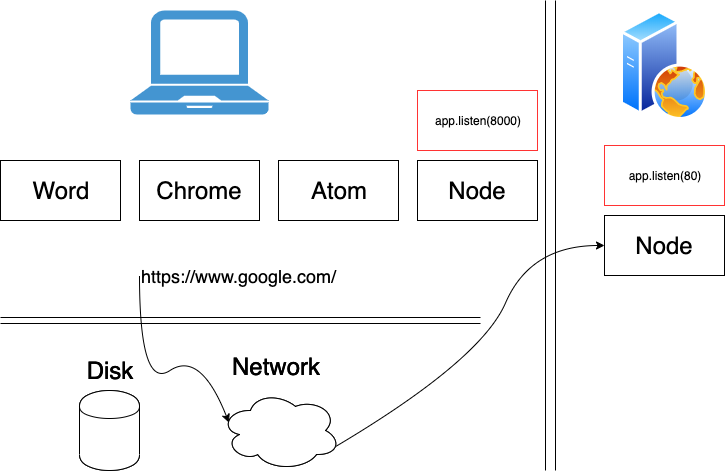
And this is effectively how the server out on the internet works too
Just by default, those servers -- that node box on their computer -- is listening on port 80.
(Since this is the default, we don't have to specify it.)
Questions?
Some Debugging
Debugging Tools
- console.log (it works in Node.js, too!)
- Chrome DevTools (it works for Node.js, too!)
- VS Code
Chrome DevTools and VS Code
Just like for our client-side JS, we can set breakpoints in our Node.js apps via Chrome's DevTools or in VS Code
Follow this guide
More Post
Review: Handling POST Requests on the server-side
- Use
app.postinstead ofapp.get - Use the
multermodule to handle FormData POST requests - Use the three middleware functions to support the 3 different POST requests
- Access POST params with
req.body.paramNameinstead ofreq.params/req.query
Implementing the /addItem POST endpoint
Note: You can find example documentation for a POST endpoint here
POST Requests on the Client-Side: Example
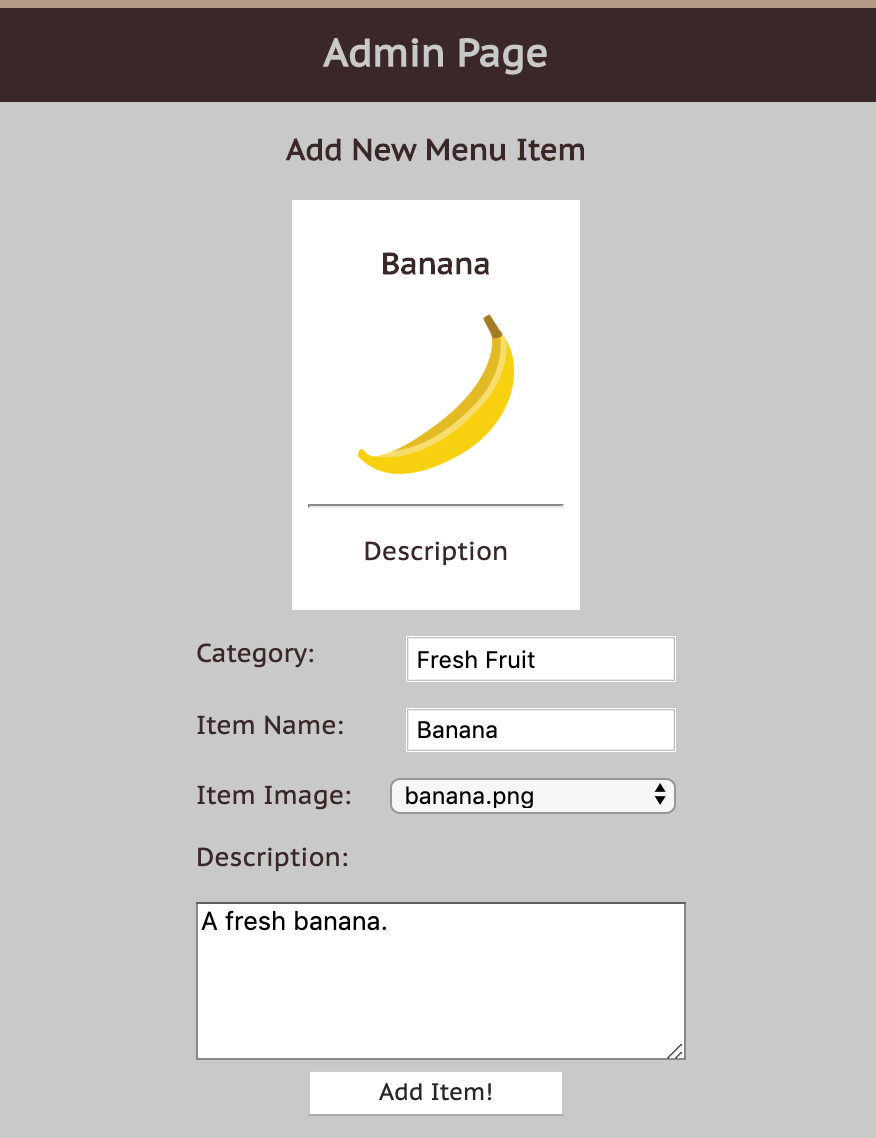
POST Requests on the Client-Side: The HTML Form
<form id="item-form">
  <p>
    <label for="category">Category: </label>
    <input type="text" name="category" required />
  </p>
  <p>
    <label for="item-name">Item Name: </label>
    <input id="item-name" name="name" type="text" required />
  </p>
  <p>
    <label for="images">Item Image:</label>
    <select id="images" name="image">
      <option value="">-- choose an image --</option>
    </select>
  </p>
  <p><label for="description">Description: </label></p>
  <textarea id="description" name="description" minlength=10 rows=5 cols=40></textarea>
  <button id="add-item">Add Item!</button>
</form>
HTML
POST Requests on the Client-Side: fetch with FormData
function addItem() {
  let params = new FormData(id("item-form"));
  fetch("/addItem", { method : "POST", body : params })
    .then(checkStatus)
    .then(resp => resp.text())
    .then(displaySuccess)
    .catch(handleError);
}
JS
POST Requests on the Server-Side
1. To add a POST endpoint, use app.post instead of app.get
app.post("/addItem", (req, res) => {
  ...
});
JS
Accessing FormData POST Parameters
2. Use the multer module to access POST parameters sent through a FormData request
3. Use the multer().none() (required to specify no file-uploading) and 2 other middleware functions built-in to Express for other POST request types
const multer = require("multer");

// for parsing application/x-www-form-urlencoded
app.use(express.urlencoded({ extended: true })) // built-in middleware
// for parsing application/json
app.use(express.json());                        // built-in middleware
// for parsing multipart/form-data (required with FormData)
app.use(multer().none());                       // multer middleware

app.post("/addItem", (req, res) => {
  ...
});
JS
Remember to run npm install multer in any project that uses it.
Accessing POST Parameters
With GET endpoints, we've used req.params and req.query to get endpoint parameters passed
in the request URL.
But remember that POST requests send parameters in the Request body, not in the URL.
app.post("/addItem", (req, res) => {
  let name = req.params.name; // this doesn't work!
  let name = req.query.name;  // this also doesn't work!
  ...
});
JS
Accessing POST Parameters
req.body contains key-value pairs of data submitted in the request body. By default, it is undefined, and is populated when you use body-parsing middleware such as multer().none(), express.json() or express.urlencoded().
...
app.post("/addItem", (req, res) => {
  let item = req.body.name;
  let category = req.body.category;
  let description = req.body.description;
  ...
  // validate parameters, then update <category>-additions.json file with new data
  ...
});
JS
Endpoint Comment for /addItem
/**
 * Adds a new item to the <category>-proposals.json file to be approved later.
 * If no <category>-proposals.json yet exists, will add a new file.
 * Required POST parameters: name, category, description.
 * Optional POST parameter: image - defaults to food.png otherwise.
 * Response type: text/plain
 * Sends a 400 error if missing one of the 3 required params.
 * Sends a 500 error if something goes wrong in file-processing.
 * Sends a success message otherwise.
 */
app.post("/addItem", async (req, res) => {
  ...
});
Pseudo-code for /addItem
// Adds a new item to the menu.
// Required POST parameters: category, name, description
// Optional POST parameter : image - (defaults to food.png otherwise)
app.post("/addItem", (req, res) => {
  // 1. validate parameters.
  //   - If one of the 3 required are missing, send a 400 error message.
  // 2. Otherwise, if no image parameter is sent, set to food.png
  // 3. Create JSON with each parameter:
  //  { name, description, image}
  // 4. Read <category>-proposals.json (create if doesn't exist),
  // add new JSON to the array.
  // 5. Write new JSON to >category>-proposals.json.
});
JS
One Solution for /addItem
app.post("/addItem", async (req, res) => {
  res.type("text");
  // 1. validate parameters.
  //   - If one of the 3 required are missing, send a 400 error message.
  let name = req.body.name;
  let category = req.body.category;
  let description = req.body.description;
  let image = req.body.image;
  if (!(name && category && description)) {
    res.status(400).send("Missing POST parameter: category, name, and/or description");
  }
  // 2. Otherwise, if no image parameter is sent, set to food.png
  if (!image) {
    image = DEFAULT_IMAGE;
  }
  // 3. Create JSON with each parameter:
  let result = { "name" : name, "description" : description, "image" : image };
  // 4. Read <category>-proposals.json, then add new JSON to the array.
  // Fresh Fruit -> fresh-fruit
  let dashedCategory = category.toLowerCase().replace(" ", "-");
  let jsonFile = dashedCategory + "-proposals.json";
  try {
    let contents = await readFile(jsonFile, "utf8");
  } catch (err) {
    if (err.code !== "ENOENT") { // file-not-found error
      res.status(500).send(SERVER_ERROR);
    } // else continue, writing a new <category>-proposals.json file.
  }
  contents = JSON.parse(contents);
  contents.push(result);
  // 5. Write new JSON to same file.
  try {
    await writeFile(jsonFile, JSON.stringify(contents), "utf8");
  } catch (err) {
    res.status(500).send(SERVER_ERROR);
  }
  res.send(req.body.name + " proposal successfully added to " + jsonFile + "!");
});
JS
Question:
Is there another way to submit a form without FormData?
Summary of Handling a POST Request
- Use
app.postinstead ofapp.get - Use
req.body.paramnameinstead ofreq.params.paramname/req.query.paramname - Require the
multer(non-core) module with the rest of your modules - Use the three middleware functions to support the three different types of POST requests from different possible clients
- Test your POST requests with Postman or with
fetchandFormDatain client-side JS (similar to HW3) - remember you can't test POST requests in the URL!
More questions from this lecture?
Especially if you're watching a recording, write your question on PollEverywhere and I'll answer them at the start of next lecture.
Either on your phone or computer, go to PollEv.com/robcse