CSE 154
Lecture 6: JavaScript and the DOM
Today's Agenda
Where does the DOM come from?
JS Skeleton File
DOM Manipulation
Mentorship Circle Starting Today!
Olga's group at 2:20pm right after lecture today. Check your email if that time was available to you.
If you could only do other times, sorry to say we didn't get enough signups.
I'll be email you about other resources for getting help and staying engaged.
HW1 Due Soon
HW 1 is due Tuesday 7/7 by 11:00pm unless you wish to use late days.
Final lock is Thursday 7/9 at 11:00pm
Will likely assign CP2 tomorrow as well.
CP1 grades and feedback will be out tonight or tomorrow morning (please check it before submitting HW1)
Online Resources: Good or Bad?
You may find some resources online helpful to explore different ways to use CSS and HTML - there are a ton of things! But some are better than others (make sure you understand why these examples are poor use of HTML and CSS).
Understanding good code quality can be extremely valuable in navigating an overwhelming amount of resources on the web today.
A good discussion.
Understanding the Good vs. Bad
We choose resources that best align with our code quality guidelines, while giving just enough "extra detail" into topics we cover in lecture/section/lab. That said, let us know if you're looking for recommendations on a specific resource!
Remember that all of your work must be your own, and cite any tutorials/resources you may be using to explore features you may be exploring.
One Good Resource
How Too provides practicable strategies for solving coding problems, not specific solutions (so no worries about bad/old methods!).
Can browse existing strategies or ask a question to prompt new ones to be written.
So about that DOM thing

Lifecycle of a browser* loading a page
- Fetch the page
- Parse the page
- Build the page's DOM (and CSSOM)
- Paint the page
Fetch Page
- DNS
- www.google.com → 172.217.14.206
- HTTP GET
-
GET /index.html HTTP/1.1 Host: www.example.com - Collection of all this information: Request Headers
-
- TCP/IP transfer
- Series of tubes...
- Check: 200 OK?
- Collection of all this information: Response Headers
Parse Page
- First line:
<!DOCTYPE html>- Ok: need to build a DOM
- Line-by-line, goes through the HTML
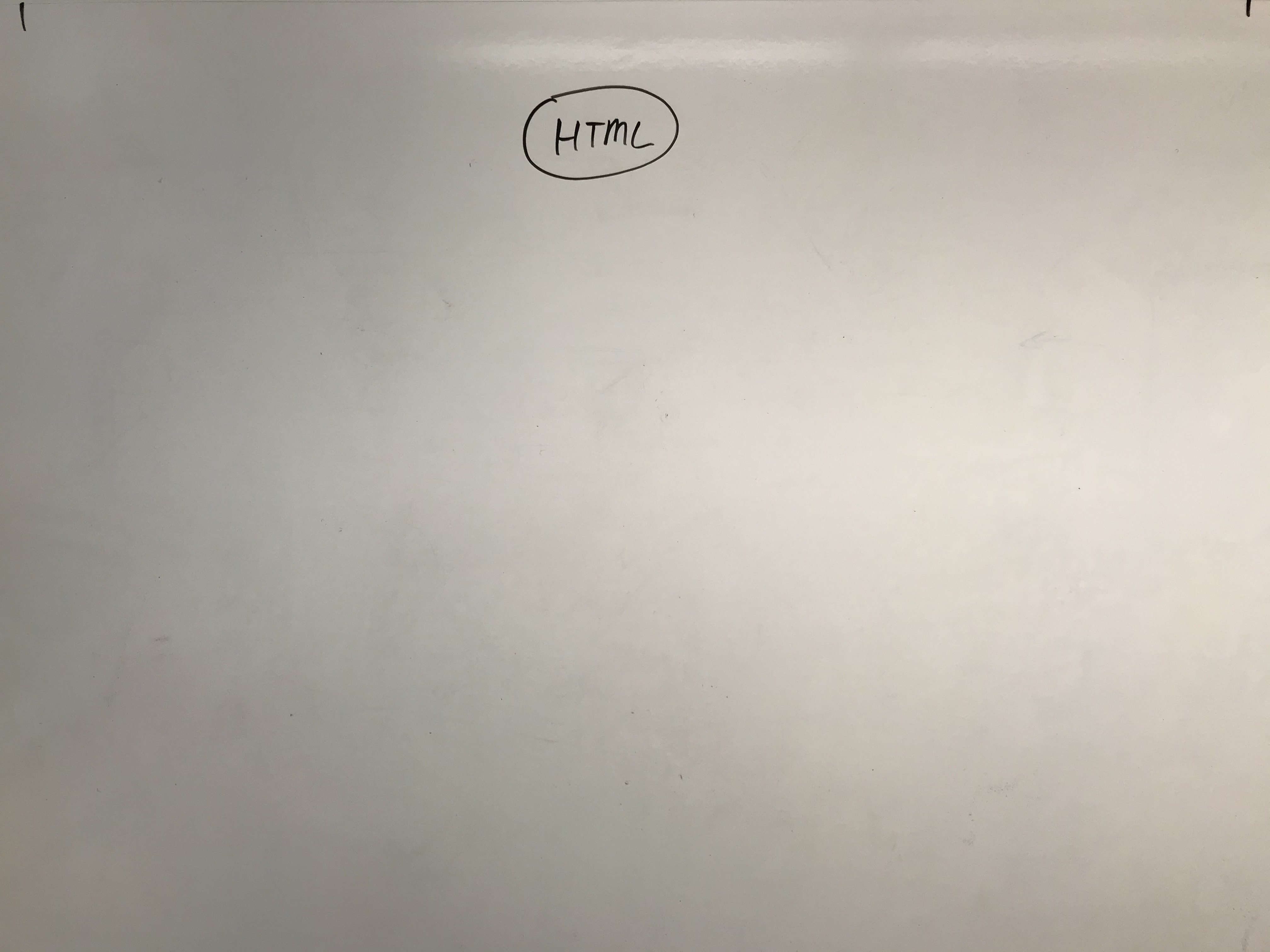
<!DOCTYPE html>
<html>
<head>
  <title>My Fancy Title</title>
  <meta charset="UTF-8">
  <link rel="stylesheet" href="styles.css">
  <script src="script.js"></script>
</head>
<body>
  <header>...</header>
  <nav>...</nav>
  <article>
    <section>
      <p>Hello world: <a href="...">here</a></p>
      <p>Welcome!</p>
      <img src="...">
      <a href="...">citation</a>
    </section>
  </article>
  <footer>
    <a href="..."></a>
  </footer>
</body>
</html>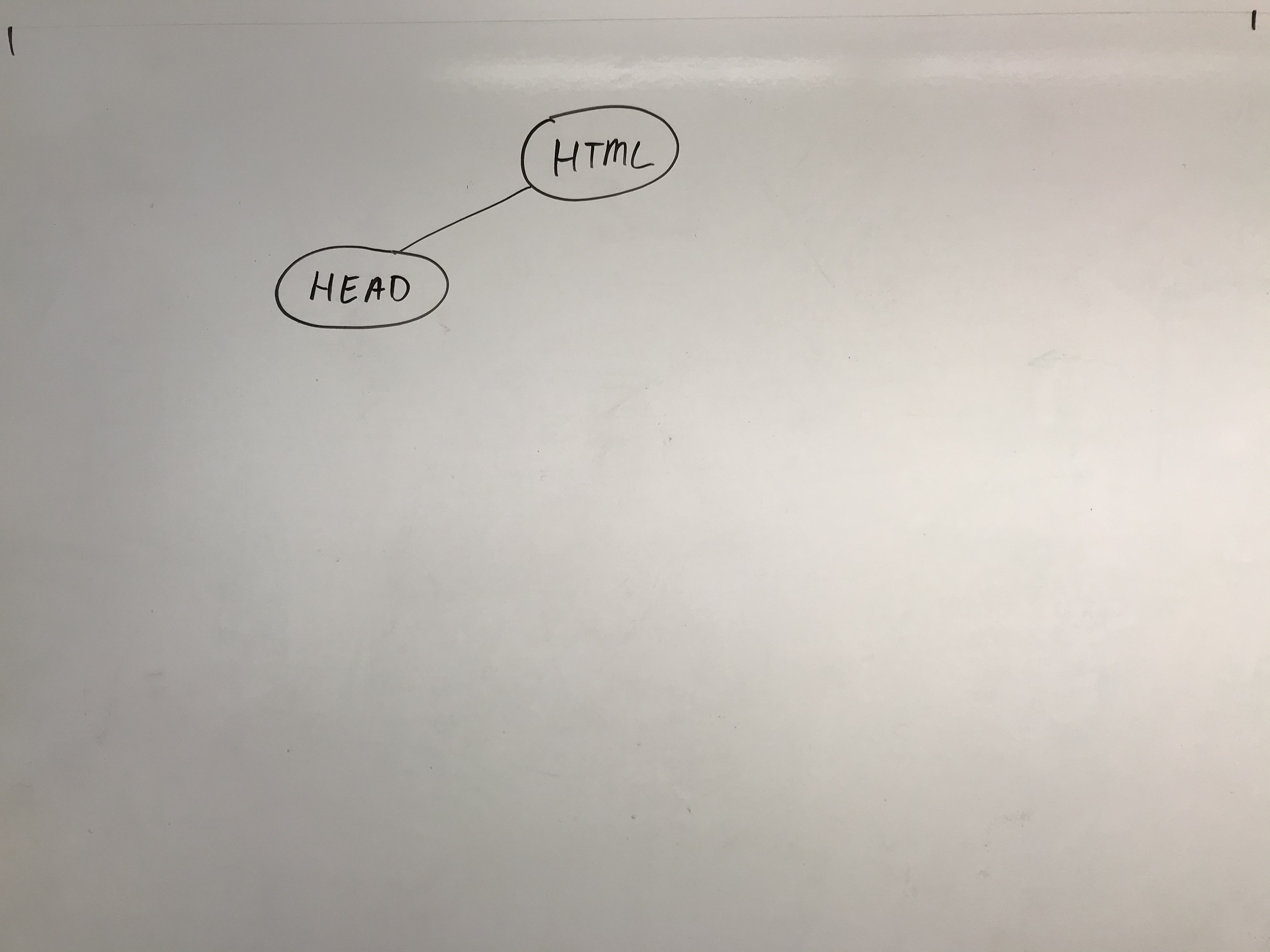
<!DOCTYPE html>
<html>
<head>
  <title>My Fancy Title</title>
  <meta charset="UTF-8">
  <link rel="stylesheet" href="styles.css">
  <script src="script.js"></script>
</head>
<body>
  <header>...</header>
  <nav>...</nav>
  <article>
    <section>
      <p>Hello world: <a href="...">here</a></p>
      <p>Welcome!</p>
      <img src="...">
      <a href="...">citation</a>
    </section>
  </article>
  <footer>
    <a href="..."></a>
  </footer>
</body>
</html>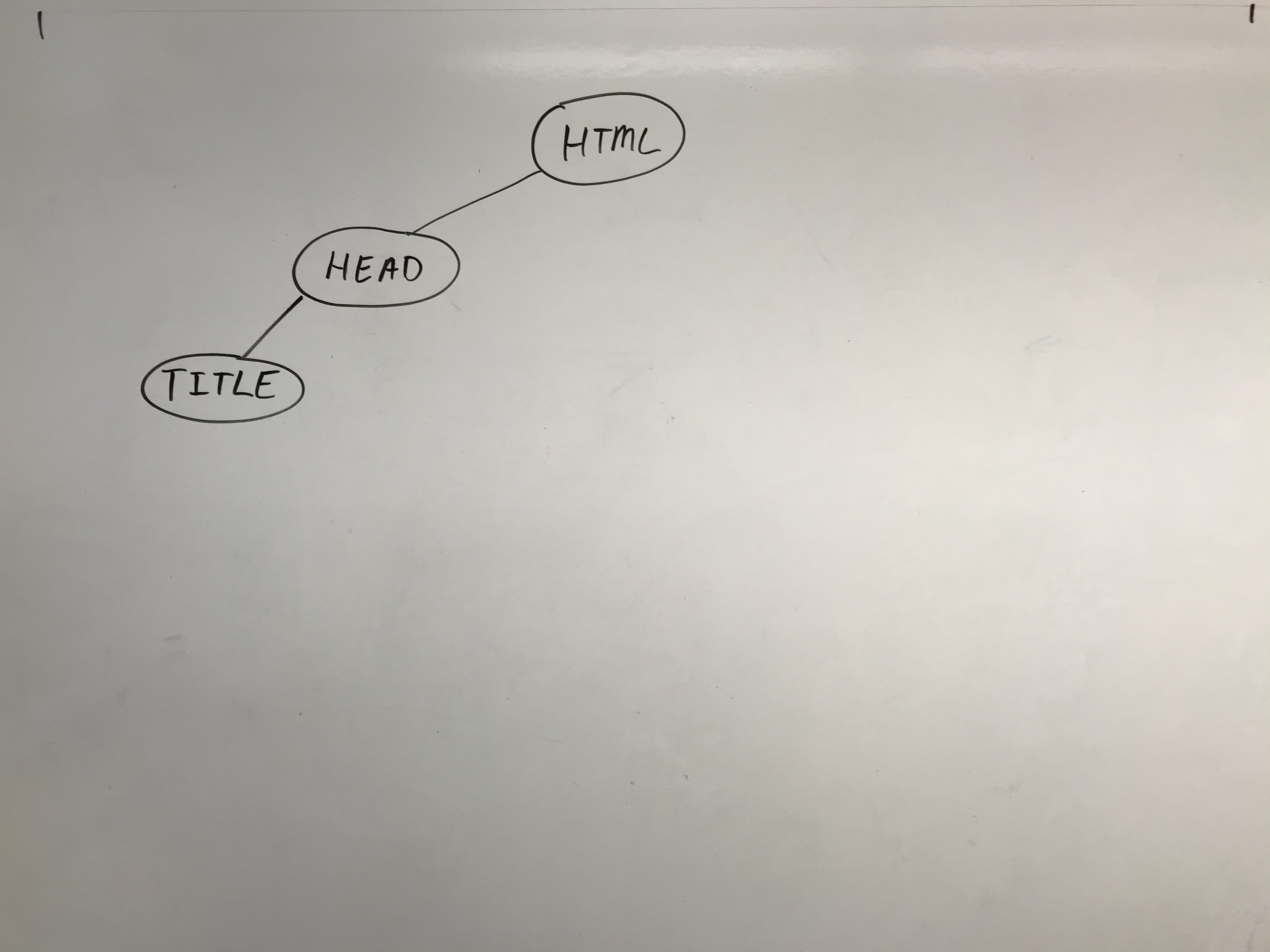
<!DOCTYPE html>
<html>
<head>
  <title>My Fancy Title</title>
  <meta charset="UTF-8">
  <link rel="stylesheet" href="styles.css">
  <script src="script.js"></script>
</head>
<body>
  <header>...</header>
  <nav>...</nav>
  <article>
    <section>
      <p>Hello world: <a href="...">here</a></p>
      <p>Welcome!</p>
      <img src="...">
      <a href="...">citation</a>
    </section>
  </article>
  <footer>
    <a href="..."></a>
  </footer>
</body>
</html>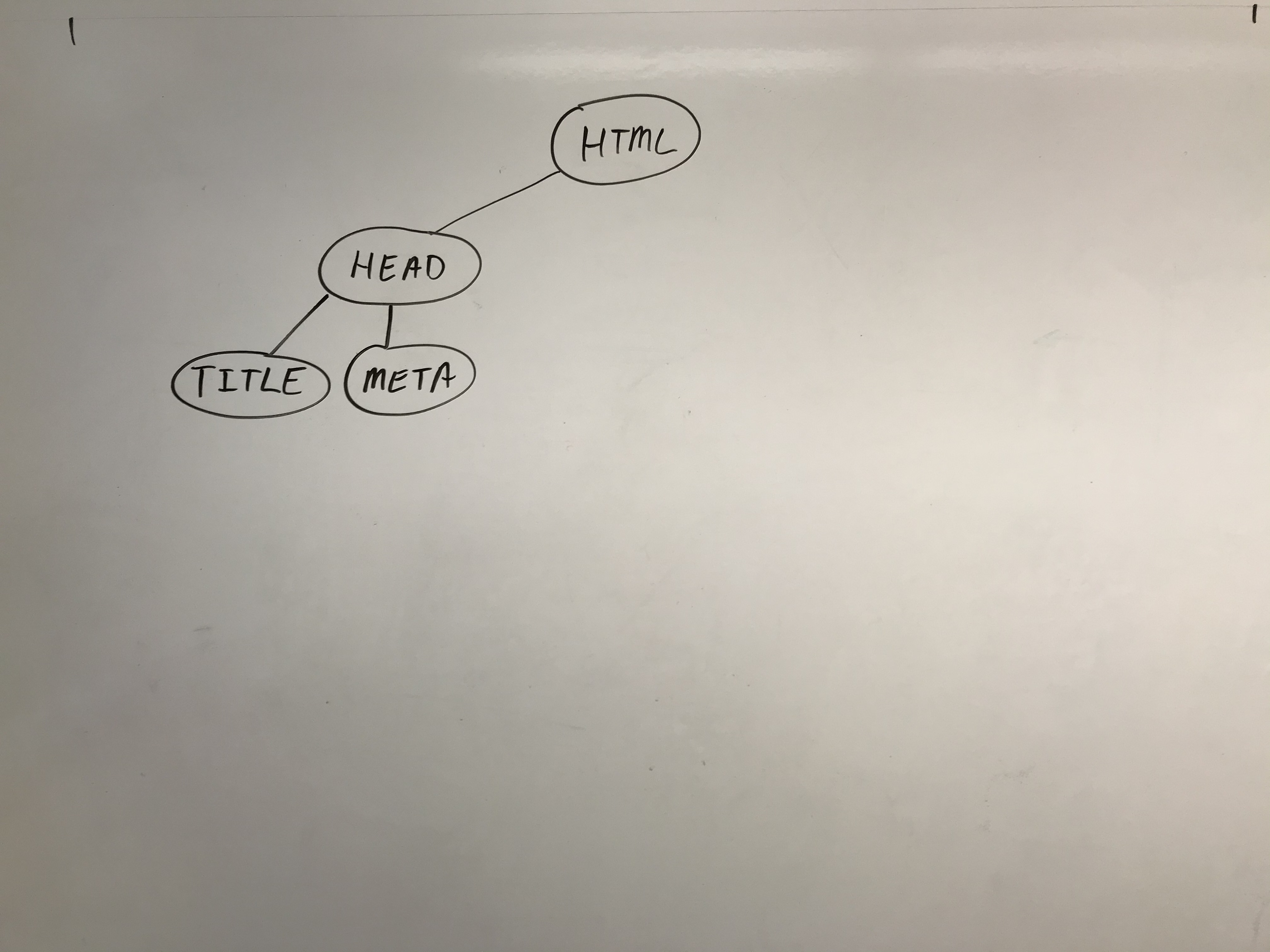
<!DOCTYPE html>
<html>
<head>
  <title>My Fancy Title</title>
  <meta charset="UTF-8">
  <link rel="stylesheet" href="styles.css">
  <script src="script.js"></script>
</head>
<body>
  <header>...</header>
  <nav>...</nav>
  <article>
    <section>
      <p>Hello world: <a href="...">here</a></p>
      <p>Welcome!</p>
      <img src="...">
      <a href="...">citation</a>
    </section>
  </article>
  <footer>
    <a href="..."></a>
  </footer>
</body>
</html>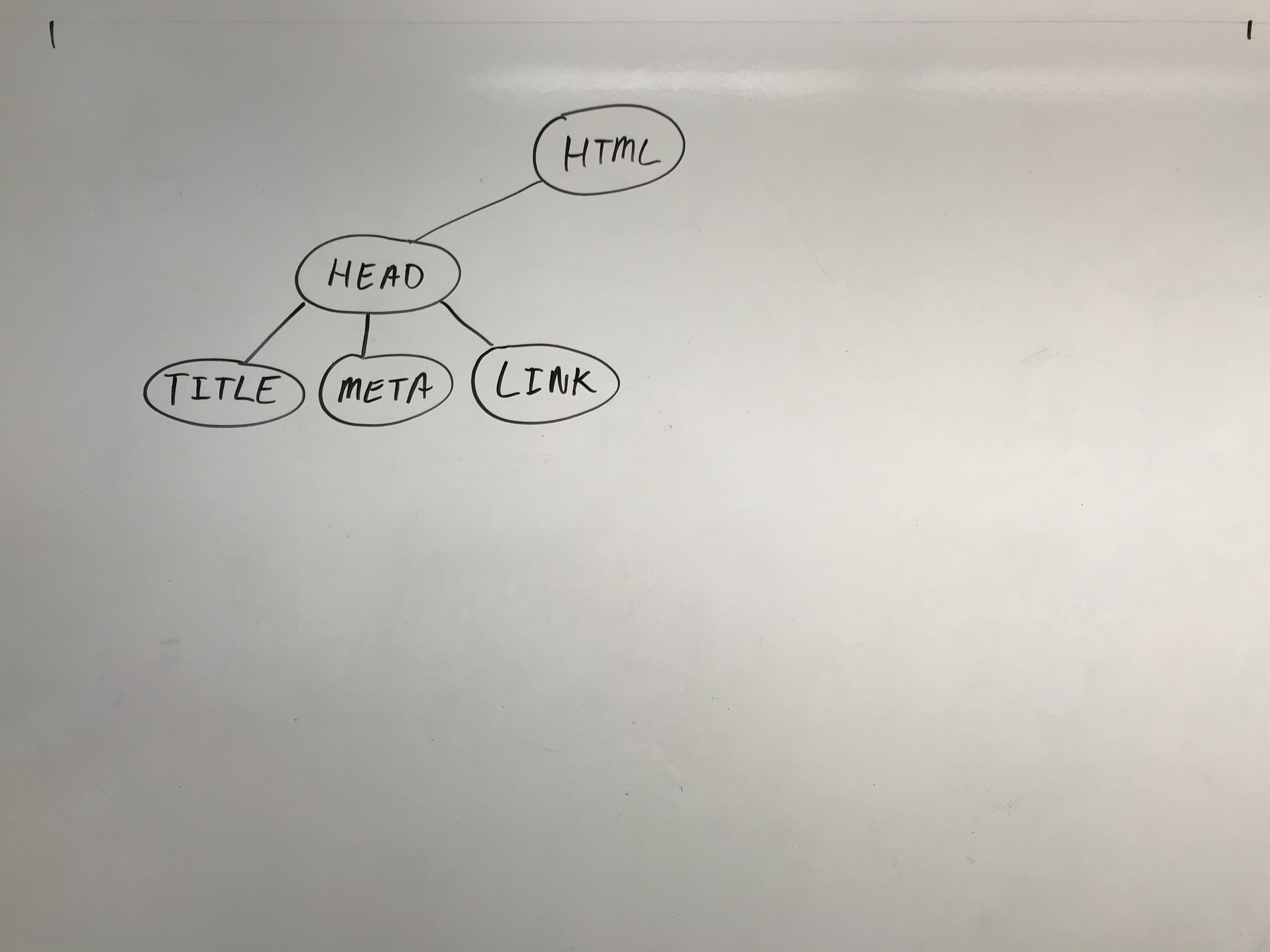
<!DOCTYPE html>
<html>
<head>
  <title>My Fancy Title</title>
  <meta charset="UTF-8">
  <link rel="stylesheet" href="styles.css">
  <script src="script.js"></script>
</head>
<body>
  <header>...</header>
  <nav>...</nav>
  <article>
    <section>
      <p>Hello world: <a href="...">here</a></p>
      <p>Welcome!</p>
      <img src="...">
      <a href="...">citation</a>
    </section>
  </article>
  <footer>
    <a href="..."></a>
  </footer>
</body>
</html>
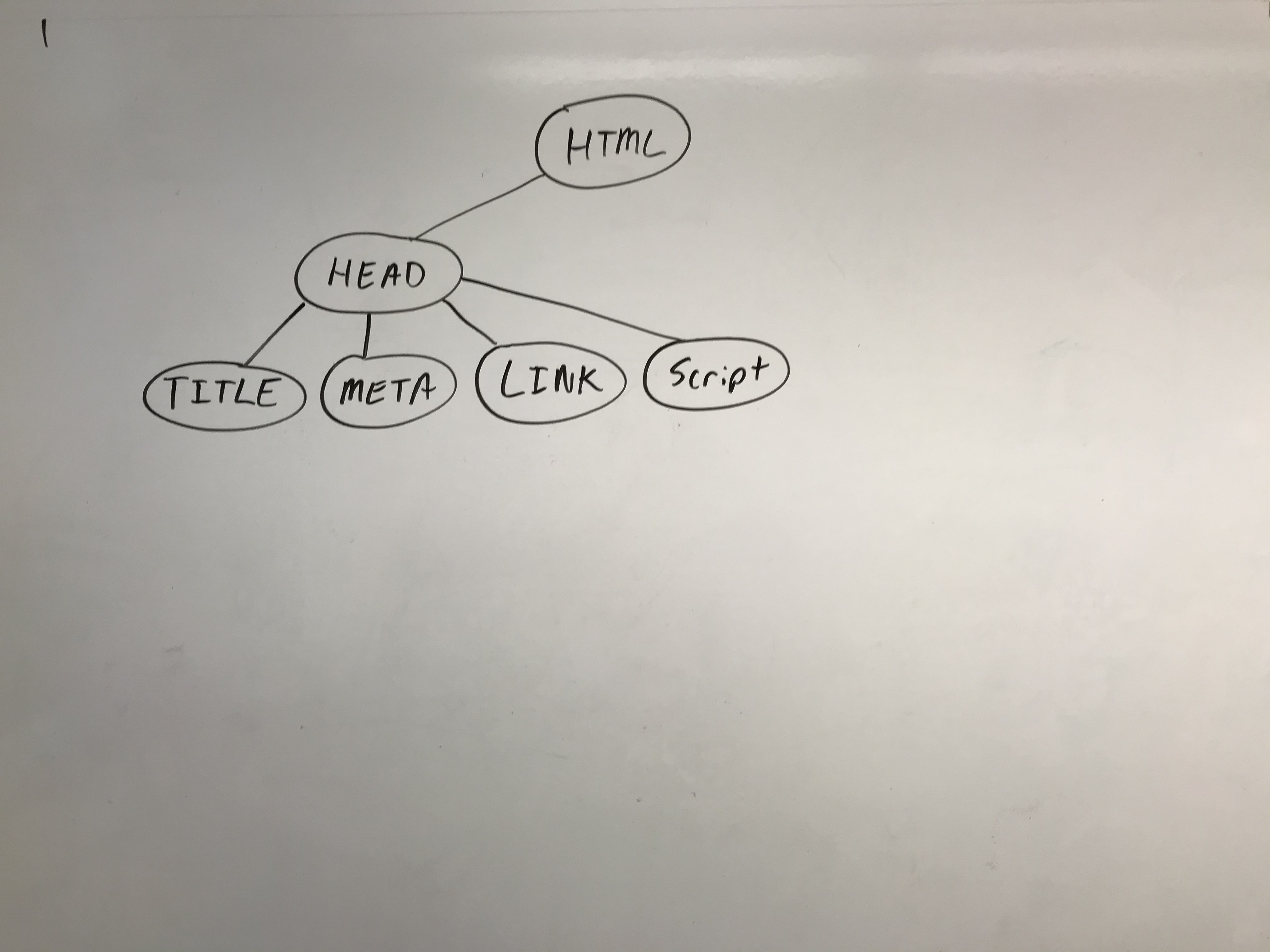
Another request:
- GET: styles.css
- Schedule: restyle.
Now back to our regularly scheduled programming...
<!DOCTYPE html>
<html>
<head>
  <title>My Fancy Title</title>
  <meta charset="UTF-8">
  <link rel="stylesheet" href="styles.css">
  <script src="script.js"></script>
</head>
<body>
  <header>...</header>
  <nav>...</nav>
  <article>
    <section>
      <p>Hello world: <a href="...">here</a></p>
      <p>Welcome!</p>
      <img src="...">
      <a href="...">citation</a>
    </section>
  </article>
  <footer>
    <a href="..."></a>
  </footer>
</body>
</html>
Another request:
- GET: script.js
- Parse JavaScript
- Compile the code
- Run the code
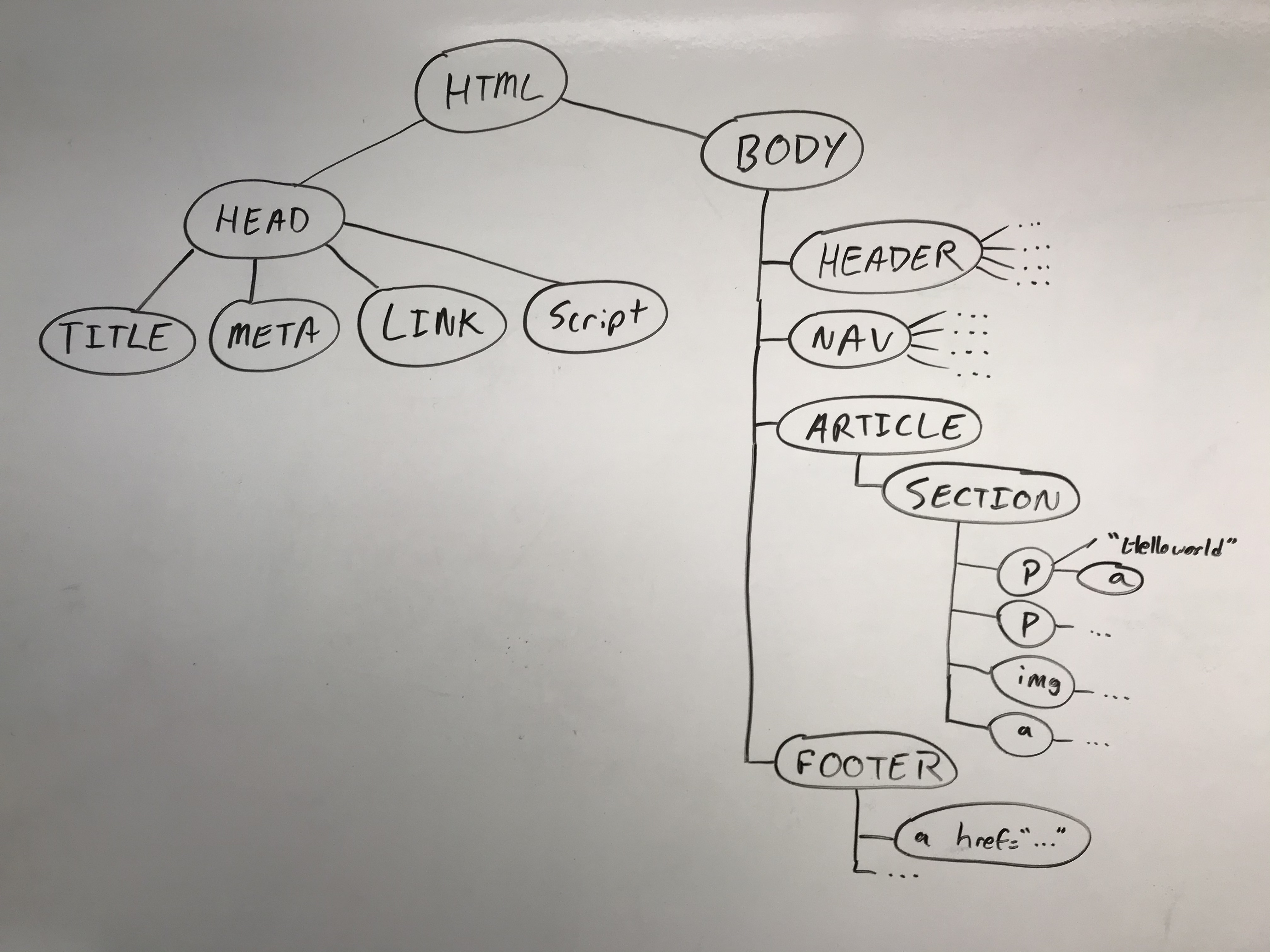
Full DOM
Each node in the tree has:
- Name of element
- Attributes, and their values
- Content (if any)
Browser ("window") events
At this point, browser fires a DOMContentLoaded event. This lets any scripts know that the DOM tree is complete.
BUT: None of the styles have been loaded yet.
Remember that "Schedule: restyle." from earlier?
Browser now goes through any of those, and constructs something called the "CSS Object Model" and the computed styles
This is a mapping (won't walk through it now) made from the selectors in our styles.css, figuring out which DOM nodes have which style rules.
"load" and the Render Tree
Between the DOM and the computed styles, the browser now has everything it needs.
It fires a load event, letting scripts know this.
And it then combines into a "Render Tree", which is the combination of visible content and the rules for how it looks.
At last, we can run our code
Questions?
But... in practice, what does that mean?
Coding time!
JS File Skeleton
JavaScript File Skeleton
/**
* Name, section, date, etc.
* Description of program
*/
"use strict";
(function() {

window.addEventListener('load', init);

function init() {
  // TODO: Your code here
}

function id() { /* TODO */ }
function qs() { /* TODO */ }
function qsa() { /* TODO */ }

})();
JS
- Strict mode
- Module pattern
- Load event
- Alias functions
JavaScript "strict" mode
"use strict";

...your code...
JS
Writing "use strict"; at the very top of your JS file turns
on strict syntax checking:
- Shows an error if you try to assign to an undeclared variable
- Stops you from overwriting key JS system libraries
- Forbids some unsafe or error-prone language features
You should always turn on strict mode for your code in this class!
Example: strict.html
The "module pattern"
(function() {
statements;
})();
Wraps all of your file's code in an anonymous function that is declared and immediately called
0 global symbols will be introduced!
The variables and functions defined by your code cannot be accessed/modified externally
We'll use this pattern moving forward for all of our programs.
Example: module.html
Listening to the window "load" event
You can only access document elements after the "load" event has fired.
"use strict";
(function() {
window.addEventListener("load", init);
// no access to the document here

function init() {
  // we now have access to the DOM tree!
  // set up your initial document event handlers here.
}
})();
JS
Example: load.html
Handy Shortcut Functions
We will use document.getElementById and
document.querySelectorAll a LOT. It's handy to
declare a shortcut to help us out. You may use the following in your JS
functions (these are exceptions to the rule of having description function
names).
/**
  * Returns the element that has the ID attribute with the specified value.
  * @param {string} idName - element ID
  * @returns {object} DOM object associated with id.
  */
  function id(idName) {
  return document.getElementById(idName);
  }

  /**
  * Returns the array of elements that match the given CSS selector.
  * @param {string} selector - CSS query selector
  * @returns {object[]} array of DOM objects matching the query.
  */
  function qsa(selector) {
  return document.querySelectorAll(selector);
  }

  /**
  * Returns the first element that matches the given CSS selector.
  * @param {string} selector - CSS query selector.
  * @returns {object} The first DOM object matching the query.
  */
  function qs(selector) { // less common, but you may find it helpful
  return document.querySelector(selector);
  }
JS
We will start using these in examples (as well as gen for document.createElement which we'll see soon)!
A Provided JS Template
We have provided a template you can refer to for the standard JS program structure
here.
However, you are expected to replace the example functions and comment examples with your own (you may use
the same JSDoc comments for id, qs, and qsa as is though).
DOM Manipulation: Classes
Hiding/Showing Elements
How can we hide an HTML element?
.hidden {
  display: none;
}
CSS
In JS, it's possible to modify the style properties of an element directly.
id("my-img").style.display = "none";JS
What's wrong with that?
How can we add/remove CSS classes with JS?
Modifying the classList
You can manipulate the DOM element's classList with the following methods:
| Name | Description |
|---|---|
| add(classname) | Adds the specified class(es) to the list of classes on this element. Any that are already in the classList are ignored. |
| remove(classname) | Removes the specified class(es) to the list of classes from this element. Any that are already not in the classList are ignored without an error |
| toggle(classname) | Removes a class that is in the list, adds a class that is not in the list. |
| contains(classname) | Returns true if the class is in the the DOM element's classList, false if not. |
| replace(oldclass, newclass) | Replaces the old class with the new class. |
More questions from this lecture?
Especially if you're watching a recording, write your question on PollEverywhere and I'll answer them at the start of next lecture.
Either on your phone or computer, go to PollEv.com/robcse