Section 18: Final Project and Exam Review
Section Goals
By the end of this section, you should:
- Be more comfortable with enforcing good code quality across a full-stack website
-
Be more comfortable solving problems related to programming with servers
- Client-to-server fetching
- Serverside request handling
- Server-to-database queries
- Database setup
Important Reminders
Remember that there are no late days for the Final Project. Make sure to turn it in no later than 11PM tomorrow (Friday the 23rd), even if it's not complete.
As a two-part GitGrade submission similar to HW2/HW3, make sure you have accepted the Final Submission after your Milestone, git add/commit/push in the same repo as your milestone, and finally click the turn-in button for your work to be considered.
The Final Project reflection will be due Saturday by 11:59PM.
Table of Contents
Pick the topics you want to study. Solving problems on paper will be the best practice for an exam setting.
- Final Project Code Quality Tips
- Fetch Requests
- RegEx
- Node with File Processing
- Standalone SQL
- SQL in Node
- Multi-Table Queries
You can find an example Practice Exam 2 here, which includes some problems covered in this slide deck. Make sure to check the Exams page for more practice material.
Final Project: Code Quality
A large part of your grade on the final project comes from your demonstration of following a set of code quality conventions and to write clean, maintainable, readable code. This part of section is here to help you find your footing when figuring out how to assess and address code quality issues in your code.
The best move you can make is to carefully go through the Code Quality Guide, comparing it against what you have. While it is most effective and efficient to code with code quality in mind from the start, checking your finished product after the fact is the best way to ensure your code meets the guidelines.
With that aside, below are some strategies you can use to make your code the best it can be :)
Asking Meaningful Questions
- Does the code work? Code should behave as expected, even given unexpected input. When testing your page, try doing things as they were not intended. Try to break it! This can reveal places to make it more robust. For Node.js, try testing different edge cases with the Node debugger!
- Can I understand what it does without reading it? Reading through raw source code to figure out what it does is tedious. Documentation exists to describe what code does and how to use it, making it easy to share and return to in the future. Aim to write descriptive header comments and API documentation which would allow someone who has never read your code to use the API to its full potential.
- Is it pleasant to read? For HTML, does the indentation clearly communicate the nesting levels? For CSS, is it easy to distinguish different elements at a glance (good spacing)? For JS, are you giving enough space around the operators to make it easy to distinguish values from symbols? Are your CSS rules and Node.js functions organized in a meaningful way? All of these can help make code intuitive and pleasant to read.
More Meaningful Questions
Is it easy to change things? Say you want to tweak a constant in your code. Is it easy to find? If it is used often, do you have to change it in every place it is used? Tweakable code (code that you can alter easily with single changes) is very valuable. Try to reduce redundancy, limiting the number of times information is repeated.
Is it accessible? It may not seem like much, but there are people out there who really appreciate when effort is put into making technology accessible for them. Think about the different abilities users of your website might have, and try to cater to their needs. For people who are visually impaired, it can be as simple as using appropriate semantic tags, alt attributes, and reducing reliance on directional or visual cues.
Additonal Strategies
- use the validators! You can find them on the course resources page. Passing the validator is free points if you take the time to do it, and they can even catch syntax errors and redundancies in your code!
- If you ever want to break the code quality guidelines for a good reason, be sure to run it by us on Piazza first, just to be sure it's okay.
- Break problems down into parts to reduce complexity. If you have a massive function that looks rather daunting, see what you can do to break off little chunks into simple functions, and simplify the whole thing considerably. This is also a good strategy when solving problems (say, on an exam.) A complex problem is just the sum of many simpler ones.
Using Fetch as a Client
To use an API, we need to send a request and wait for the response. This can be done using fetch statements. In this part, the following topics are covered:
- General JS syntax with events
- Using fetch and the promise pipeline to make requests and handle responses
- Updating the DOM with data provided by an API.
Exercise: Plan-It
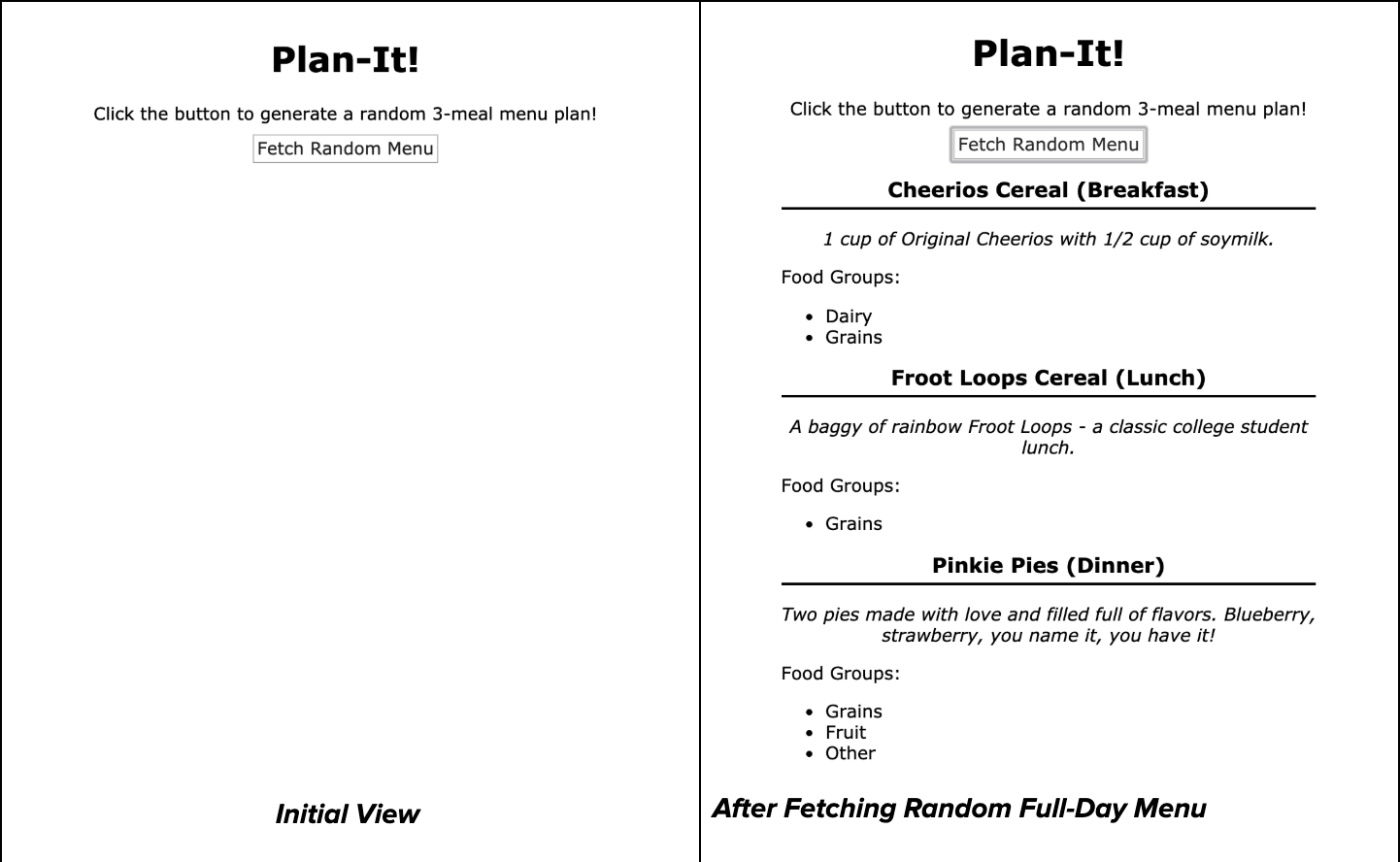
In this exercise you will write JS to implement a meal planner. For simplicity, we will consider a "full day meal plan" as a breakfast, lunch and dinner. The screenshot below shows the front-end.
Implementation Requirements
You will fetch from one endpoint, which is implemented in this exercise.
Clicking the #day-btn should make a request to
/day to fetch a random full day meal plan of the following format:
{ "breakfast": {
    "name": "Blueberry Oatmeal",
    "description": "One cup of hot oatmeal...",
    "food-groups": ["Grains", "Fruit"]
  }, "lunch": {
    "name": "Froot Loops",
    "description": "A baggy of rainbow Froot...",
    "food-groups": ["Grains"]
  }, "dinner": {
    "name": "Pinkie Pies",
    "description": "Two pies made with love and...",
    "food-groups": ["Grains", "Fruit", "Other"]
}}
JSON response example
Upon success, remove the .hidden class from the #day-results
and use the response JSON to populate each of the #breakfast,
#lunch and #dinner aside elements on the page
such that:
- The
span.nameis populated with the meal name - The
p.descriptionis populated with the meal description -
The
ul.food-groupsis populated with a list of the food groups. The JSON will have one or more per meal.
A client should be able to click the #day-btn multiple times to get
a new random 3-meal plan, replacing previous results. You do not need to worry
about CSS. Assume .hidden is implemented already.
On the next slide is the HTML code for this exercise.
<body>
  <h1>Plan-It!</h1>
  <p>
    Click the button to generate a random 3-meal menu plan!
    <button id="day-btn">Fetch Random Menu</button>
  </p>

  <section id="day-results" class="hidden">
    <article id="breakfast">
      <h2><span class="name"></span> (Breakfast)</h2>
      <p class="description"></p>
      <p>Food Groups:</p>
      <ul class="food-groups"></ul>
    </article>
    <article id="lunch">
      <h2><span class="name"></span> (Lunch)</h2>
      <p class="description"></p>
      <p>Food Groups:</p>
      <ul class="food-groups"></ul>
    </article>
    <article id="dinner">
      <h2><span class="name"></span> (Dinner)</h2>
      <p class="description"></p>
      <p>Food Groups:</p>
      <ul class="food-groups"></ul>
    </article>
  </section>
</body>
Provided HTML
Write the client-side JS solution to fufill the spec. You may assume that
checkStatus, id, qs and qsa
are all defined and included as appropriate.
You can find the starter files here for both this question as well as the Node.js API questinn.
RegEx
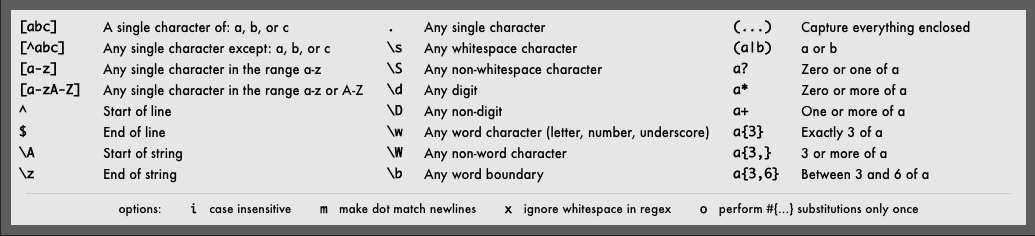
RegEx is usually used to match strings against patterns, ensuring that they meet a certain format, or for finding certain strings within a large body of text. The exercises in this section cover:
- Basic RegEx syntax
- Identifying whether a string matches a given regex pattern.
Exercise 1
Identify which of the given strings match the given RegEx pattern.
/^[irA]{3}b*[n]+b?$/
- A3bnnnb
- rAin
- iiiBnB
- AAibnbb
- Airbnb
/^[A-Z]L{1,}..$/
- AL3rt
- GL33..$
- XL33TX
- LLLL
- WILL321
Solutions
- A3bnnnb
- rAin
- iiiBnB
- AAibnbb
- Airbnb
- AL3rt
- GL33..$
- XL33TX
- LLLL
- WILL321
Exercise 2
Identify which of the given strings match the given RegEx pattern.
/[A-Za-z]+@[0-9]/
- foo+@5
- foo@123
- 45foo@321
- f8@8f
- @123
/^F*\.jpg$/
- F.jpg
- ^FFF.jpg$
- FFF.jpg
- F\.jpg
- .jpg
Solutions
- foo+@5
- foo@123
- 45foo@321
- f8@8f
- @123
- F.jpg
- ^FFF.jpg$
- FFF.jpg
- F\.jpg
- .jpg
Node with File Processing
An important feature of Node is that it has access to a file system for reading and writing files. This part of the section has exercises related to the following material:
- Using
asyncandawait readdirandglobreadFileandwriteFile
Exercise 1: readdir and glob
Provide three glob/readdir statements, each
returning one of the given arrays when used on this directory structure.
birds.php
  birds/
    eagle/
      call1.mp3
      image.png
      info.txt
    heron/
      call1.mp3
      call2.mp3
      image.png
      info.txt
    merlin/
      call1.mp3
      image.png
      info.txt
["eagle", "heron", "merlin"]["birds/merlin/image.png", "birds/merlin.info.txt"]["birds/eagle/call1.mp3", "birds/heron/call1.mp3", "birds/heron/call2.mp3", "birds/merlin/call1.mp3"]
Solutions
readdir("birds");glob("birds/merlin/i*");glob("birds/*/*.mp3");
Exercise 2: Plan-it API
This exercise has you build the API as app.js used in
this exercise. It may help to do
that one first.
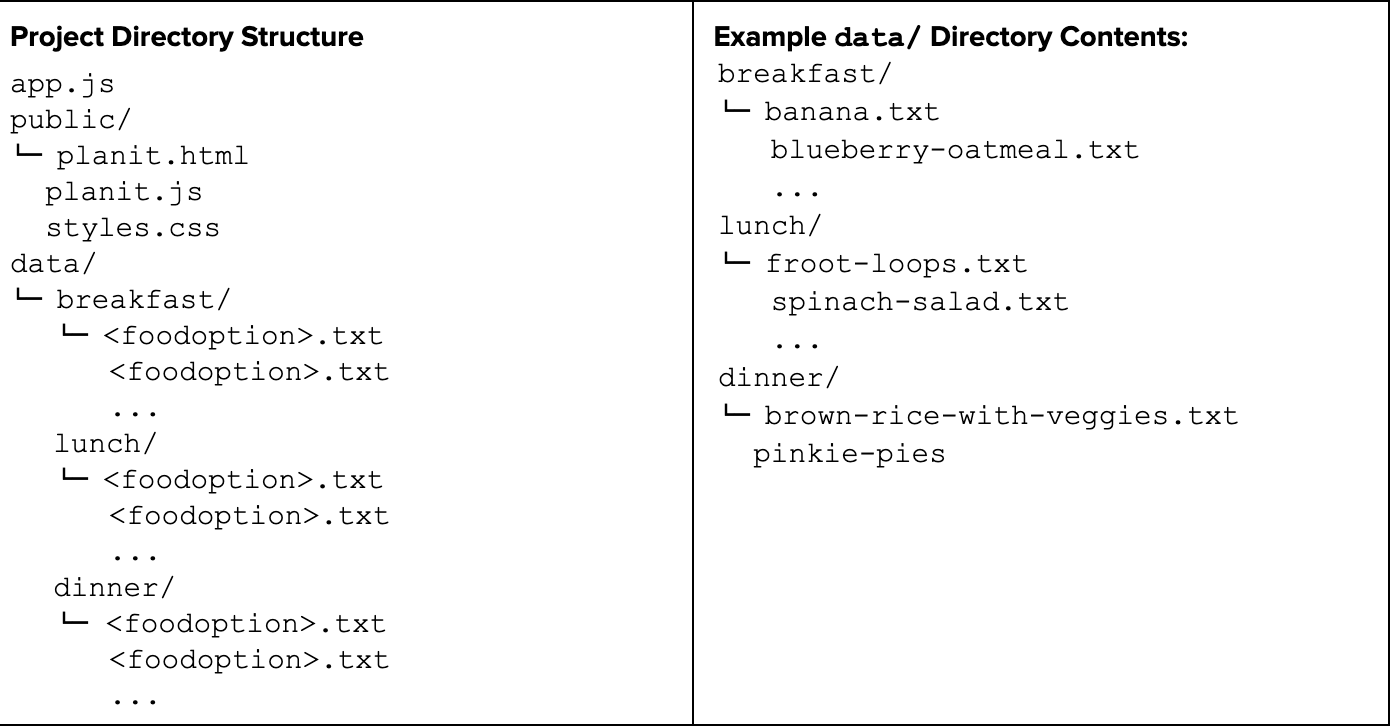
app.js will be located in the same directory as a data/ directory containing three directories, each
corresponding to one of the three standard meals (breakfast, lunch, and dinner) (included in starter code from client-side part). They contain txt files for
different food options.
Each food option txt file has 3 lines:
name
description
food groups
The first is the full name, the second is a short description, the third is a space-separated list of food groups.
Your web service should support the following two GET endpoints:
/dayplan: Returns JSON representing a full day meal plan.-
/meal/:type: Returns a text response of all food options for that meal type.
For all endpoints, be sure to provide 500 errors for any problems that occur during asynchronous operations.
You can find the starter files here for both this question as well as the Node.js API questinn.
See the following slides for implementation details.
Part A: /meal/:type
Implement a GET endpoint /meal/:type. You can assume the
type is either breakfast, lunch or dinner.
Respond in plain text with a list of all meal options in the type
directory. Each on their own line, in the format name: description.
For example, the request /meal/breakfast may output:
Banana: A good source of potassium on the go.
Blueberry Oatmeal: One cup of hot oatmeal with...
Cheerios Cereal: One cup of original...
Part B: GET /dayplan
Implement a GET endpoint /dayplan. It should respond in JSON format
with a random selection of one food for each meal type (as seen in the fetch
problem that uses this API). Here is an example response:
{ "breakfast": {
    "name": "Blueberry Oatmeal",
    "description": "One cup of hot oatmeal...",
    "food-groups": ["Grains", "Fruit"]
  }, "lunch": {
    "name": "Froot Loops",
    "description": "A baggy of rainbow Froot...",
    "food-groups": ["Grains"]
  }, "dinner": {
    "name": "Pinkie Pies",
    "description": "Two pies made with love and...",
    "food-groups": ["Grains", "Fruit", "Other"]
}}
JSON response example
Basic SQL
This part of the section is about writing simple SELECT queries
to get the data we want from a database. The following material is included:
SELECT FROMstatements- Using
WHEREandLIKEto filter information - Using
ORDER BYto organize rows INSERTdata into tablesDELETEorUPDATErows in a table.
Exercise: Basic Queries
In this problem, you will work with a table called posts in the database
messageboarddb. This table contains information about questions students
have posted to a message board and the category for each question. Each row has
a unique id that is an INTEGER - the rest of the columns are VARCHAR types.
Below are some example rows in the posts table:
| id | name | question | category |
|---|---|---|---|
| 404 | John doe | I can't find the exams page on the course website?? | website |
| 405 | Terra Billpun | my code | creative project |
| 406 | Terra Billpun | Sorry the last post was wrong, here's my code. | creative project |
| 407 | Steve W. | How do you pronounce "gif"? | other |
| 408 | Sharon Tumuch | This is my code for HW5. Why doesn't it work? | homework |
Part 1:
Write a SQL query that lists the names of all students, with no duplicates, who have posted questions containing the phrase "my code". The names of the students should be sorted alphabetically in ascending order.
| name |
|---|
| Sharon Tumuch |
| Terra Billpun |
| ... |
Part 2:
Write a SQL statement that inserts a new row into the table so that the row would look like the following:
| id | name | question | category |
|---|---|---|---|
| 541 | Piaz Za Rocks | Will this be tested? | other |
Part 3
Write a SQL statement that would delete all rows with questions containing the phrade "code does not work".
Solutions
SELECT DISTINCT name
FROM posts
WHERE question LIKE "%my code%"
ORDER BY name;
Part 1 Solution
INSERT INTO posts
VALUES(541, "Piaz Za Rocks", "Will this be tested?", "other");
Part 2 Solution
DELETE FROM posts
WHERE question LIKE "%code does not work%";
Part 3 Solution
SQL in Node.JS
A SQL database shines when it can be useful to a serverside program in storing and retrieving data. In this part, the following topics are covered:
- Using
db.querywith promise-mysql. - Protecting queries from vulnerabilities with placeholders.
- Writing asynchronous code in JS with
async/await
Exercise 1
Identify six separate security issues and/or potential bugs in the following endpoint. Then rewrite it so that those isues are no longer present.
app.get("/editpost", function(req, res) {
  res.type("text");
  let id = req.query["id"];
  let newQuestion = req.query["question"];
  if(!id || !newQuestion) {
    res.status(400).send("Missing required parameters!");
  } else {
    let query = "UPDATE posts SET question = '" + newQuestion +
                "' WHERE id = '" + id + "';";
    try {
      let db = getDB();
      await db.query(query);
    } catch (err) {
      res.status(500).send("A problem happened on the server");
    }
    res.send("Your post has been edited successfully!");
  }
});
Node.JS Example with Errors
Solution part 1: Six issues
- It is vulnerable to injection attacks in the SQL query.
- This should be a POST request, since they are POSTing information.
- If it enters the catch block, it
res.sends twice. - It does not end the db connection
- The endpoint function should be
async - It must
awaitthe call togetDB()
Solution part 2: The fixed code
app.post("/editpost", function(req, res) {
  res.type("text");
  let id = req.body["id"];
  let newQuestion = req.body["question"];
  if(!id || !newQuestion) {
    res.status(400).send("Missing required parameters!");
  } else {
    let query = "UPDATE posts SET question = ? WHERE id = ?";
    let db;
    try {
      db = await getDB();
      await db.query(query, [newQuestion, id]);
      db.end();
      res.send("Your post has been edited successfully!");
    } catch (err) {
      if(db) {
        db.end();
      }
      res.status(500).send("A problem happened on the server");
    }
  }
});
Node.JS Solution
Multi-Table Queries
Refactoring redundancies in databases using multiple tables is important, but it introduces a need for multi-table queries. The following topics are covered in this part:
- joining tables on FOREIGN and PRIMARY keys.
- Basic SQL syntax and features
Exercise: Movies
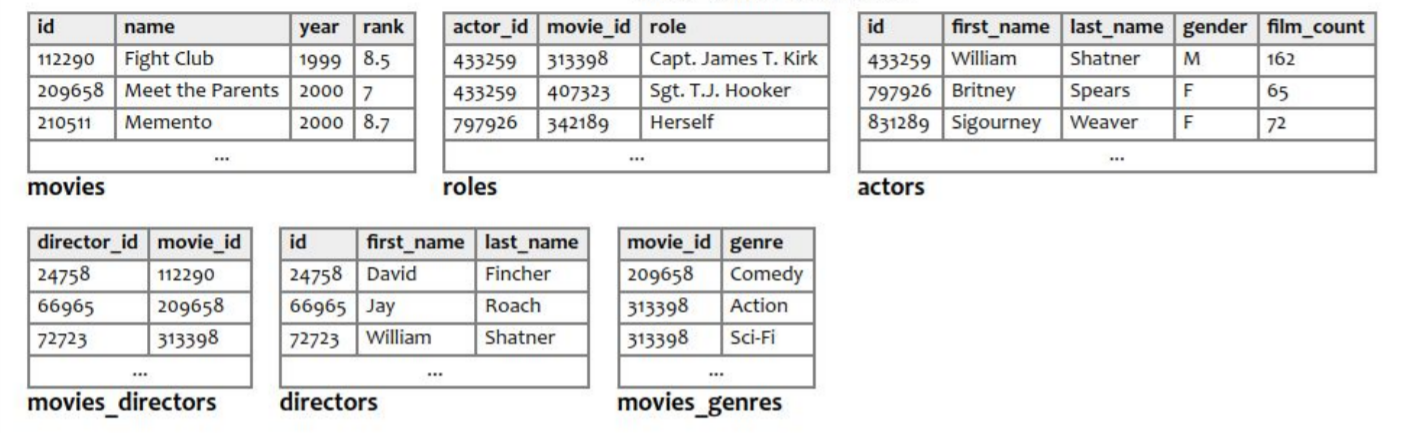
- Write a SQL query to list all columns out of the directors table for all directors that have directed a move with a rank of 8 or higher, order by last name of director in alphabetical order. Return one row per unique director.
- Write a SQL query to list all roles from movies made in the year 2000. List actor first name, last name, role, and the movie they played in. Order the results by movie name alphabetically, with ties broken by the role name.
Solution 1
SELECT DISTINCT d.id, d.first_name, d.last_name
FROM directors d
JOIN movies_directors md ON md.director_id = d.id
JOIN movies m ON m.id = md.movie_id
WHERE m.rank > 8
ORDER BY d.last_name;
SQL solution 1 (JOIN style)
SELECT DISTINCT d.id, d.first_name, d.last_name
FROM directors d, movie_directors md, movies m
WHERE md.director_id = d.id
AND m.id = md.movie_id
AND m.rank > 8
ORDER BY d.last_name;
SQL solution 1 (WHERE style)
Solution 2
SELECT a.first_name, a.last_name, r.role, m.name
FROM actors a
JOIN roles r ON r.actor_id = a.id
JOIN movies m ON m.id = r.movie_id
WHERE m.year = 2000
ORDER BY m.name, r.role;
SQL solution 2 (JOIN style)
SELECT a.first_name, a.last_name, r.role, m.name
FROM actors a, roles r, movies m
WHERE r.actor_id = a.id
AND m.id = r.movie_id
AND m.year = 2000
ORDER BY m.name, r.role;
SQL solution 2 (WHERE style)
Practice Exam Solutions
Practice Exam 2A and key
Practice Exam 2B and key
Don't forget to practice exams on paper with a full 60 minutes (without notes) before referring to solutions. It will be most effective in helping identify your common in-moment mistakes when preparing.