Lecture 13
Using fetch with APIs
Agenda
HW3 Part A Due Friday
Brief review of Promises/AJAX
Using fetch with public APIs
JSON and AJAX
- JSON introduced as object type to package/process structured data
- AJAX introduced with Promises and
fetchto fetch data from a server - Used the
fetch(URL).then(...).then(...).catch(...)pipeline to handle requests (yesterday)
AJAX fetch template
When we make a call to fetch data (whether it's HTML, txt, JSON, etc) we use a
function in JavaScript called fetch, which takes a URL path to
fetch data from.
Here's the general template you will use for most AJAX code:
const BASE_URL = ""; // you may have more than one

// Step 1. Write a function to "fetch" data from a URL
function makeRequest() {
  let url = BASE_URL + "?query0=value0"; // some requests require parameters
  fetch(url)
    .then(checkStatus)
    //.then(resp => resp.text()) // include if your data comes in text
    //.then(resp => resp.json()) // include if your data comes in JSON
    .then(processData)
    .catch(handleError); // define a user-friendly error-message function
}

// Step 2: Implement a function to process the response data. You may want to break this apart
// into multiple functions.
function processData(responseData) {
  // Do something with your responseData! (build DOM, display messages, etc.)
}

// Step 3. Include the checkStatus function
function checkStatus(response) {
  if (!response.ok) { // response.status >= 200 && response.status < 300
     throw Error("Error in request: " + response.statusText);
  }
  return response;
}
JS
Promises and Fetch
We initiate a fetch of a URL
A fetch returns a Promise
Promises are good because...
- They help deal with code that has an uncertain outcome
- They separate the completion of the fetch request from the page logic
- Lets us reuse the same logic and handle completion in different ways (AJAX logic vs page insertion, for example)
- Chaining of Promises gives us a nice data flow, like down a pipe!
States of a Promise

Using Promises with fetch
We won't be constructing Promises, but will be using them when we fetch information from a
server, which is an uncertain task
The returned Promise contains a value that is a Response from the requested resource,
which we can get then. after the fetch call.
fetch(url).then((resp) =< {
    // resp is a Response object!
});
JS
What's in a Response?
Recall Status Codes
Set by the server
A 2XX status code (e.g. 200, 201, etc.) will indicate a successful request
Other status codes indicate a failure in the request
- 3XX: Redirects
- 4XX: Client errors (400: Bad Request, 403: Forbidden, etc.)
- 5XX: Server errors
Full list here
We can access the status code and status text with the Response object
This is a useful service to test different error codes: https://httpstat.us/
Demo: status-tester.html
Why AJAX?
Recall our earlier Cafe Demo
Version 1 (HTML): Menu in HTML
Version 2 (JS): Menu in JSON as local variable in JS
Version 3: Let's use fetch with the JSON on a server!
Application Program Interfaces (APIs)
An application programming interface (API) is a communication protocols that allows two pieces of software to communicate.
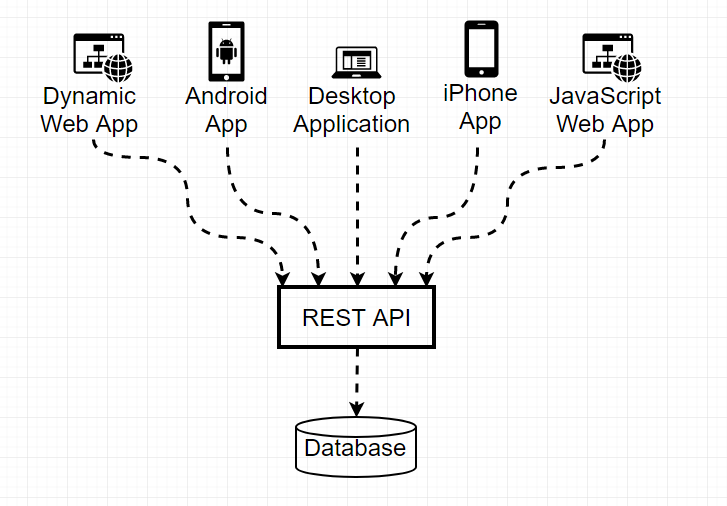
A Web API is a set of pre-defined URLs with parameters that allow a user to get information from a web server. Can be used by many types of clients.
The Client-Server Model

The Request/Response Transaction with Web APIs

Much like the request/response analogy at a restaurant!
Examples of APIs
Fetching data from a web service
To make a request to a web service (API), we need to know:
- Who to ask (the url)
- Do we have permission to ask (any API keys/tokens)
- Not in menu.php, but NASA/TMDB require them; add as additional query parameter
- What to ask (any query parameters)
- Differ per API, some have specific order of parameter values, separated by /, others have explicit key/value pairs started with ? and combined with &
- Example: A Recipes API might have
recipe.php?recipe=cupcake&vegan=true - Example: https://courses.cs.washington.edu/courses/cse154/webservices/cse154-cafe/menu.php?menu=cafe-menu (also supports menu=pizza-menu)
- Example: Numbers API from last week's section: http://numbersapi.com/154/math)
- What format we get answers in (the response data format, preferrably txt or JSON)
Check your Understanding
Consider the following request we might make with fetch:
function makeRequest() {
  let requestString = "https://api.nasa.gov/planetary/apod?" +
                      "api_key=DEMO_KEY&date=2018-09-30";
  fetch(requestString)
    .then(checkStatus)           // 1
    .then((resp) => resp.json()) // 2
    .then(processData)           // 3
    .catch(handleError);         // 4
}
JS
- Who are we asking for data from (the base url)?
- What query parameters are we using? What are the values of the parameters?
- What is the purpose of each step (1 through 4)?
Note: Convenient In-browser JSON Formatter
We're about to dive into how to get started with a public API. The first thing you usually want to do is to find a url with query parameters you're interested in, and see if you can view it on your browser.
There is a great Chrome extension to format nested JSON returned by different API's!
Chrome Extension: JSON View
Example API Requests
The following slides provide a few examples of breaking down request URLS for various APIs, starting with the NASA APOD API used in the Pre-Check and demonstrated in lecture.
API 1: NASA APOD (Astronomy Photo of the Day) API
Solution: apod.html
- What kind of format is the response data? JSON
- Do you need an API key? Yes* *(but you can make 50 calls per day with "DEMO_KEY" as your api key parameter!
- What is the base url? https://api.nasa.gov/planetary/apod
API 1: NASA APOD (Astronomy Photo of the Day) API
Examples:
- Photo of the day data (for current day): https://api.nasa.gov/nasa/planetary/apod?api_key=DEMO_KEY
- Photo of the day data (for a given date): https://api.nasa.gov/nasa/planetary/apod?api_key=DEMO_KEY&date=2018-09-30
API 2: Reddit
Note: Go "down" slides for more
- What kind of format is the response data? JSON
- Do you need an API key? Not always
- Note: You need a key if you are wanting to access/update user-specific information on reddit (see documentation). To simply fetch JSON about subreddit posts though, you can just append /.json to the end of a subreddit url.
-
What kind of query parameters can you pass?
- limit=postcount (optional): limits the number of JSON objects returned in array of subreddit post data
- q=query (optional): filters posts based on search query term
API 2: Reddit Example
https://www.reddit.com/r/subreddit/.json?limit=postcountTemplate
https://www.reddit.com/r/subreddit/search/.json?limit=postcount&q=searchqueryTemplate
Examples:
API 2: Another Reddit Example
To get JSON response about best and trending posts on Reddit:
https://www.reddit.com/r/best/.json?limit=postcounthttps://www.reddit.com/r/trending/.json?limit=postcountTemplate
Examples:
More information about JSON data returned: Reddit Wiki
API 3: Datamuse API
Note: Go "down" slides for more
An word-querying API: https://www.datamuse.com/api/
- What kind of format is the response data? JSON
- Do you need an API key? No
- What is the base url? https://www.api.datamuse.com
API 3: Datamuse API
Examples:
- Words with similar meaning to dog: https://api.datamuse.com/words?ml=dog
- Words with similar meaning to dog (include definitions as metadata): https://api.datamuse.com/words?ml=dog&md=d
API 4: XKCD
Note: Go "down" slides for more
"Documentation": https://xkcd.com/json.html
- What kind of format is the response data? JSON
- Do you need an API key? No
- What is the base url? https://xkcd.com/
Examples:
Comic of the Day: https://xkcd.com/info.0.json