Accessible Needfinding
AEIOU and Interviewing
University of Washington
2025-02-03
Announcements
Learning Goals
Announcements
AEIOU
Accessible Study Planning
Document Accessibility
Quick Reminder
- Turn on captioning
- Turn on recording
Submitting your first assignment
- Submit on canvas
Contribution statement
- We don’t expect everyone to contribute equally to each assignment, but you should support each other
- Don’t overthink it!
- Submissions with a missing statement will not be graded
Contribution statement example
- Name 1: 40%, researched the background of the problem, outlined the content of the document, wrote the first version of one paragraph, also selected the images to be included
- Name 2: 15%, conducted 3 interviews and took notes
- Name 3: 20%, wrote the first version of the background section, made sure the final version got submitted
- Name 4: 25%, conducted 3 interviews (with Name 2) organized the group meeting, researched the background of the problem, contributed to the formatting of the text
This week
Time’s running out to meet your project mentors
- You’ll need them to help with finding clients.
- It’s important to reach out to them TODAY if you haven’t and schedule a meeting THIS WEEK.
Start recruiting clients to interview
Next week…
- prepare for your first critique
- End of week: interview clients
Where we are: Understand
Understanding ends in insight
| understand | create | deliver |
|---|---|---|
| Develop empathy –> define | ideate | prototype –> test |
- Upcoming assignment
- planning for initial need finding
- AEIOU assignment
Next: Create
Creation ends in ideas
| understand | create | deliver |
|---|---|---|
| Develop empathy –> define | ideate | prototype –> test |
(design proposal)
AEIOU
Learning Goals
Announcements
AEIOU
Accessible Study Planning
Document Accessibility
AEIOU Method
A framework for organizing data collection and data analysis.
- Activities: goal-directed sets of actions (1-3 tasks)
- Environments: Where do the activities take place?
- Interactions: Who are the players? What is the sequence?
- Objects: What objects do they use and how? Are any of them accessibility tools?
- Users: Who do you need to observe to understand?
How is Intersectionality missing from this framework?
(discuss)
Intersectionality? (1/2)
- Activities: Pick 1-3 tasks
- How, if at all, are clients’ racial or other identities harmed, or supported, during these activities?
- Environments: Where do the activities take place?
- What structural forces, or assumptions, are at play regarding client race, gender and/or disability status?
- Interactions: Who are the players? What is the sequence?
- What biases or assumptions might impact the client during these interactions?
Intersectionality? (2/2)
- Objects: What objects do they use and how?
- How are cultural identity, gender identity, and disability identity represented in these objects, if at all?
- Users: Who do you need to observe to understand?
- What sort of power differentials exist in these interactions?
Accessible Study Planning
Learning Goals
Announcements
AEIOU
Accessible Study Planning
Document Accessibility
Translating to Need-finding (1/4)
Participatory Design/Research
- Emanates from design & technology field, has been specifically used in Assistive Technology & HCI research;
- Also applied in education and healthcare settings; children & older adults
Translating to Need-finding (2/4)
Participatory Design/Research
- Working directly with users (& other stakeholders) in the design of systems
Translating to Need-finding (3/4)
Participatory Design/Research
Working directly with users (& other stakeholders) in the design of systems
Users are actively involved in setting design goals and planning prototypes
- Contrasts with methods where user input is sought only after initial concepts and prototypes have been produced (i.e. PD is more than user-testing)
Translating to Need-finding (4/4)
Participatory Design/Research
Working directly with users (& other stakeholders) in the design of systems
Users are actively involved in setting design goals and planning prototypes
Early and continual participation of intended users to produce better technologies that better suit the needs of users
Participatory Methods in A11y (1/3)
- Aims to engage participants in the design, conduct and evaluation of products/research with the construction of non-hierarchical relations
- Participants encouraged to own the outcome by setting the goals and sharing in decisions about processes
- “Nothing about me, without me”
Participatory Methods in A11y (2/3)
- Aims to engage participants in the design, conduct and evaluation of products/research with the construction of non-hierarchical relations
- Ensures research topic is one that people with disabilities consider worthy of investigation
- Asking people with disabilities to act as consultants or advisors to projects
- Provision of support, training and payment so that people with disabilities can undertake their own research
Participatory Methods in A11y (3/3)
- Aims to engage participants in the design, conduct and evaluation of products/research with the construction of non-hierarchical relations
- Ensures research topic is one that people with disabilities consider worthy of investigation
- Other methods
- Narrative research: Life history, biography, oral history
- Focus groups, interviews
- Action Research
Accessible Participatory Methods
- Accessibility doesn’t come by accident when planning studies
- All research should be accessible research (regardless of if it is accessibility research)
- You have to make your system accessible (using inspection techniques) before doing this (if you have one)
- We will discuss accessibility for evaluators and for participants today
Study Planning Workflow
- Identify stakeholders
- Identify tasks
- Assign Tasks
- Access needs
- Effects of familiarity
- Personal preferences
- Institutional constraints
An Example
Supposed you want to co-design a new directional control system for increased independence among paddlers who are blind.
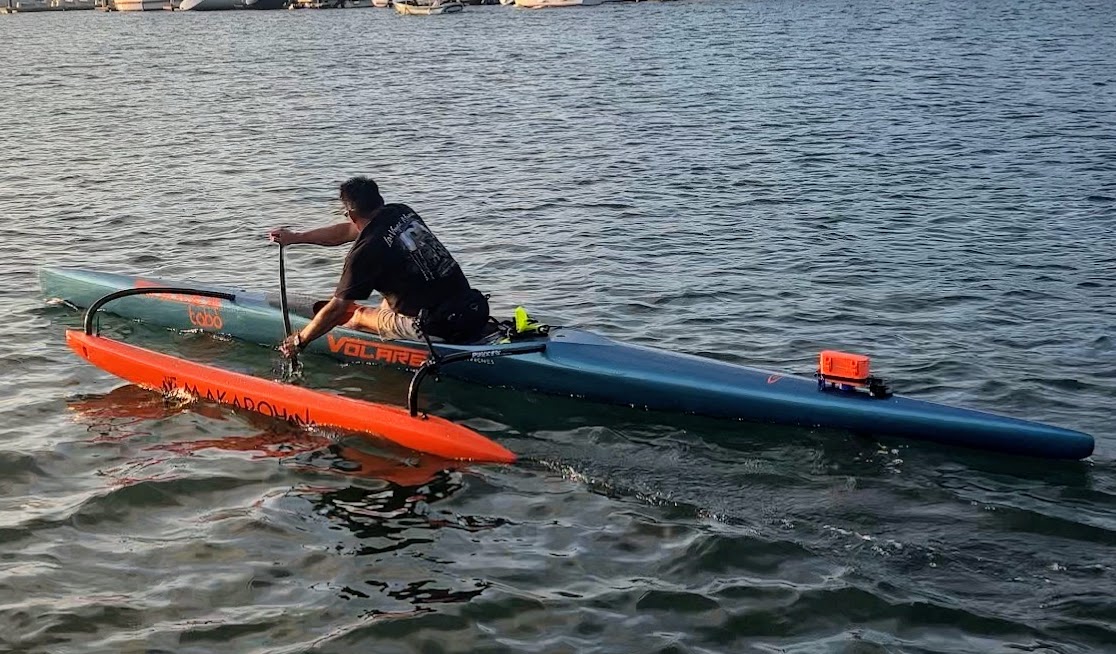
Identify Stakeholders & Tasks
- Stakeholders – Blind paddler and guide (and potential others more peripheral)
- Tasks – one to three key activities
- Help paddler with speed
- Help paddler with direction
- ??
Assigning tasks: considerations
- Access needs
- Effects of familiarity with the task
- Personal preferences
- Other institutional constraints
Accessible Study Planning Workflow
- Plan Accommodations
- Prepare Team
- Reflect
Plan Accommodations
- Communication: Need to support screen readers? interpreters? etc
- Materials: Braille? Tactile graphics? sensory concerns?
- Time: Does anyone on your team need to limit engagement length? Standing time? etc
- Space: Do you need to be outdoors? Oriented to easily see or hear each other?
Further considerations
- Ensuring that you address access needs and communication support from recruitment onward
- When engaging with participants
- Don’t be overly sensitive (don’t overcompensate)
- Don’t rely on useless cues (audio/visual) to convey encouragement
- Monitor participant fatigue and overall affect
- Understand when to help and when to end a task if participants have trouble
Piloting can help
- First, revisit accommodations plan
- Print out accessible study materials, consent form, etc
- Understand (and possibly prepare) the space that the team will work in
- Have compensation ready
How to interview
- Establish rap – just be friendly
- Listen actively
- Full attention
- Show you are interested (nonverbal cues; questions)
- Paraphrase to make sure you understood
- Avoid jargon; be reflective
Interview structure
- Ask an open ended question on the general topic (“how did you get interested in paddling”)
- AEIOU questions
- Share something you learned and ask if you understood
Reflection
After the interview meet as a team to discuss
- Interview accessibility
- Access Synergies
- Access conflicts
- Power Dynamics
- Interview results (what you learned)
Let’s try it
- Find a partner. Interview them about a holiday they celebrated while at UW
- Activities: Focus on 1-3 things they did to celebrate
- Environments: Where did they celebrate
- Interactions: Who & order of events important
- Objects: Objects & uses? Accessibility tools?
- You can ask about intersectional topics: How, if at all, was your interview partners’ identities harmed, or supported, during these activities? How did assumptions made by UW impact them? etc.
Recruitment: considerations
We are helping, but note that recruitment typically raises a number of access issues
- Are your recruitment materials accessible
- How will you compensate participants?
- How much do you know about the group your are targeting and what to expect from/of them?
- Will they see you as trustworthy?
- Are you giving them enough agency in the study process?
Document Accessibility
Learning Goals
Announcements
AEIOU
Accessible Study Planning
Document Accessibility
Color Contrast
- Color contrast: WCAG Level AAA requires a contrast ratio of at least
- 7:1 for normal text
- 4.5:1 for large text (14t pt bold or larger)
- Avoid anything else!
Use structure properly
- Differs with each platform
- Key things
- Use headers and styles
- Don’t ever skip from one header to the next
- Ensure that the tab and reading order are logical and intuitive
PowerPoint / Google Slides order
- tab-order == reading order
- Slides go back (highest z) to front
Simplify Language
- Avoid jargon
- You can always elaborate when you speak (for posters and presentations)
- Avoid clutter
What is clutter?
Please, for the love of all that is good on this fine planet we call home, do not do this to your poor audience members
They don’t deserve this! What did they do to you? They probably flew hundreds of miles and of all talks and things to do in this new place came to YOUR presentation. And what do you do? You greet them with this GIANT wall of text! How rude. It’s ugly to look at. It’s hard to read. It’s annoying as heck for me to type out this thing just to make a point!
So please, don’t do this to your audience members. Be a responsible presenter. Practice your talks so you don’t have to read off the slide (or use speaker notes! also okay!). Break up your content so looking at your slides isn’t like getting smacked in the face with a wall of text.
But there are exceptions! (e.g., if you have a thick accent)
Don’t use color or other visual characteristics to convey meaning
Wrong: “required fields are in red”
Wrong: “click the circle on the right”
Correct: “required fields are labeled ‘Required’ and colored red”
Label things properly (1/2)
- Links should be labeled appropriately, as described here.
- Just kidding! as described on the UW page explaining meaningful link text
- Provide a document title that describes its topic or purpose
Label things properly (2/2)
- Identify the language of the document (or individual parts of a multilingual document).
- Allow users to bypass blocks of content that are irrelevant or often repeated (e.g., bookmarks in a PDF)
- Provide ALT text
How to add ALT Text to various things
- HTML ```img src=… alt=“Girl in a jacket” width=“500” height=“600”’’’
- “Content Creation Platforms” (e.g. WordPress, twitter)
- Google Slides & PowerPoint
- Word Documents
- Any other questions?
When to Describe Identity
Bennett et al interviewed BIPOC, Non-Binary and/or Transgender Blind people.
- Meeting new people
- Identity is the topic of discussion
- Seeking specific first person perspectives
- Want/need to understand representation in the media
- Need to “read” a room, for example to decide whether to code switch
Many different situations to consider (1/2)
Read up on some of these links when you are faced with specific description needs
- Decorative and branding
- Formatting and text styling
- Images as links
- Diagrams
- Visualizations
Many different situations to consider (2/2)
Read up on some of these links when you are faced with specific description needs
- Memes
- GUIS
- Animations/Videos (we’ll talk more about this later today)
- AR/VR (Accessibility, Disabilities, and VR)
- Comparison of IoS and Android Rich Interactions
- …