CSE 154
Lecture 10: Asynchronous Programming and Promises
Agenda
Asynchronous Programming
Promises
Reminders and Administrivia
Quiz 2 releasing Friday afternoon
CP2 due (late) by Thursday 11 pm PST
HW2 out now, using JS to make SET
Asynchronous Programming
Synchronous vs Asynchronous

Synchronous vs Asynchronous
(function() {
  ...
  function init() {
    console.log('page loaded');
    qs('button').addEventListener('click', clickHandler);
    showMenu();
  }

  function showMenu() {
    id('menu').classList.remove('hidden');
  }

  function clickHandler() {
    /* Your code */
  }
})();
JS
Callbacks?
Callbacks are a very powerful feature in event-driven programming.
Why do you think it's useful to have the ability in the JavaScript language to pass callback
functions as arguments to other functions like addEventListener and setTimeout in JS?
Asynchronous Programming
The JS programs we've been writing are naturally asynchronous
We pass functions as arguments to other functions so that we can “call back later” once we know something we expect occurred.
We've already been writing asynchronously!
btn.addEventListener("click", callbackFn);
btn.addEventListener("click", function() {
  ...
});
btn.addEventListener("click", () => {
  ...
});
JS
setTimeout(callbackFn, 2000);
setTimeout(function() {
  ...
}, 2000);
setTimeout(() => {
  ...
}, 2000);
JS
Why is JavaScript so different?
Java is often used to build systems.
- Objects are great to compose together to build complex systems.
- Systems must be reliable - a benefit of strict types, compiling, and well-defined behavior in Java.
JavaScript is used to interact and communicate.
- It listens.
- It responds.
- It requests.
Whereas in Java, programs often have a well-defined specification (behavior), JS has to deal with uncertainty (weird users, unavailable servers, no internet connection, etc.)
What if?
let myBtn = qs('button:nth-child(1)');
while (!myBtn.clicked) {
  // twiddle our thumbs
}
console.log('"Finally Been Clicked", starring Drew Barrymore');

let myBtn2 = qs('button:nth-child(2)');
while (!myBtn2.clicked) {
  // twiddle our thumbs
}
console.log('"Click 2", never coming soon to a theater near you');
JS
- This won't work (and will crash your browser)
- We wouldn't be able to do anything while we were waiting
- But the synchronous logic is nice
- What if we could could make our code feel more synchronous?
Promises
Analogy: You're out for pizza
At the restaurant you might follow these steps:
- Request menu
- Order pizza
- Check pizza
- Eat pizza
- Pay for pizza
Each step can’t continue before the previous finishes.
Callback (again) to Callbacks:
We can imagine all of these steps as a series of callbacks, depending on the event previous to them:
function order() {
  setTimeout(function() {
    makeRequest("Requesting menu...");
    setTimeout(function() {
      makeRequest("Ordering pizza...");
      setTimeout(function() {
        makeRequest("Checking pizza...");
        setTimeout(function() {
          makeRequest("Eating pizza...");
          setTimeout(function() {
            makeRequest("Paying for pizza...");
            setTimeout(function() {
              let response = makeRequest("Done! Heading home.");
              console.log(response);
            }, ?);
          }, ?);
        }, ?);
      }, ?);
    }, ?);
  }, ?);
}
JS
Example
Pizzeria: pizza.html
Wouldn't It be Nice...
...if we could do this?
orderPizza()
  .then(eat)
  .then(pay)
  .catch(badPizza);
Spoiler alert! We can!
Promises
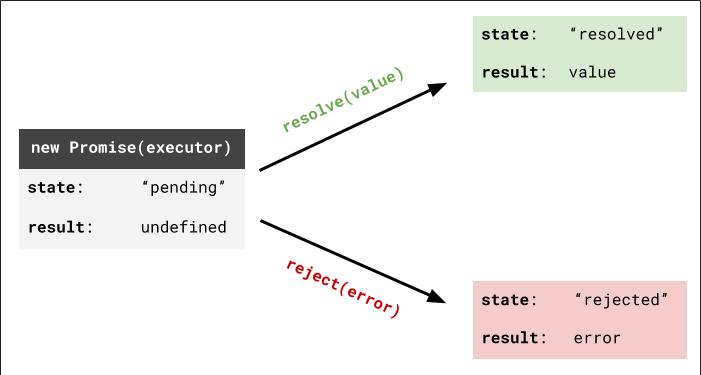
Promises are a sort of contract:
- Something will happen
- You can have multiple things happen.
- And catch any errors.
Can only go from Pending to Fulfilled or Rejected (no takebacks)
Example: "I promise to return to your table"
- Pending: Waiting for my pizza
- Fulfilled: Pizza has arrived!!
- Rejected: Kitchen ran out of cheese. :(
Creating a Promise
| function | description |
|---|---|
| new Promise(executorFn) | Creates a new Promise object with the executorFn |
| promiseObject.then(onFulfilled, onRejected) | Invokes the onFulfilled (onRejected) function when the promise is fulfilled (rejected) |
| promiseObject.catch(callback) | Invokes the callback function if the promise is rejected (or an error occurs) |
function executorFn(resolve, reject) {
    ...
    if (conditionMet) {
        resolve(); // Passed by the Promise object
    } else {
        reject(); // Passed by the Promise object
    }
}
JS
You define this function and pass it into the Promise constructor
Back to that Pizza
function orderExecutor(resolve, reject) { // reject not required here
    console.log('making our pizza...');
    setTimeout(resolve, 5000);
}

let orderPizza = new Promise(orderExecutor);
orderPizza.then(function () { console.log('eating pizza!'); });
JS
Back to that Pizza
We can pass a value to resolve...
function orderExecutor(resolve, reject) {
    console.log('making our pizza...');
    setTimeout(function() {
        resolve("Here's your pizza!");
    }, 5000);
}

let orderPizza = new Promise(orderExecutor);
orderPizza.then(function (value) { console.log(value); });
JS
That value gets passed to the function passed into then
Back to that Pizza
The functions passed to then can pass values to the next then callback
function eat(value) {
    return value + ", and now it's gone";
}

let orderPizza = new Promise(orderExecutor);
orderPizza.then(eat).then(function (value) { console.log(value); });
JS
Back to that Pizza
You can also return other promises, which halt the execution of the next then callback until it's resolved
function eatExecutor(resolve, reject) {
    console.log('eating our pizza...');
    setTimeout(resolve, 3000);
}

function eat() {
    return new Promise(eatExecutor);
}

let orderPizza = new Promise(orderExecutor);
orderPizza.then(eat).then(function () { console.log('Paying the bill!'); });
JS
Still Asynchronous
function orderExecutor(resolve, reject) {
    console.log('Pizza ordered...');
    resolve("Here's your pizza!");
}

let orderPizza = new Promise(orderExecutor);
orderPizza.then(function (value) { console.log(value); });
console.log("Waiting for my pizza!");
JS
In what order do these log statements appear in the console?
Note that the setTimeout has been removed
Rejecting a Pizza
function orderExecutor(resolve, reject) { // MUST have both parameters defined
    console.log('Pizza ordered...');
    setTimeout(function() {
        reject("Ran outta cheeese. Can you believe it?");
    }, 2000);
}

let orderPizza = new Promise(orderExecutor);
orderPizza
    .then(function () { console.log("Woohoo, let's eat!"); })
    .catch(function (value) { console.log(value); });
JS
Example: Let's Fix that Pizzeria
Pizzeria: pizza.html
More questions from this lecture?
Especially if you're watching a recording, write your question on PollEverywhere and I'll answer them at the start of next lecture.
Either on your phone or computer, go to PollEv.com/robcse
